

MzAgent

一个简单的基于ReAct模式的AI Agent
- Active · last change 5-14-2026
- ★ 8 on GitHub
README
本项目由 MarkTechStation/VideoCode 中的示例转换而来。想进一步学习可前往作者主页(各平台链接见 该仓库 README)。
概述
MzAgent 是一个基于 ReAct (Reasoning + Acting) 模式的 AI Agent,通过调用大语言模型来分解和执行用户任务。
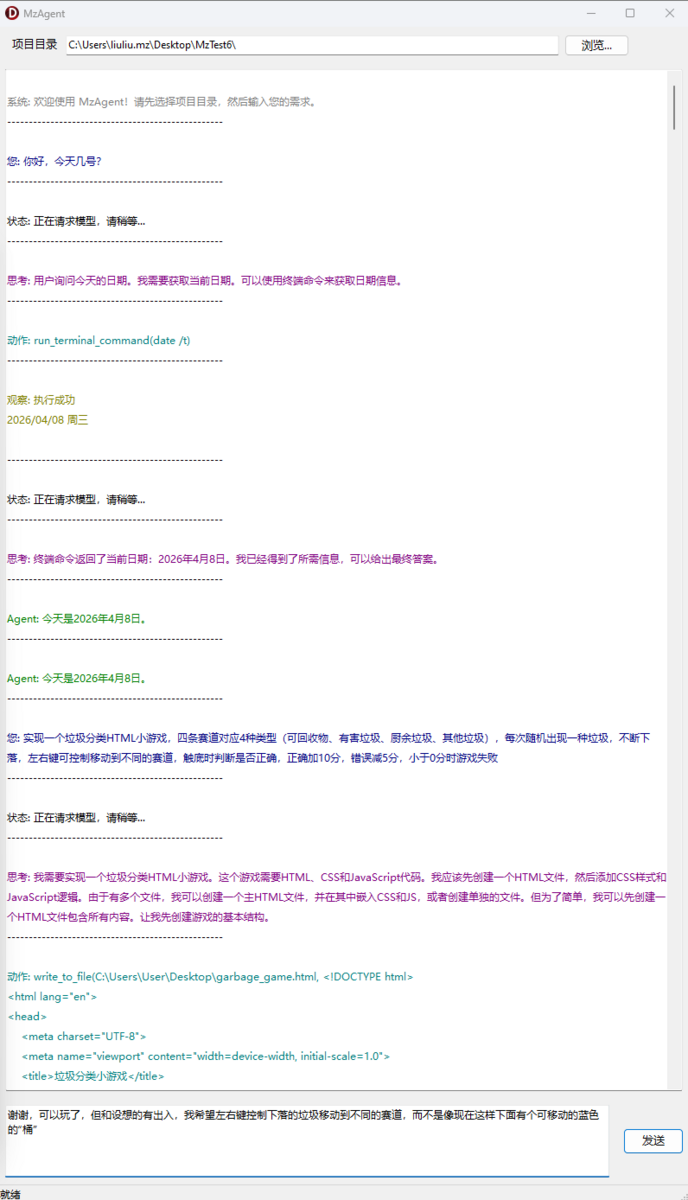
核心组件
1. TReActAgent 类
- 负责与 LLM API 通信
- 管理对话消息历史
- 解析模型输出并执行工具
2. TToolList + TBaseTool
- 工具管理器
- 提供三个内置工具:
read_file- 读取文件write_to_file- 写入文件run_terminal_command- 执行终端命令
3. PromptTemplate
- 系统提示词模板
- 定义了 Agent 的行为规范和输出格式
工作流程
??????????????????
    ???
    ???
?????????????????????????????????????????????????????????????????????????????????????????????????????????????????????????????????
???  1. ?????????
???  - ?????? system prompt
???  - ?????? user question
?????????????????????????????????????????????????????????????????????????????????????????????????????????????????????????????????
    ???
    ???
?????????????????????????????????????????????????????????????????????????????????????????????????????????????????????????????????
???  2. ?????? LLM API
???  - ????????????????????? API
???  - ??????????????????
?????????????????????????????????????????????????????????????????????????????????????????????????????????????????????????????????
    ???
    ???
    ???
    ????????? ?????? <thought> ????????????
    ???     (????????????)
    ???
    ????????? ?????? <final_answer> ????????????
    ???     (??? ??? ???????????????????????????)
    ???
    ????????? ?????? <action> ????????????
          (??? ??? ??????)
    ???
    ???
?????????????????????????????????????????????????????????????????????????????????????????????????????????????????????????????????
???  3. ?????? Action
???  - ????????????????????????
???  - ??????????????????
?????????????????????????????????????????????????????????????????????????????????????????????????????????????????????????????????
    ???
    ???
?????????????????????????????????????????????????????????????????????????????????????????????????????????????????????????????????
???  4. ????????????
???  - ??????????????? Execute ??????
???  - ??????????????????
?????????????????????????????????????????????????????????????????????????????????????????????????????????????????????????????????
    ???
    ???
?????????????????????????????????????????????????????????????????????????????????????????????????????????????????????????????????
???  5. ?????? Observation
???  - ??????????????????????????????????????????
???  - ???????????? 2 ????????????
?????????????????????????????????????????????????????????????????????????????????????????????????????????????????????????????????
详细流程说明
第一步:初始化
AddMessage('system', RenderSystemPrompt);
AddMessage('user', '<question>' + UserInput + '</question>');
第二步:循环调用模型
while True do
begin
  Content := CallModel; // 调用 API

  // 提取各种标签
  Thought := ExtractTagContent(Content, 'thought');
  Action := ExtractTagContent(Content, 'action');

  // 检查是否有最终答案
  if Pos('<final_answer>', Content) > 0 then
  begin
    Result := ExtractTagContent(Content, 'final_answer');
    Exit;
  end;

  // 执行工具
  Tool := FTools.GetToolByName(ToolName);
  Observation := Tool.Execute(ParsedAction.Value);

  // 将结果添加回消息历史
  AddMessage('user', '<observation>' + Observation + '</observation>');
end;
第三步:API 调用
- 使用 DeepSeek API(可配置)
- 发送消息历史到
https://api.deepseek.com/v1/chat/completions - 接收模型响应
消息格式
System Prompt
包含:
- 任务说明
- XML 标签格式规范
- 可用工具列表
- 当前目录文件列表
- 操作系统信息
用户消息
<question>????????????</question>助手消息
<thought>????????????</thought>
<action>????????????</action>
用户消息(工具执行后)
<observation>??????????????????</observation>工具调用格式
模型输出的 action 格式:
tool_name(arg1, arg2, ...)例如:
read_file("test.txt")
write_to_file("result.txt", "??????")
run_terminal_command("dir")
错误处理
- 如果模型未输出
<action>,抛出异常 - 如果工具不存在,返回错误消息
- 如果工具执行出错,返回错误消息
- API 请求失败,抛出异常
使用示例
// 创建工具列表
ToolList := TToolList.Create;
ToolList.Add(TReadFileTool.Create);
ToolList.Add(TWriteToFileTool.Create);
ToolList.Add(TRunTerminalCommandTool.Create);

// 创建 Agent
Agent := TReActAgent.Create(ToolList, 'deepseek-chat', 'C:\MyProject');
try
  // 执行任务
  Result := Agent.Run('帮我创建一个 hello world 程序');
finally
  Agent.Free;
end;