

Catalog · How the catalog works
VittixDBGridController

Advanced feature-rich VCL DBGrid replacement for Delphi with filtering, grouping, summaries, and multi-format export support
- ★ 9 on GitHub
Anyone may press Interesting, signed in or not. It helps others find this project.
README
Vittix.DBGrid
Vittix.DBGrid is a modern, feature-rich replacement for Delphi's standard TDBGrid, built for professional VCL applications that need advanced data visualization, extensibility, and performance.
Screenshot
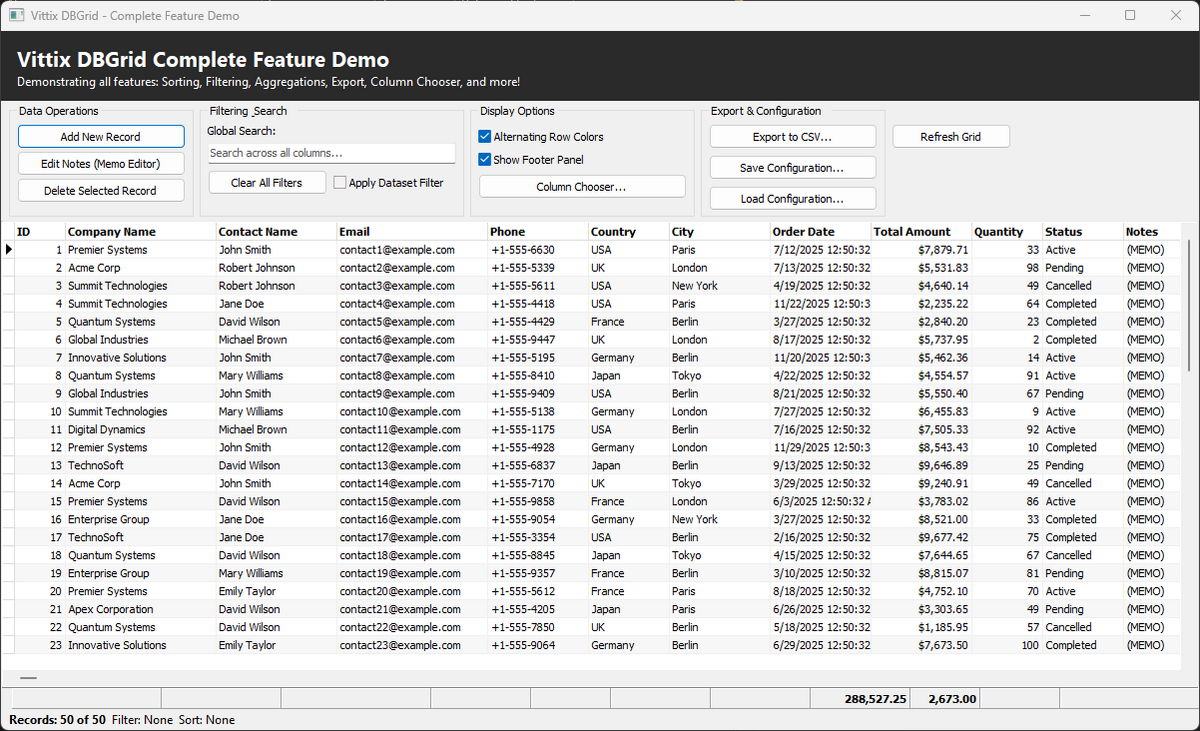
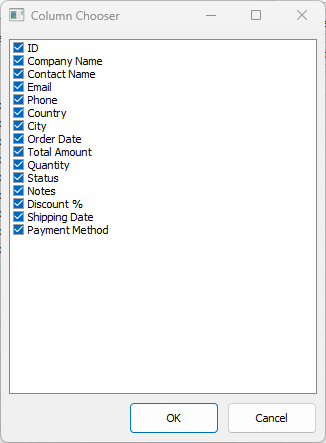
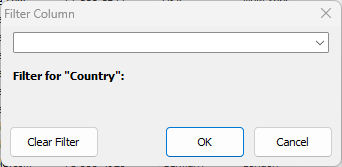
Example showing sorting, filtering, footer aggregations, and column chooser enabled.
Features
- Multi-column sorting engine
- Advanced filtering with popup UI and operator syntax
- Aggregation engine (SUM, COUNT, AVG, MIN, MAX)
- Footer panel with live calculations
- Runtime column chooser
- Custom in-place editors
- Export to CSV, TSV, XLSX, HTML, XML, JSON, Text and clipboard
- DUnitX regression suite (206 tests)
- Controller-based architecture
- Pure Object Pascal (Delphi VCL)
Aggregation performs a full dataset scan per recalculation and filters are re-evaluated per row — correct for tens of thousands of rows; incremental aggregation for very large datasets is on the roadmap (item 3.1).
Package Structure
The component is delivered using Delphi runtime and design-time packages.
Runtime Package
VittixDBGridControllerR.dpkContains all runtime logic required by applications:
- Core
TVittixDBGridimplementation - Sorting engine
- Filtering engine
- Aggregation engine
- Footer panel logic
- Column metadata and controller logic
- Custom editors
- Export engine and dialogs
This package must be included with your application.
Design-Time Package
VittixDBGridControllerD.dpkProvides IDE integration and component registration:
- Registers
TVittixDBGridin the Tool Palette - Enables design-time support
- Depends on
VittixDBGridControllerR.dpk
Main Units
Vittix.DBGrid.pasVittix.DBGrid.Controller.pasVittix.DBGrid.ColumnInfo.pasVittix.DBGrid.ColumnChooser.pasVittix.DBGrid.Sort.Engine.pasVittix.DBGrid.Filter.Engine.pas- Filtering engineVittix.DBGrid.Filter.Popup.pas- Filter popup UIVittix.DBGrid.Aggregation.Engine.pas- Aggregation engineVittix.DBGrid.FooterPanel.pas- Footer renderingVittix.DBGrid.Editors.pas- Custom editorsVittix.DBGrid.Export.Engine.pas- Export engineVittix.DBGrid.Export.Dialog.pas- Export dialogVittix.DBGrid.Reg.pas- Design-time registration
Requirements
- Delphi 12 Athens (the supported toolchain; packages, tests and installer are built for it)
- VCL framework
Vcl.DBGridsTDataSetdescendants such as FireDAC, ClientDataSet, BDE, ADO, and third-party datasets
Sorting uses the dataset's
IndexFieldNamesmechanism. Datasets that do not publishIndexFieldNames(for exampleTADODataSet) raise a clearEVittixSortErrorwhen a sort is applied instead of silently doing nothing. On a header click the sort state is rolled back and the error is reported throughOnSortErrorwhen a handler is assigned, or re-raised otherwise.TClientDataSetdescendants get true descending indexes; other datasets use the FireDAC-style:Dsuffix.
Installation
Recommended (Package Installation)
- Open the runtime package:
VittixDBGridControllerR.dpkBuild the package.
- Open the design-time package:
VittixDBGridControllerD.dpkInstall the package.
- Restart Delphi.
The Vittix.DBGrid component will appear in the Tool Palette.
Manual Installation (Source Only)
- Add the source folder to the Library Path.
- Add the required units to your project.
- Compile.
Manual installation does not include design-time support.
Basic Usage
uses
  Vittix.DBGrid;

var
  Grid: TVittixDBGrid;
begin
  Grid := TVittixDBGrid.Create(Self);
  Grid.Parent := Self;
  Grid.Align := alClient;
Grid.DataSource := DataSource1;
end;
Export
TVittixDBGridExporter (drop it next to the grid, or use the grid's export
dialog) writes the visible/selected columns of the bound dataset:
| Format | Notes |
|---|---|
vefCSV / vefTSV |
RFC 4180 quoting, formula-injection neutralization for text |
vefExcelXLSX |
Built-in SpreadsheetML writer; numbers stored as numeric cells |
vefHTML |
Styled table, display formatting |
vefXML / vefJSON |
Typed values (numbers, true/false, null); JSON parses cleanly |
vefText |
Fixed-width text |
vefClipboard |
Any text format to the clipboard |
Options (Export): ExportVisibleOnly, ExportFilteredOnly, IncludeHeaders,
IncludeFooter (aggregation/footer text row), date/time/float/currency
formats, delimiter/quote/encoding, and an OnProgress callback with
cancellation.
Behavior worth knowing:
- Machine-readable vs display formats. CSV, TSV, XML, JSON and XLSX
write numbers with full precision and an invariant decimal separator.
HTML and Text keep the configured display formats (
FloatFormat,CurrencyFormat). SetExportLocaleFormat := Trueto make the machine formats use the locale-aware display formatting instead (for consumers who open exports in comma-decimal Excel). - Dataset friendly. Exports preserve the current record, temporarily
lift the grid's filter when
ExportFilteredOnly = False, and support cancellation throughOnProgressorCancel. - Atomic files. File exports stage a temp file and swap it over the target, so a cancelled or failed export never destroys the previous file.
Filter Operator Syntax
Column filters accept a typed operator prefix (also selectable in the popup):
| Prefix | Operator | Example |
|---|---|---|
| (none) | Contains | alpha |
= |
Equals | =Alpha |
^ |
Starts With | ^Al |
$ |
Ends With | pha$ |
! |
Does Not Contain | !alpha |
<> |
Not Equals (exact) | <>Alpha |
> >= < <= |
Numeric comparison | >250 |
.. |
Between (pipe-separated) | 150..300 → >150 | <300 |
!.. |
Not Between | !150..300 |
null / !null |
Is Null / Is Not Null | |
empty / !empty |
Is Empty / Is Not Empty |
Comparisons run numerically when both sides parse as numbers, otherwise as case-insensitive text. The popup persists the chosen operator per column.
Layout Persistence
TVittixDBGrid exposes a single persistence root plus per-feature file overrides:
PersistenceRootPathLayoutStorageFileNameChooserStateFileNameFilterHistoryFileName
Use PersistenceRootPath when you want one folder for all saved grid state. Use the per-feature file properties when you want to direct a specific area to an explicit file.
Current behavior:
- explicit file properties take precedence when set
PersistenceRootPathacts as the shared fallback base- the component keeps persistence wiring internal; application code configures only
TVittixDBGrid
Chooser, filter, and footer behavior
The current chooser and popup surfaces now include a few small but useful affordances:
- chooser search supports multiple terms, a live match summary,
Ctrl+Ffocus,Escclear, andCtrl+Up/Ctrl+Downreorder - filter popup supports
Entercommit,Esccancel, scoped history, distinct-value restriction, andNot Between - footer popup exposes clear-current and clear-all actions, plus keyboard accelerators for those actions
For testability, several of these surfaces expose read-only summary helpers on the corresponding classes. They are intended for regression coverage and diagnostics, not as a new public UI contract.
Testing
The suite is DUnitX-based and covers the export engine, filter engine and operator table, sort engine, aggregation engine, column info, layout persistence and controller lifecycle:
cd tests
build-tests.bat
VittixDBGridTests.exe
Set VITTIX_DELPHI_ROOT if your Delphi installation is not at the default
C:\Program Files (x86)\Embarcadero\Studio\23.0.