

Catalog · How the catalog works
dih

Delphi Install Helper is a command-line tool for automated installation, uninstallation, and building of Delphi component packages.
- ★ 9 on GitHub
Anyone may press Interesting, signed in or not. It helps others find this project.
README
Delphi Install Helper (DIH)
A command-line tool for automated installation, uninstallation, and building of Delphi component packages. It handles the complete lifecycle: compiling packages with msbuild (full versions) or bds.exe (Community Edition, Trial), registering BPL packages in the IDE, managing library paths (Registry + EnvOptions.proj for direct usage), copying files, setting registry values, and executing pre/post build events.
Current version: 1.0 beta
This is the first version. It hasn't been thoroughly tested yet. I'm releasing it as a beta version, primarily to get feedback.
Features
- XML-driven configuration - All settings defined in XML files, parsed via OmniXML (no MSXML dependency)
- Automatic compiler detection - Tries msbuild first, falls back to bds.exe if no command-line compiler is available (e.g. Community Edition)
- Multi-platform support - Processes Win32 and Win64 sequentially, with platform-aware BPL/DCP output directories
- Placeholder system - Variables like
{#DcuTargetDir},{#Platform},$(BDSCOMMONDIR)are resolved automatically - Library path management - Updates both the Windows Registry and
EnvOptions.projso changes take effect without IDE restart - Pre/Post events - Execute shell commands before and after processing (e.g. compile resource scripts)
- External XML references - Split configuration across multiple files via `` elements
- Colored console output - Green for success, red for errors, with configurable verbosity
- Log file - Automatic logging to a file with the same name as the XML configuration
- Entry summary - Final overview showing which entries succeeded and which failed
Requirements
Tested with:
- Delphi 10.4 + Delphi 13 (should work with older versions too, can't tell which)
- Windows 10/11
Quick Start
- Place the
dihfolder in your component project - Create an XML configuration file (see Configuration Guide)
- Create batch scripts that call
delinst.exe(see the included example) - Run
install.cmd(if you do not use Delphi 13, you have to edit the batch files and put in the appropriate version)
The tool bootstraps itself: the batch scripts build delinst.exe from source before using it.
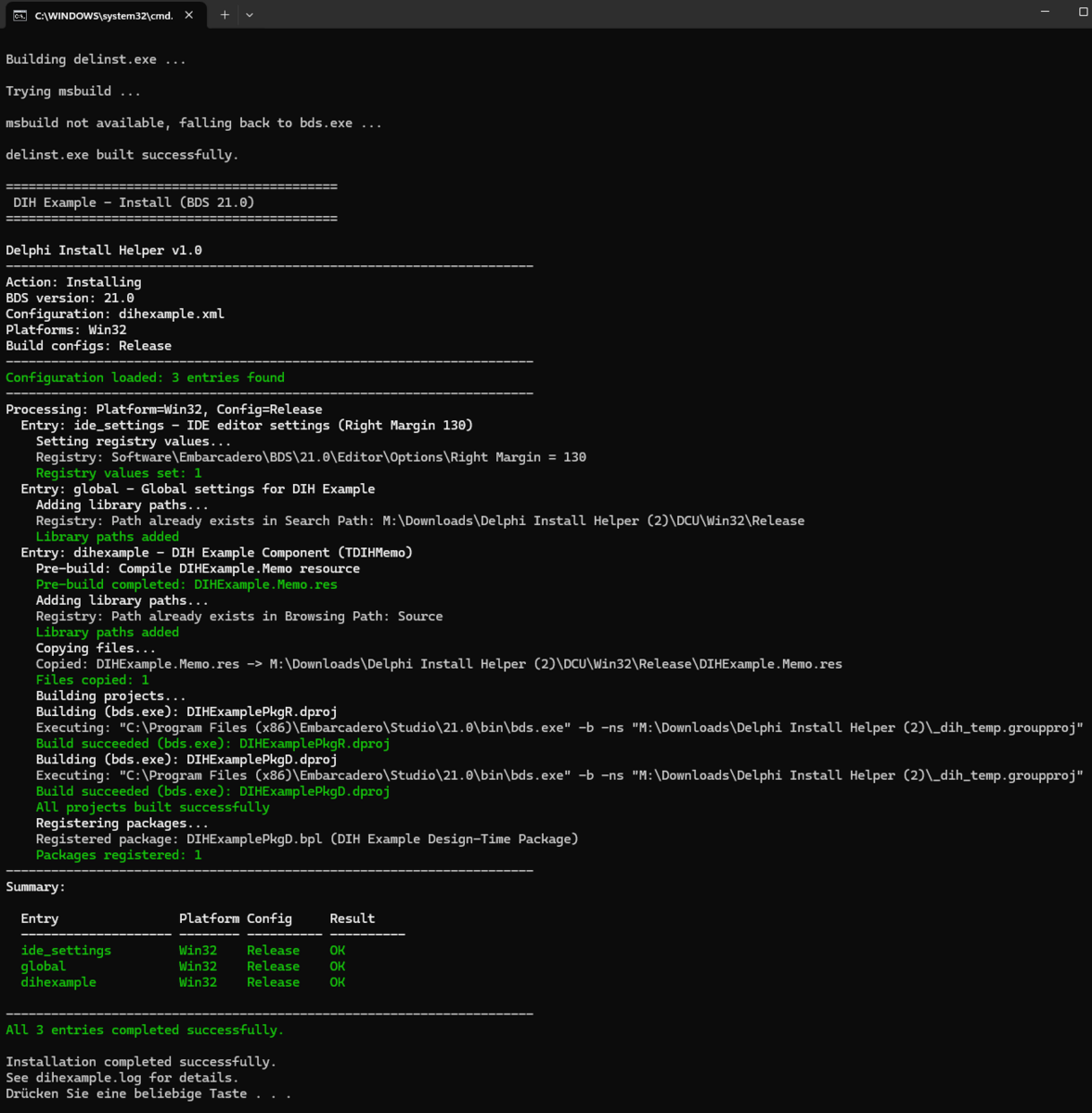
The dcu output directory should contain everything needed to use the units, for example .dfm files or ressource files. You can copy them using the files node. The example shows this by creating the image ressource for the component as pre build step and copying it to the target directory.
Example output
Command Line
delinst.exe <bdsversion> -config <xmlfile> [options]| Parameter | Description | Default |
|---|---|---|
<bdsversion> |
BDS version number (e.g. 23.0, 37.0) |
required |
-config <file> |
XML configuration file | required |
-platforms <list> |
Comma-separated: Win32, Win64 |
Win32 |
-configs <list> |
Comma-separated: Release, Debug |
Release |
-entries <list> |
Comma-separated entry IDs to process | all entries |
-action <action> |
install, uninstall, or build |
install |
-verbose <targets> |
Compiler output target: output, log, or output,log |
output,log |
-usebds |
Use bds.exe instead of msbuild | auto-detect |
-dcudir <path> |
Override DCU output directory | .\DCU\<Platform>\<Config> |
-bpldir <path> |
Override BPL output directory | $(BDSCOMMONDIR)\Bpl[\Win64] |
-dcpdir <path> |
Override DCP output directory | $(BDSCOMMONDIR)\Dcp[\Win64] |
-D:<name>=<value> |
Override placeholder value | - |
Project Structure
YourProject/
  dih/                          # DIH tool (include as subfolder)
    delinst.dpr                 # Main program
    delinst.dproj               # Delphi project file
    delinst.groupproj           # For building via bds.exe
    builddih.cmd                # Bootstraps delinst.exe
    closedialog.ps1             # Auto-closes bds.exe save dialogs
    DIH.*.pas                   # Source units
  Packages/                     # Your .dpk/.dproj package files
  Source/                       # Your component source files
  config/                       # Optional: external XML configs
  yourconfig.xml                # Main XML configuration
  install.cmd                   # Install script
  uninstall.cmd                 # Uninstall script
  rebuild.cmd                   # Build-only script
Architecture
| Unit | Responsibility |
|---|---|
DIH.Engine |
Main orchestration - processes entries per platform/config |
DIH.CommandLine |
Command-line parameter parsing |
DIH.XmlConfig |
XML configuration loading via OmniXML |
DIH.Placeholders |
Resolves {#...} and $(...) variables, reads BDS paths from Registry |
DIH.Builder |
Builds projects via msbuild or bds.exe with temp groupproj |
DIH.Packages |
Registers/unregisters BPL packages in Known Packages |
DIH.PathManager |
Manages library paths in Registry and EnvOptions.proj |
DIH.FileOps |
Copies/deletes files with wildcard support |
DIH.Registry |
Sets/deletes arbitrary registry values |
DIH.Logger |
Colored console output + file logging with verbosity control |
DIH.Types |
Shared types, records, and enums |
Example
The repository includes a complete example with a TDIHMemo component (a TMemo descendant with line numbering). See the Configuration Guide for a detailed walkthrough.
AI Disclosure
This project was developed with the assistance of Claude (Anthropic). The architecture, design decisions, requirements, and quality assurance were provided by the human author. The AI assisted with code generation and documentation.
License
This project is licensed under the Mozilla Public License 2.0.