

Catalog · How the catalog works
TRD-Audio-Suite

TRD Audio Suite is a music player for tracker formats inside ZX Spectrum .trd disk images. Extract and play modules, real-time spectrum visualization, file export. Drag & drop support, create and edit disk images. Compatible with AY/YM, PT3, ASC, STC, TXT and more.
- ★ 9 on GitHub
Anyone may press Interesting, signed in or not. It helps others find this project.
README
[License: MIT] [Platform: Windows | Linux ]
TR-DOS Audio Suite
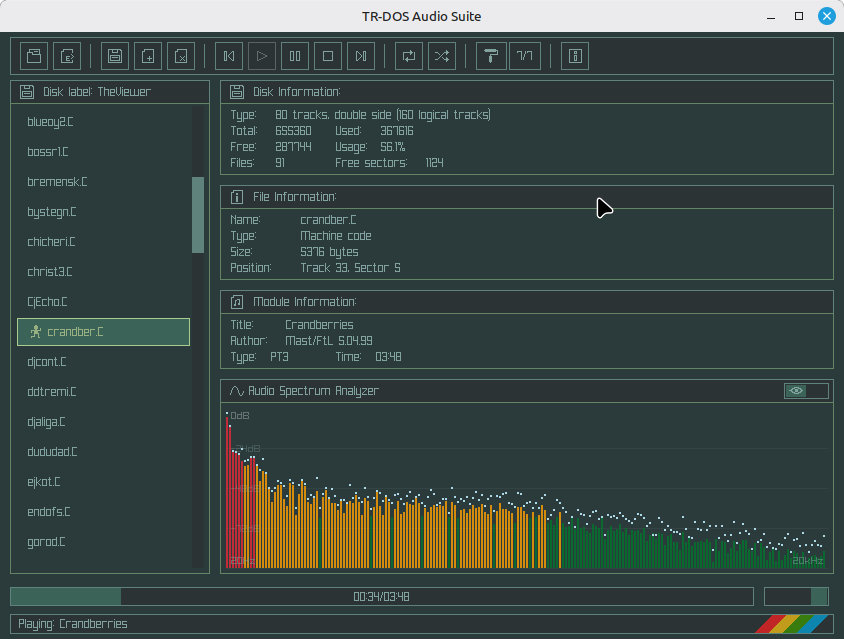
TR-DOS Audio Suite is a desktop application for managing TR-DOS disk images (.trd) and playing audio modules from ZX Spectrum games and demos. The application combines a disk image editor with a powerful audio player based on the ZXTune engine.
Features
Disk Image Management
- Open and edit TR-DOS or SCL disk images (.trd, .scl)
- Drag & drop support for files and disk images
- Add and delete files on the disk image
- Export files from the disk image
- Automatic disk format detection (80 tracks, double-sided)
Audio Playback
- Play music directly from TR-DOS disk images
- Support for multiple audio formats via the ZXTune engine:
- AY/YM chiptunes (PT1/2/3, STC, ASC, and more)
- ZX Spectrum music modules
- Many other formats supported by ZXTune
- Playback controls (Play, Pause, Stop, Previous, Next)
- Loop and Shuffle modes
- Position slider with progress tracking
- Volume control
Visualization
- Real-time spectrum analyzer
- Module information (song title, module type, duration)
- Disk information panel (free sectors, track count)
Interface & Customization
- Multiple color themes:
- Default (Raylib)
- Amber
- Ashes
- Cyber
- Dark
- Genesis
- Jungle
- ZX Spectrum style font
- Resizable window
Music Collection
A large collection of disk images with ZX Spectrum music can be downloaded from the Murmulator website:
The website features thousands of tracks in TR-DOS format, ready to use with TR-DOS Audio Suite.
Dependencies
- Lazarus / Free Pascal Compiler (FPC) 3.2+
- ray4laz - Raylib bindings for Lazarus
- raylib 6.0
- rayGui
- ZXTune library
Pascal Modules Used
- raylib - graphics and window management
- raygui - GUI controls
- ray4laz - Raylib integration with Lazarus
- trdos_reader - TR-DOS disk image handling
- libzxtune - audio playback engine
- TuneZXPlayer - player wrapper
- SpectrumPanel - spectrum visualization
Usage
Basic Workflow
- Load a disk image - Click the Open button or drag & drop a .trd file
- Select a file - Click on any file in the list
- Play - Click Play or double-click a file
- Export - Select a file and click Export to save it to disk
Disk Operations
| Action | Method |
|---|---|
| Open disk | Click Open or drag & drop a .trd file |
| Create new disk | Click New Drive |
| Add file to disk | Click Add File or drag & drop a file into the window |
| Delete file | Select file -> Click Delete |
| Export file | Select file -> Click Export |
Playback Controls
| Button | Action |
|---|---|
| ◀ | Previous track |
| ▶ | Play / Resume |
| ⏸ | Pause |
| ■ | Stop |
| ▶▶ | Next track |
| 🔁 | Loop mode |
| 🔀 | Shuffle mode |
License
This project is licensed under the MIT License.
Acknowledgements
- ZXTune - Audio playback engine
- raylib - Graphics library
- rayGui - GUI library
- TR-DOS documentation from the ZX Spectrum community
- Murmulator - For the ZX Spectrum music collection
Links
- Murmulator - Music for ZX Spectrum: https://murmulator.ru/zxmusic
- ZXTune Official: https://zxtune.bitbucket.io/
- raylib: https://github.com/raysan5/raylib
- ray4laz GitHub: https://github.com/guvacode/ray4laz