

Catalog · How the catalog works
InfoBarToast

Lazarus components: TInfoBar, a non-modal MessageDlg on a strip over a form or control, and TToast. Plain LCL.
- ★ 1 on GitHub
Anyone may press Interesting, signed in or not. It helps others find this project.
README
InfoBarToast
Two non-visual Lazarus components, plain LCL, for Linux, Windows and macOS.
- TInfoBar shows a message with MessageDlg's icon and buttons on a strip over the top or bottom edge of the form or of a control. It is not modal.
- TToast shows a short message near the bottom of the form for a few seconds, with an optional action button such as Undo.
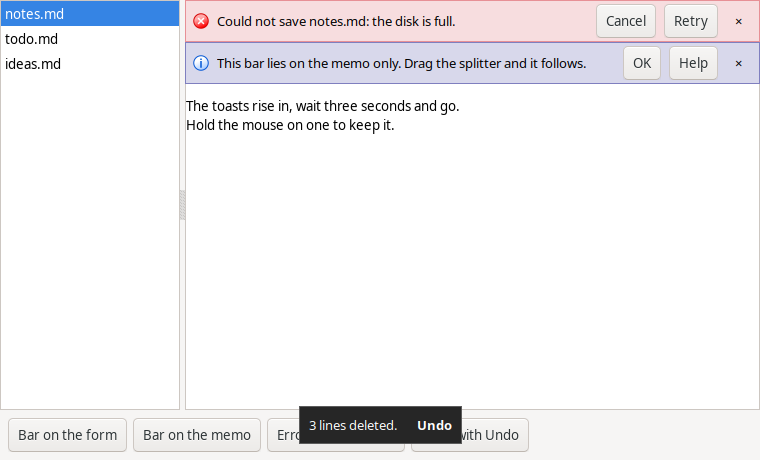
TInfoBar
InfoBar1.Show('Load the new version of notes.md?', mtConfirmation, [mbYes, mbNo], 'reload');

// QuestionDlg style, for your own captions
InfoBar1.ShowQuestion('notes.md was changed by another program.', mtWarning,
  [mrYes, '&Reload', mrNo, '&Keep mine'], 'reload');

procedure TForm1.InfoBar1Answer(Sender: TObject; const Key: string; Answer: TModalResult);
OnAnswer receives the message's key and the ModalResult that MessageDlg
would have returned. A button click takes the message away, except Help,
which passes mrNone and leaves it up. The close button passes mrClose.
OnAnswer runs after the click has finished, so it can show a modal dialog. The buttons
have no Alt+letter accelerators, as in LibreOffice's info bars, so a bar that
stays up never takes a key from the window.
Several messages stack, as in browsers and LibreOffice: errors first, then
warnings, then the rest, up to MaxVisible (3). The others wait, and the
last strip shows how many. MaxVisible := 1 shows one at a time. Showing a
message under a key that is already up replaces it instead of adding
another. Has(Key), Hide(Key), Hide and Count manage what is up.
Control is the control the bars are placed on; leave it empty for the
form. They get that control's width and move with it when the window or a
splitter moves. Edge is ieTop or ieBottom. While shown they cover that
edge of the control; other controls are not moved.
TToast
Toast1.Show('Saved.');
Toast1.Show('3 lines deleted.', 'Undo');   // OnAction runs if Undo is clicked
It hides after Duration milliseconds (default 3000); the timer is paused
while the mouse is over it. A click hides it. For desktop notifications
outside the window, use TPopupNotifier.
Install
Open infobartoast.lpk in Lazarus, compile and install. Both components go
on the LazControls tab. demo/ is the program in the picture; tests/
has the automated test, run on all three systems.
Tested on Linux (GTK3), Windows 10 and macOS 15, with Lazarus 4.8 and FPC 3.2.4 as well as the development versions.