

Catalog · How the catalog works
mORMot2-Multi-Socket-Connections

mORMot2 async socket demo
- ★ 9 on GitHub
Anyone may press Interesting, signed in or not. It helps others find this project.
README
mORMot2 Multi-Socket Connections
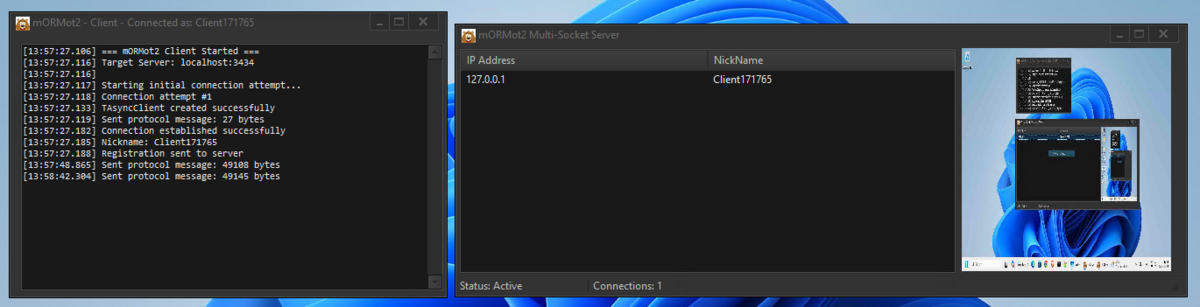
A Pascal/Delphi implementation demonstrating mORMot2 async socket programming with connection management, logging, automatic reconnection capabilities, and real-time screenshot sharing.
🚀 Key Features
- Handle-Based Connection Management - Uses
TPollAsyncConnectionHandlefor unique client identification - Logging - Comprehensive logging with timestamps and connection lifecycle tracking
- Automatic Reconnection - Intelligent client reconnection with exponential backoff
- Thread-Safe Operations - Critical sections protecting all shared data structures
- Real-time Connection Tracking - Live ListView updates with IP addresses and nicknames
- Message Broadcasting - Send to all clients or individual selected clients
- 🆕 Screenshot Sharing - Compressed JPEG screenshots with zlib compression
- 🆕 Simplified API - Clean
SendData(TBytes)method for all communications - 🆕 Enhanced Commands -
All|messageandSelected|messagecommand format - Memory Leak Prevention - Proper resource cleanup and object lifecycle management
- Cross-Platform Ready - Windows, Linux, macOS compatibility via mORMot2
- Simple Protocol with Magic Markers - Binary protocol using TBytes for all data
- String-Based Commands - Intuitive command parsing with pipe-delimited format
- Robust Stream Parser - Magic marker detection and fragmented TCP data handling
📊 Connection Lifecycle
Server Side Flow
1. Client Socket Connect
   ???
2. TConnection.AfterCreate()
   - Generate unique Handle ID
   - Add to fClients dictionary
   - Update connection counter
   - Wait for nickname registration
   ???
3. Client sends "NewCon|NickName" via protocol
   ???
4. TConnection.ProcessCommand()
   - Parse nickname using StringOf(TBytes)
   - Update UserData with nickname
   - Add to ListView with IP + nickname
   - Complete registration process
   ???
5. Normal operation (message exchange, screenshots)
   ???
6. TConnection.OnClose()
   - Remove from all collections by Handle
   - Update ListView and counters
   - Log disconnection event
Client Side Flow
1. TAsyncClient.Create()
   ???
2. TConnection.AfterCreate()
   - Generate unique nickname (Client + timestamp)
   - Send "NewCon|NickName" via SendData()
   - Update UI to connected state
   - Stop reconnection timer
   ???
3. Normal operation (receive server messages, capture screenshots)
   ???
4. TConnection.OnClose()
   - Update UI to disconnected state
   - Trigger OnConnectionLost()
   - Start reconnection timer
   ???
5. Automatic reconnection attempts every 3 seconds
📡 Simple Protocol Implementation
Protocol Structure
Magic Marker + Data Size + Data
[$CAFEBABE ] [UInt32    ] [TBytes]
4 bytes      4 bytes      Variable
Key Features
- Magic Marker:
$CAFEBABEfor protocol identification - Binary Safe: Uses
TBytesfor all data transmission - String Commands: Pipe-delimited format like 'NewCon|ClientName'
- Simplified API:
SendData(BytesOf('Command|Data'))method
Usage Example
// NEW: Simplified sending with SendData method
SendData(BytesOf('NewCon|' + ClientName));
SendData(BytesOf('All|Hello everyone!'));
SendData(BytesOf('Selected|Private message'));

// Screenshot with binary data
SendData(BytesOf('ScreenShot|') + CompressedImageData);

// Receiving data
procedure ProcessCommand(const Data: TBytes);
var
  sl: TStringList;
begin
  sl := TStringList.Create;
  try
    sl.Delimiter := '|';
    sl.StrictDelimiter := True;
    sl.DelimitedText := StringOf(Data);

    if sl[0] = 'NewCon' then
      RegisterClient(sl[1])
    else if sl[0] = 'All' then
      ShowMessage('Broadcast: ' + sl[1])
    else if sl[0] = 'ScreenShot' then
      ProcessScreenshot(Copy(Data, 11, Length(Data)));
  finally
    sl.Free;
  end;
end;
🖼️ Screenshot Functionality
Client-Side Screenshot Capture
function CaptureScreenshot: TBytes;
begin
  // 1. Capture screen as bitmap
  // 2. Convert to JPEG (30% quality)
  // 3. Apply zlib compression
  // 4. Return compressed TBytes
end;

// Automatic screenshot on server request
if sl[0] = 'GetScreenShot' then
begin
  ScreenshotData := CaptureScreenshot;
  SendData(BytesOf('ScreenShot|') + ScreenshotData);
end;
Server-Side Screenshot Processing
if sl[0] = 'ScreenShot' then
begin
  TThread.Queue(nil,
    procedure
    var
      imageData: TBytes;
      jpgImage: TJPEGImage;
    begin
      // Extract compressed image data (skip "ScreenShot|" prefix)
      imageData := Copy(Data, 11, Length(Data));

      // Decompress zlib data
      // Load JPEG from decompressed data
      // Display in TImage component
      Form1.Image1.Picture.Assign(jpgImage);
      Form1.Image1.Stretch := True;
    end);
end;
📋 Usage Instructions
1. Start the Server
- Open
Server/Server.dprojin Delphi - Compile and run (F9)
- Server starts on port 3434
- Status bar shows "Status: Active"
2. Connect Clients
- Open
Client/Client.dprojin Delphi - Compile and run multiple instances
- Each client auto-connects and registers
- Watch ListView populate with client info
3. Test Messaging
- Right-click in server ListView → "Send to All"
- Select client → Right-click → "Send to Selected"
- Messages appear in client log windows with clear labels:
- "Message to all: Hello everyone!"
- "Message to me: Private message"
4. Test Screenshot Sharing
- Select client → Right-click → "Get Screenshot"
- Client captures and sends compressed screenshot
- Screenshot appears in server's Image component
- Real-time visual monitoring capability
5. Test Reconnection
- Close client applications
- Server automatically removes from ListView
- Restart clients - automatic reconnection
- Registration happens seamlessly
🎓 Learning Outcomes
This implementation demonstrates:
- mORMot2 Async Framework - Proper use of TAsyncServer/TAsyncClient
- Connection Lifecycle - AfterCreate/OnClose pattern implementation
- Thread Safety - Critical sections and proper synchronization
- Resource Management - RAII and automatic cleanup
- Network Programming - Client-Server communication
- Binary Data Handling - Screenshot compression and transmission
- Error Handling - Comprehensive exception management
- UI Integration - Real-time updates and visual feedback
- API Design - Clean, simplified method interfaces
- Image Processing - JPEG compression and zlib optimization
Perfect foundation for building scalable network applications with mORMot2.
Made with ❤️ using Delphi RAD Studio