

Catalog · How the catalog works
Edge-OpenAI-Realtime

Delphi VCL component + WebView2 embedding OpenAI Realtime (WebRTC, voice & text). UI-free core, reusable sources, with ephemeral secret auth.
- ★ 9 on GitHub
Anyone may press Interesting, signed in or not. It helps others find this project.
README
Edge-OpenAI-Realtime (POC VCL + WebView2)
A VCL component that encapsulates a UI-free Realtime layer and an Edge/WebView2 (Chromium) adapter to drive WebRTC (audio + DataChannel) inside an embedded page, enabling real-time voice interactions with OpenAI’s Realtime API. The POC validates the end-to-end chain inside Edge/WebView2 with conversational perceived latency, without reusing documentation sample code, and keeps the Edge adapter swappable.
[!WARNING] TL;DR - Executive Summary
- What it is: a palette-ready VCL component; a UI-free Realtime layer; and an Edge/WebView2 adapter that hosts WebRTC and bridges Delphi ⇄ JS.
- What it proves: live voice to voice; default semantic_vad; user barge-in; audio playback handled by Edge; rich events to observe session state.
- What it does not try to do: native WebRTC stack outside Edge, production packaging, custom audio processing (AEC/AGC), or cloud storage.
Note: FMX is not targeted because Embarcadero does not provide an Edge/WebView2 component for FMX; this is a platform constraint, not a POC choice.
Built with Delphi 12 Community Edition (v12.1 Patch 1)
The wrapper itself is MIT-licensed.
You can compile and test it free of charge with Delphi CE; any recent commercial Delphi edition works as well.
Objective
Edge-OpenAI-Realtime ships a VCL component that embeds a UI-free Realtime layer (Delphi) and an Edge/WebView2 adapter to orchestrate WebRTC (SDP/ICE, DataChannel, mic capture and playback) in the embedded page. The POC demonstrates real-time voice dialog with the Realtime API: mic permission, connection establishment, turn detection enabled by default (semantic_vad), smooth barge-in, TTS synthesis and audio playback.
Authentication uses ephemeral client secrets: no long-lived key in the page. The component exposes a clean event model (WebRTC state, listen start/stop, volume, open, etc.) and relies on JSON interop (polymorphic payloads, normalization/hydration, safe memory handling). The goal is to prove the end-to-end real-time chain in Edge/WebView2 and keep the Edge adapter replaceable, not to build a polished UI.
POC Scope
This POC is strictly VCL + Edge/WebView2. FMX is not targeted because Embarcadero does not provide an Edge/WebView2 component for FMX. It does not include a native WebRTC stack outside Edge, does not cover productization (packaging/installer/signing), does not implement specialized audio processing (custom AEC/AGC), and does not address cloud storage or a production backend.
Single priority: validate WebRTC behavior in Edge/WebView2 and Realtime orchestration (latency feel, turn detection, barge-in, ICE lifecycle); not ship a finished product.
Guides
The README only provides a concise overview of the project.
For detailed design notes and technical explanations, see the following guides:
- Architecture
Explains the three-layer split (Realtime, Edge/WebView2, VCL) and their orchestration. - End-to-End Sequence
Step-by-step flow from initialization to WebRTC negotiation and DataChannel usage. - Deployment Diagram
Shows the runtime footprint (EXE, WebView2Loader.dll, local web resources) and external calls. - Authentication
Describes how long-lived keys are resolved in Delphi and exchanged for short-lived ephemeral secrets. - Reconnect & AutoResume
Covers the lifecycle during disconnection, controlled shutdown, reconnection, and optional session resume. - Component Surface
Details the public API of the VCL component (properties, methods, events). - Realtime Sources
Self-contained implementation of the latest OpenAI Realtime API (Sept. 2025), with support for functions and remote MCP tools.
Each guide is self-contained and can be read independently.
Together, they provide the full technical picture behind the POC.
Component installation (POC)
-
Prereqs
- Windows 10+ with WebView2 Runtime.
- Recent Delphi VCL (Win32/Win64).
-
Setup
- Install the component package
Edge.Realtime.Design.dpk
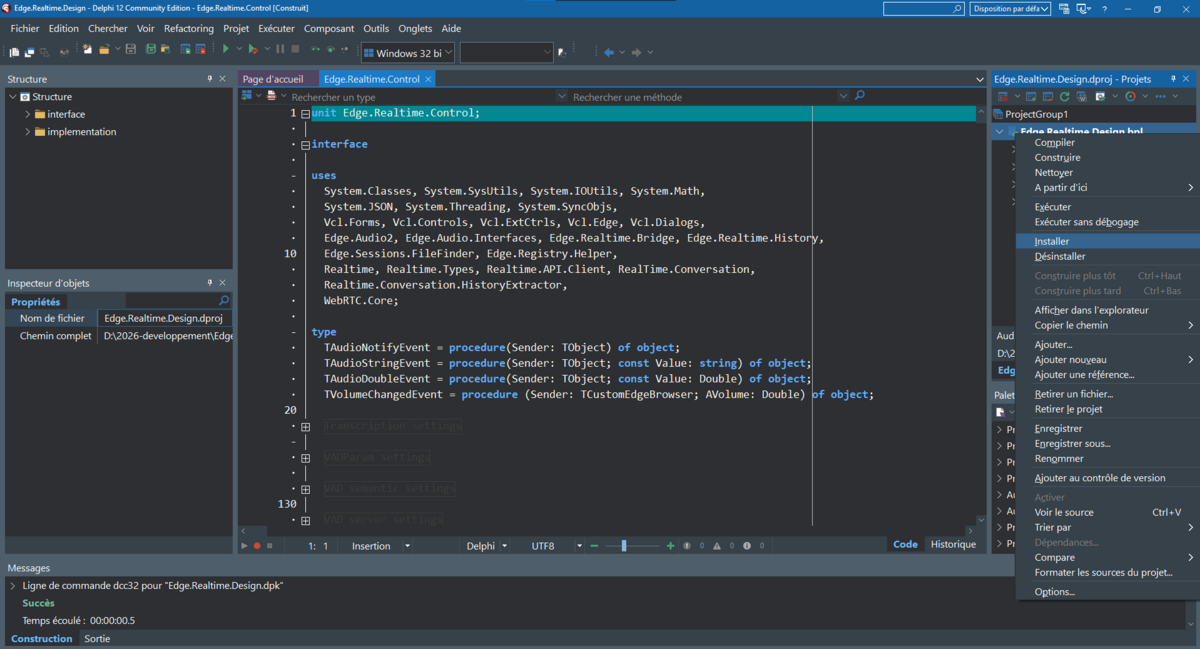
- Install the component package
Acceptance Criteria
- Smooth voice↔voice dialog with conversational perceived latency.
- Turn detection enabled by default, switchable, and disablable with manual control.
- Barge-in works during playback.
- ICE lifecycle works in normal connect/reconnect; diagnostics are actionable.
- No long-lived secret ever injected into the page.
Caller Example
The component ships with a demo app that contains the reference caller. To avoid drift, this README does not copy the code; refer to:
sample/EdgeAudioWebRC.zip(projectEdgeAudioWebRC.dproj).
Running the demo
-
Unzip the archive
-
Open
EdgeAudioWebRC.dprojin Delphi. -
Ensure WebView2 Runtime is installed.
-
Build & run (F9).
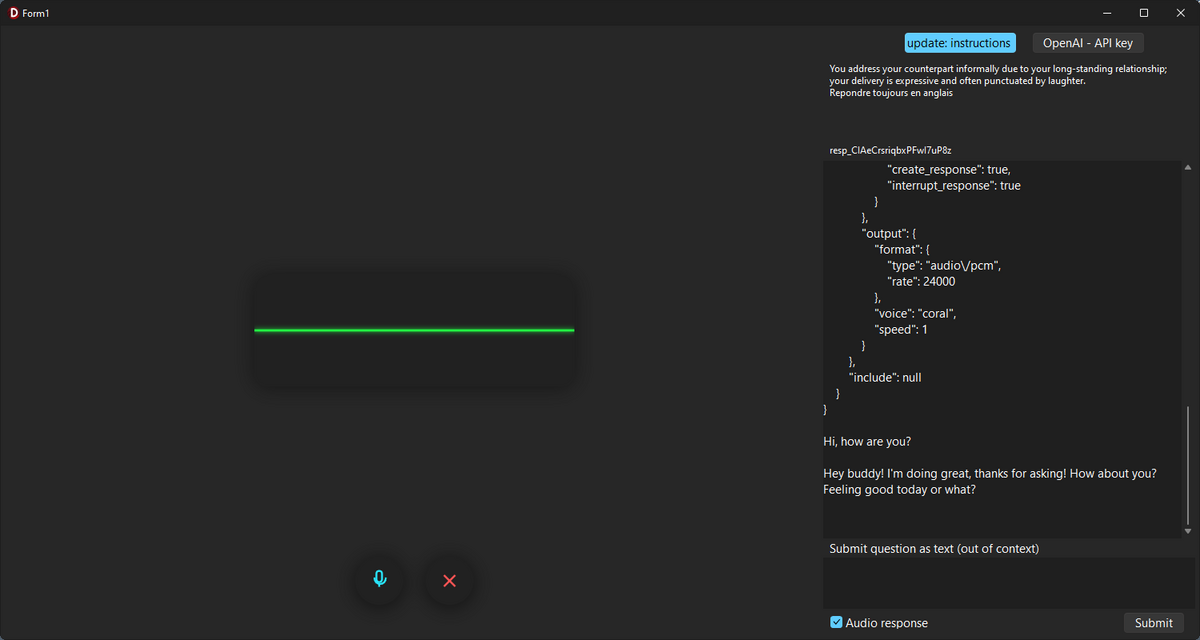
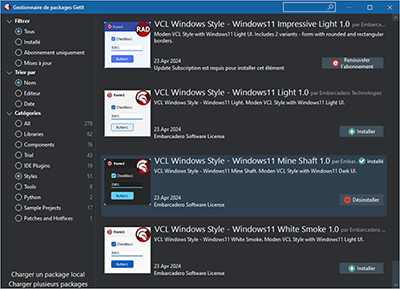
[!NOTE] he code examples use the
Windows 11 MineShaftcustom VCL theme.
Redistribution
- Place the web folder next to the executable; an automatic message appears if it’s missing.
- Ship WebView2Loader.dll (32/64‑bit) with the executable.
License
This project is licensed under the MIT License.
Final Note
This repository is a proof of concept published for documentation and reference.
Future updates are not guaranteed, but the project remains available as a basis or inspiration for anyone exploring Delphi VCL + WebView2 + OpenAI Realtime.