

Catalog · How the catalog works
Delphi_Alternative_Data_Streams_Smart-Screen-Bypass

This project shows how to add and remove Zone ID's so that a PE Binary (.EXE) can run without triggering Microsoft Windows Smart Screen.
- ★ 9 on GitHub
Anyone may press Interesting, signed in or not. It helps others find this project.
README
Project Title
This project demonstrates how to add and remove Zone IDs to ensure a PE Binary (.EXE) can run without triggering Microsoft Windows Smart Screen.
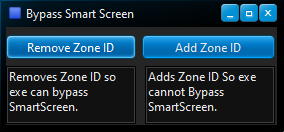
Key Points to Consider:
- Zone ID #3 (Internet Zone) triggers SmartScreen.
- When a file is downloaded from the internet, it is flagged with Zone ID 3.
- Removing or modifying this Zone ID can prevent SmartScreen from being triggered, allowing the executable to run smoothly.
Preserving a PE File:
- To prevent a PE file from being flagged with Zone ID 3 after being downloaded, you can compress the .exe file into a .zip archive or use other methods such as adding it to a container like an .ISO file.
- Browsers do not directly see the contents of these containers and thus do not flag their Zone ID.
- Users can then extract the .exe from the .zip archive, .ISO file, or other containers without triggering SmartScreen.
This approach ensures that the executable remains unflagged and can be executed without unnecessary security warnings.
📧 Contact
Discord: BitmasterXor
Made with ❤️ by: BitmasterXor, using Delphi RAD Studio