

Catalog · How the catalog works
Delphi_Chrome_Password_Recovery_TMSCRYPTO

Delphi project to get and Decrypt Chrome encrypted passwords (Works on all chrome based Browsers)
- ★ 9 on GitHub
Anyone may press Interesting, signed in or not. It helps others find this project.
README
Chrome Password Recovery Tool
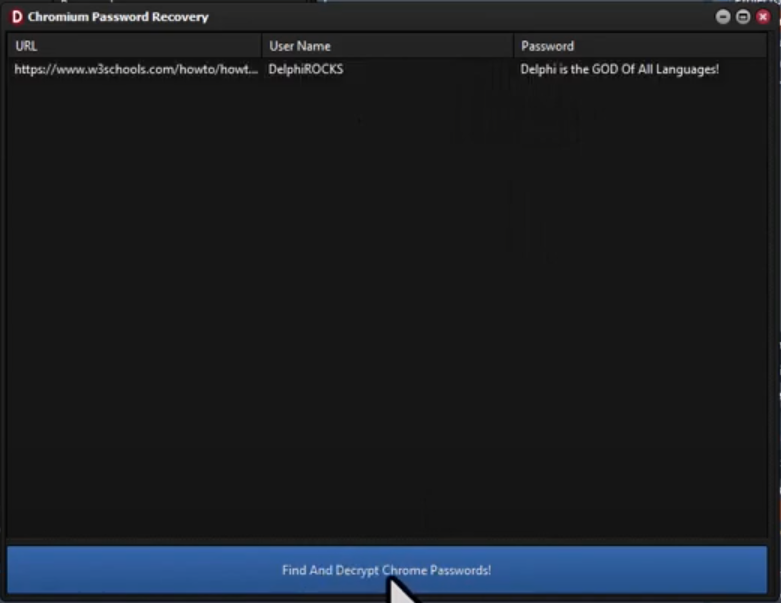
This Delphi application helps recover saved passwords from Google Chrome's profile data. It decrypts the encrypted passwords stored in Chrome for retrieval.
⚠️ Compatibility Warning
This tool only works with Chrome versions prior to Chrome 127. Starting with Chrome 127, Google implemented App-Bound Encryption which prevents external applications from accessing Chrome's encrypted data.
Features
<ul> <li>Recover Saved Passwords: Extract passwords stored in Chrome.</li> <li>Decrypt Passwords: Decrypts encrypted passwords for access.</li> <li>User-Friendly Interface: Simple and easy to use.</li> </ul>
Installation
- Install Required TMS Components:
- Open the Delphi IDE.
- Click on File -> Open... and browse to the TMS Cryptography Suite components folder.
- Look for two files named:
TMSCryptoPkgDEDXE??.dprojTMSCryptoPkgDXE??.dproj- (The "??" represents your Delphi IDE version number.)
- Open both files in the IDE simultaneously. (HOLD DOWN SHIFT and click on them both to ensure both are selected then click the OPEN button)
- Compile the packages:
- Click once to compile the package.
- Right-click on the installable package and select Install.
- Update the Library Path:
- Go to Tools -> Options... and select Library Path for Win32.
- Add the path to the components directory where the
.dprojfiles are located.
- Open Delphi Project: Open the
.dprfile in the Delphi IDE. - Compile: Build the project to generate the executable.
- Run: Execute the tool to start using it.
Usage
<ol> <li>Launch the Application: Run the tool to automatically locate and scan the Chrome profile directory.</li> <li>View Recovered Passwords: The passwords will be displayed within the application's interface.</li> </ol>
Contributing
Contributions are welcome! If you have improvements or bug fixes, please fork the repository and submit a pull request.
License
This project is provided as is without warantee, use at your own risk!
📧 Contact
Discord: BitmasterXor
Made with ❤️ by: BitmasterXor and Friends, using Delphi RAD Studio