

Catalog · How the catalog works
csv-adapter-restrequest4delphi

CSV Adapter for RESTRequest4Delphi
- ★ 6 on GitHub
Anyone may press Interesting, signed in or not. It helps others find this project.
README
CSV Adapter for RESTRequest4Delphi
This is the adapter for generating CSV files for RESTRequest4Delphi. Allows you to generate a text or CSV file with the content of a request.
📞 Contacts
✳ Prerequisites
This adapter must be used together with RESTRequest4Delphi
⚡ Installation
- Installation using the Boss:
boss install github.com/Code4Delphi/csv-adapter-restrequest4delphi- Manual installation: Open your Delphi and add the following folder to your project, under Project > Options > Building > Delphi Compiler > Search path
csv-adapter-restrequest4delphi\Src🚀 Quickstart
- Add uses to your system:
uses
CSV.Adapter.RESTRequest4D;- Getting the CSV for a TString:
begin
  TRequest.New.BaseURL('http://localhost:9050/clients')
    .Adapters(TCSVAdapterRESTRequest4D.New(Memo1.Lines, 'optional-root-element'))
    .Accept('application/json')
    .Get;
end;- Automatically saving CSV to a file:
begin
  TRequest.New.BaseURL('http://localhost:9050/clients')
    .Adapters(TCSVAdapterRESTRequest4D.New('C:\Temp\MyFile.csv', 'optional-root-element'))
    .Accept('application/json')
    .Get;
end;
⚙ Configurations
You can customize resources through the TCSVAdapterRESTRequest4DConfig class:
- With Inline Settings
TRequest.New.BaseURL('http://localhost:9050/clients')
    .Adapters(TCSVAdapterRESTRequest4D.New('C:\Temp\MyFile.csv', 'optional-root-element', TCSVAdapterRESTRequest4DConfig.New.Separator('|')))
    .Accept('application/json')
.Get;- With Settings in variable
procedure TViewMain.Button1Click(Sender: TObject);
var
  LResponse: IResponse;
  LConfig: ICSVAdapterRESTRequest4DConfig;
begin
  LConfig := TCSVAdapterRESTRequest4DConfig.New.Separator(cBoxSeparator.Text);

  LResponse := TRequest.New
    .BaseURL(edtBaseURL.Text)
    .Resource(edtResource.Text)
    .Adapters(TCSVAdapterRESTRequest4D.New('C:\Temp\MyFile.csv', 'optional-root-element', LConfig))
    .Accept('application/json')
    .Get;
end;
⌨️ Demo
- Along with the project sources, you will find test projects. The API and Client project are respectively in the folders:
csv-adapter-restrequest4delphi\Samples\API
csv-adapter-restrequest4delphi\Client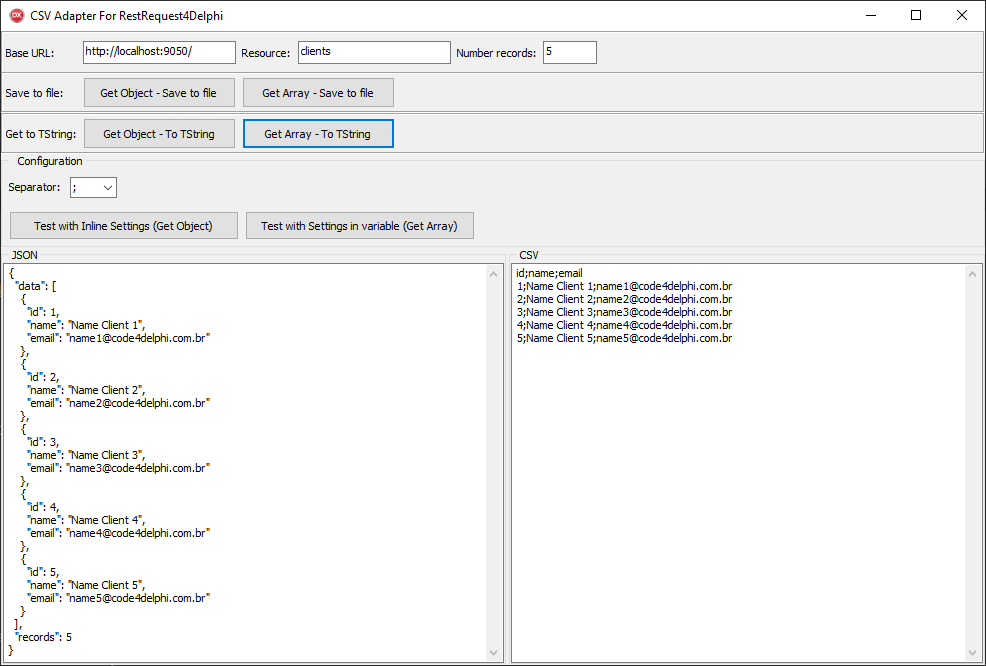
💬 Contributions / Ideas / Bug Fixes
To submit a pull request, follow these steps:
- Fork the project
- Create a new branch (
git checkout -b minha-nova-funcionalidade) - Make your changes
- Make the commit (
git commit -am 'Functionality or adjustment message') - Push the branch (
git push origin Message about functionality or adjustment) - Open a pull request