

Catalog · How the catalog works
FileAss

File associations for Lazarus applications on Windows and Linux, with a nonvisual component and custom document icons.
- ★ 2 on GitHub
Anyone may press Interesting, signed in or not. It helps others find this project.
README

FileAss
File associations and single-instance apps for Lazarus.
Two non-visual components for Free Pascal / Lazarus: TFileAssMan registers
file associations with the operating system, and TFileAssInstance keeps
one copy of an application running. Most setup is done in the Object
Inspector, and the application code is the same on Windows and Linux.
📄 File associations
Put TFileAssMan on a form, set the application name and ID, and add
extensions and document icons to its FileTypes collection. Register or
remove them from your application's install action:
FileAssMan1.RegisterAll;
// When removing the associations:
FileAssMan1.UnregisterAll;
Registration only happens when you call it, and it keeps the user's chosen default applications unless you ask it to claim them. Configuration and registration
⭐ One application instance, without writing IPC code
Put TFileAssInstance on the main form, set its ApplicationID (or link it
to TFileAssMan) and set Enabled to True. No event handler is needed to
keep one instance running.
To open files in the running instance, select fimForwardParameters and
handle OnParameters. Requests that arrive during startup are queued and
delivered once the application is ready.
Forwarding, readiness and events
Demo
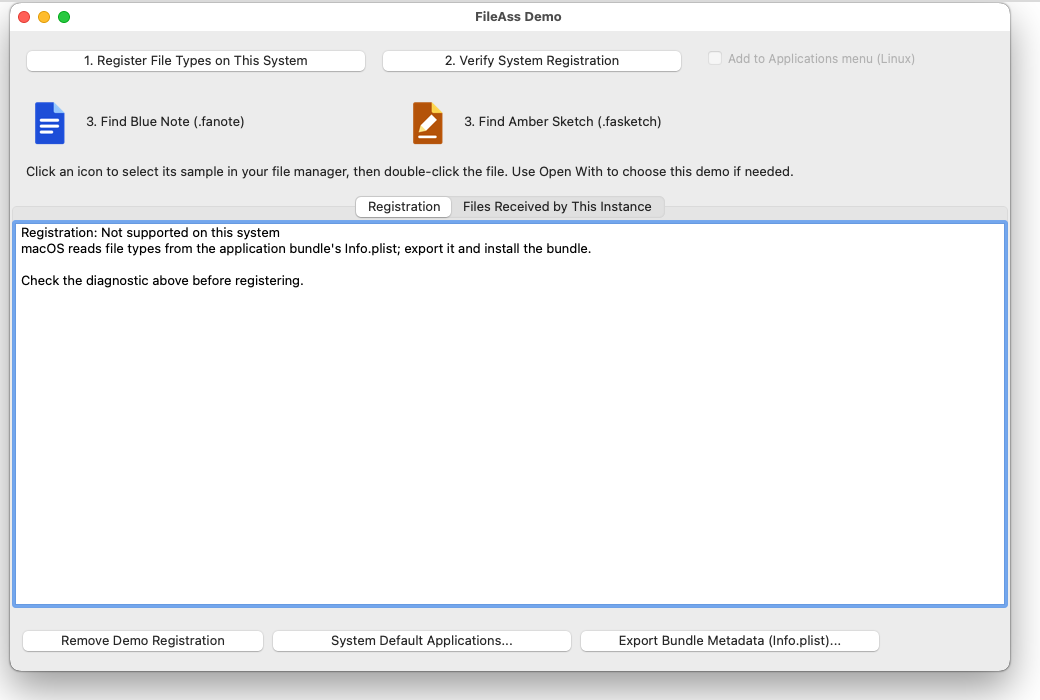
Install the package, then open
demo/FileAssDemo.lpi. Register the sample types,
click a document icon to find its file, and open more files into the running
instance. The demo's .lfm shows the component settings.


🛠️ Other uses
Installer exports, application-menu launchers and icons and console applications use the same core. The developer guide covers setup, properties and platform details; the Object Inspector shows a hint for every property.
✅ Tested on
| Linux | Windows | macOS | |
|---|---|---|---|
| Tested on | Mint, Cinnamon desktop | Windows 10, and Wine | Sequoia 15, Intel, in a virtual machine |
| Built with | Lazarus trunk, FPC 3.3.1 | the same, cross-compiled | Lazarus 4.8, FPC 3.2.4 |
| Core unit tests | ✅ | ✅ | ✅ |
| Register and remove file types | ✅ | ✅ | not how a Mac does it - see the next row |
| Installer export | ✅ .desktop, MIME, icons |
✅ .reg |
✅ Info.plist, accepted by Apple's plutil |
| Document icons show in the file manager | ✅ | ✅ | not checked yet |
| One instance: unit tests | ✅ | ✅ | ✅ |
| Fifty copies started at once pick one primary and lose nothing | ✅ | ✅ | ✅ |
| Launches queued while the first copy is still starting | ✅ | ✅ | ✅ |
| A killed primary releases the instance, and its queue is kept | ✅ | ✅ | ✅ |
| A document opened by the system is passed to the running copy | ✅ | ✅ | ✅ |
| The demo, clicked through by hand | ✅ | ✅ | not yet |
Still wanted: the demo clicked through in Finder on a real Mac (and how the document icons look there), Apple Silicon, Windows 11, and file managers other than Cinnamon's. Test reports are welcome in the issues.
License
0BSD. Copyright (c) 2026 Tony Stone.