

TurnMeDown

Windows tool to restrict volume during quiet hours
- Active · last change 3-6-2025
- ★ 7 on GitHub
README
Turn Me Down
Windows tool to restrict volume during quiet hours
Live in an apartment? Listen to a lot of music? Neighbors hate you? Worry no more - Turn Me Down restricts your system volume during the quiet hours which you set.
Usage
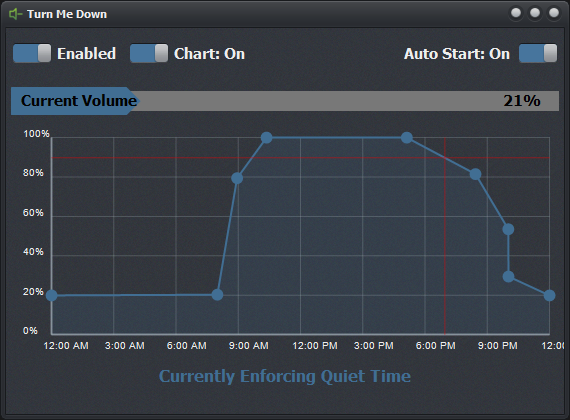
The application is fairly simple. Once you install and run Turn Me Down, it will show the main screen. It runs in the background, with a tray icon in your notification area. You can double-click or right-click this icon for further actions. Note that minimizing the window will hide it from the taskbar, and closing it will prompt you to terminate the application.
Tray Popup Menu
When you right-click the icon in your notification area, you will see a popup menu with the following options:
- Show - Opens the main user interface for you to adjust settings to your needs.
- Enabled - Toggles enforcement on or off, showing a checkmark if it's enabled.
- About - Opens the about window with information about Turn Me Down.
- Exit - Terminates the application with a confirmation.
Options
The following options are available in the main user interface:
- Enabled - A switch to toggle enforcement on or off.
- Chart - Whether to use basic time range or plotted chart for volume control.
- Auto Start - Whether to start the application with Windows.
- Current Volume - The current system volume. Click or use mouse wheel to change.
- When chart is disabled...
- Quiet Time Start - The time of day to begin quiet time enforcement.
- Quiet Time Stop - The time of day to stop quiet time enforcement.
- Max Volume - The maximum volume allowed during quiet time.
- When chart is enabled:
- Plot Chart - Click and drag points around to desired locations.
- NOTE: Double-clicking on line creates plot point, and double-clicking on point deletes that point.
Open-Source
Turn Me Down is an open-source application, allowing you to modify it to your needs, or contribute to the live project. I encourage feedback and contributes of any kind to help keep this project going.
Development Tools
- Delphi 10.4
- VCL Styles
- Raize (Konopka) Components
- TRzPanel
- TRzTrayIcon
- JDLib - Custom Controls by Jerry Dodge
- TJDVolumeControls
- TJDFontGlyphs
- TJDGauge
- TJDPlotChart
- InnoSetup Installer