

Catalog · How the catalog works
LazHIDControl

Cross platform keyboard and mouse input control and window automation in Pascal.
- ★ 3 on GitHub
Anyone may press Interesting, signed in or not. It helps others find this project.
README
LazHIDControl
Desktop automation for Lazarus / Free Pascal: type, click, scroll, register global hotkeys, find and control other programs' windows, take screenshots, and watch the clipboard, the power supply, and session idle time. Ten nonvisual components to drop on a form, the library underneath them, and a command-line tool that drives any program from a script.
The repository has three parts:
hidctl/ |
The command-line automation tool. Covers most of what xdotool does, in one binary, using the same API you can call from Pascal. |
lazhidcontrol/ |
The package: components, input backends, window management. |
examples/ |
The demo program, with a tab for each area. |
One script, every desktop
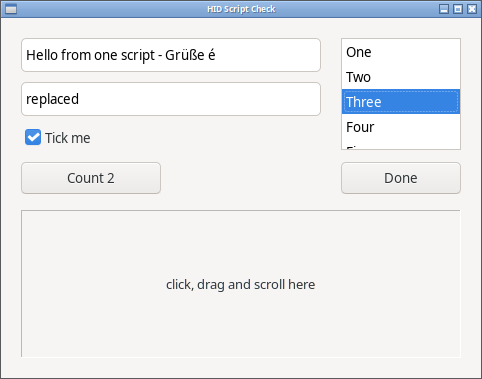
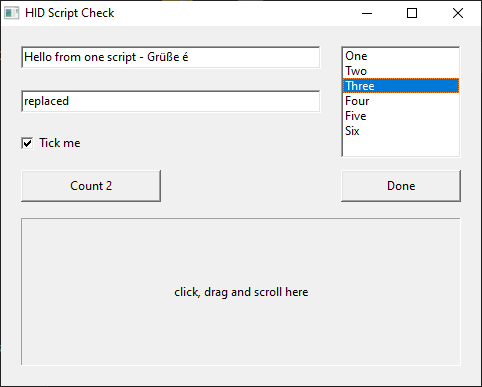
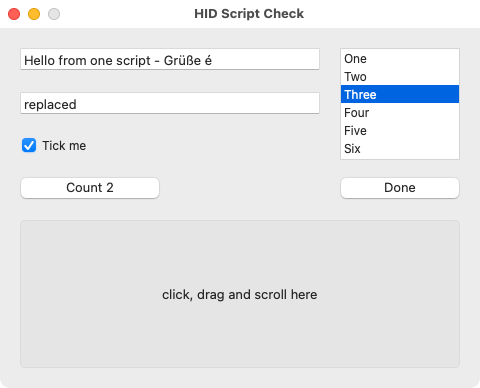
The same hidctl script file drives the same program on Linux, Windows and
macOS and gets the same result. tests/scriptcheck
checks it: check.hid types Unicode text,
selects with Shift, ticks a box, clicks a button twice, picks a list item
with the arrow keys, presses Ctrl+Shift+K, clicks, right-clicks,
double-clicks, drags and scrolls. The program writes down what reached it,
and that has to match expected.txt line
for line. On 16 October 2026 it did, with the script unchanged, on Linux
(GTK2 and GTK3 on X11), Windows 10 and macOS 15. These are the window at
the end of the script, one run on each:
| Linux, GTK3 | Windows 10 | macOS 15 |
|---|---|---|
 |
 |
 |
What makes that work:
- Coordinates count from the inside of the window, below the title bar, on every system. Each system draws a different frame; none of them moves a click.
scale lclreads the script's coordinates as the Lazarus designer's numbers - theLeftandTopin the.lfm- and grows them the way the LCL grows the form on a 125% screen. It is opt-in, in hidctl only; without it coordinates are plain pixels, as in xdotool.typesends characters, not key positions, so the text comes out right on any keyboard layout.
That makes it a tool for documentation as much as for testing. One script
walks a program through its screens and shot saves a picture at each
step under the name the script gives it; run it on each system and the
manual has a matching set of pictures from each, retaken in minutes after
every change to the program.
What does not carry from one system to another, and a portable script avoids:
- shortcuts that differ by system: Ctrl+A is "start of line" in a Mac text field, and the Mac's own shortcuts use Command;
- the End key on its own in a Mac text field, which scrolls rather than moving the caret; click past the end of the text instead;
- things placed by their size: list rows and menu items are different heights on each widget set, so choose them with the arrow keys;
- a form with a main menu: on Linux the menu bar is inside the window, so there a click counts from the top of the menu bar;
- Wayland: no program is told where windows are, so window-relative commands cannot work there; keys and screen coordinates do.
A drive script can be written three ways, all running the same code underneath:
- a hidctl script, plain text, one command a line - hidctl;
- a Pascal program using the package, built once for each system -
tests/inputcheck.lpris one; - an instantfpc script: Pascal run straight from its source, like a
shell script. Point instantfpc at the compiled units once
(
INSTANTFPCOPTIONS="-Fu<lazarus>/lcl/units/x86_64-linux -Fu<lazarus>/lcl/units/x86_64-linux/gtk2 -Fu<lazarus>/components/lazutils/lib/x86_64-linux -Fu<this package>/lazhidcontrol/lib/x86_64-linux/gtk2 -dLCL -dLCLgtk2") and a file like this runs with./drive.pas. Tried on Linux only.
#!/usr/bin/env instantfpc
program drive;
{$mode objfpc}{$H+}
uses
  cthreads, Interfaces, Types, Forms, Controls,
  HIDMouseAndKeyInput, WindowManager, WindowManagerIntf;
var
  W: TWindowHandle;
  Inside: TRect;
begin
  Application.Initialize;
  EnsureWindowManager;
  W := WindowMgr.FindWindow('HID Script Check');
  WindowMgr.ActivateWindow(W);
  Inside := WindowMgr.GetClientRect(W);
  MouseInput.Move([], Inside.Left + 150, Inside.Top + 32);
  MouseInput.Click(mbLeft, []);
  KeyInput.PressString('typed by a Pascal script');
end.
The components
| Component | What it does | |
|---|---|---|
 |
THIDHotkey |
Registers a global shortcut, configured in the Object Inspector; fires OnHotkey from any application. |
 |
THIDKeyboard |
Types text - Unicode included - and sends keys with modifiers to the focused application. |
 |
THIDMouse |
Moves, clicks, and scrolls; coordinates can be screen, control, or window relative. |
 |
THIDWindow |
Finds windows by title, class, or process; waits for them, activates, moves, resizes. |
 |
THIDScreenshot |
Captures the desktop, a monitor, a window, a rectangle, or a drag selection. |
 |
THIDClipboardMonitor |
Fires OnChanged when the clipboard content changes, without reading it. |
 |
THIDPowerMonitor |
Sleep and wake notifications, power source, battery percentage, charging. |
THIDSystemIdle |
Fires OnIdle and OnActive as session input stops and resumes. |
|
THIDInputMonitor |
Reports key presses and mouse clicks anywhere on the system, for recording a task to play back. | |
THIDPermission |
Explains which permissions this desktop needs and requests them: the udev rule on Wayland through the system's password dialog, the Privacy & Security prompts on macOS. |
Every component has palette icons and Object Inspector hints on every
property, reports errors through OnError rather than dialogs, and does
nothing in the designer or at form load beyond what you enabled.
MANUAL.md covers each component in detail, the library beneath them, and the per-platform notes.
Install
Open lazhidcontrol/lazhidcontrol.lpk in Lazarus, Compile, then
Use → Install to put the components on the palette. For library-only use,
Use → Add to Project is enough. From a shell:
lazbuild --add-package-link lazhidcontrol/lazhidcontrol.lpk
lazbuild examples/automation/AutomationDemo.lpi
lazbuild hidctl/hidctl.lpi
Dependencies are LCL and FCL. Linux also needs the X11, Xtst and D-Bus
libraries, which every desktop has.
Example
// Drop a THIDWindow and a THIDMouse on a form, or create them in code:
if Window.Find then            // WindowTitle set in the Object Inspector
begin
  Window.Activate;
  Mouse.RelativeWindow := Window;
  Mouse.MoveTo(200, 150);      // 200,150 inside that window, wherever it is
  Mouse.Click;
end;
Or skip the components and use the library directly:
uses HIDMouseAndKeyInput, LCLType;
KeyInput.PressString('Hello World!');
KeyInput.Press(VK_RETURN);
MouseInput.Move([], 100, 100, 500);  // move there over 500 ms
MouseInput.Click(mbLeft, []);
hidctl
The same functions from a shell, on Linux, Windows and macOS. It accepts xdotool's command names, chained on one line as xdotool does:
hidctl search --name "Text Editor" windowactivate key ctrl+a type "Hello" key ReturnIt also runs scripts, one command per line from a file or standard input, with its own commands that use coordinates relative to the target window, so a script still works when the window opens somewhere else.
./hidctl/hidctl --window "Some App" - <<EOF
waitfor 5000 Some App
at 300 200
click
type Hello from a script
shot /tmp/proof.png
power
EOF
It covers the pointer, the keyboard, window find/wait/activate/geometry,
screenshots of the window, the desktop, or an area, the clipboard, idle time,
and power status. hidctl --help prints every command;
hidctl/README.md lists which xdotool commands it supports. We use it, against a nested X server, to drive the GUI tests of our
other projects.
Build your own automation tool
The components are the parts of a desktop automation program of the AutoHotkey kind, ready to drop on a form:
| The tool needs to | Component |
|---|---|
| start something on a key combination, from any program | THIDHotkey |
| type text and press keys | THIDKeyboard |
| move, click, drag and scroll | THIDMouse |
| find the program to work on, bring it forward, place it | THIDWindow |
| record what the user does, to play it back | THIDInputMonitor, then THIDKeyboard and THIDMouse |
| keep pictures for a log or a bug report | THIDScreenshot |
| keep a clipboard history | THIDClipboardMonitor |
| run jobs while the user is away | THIDSystemIdle |
| hold off on battery, carry on after sleep | THIDPowerMonitor |
| ask macOS or a Wayland desktop for permission, once | THIDPermission |
A text expander, whole: a THIDHotkey with ShortCut Ctrl+Alt+D and
Enabled ticked, a THIDKeyboard beside it, and
procedure TForm1.HIDHotkey1Hotkey(Sender: TObject);
begin
  HIDKeyboard1.TypeText(FormatDateTime('yyyy-mm-dd', Date));
end;
The date is typed into whatever program has the focus. The keyboard lets go of Ctrl and Alt first, though the user is still holding them.
hidctl itself is the larger example: one Pascal program of about 850 lines over the same library, and its script reader is the start of a scripting language for anyone who wants to build one.
Compared with other tools
What each one documents, as of October 2026. Corrections are welcome.
| Runs on | Wayland | Other programs' windows | Global hotkeys | Screenshots | Types any Unicode text | The user installs | |
|---|---|---|---|---|---|---|---|
| LazHIDControl / hidctl | Linux, Windows, macOS | typing, mouse, screenshots, watching keys (KDE tested) | X11, Windows, macOS | X11, Windows, macOS | yes | yes, on any layout | nothing: one binary, or built into your program |
| xdotool | Linux and BSD, X11 | no | yes | no | no | yes | the xdotool package |
| ydotool | Linux | typing, mouse | no | no | no | no, US layout key codes | a daemon with access to /dev/uinput |
| AutoHotkey | Windows | - | yes | yes | finds pixels and pictures; no saving | yes | AutoHotkey, or a compiled script |
| AutoIt | Windows | - | yes | yes | yes | yes | AutoIt, or a compiled script |
| PyAutoGUI | Windows, macOS, Linux X11 | no | Windows only | no | yes, and finds pictures | no, keys it can name | Python and its packages |
Many of the gaps in that table are the systems' rules rather than the tools' faults, and they bind every tool the same way:
- Wayland tells no program where windows are, offers global hotkeys only
to installed applications through its portal, and lets a program watch
the keyboard only with a rule from the administrator. Every tool on
Wayland goes through the same doors: the desktop's portals, or the
kernel's
/dev/uinputwith permission. This package uses both, asks through the system's own dialogs, and goes as far as those doors allow. - macOS makes the user allow each program under Privacy & Security before it may type, click, watch keys or read the screen. No tool gets round that.
- Windows stops a program from sending input to one running as administrator unless it is running as administrator too.
Where other tools are ahead, plainly:
- Reading the program back. AutoIt, AutoHotkey and pywinauto read
controls on Windows - a button by its name, an edit box's text - so a
script can check what happened and find a button that moved. hidctl
clicks positions and cannot read anything back;
tests/scriptcheckcan check its results only because the program under test writes them down. The systems' accessibility interfaces (UI Automation, macOS Accessibility, AT-SPI) are the way to that; it is not built. - Seeing the screen. SikuliX, PyAutoGUI and AutoHotkey find a picture on the screen and click it. hidctl takes pictures but does not look at them.
- Waiting for a thing instead of a time. Browser tools such as
Playwright wait until a button is ready. hidctl waits for a window to
appear (
waitfor), and otherwise for a fixed time. - A language. AutoHotkey has variables, loops and functions. A hidctl script is a list of commands; loops and sums come from the shell that writes it, or the script is a Pascal program instead.
- A recorder.
THIDInputMonitorhears every key and click, but there is no program yet that turns a recording into a script.
What is tested, what is not
| Linux / X11 | Windows | macOS | Linux / Wayland | |
|---|---|---|---|---|
| Tested on | Mint, in a nested X server; GTK2 and GTK3. Qt5 on Ubuntu 26.04 with its own Lazarus 4.4 and FPC 3.2.2 | Windows 10, in a virtual machine | macOS 15 on Intel, in a virtual machine; Lazarus 4.8, FPC 3.2.4 | KDE Plasma 6 on Ubuntu 26.04, in a virtual machine; GTK3 |
| Typing, Unicode included | ✅ on US, German, French, Spanish and Russian layouts | ✅ | ✅ | ✅ on KDE; the desktop asks the user once when the text goes beyond ASCII |
| Keys with Ctrl, Alt, Shift | ✅ | ✅ | ✅ | ✅ |
| Mouse: move, click, scroll | ✅ | ✅ | ✅ | ✅ in screen coordinates |
| Back and forward mouse buttons | ✅ GTK2 and Qt5; a GTK3 Lazarus program does not receive them, a fault in the LCL | ✅ | not passed on in the virtual machine | not tried |
| Global hotkeys | ✅ | ✅ | ✅ | not written; the portal serves only installed applications |
| Windows: find, activate, move, size, minimize | ✅ | ✅ | ✅ | not possible on Wayland |
| Screenshots | ✅ | ✅ | ✅ | ✅ through the desktop's portal; it asks the user once |
| Clipboard monitoring | ✅ | ✅ | ✅ | ✅ through XWayland, which passes on what Wayland programs copy |
| Idle time | ✅ | ✅ | ✅ | ✅ on KDE; GNOME untested |
| Power status | ✅ | ✅ | ✅ | ✅ |
| Sleep and wake events | ✅ | not tried | not tried | not tried |
| Watching keys and clicks system-wide, for recording a task to replay | ✅ | ✅ | ✅ | ✅ keys and buttons from the kernel's input devices, once THIDPermission has installed its rule; no click positions |
| hidctl | ✅ | ✅ | ✅ | ✅ for what the rows above allow |
One hidctl script, unchanged, same result (tests/scriptcheck) |
✅ GTK2 and GTK3; Qt5 all but the double-click, which a Qt5 Lazarus program on a slow machine misses: the LCL times the two presses when it gets round to them, not when they happened | ✅ | ✅ | not possible: no window positions |
Qt5 builds pass the same input, hotkey and clipboard checks as GTK2 on X11. Qt6 has not been tried.
The keyboard, mouse and hotkey rows were checked again on 15 October 2026, after those units were rewritten: on Linux (GTK2, GTK3 and Qt5) and Windows with the two test programs below, on macOS with the hotkey test and by typing into TextEdit, and on Wayland by typing and clicking into KWrite with hidctl.
tests/inputcheck types into its own window and clicks, drags and scrolls on
its own controls, then checks what arrived (29 checks); tests/hotkeycheck
registers global hotkeys and presses them (23); tests/scriptcheck/run.sh
(run-windows.ps1 on Windows) drives a small program with one hidctl script
and compares what arrived (11 lines). All take over the keyboard and mouse,
so run them in a nested X server or a virtual machine; run.sh starts its
own nested X server on Linux.
On a Mac the user has to allow it. macOS asks before a program may do any of this to other programs, under System Settings > Privacy & Security: Accessibility for typing, the mouse and moving windows, Input Monitoring for watching keys, Screen Recording for screenshots that show other programs' windows. Hotkeys, the clipboard, idle time and power need nothing. Without a permission the call fails or comes back empty; nothing crashes. One Mac difference: a minimized window is not in the window list, so keep its handle if you mean to bring it back.
On Wayland the user grants access once, through a prompt the package starts. Which prompt depends on what the program does:
- Typing and the mouse only: the desktop's own "may this program control
input devices" question, through its RemoteDesktop portal, the first time
input is sent. No password, no system file, and the desktop remembers the
answer for that program.
THIDKeyboard.PermissionNoteis shown just before it, to say why. Desktops without that portal - the wlroots ones, such as Sway - take the password route below instead. - Watching keys and clicks as well: there is no portal for watching, so
that takes a small udev rule, and the same password installs a second
rule that lets typing and the mouse go through the kernel's virtual
devices, so the portal prompt is not used. Drop
THIDPermissionon the form with both needs and callAsk: it shows the user what is being allowed and the exact files, then the system's own password dialog installs them. The manual has the rules for anyone who would rather write them by hand.
One exception: a virtual keyboard presses keys, not characters, so text
beyond ASCII still goes through the desktop's portal prompt the first time. Set THIDKeyboard.WaylandUnicode off and it never does;
TypeText refuses such text instead.
Text sent through the virtual keyboard is typed with a US layout. Wayland does not tell a program where windows are, its own included, so the mouse works in screen coordinates only and other programs' windows cannot be targeted. Screenshots come from the desktop's portal. KDE Plasma 6 is what was tested; GNOME and other desktops have not been, and reports are welcome.
Still wanted on Wayland: where the pointer is. No Wayland desktop tells
a program that, so THIDInputMonitor does not watch clicks there - its
OnError says why - and a recorder cannot say where anything was clicked. Per-desktop workarounds exist, and this package
does not use them: it has to work the same everywhere with nothing extra to
install. The only option that does is the desktop's screen-sharing portal,
which can report the cursor alongside the screen - TODO.md has
the plan, the costs and a first step, for anyone who wants to take it on.
Still wanted from a real Mac: Apple Silicon, battery changes, and
sleep/wake events - a virtual machine has none of them. sh tests/run_macos.sh
runs the checks.
The demo on macOS, listing the Mac's windows and showing its typing test sheet:
Where it started
LazHIDControl began from LazMouseAndKeyInput, the package Tom Gregorovic
wrote in 2008 that ships with Lazarus in components/mouseandkeyinput,
with its Cocoa units by Sammarco Francesco. Global hotkeys adapted from the
Codebot library by Anthony Walter were added to it. Much of what this
package knows about sending input on each system was learned from reading
their code.
It has come a long way since. What began as typing and clicking is now ten components, window control, screenshots, clipboard, power and idle monitoring, watching keys and clicks system-wide, Wayland through the desktop's portals and the kernel's input devices, and hidctl.
In October 2026 the last of the borrowed code was replaced. The keyboard, mouse and hotkey units were written new from a written description of what they must do, by a writer who had not seen the earlier code. That was not because the old code was bad - it worked, and this package rests on what it taught. It was because that code was under the GPL, and this package is meant to be usable in any program. On the package's own tests the new units do at least as well as the old ones on every platform.
Components, window management, hidctl, and everything since: Tony Stone.
License
0BSD: use it in anything, open or closed, with or without credit. Releases before October 2026 were GPL-2.0-or-later, and copies of those stay under it.