

Catalog · How the catalog works
NetChatLink

A small application that links chat messages across multiple DC hubs and IRC channels
- ★ 5 on GitHub
- ✦ 1 finds this interesting
Anyone may press Interesting, signed in or not. It helps others find this project.
README
NetChatLink
NetChatLink is a small application written in Delphi that links chats across multiple DC hubs and IRC channels. It includes support for the ADC protocol, IRC channel keys, chat filtering, per-user settings, OP commands, and more.
Screenshots
Quick start
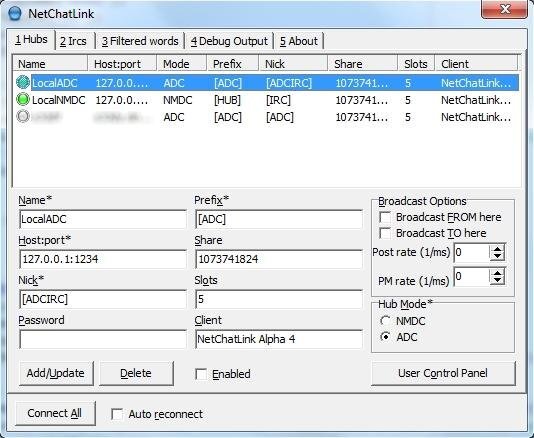
When you open the program, you will see a few tabs. To add a connection, go to the Hub/IRCs tab and click the 'New' button. Configure the connection the way you want. Hit the 'Update' button to save your changes. Do the same for any other connections. The connection you are updating will disconnect to apply the settings.
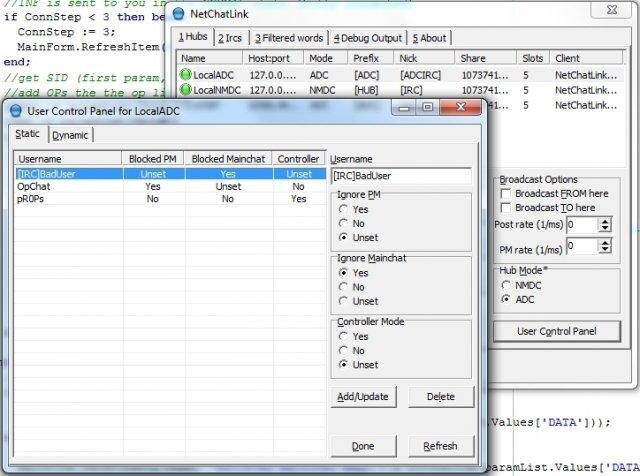
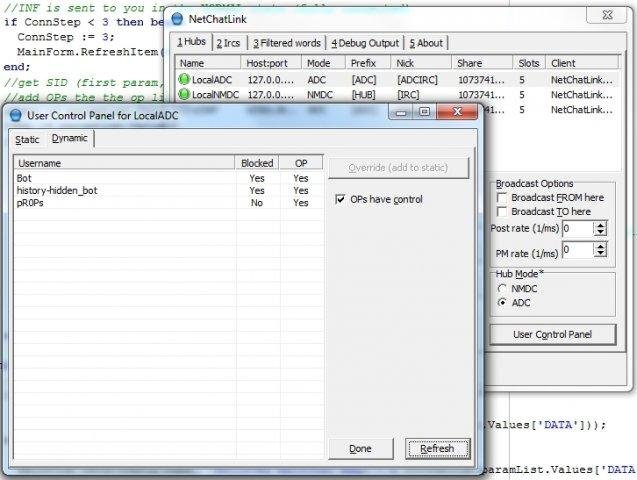
The 'User Control' button opens up a control panel where you can modify permissions of users. In the 'Static' tab you can block PMs and mainchat messages from users, as well as allow them to control the bot with commands. These entries will be saved to a file. In the dynamic tab you will see users that the bot has determined are bots or OPs. Bots are blocked from communicating with this bot. Here you can also specify if the local OPs are allowed to control this bot with commands or not. If you click the 'Override' button, you will be able to add that user to the 'Static' list and specify different options for them. These modifications are done in realtime, there's no need to update the connection after.
The 'Connection Script' button (on the IRC tab) allows you to add custom commands you want the bot to execute when it connects to the server. For example, if the channel has a NickServ, you might want to send an 'IDENTIFY' to it to sign in. You can also include the connection properties in the script (nick, password, etc). Click the '?' button on the form for more info.
Use the 'Filtered Words' tab to add words you want the bot to filter out. Add words one word per line and hit the 'Save' button. The filtered words will be replaced with *s when the bot relays the message.
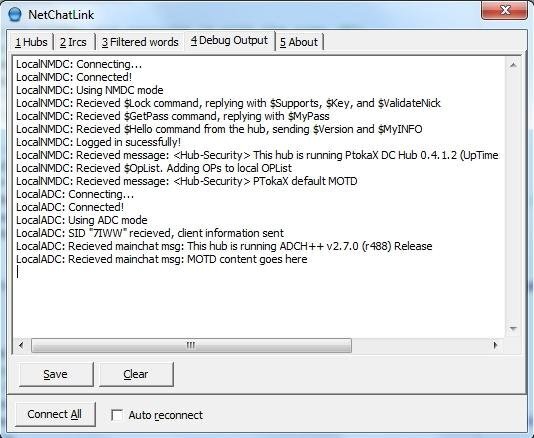
Hit the 'Connect All' button to initiate connections to all of the enabled hubs/IRCs that you added. Be sure to check out the debug tab to see if everything is working properly. The status lights will turn green when the bot is properly connected to the hub/IRC.
When the bot is connected to a hub/IRC, authorized users can control it via text-based commands. To see a list of commands, send a PM of '.help' to the bot. Unauthorized users will receive an error message.
Connection Properties
Fields marked with a * are required
Hub/IRC:
| Property | Explanation |
|---|---|
| Name* | Connection name |
| Host:port* | Host and port of the hub/IRC |
| Nick* | Username the bot will use on that hub/IRC |
| Password | Password for that username |
| Prefix* | Prefix of that hub/IRC (added to name when broadcasting) |
| To here/From here | Controls chat broadcasting (send chat to/from hub/IRC) |
| Broadcast Parts | Broadcast when users leave ('**xx left [connection name]') |
| Post rate | 1 chat sent per specified ms, 0 to disable delay |
| PM rate | 1 PM sent per specified ms, 0 to disable delay |
| Enabled | Will connect when the 'Connect All' button is clicked |
Hub specific:
| Property | Explanation |
|---|---|
| Share | Share size the bot will report |
| Slots | Number of slots the bot will report |
| Client | The client the bot will report to be |
| NMDC/ADC* | The mode the bot will use to connect to the hub |
IRC specific:
| Property | Explanation |
|---|---|
| Ident | Ident text (if you are running an ident deamon) |
| Channels | Channels to join(comma-separated, supports channel keys) |
Licensing
This project is licensed under the GNU GPL v3. It also includes parts of the Delphi Encryption Compendium, which is licensed under the MIT License.
Final notes
This project is a fork of Burek's MyIrcDcLinks.
It is the result of me using his codebase, fixing a few bugs, and adding features such as ADC support, IRC channel keys, custom OP lists, and a few other things.
Hopefully you put it to good use.