

Catalog · How the catalog works
FAST-2D-Canvas

A library that wraps D3D11, providing functions to create 2D graphics.
- ★ 5 on GitHub
Anyone may press Interesting, signed in or not. It helps others find this project.
README
FAST-2D-Canvas
About
This is a library that wraps D3D11 to provide functions for creating 2D graphics.
It is extremely useful in situations in which hardware processing is needed, such as drawing very fast real-time graphics, with a large number of lines and polygons. In those occasions, it should outperform Direct2D considerably.
Examples
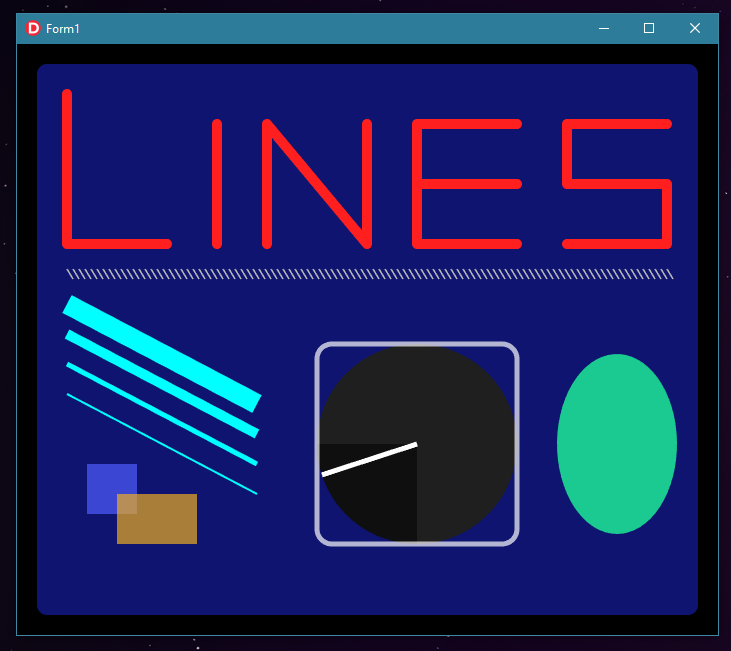
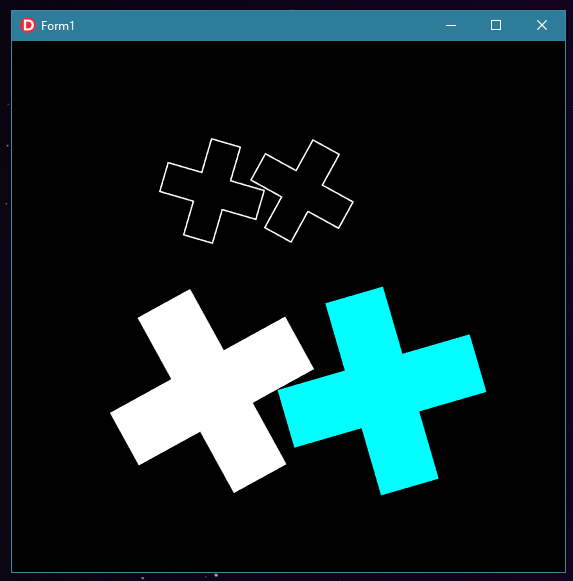
So far, there are two examples:
- DrawShapes : Displays the result of drawing and filling functions rendered every 10ms:
- DrawPaths : Uses the path funcionality to create a gear shaped polygon which is replicated four times and rotated constantly.
Setup
It's recomended to use a component with ovewritten WM_PAINT and WM_ERASEBKGND handlers, so it doesn't interfere with the library's painting. That can be achieved by creating a simple TPanel child:
type
  TContainer = class(TPanel)
    private
      procedure WMPaint     (var Msg : TWMPaint); message WM_PAINT;
      procedure WMEraseBkgnd(var Msg : TMessage); message WM_ERASEBKGND;
  end;

(...)

procedure TContainer.WMPaint(var Msg : TWMPaint);
var
  PS: TPaintStruct;
begin
  BeginPaint(Handle, PS);
  EndPaint(Handle, PS);
end;

procedure TContainer.WMEraseBkgnd(var Msg : TMessage);
begin
  //
end;
In order to initialize the canvas, you must pass as parameter a TF2DCanvasProperties struct, containing the dimensions and HWND of the parent:
(...)

uses
  F2DTypesU,
  F2DCanvasU;

(...)

procedure InitializeCanvas;
var
  f2dProp : TF2DCanvasProperties;
begin
  with f2dProp do
  begin
    Hwnd   := m_pnlContainer.Handle;
    Width  := m_pnlContainer.ClientWidth;
    Height := m_pnlContainer.ClientHeight;
    MSAA   := 8;
  end;

  //////////////////////////////////////////////////////////////////////////////
  ///  Create canvas
  m_f2dCanvas := TF2DCanvas.Create(f2dProp);

end;
For drawing, use BeginDraw and EndDraw calls:
  m_f2dCanvas.BeginDraw;

  m_f2dCanvas.Clear;

  // Setup and drawing functions
  (...)

  m_f2dCanvas.EndDraw;
Draw functions
- DrawLine - Draws a line from point A to point B with the specified Width. If no width is provided, the value in the property LineWidth will be used:
procedure DrawLine(a_pntA, a_pntB : TPointF; a_sLineWidth : Single = -1);
procedure DrawLine(a_dPntAX, a_dPntAY, a_dPntBX, a_dPntBY : Double; a_sLineWidth : Single = -1);- DrawRect - Draws a rect delimited by points A and B with the specified Width. If no width is provided, the value in the property LineWidth will be used:
procedure DrawRect(a_pntA, a_pntB : TPointF; a_sLineWidth : Single = -1);
procedure DrawRect(a_dPntAX, a_dPntAY, a_dPntBX, a_dPntBY : Double; a_sLineWidth : Single = -1);- DrawRoundedRect - Draws a rect delimited by points A and B with rounded corners specified by the radius parameter and the specified width. If no width is provided, the value in the property LineWidth will be used:
procedure DrawRoundRect(a_pntA, a_pntB : TPointF; a_dRadius : Double; a_sLineWidth : Single = -1);
procedure DrawRoundRect(a_dLeft, a_dTop, a_dWidth, a_dHeight, a_dRadius : Double; a_sLineWidth : Single = -1);- DrawArc - Draws an arc with the specified X and Y radius, starting at a specific point and rotating a specific amount. The a_dStart and a_dSize range from 0 to 1 and represent the percentage of the circle's circunference. If no width is provided, the value in the property LineWidth will be used:
procedure DrawArc(a_pntC : TPointF; a_dRadiusX, a_dRadiusY, a_dStart, a_dSize : Double; a_sLineWidth : Single = -1);
procedure DrawArc(a_dLeft, a_dTop, a_dRadiusX, a_dRadiusY, a_dStart, a_dSize : Double; a_sLineWidth : Single = -1);
Fill functions
- FillRect - Fills a rect delimited by points A and B.
  procedure FillRect(a_pntA, a_pntB : TPointF);
procedure FillRect(a_dLeft, a_dTop, a_dWidth, a_dHeight : Double);- FillRoundRect - Fills a rect delimited by points A and B with rounded corners specified by the radius parameter.
procedure FillRoundRect(a_pntA, a_pntB : TPointF; a_dRadius : Double);
procedure FillRoundRect(a_dLeft, a_dTop, a_dWidth, a_dHeight, a_dRadius : Double);- FillArc - Fills an arc with the specified X and Y radius, starting at a specific point and rotating a specific amount. The a_dStart and a_dSize range from 0 to 1 and represent the percentage of the circle's circunference.
procedure FillArc(a_pntC : TPointF; a_dRadiusX, a_dRadiusY, a_dStart, a_dSize : Double);
procedure FillArc(a_dLeft, a_dTop, a_dRadiusX, a_dRadiusY, a_dStart, a_dSize : Double);
Customizability
There are two painting styles: drawing and filling. Drawing implies outlining the shape, while filling fills it with the specified color. Colors must be setted by changing the correspondent property of the canvas:
m_f2dCanvas.DrawColor := $FFFF0000; // Sets red color for drawing
m_f2dCanvas.FillColor := $9F00FF00; // Sets alpha green color for filling
Drawing funcions will utilize the line style specified by the following properties:
m_f2dCanvas.LineCap := lcRound; // Lines will have rounded ends
m_f2dCanvas.LineCap := lcMitter; // Lines will have cutted ends
m_f2dCanvas.LineWidth := 2.5; // Every shape drawed will be 2.5px wide
Paths
Use the TF2DPath type for creating a geometry. In order for the triangulation algorithm to properly work, points must be added in order to create a clockwise defined geometry. Points can be added and removed individually, and edited by transforming procedures, which changes all points at once.
- AddPoint - Adds a point in the specified coordinates:
procedure AddPoint(a_pntNew : TPointF); overload;
procedure AddPoint(a_dX, a_dY : Double); overload;- RemovePoint - Removes a point in the specified coordinates:
procedure RemovePoint(a_pntDel : TPointF); overload;
procedure RemovePoint(a_dX, a_dY : Double); overload;- Scale - Multiplies all points by the specified values:
procedure Scale (a_dX, a_dY : Double);- Offset - Adds all points by the specified values:
procedure Offset(a_dX, a_dY : Double);- Rotate - Rotates all points by a specified amount around a specified point:
procedure Rotate(a_pntRef : TPointF; a_dRatio : Double);- FlipX - Multiplies all X values by -1, flipping the image around the Y axis:
procedure FlipX;- FlipY - Multiplies all Y values by -1, flipping the image around the X axis:
procedure FlipY;- DrawPath - Draws the specified path:
procedure DrawPath(a_f2dPath : TF2DPath);- FillPath - Fills the specified path:
procedure FillPath(a_f2dPath : TF2DPath);A simple example:
procedure RenderScreen;
var
  f2dPath : TF2DPath;
begin
  m_f2dCanvas.BeginDraw;
  m_f2dCanvas.Clear;

  m_f2dCanvas.LineWidth := 1.5;
  m_f2dCanvas.LineCap   := lcRound;
  m_f2dCanvas.DrawColor := $FFFFFFFF;
  m_f2dCanvas.FillColor := $FFFFFFFF;

  f2dPath := TF2DPath.Create;

  // Uses AddPoint procedure for adding points:
  f2dPath.AddPoint(0, 0);
  (...)

  f2dPath.Scale(10, 10);
  f2dPath.Offset(100, 150);
  f2dPath.Rotate(PointF(200, 150), 0.5);

  m_f2dCanvas.DrawPath(f2dPath);
  m_f2dCanvas.FillPath(f2dPath);
  m_f2dCanvas.EndDraw;
end;