

Catalog · How the catalog works
mousewiggler

MouseWiggler is a simple application to periodically send message to make mouse move to prevent screen saver from executing
- ★ 5 on GitHub
Anyone may press Interesting, signed in or not. It helps others find this project.
README
MouseWiggler

is a simple application to periodically send message to make mouse move to prevent screen saver from executing (could be useful in a limited environment like a computer lab with auto logoff :stuck_out_tongue_winking_eye:).
How to run
Either build the project or download the executables then just run it like any other GUI app you know.
How to use
Upon execution, you will be greeted by the following dialog:
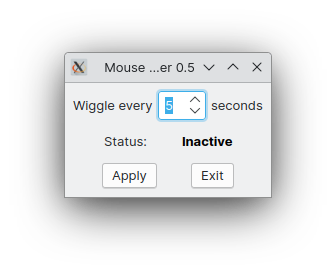
There will be no window on the taskbar but an icon is there on the system tray.
Fill in the "every" spin edit to configure the interval between the wiggles. Click Apply then the status text should be like this:
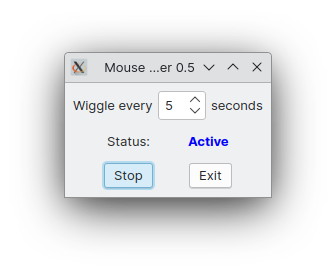
Click Stop to, well, stop it. Click Exit to, well, exit.
You can close the window and it will minimize to the system tray. Hovering the tray icon will give you something like this:

(left) Clicking on the icon will bring back the dialog while right clicking will allow you to exit the app right from the tray.
How to build
- Install Lazarus, any recent version will do, the code was even written with whatever Lazarus version available in 2015.
- Open mousewiggler.lpi with it
- Optionally select a build mode (should default to Release)
- Press Run->Build (Ctrl+F9)
The executable will be created in the same folder as the source code. This is a portable, standalone application you can move anywhere you want, no other files are necessary.