

b2fh

Convert binary files to pascal, delphi, c++ format
- Quiet · last change 10-7-2022
- ★ 5 on GitHub
README
b2fh
Binary to formatted (pascal\c++) hex byte array convertor
Pascal sample result
//
// *****************************************
//  b2fh v1.0 | github.com/arctic-sun
// *****************************************
// FileName: icon-mono-sm.png
// Size: 3663 bytes
// MD5: 62a9d363569975d191bfcdbcb43f24f5
//const
BuffData: array[0..3662] of Byte = (
$89, $50, $4E, $47, $0D, $0A, $1A, $0A,
$00, $00, $00, $0D, $49, $48, $44, $52,
$00, $00, $00, $C0, $00, $00, $00, $C0,
$08, $06, $00, $00, $00, $52, $DC, $6C,
$07, $00, $00, $00, $19, $74, $45, $58,
$74, $53, $6F, $66, $74, $77, $61, $72,
$65, $00, $41, $64, $6F, $62, $65, $20,
$49, $6D, $61, $67, $65, $52, $65, $61,
.....C++ sample result
//
// *****************************************
//  b2fh v1.0 | github.com/arctic-sun
// *****************************************
// FileName: icon-mono-sm.png
// Size: 3663 bytes
// MD5: 62a9d363569975d191bfcdbcb43f24f5
//int BuffData[3663] = {
0x89, 0x50, 0x4E, 0x47, 0x0D, 0x0A, 0x1A, 0x0A,
0x00, 0x00, 0x00, 0x0D, 0x49, 0x48, 0x44, 0x52,
0x00, 0x00, 0x00, 0xC0, 0x00, 0x00, 0x00, 0xC0,
0x08, 0x06, 0x00, 0x00, 0x00, 0x52, 0xDC, 0x6C,
0x07, 0x00, 0x00, 0x00, 0x19, 0x74, 0x45, 0x58,
0x74, 0x53, 0x6F, 0x66, 0x74, 0x77, 0x61, 0x72,
0x65, 0x00, 0x41, 0x64, 0x6F, 0x62, 0x65, 0x20,
0x49, 0x6D, 0x61, 0x67, 0x65, 0x52, 0x65, 0x61,
.....Description
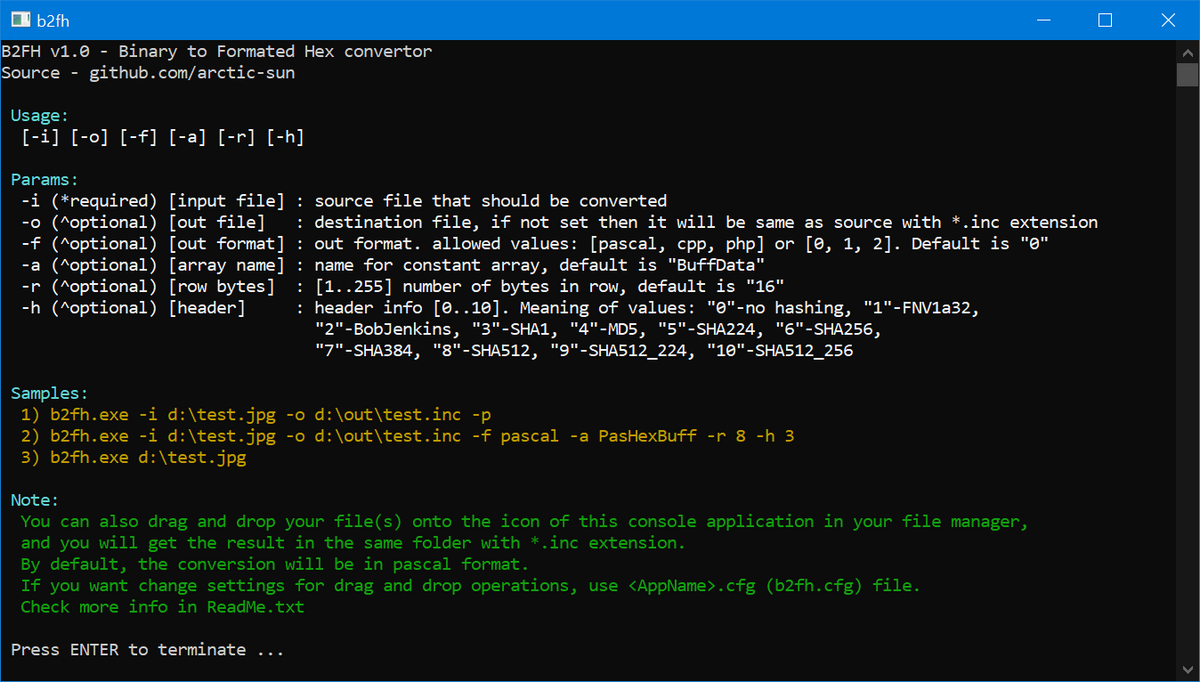
This utility converts files to a formatted array of bytes.
Available formats: pascal, c++, php
Operating modes
There are two modes of operation:
    1) Run with command line
2) Launch via Drag&Drop- Launch via command line
The following options are available to run from the command line:
[-i] [-o] [-f] [-a] [-r] [-h]-i ( *required ) source file
The source file that we will convert.
Required parameter.-o ( ^optional ) destination file
The destination file where the result will be written.
If this option is not used, then by default,
the final file will be named same as the source file but with the *.inc extension
for example, the result of the command <b2fh.exe -i test.txt>
will be written to <test.txt.inc>-f ( ^optional ) array format
There are currently three array formats:
-f 0 or pascal (suitable for Delphi, Lazazrus, CodeTypon)
-f 1 or cpp
-f 2 or php
If this option is not used, pascal format will be used as default.-a ( ^optional ) array constant name
Array constant name, by default is set to "BuffData"-r ( ^optional ) number of bytes per line
Available values: from 1 to 255. Default is 16.-h ( ^optional ) add destination file header (filename, size, hash)
The parameter value determines the hash type of the source file
which will be written as a comment in the header of the destination file.Description of values:
0 - no hash, just the name of the source file and its size.
1 - FNV1a32
2 - Bob Jenkins
3 - SHA1
4 - MD5
5 - SHA224
6 - SHA256
7 - SHA384
8 - SHA512
9 - SHA512_224
10 - SHA512_256If this parameter is not used, then no information about the source file
will be written to the target file.Examples:
b2fh.exe -i test.txt
b2fh.exe -i test.txt -o c:\out\test.bin
b2fh.exe -i c:\data\test.txt -f pascal -a ABUFFER -r 8 -h 1
b2fh.exe -i c:\data\test.txt -o c:\data\result\test.h -f cpp -a ABUFFER -r 18 -h 4- Launch via Drag&Drop
Launch:
    To launch via Drag&Drop, do the following:
    Open the file manager and in the file manager window just drag and drop the source files onto the b2fh.exe icon,
and you will get the result in the same directory where the source files are located.Config file:
Drag&Drop conversion settings are stored in *.cfg file.
The name of the cfg file must match the name of the converter (b2fh) and have the ".cfg" extension.
In other words, if the executable file is called "b2fh_any_name.exe" then config file must be named
"b2fh_any_name.cfg"
By default, the converter is called "b2fh.exe" therefore the config should be named "b2fh.cfg"Config file parameters:// destination file extension
outextension=.inc;// array name
arrayname=DataBuff;// number of bytes per line, from 1 to 255
bytesinrow=15;// array format, valid values: pascal, cpp, php or 0, 1, 2
format=cpp;// header of the destination file, valid values are from 0 to 10
outfileinfo=0;// silent mode: 0 - no, 1 - yes
// if silent mode is used, the command window will be closed automatically at the end of the work.
// if silent not used, then you will be prompted to close the cmd window at the end of the process.
silent=1;Additional settings
FNS (File Name Settings):If the formatting type is not specified in the command line or config file
then the pascal type is used as default, this can be changed by renaming the application file (b2fh.exe).
To do this, the end of the application file name must contain: "_cpp.exe" or "_php.exe"Examples:
b2fh_cpp.exe -i test.txt // result will be in c++
b2fh_php.exe -i test.txt // result will be in php
b2fh.exe -i test.txt // result will be in pascal
anyN_cpp.exe -i test.txt // result will be in c++it does not matter how you application file (b2fh.exe) is named, the only thing that matters is ending.FNS does not have priority over CMD and CFG, i.e. the command:
"b2fh_cpp.exe -i test.txt -f pascal" will result in Pascal code.
The same thing for the Drag&Drop mode if the "outformat=pascal;" parameter is present in the cfg file.