

Catalog · How the catalog works
costa

The Costa Graphical User Interface for MS-DOS and compatible systems. This repository is a mirror of https://codeberg.org/jacobpalm/costa
- ★ 138 on GitHub
Anyone may press Interesting, signed in or not. It helps others find this project.
README
The Costa GUI
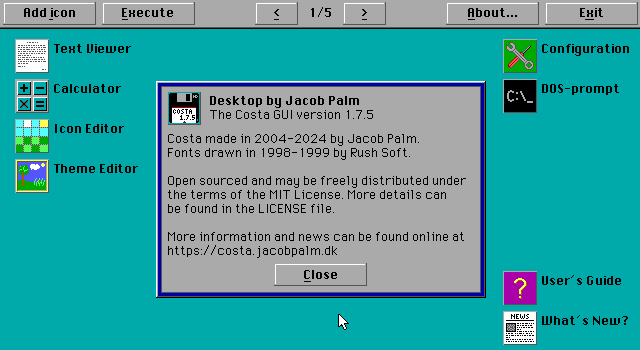
Costa is a graphical user interface (GUI), designed to run on top of the DOS command line as a shell. It consists of a desktop with icons, as well as a collection of accessories to create icons and themes, a couple of games and more.
The low system requirements make Costa especially useful for older machines, which are also the machines that typically run the DOS operating system.
System requirements
Costa is designed for MS-DOS, but tested with PC-DOS, DR-DOS, FreeDOS, Novell DR Multiuser DOS and DOSBox as well. In theory, it should run on any IBM compatible computer or virtual machine with at least:
- An 8088 or better CPU (386 or better recommended).
- EGA or VGA graphics supporting 640x350 pixels at 16 colors (most newer EGA cards, or any VGA compatible card, should do).
- A recommended minimum of 200 KB available memory while running Costa. When running external programs or games, Costa will use about 8 KB RAM.
- MS-DOS 4.0 or newer, or a compatible operating system.
- A mouse is optional. If used, a mouse driver must be loaded (DOSBox has a built-in mouse driver).
Although not required, a 386 or better CPU is recommended, as well as disk caching software (SmartDrive or similar) when running on older machines - especially if running Costa from a floppy drive.
Licensing
Costa is open source, and released under the MIT License. See the LICENSE file for more information on how you may use the code, and what credits should be given if you do, as well as the terms for distributing the releases I make.
Further information
See the included documentation for more information on using Costa, or visit the homepage of Costa.
Icons and themes always welcome!
If you have made any icons you would like to see included with Costa, or perhaps a nifty theme, feel free to drop me a message. I am always looking to add more to Costa, and credit will of course be given!
About this code
Costa is written using Borland Turbo Pascal 7, but should be compatible to some extent with Microsoft QuickPascal as well - although this has not been tested. Free Pascal is not supported, as that produces 32-bit executables which goes against the 16-bit design goal of Costa. It might be possible to create 16-bit executables using Free Pascal and cross compiling, but that is not something that has been looked into.
[!NOTE] Previous versions, up to and including 1.8.0, were written using Microsoft Visual Basic for DOS. If you're looking for the BASIC code, switch to the non-maintained "Archived_1xx" branch of this repository.
All programs (except COSTA.COM) are written using the Costa UI Library. The library code is stored in the LIBRARY directory. The base library resides in the unit COSTALIB.PAS, which must be included in the USES section of all programs that use the library.
Most UI controls are defined in separate units for modularity and easier maintenance, and these should be included as needed. Their filenames all start with UI, indicating that they are UI-related extensions to the library. In addition, some units with commonly used dialogs are included, such as FILESEL.PAS for implementing "Open" dialogs and INPUTDLG.PAS for showing an input box to the user. These dialogs include the controls they need themselves, so to use them, you only need to include the one unit.
The exception - COSTA.COM
COSTA.ASM is the memory-resident part of Costa. It launches the desktop, and when the desktop exits, it checks if Costa should terminate, or if the desktop has instructed it to run another program. If it runs another program, the desktop will be reloaded when that program exits. This is to avoid keeping the entire desktop in memory when running programs, and to make more memory available for the programs the user launches.
To make this program as small as possible, it has been written in Assembly instead of Pascal. Borland Turbo Pascal 4.1 and Borland Turbo Linker 7.1 was used in development and testing.
Code prerequisites
The source code and build script assume the following:
- That the source code has been extracted/cloned to C:\COSTA (this path is only required for development, once built Costa will run from any path).
- That Turbo Pascal, Turbo Assembler and Info-ZIP is installed, and the paths to the executables for each of these are in the PATH environment variable. Otherwise, full paths must be added to the variables at the top of MAKEFILE.
Building Costa
To build Costa, use the MAKE.EXE utility included with Turbo Pascal:
MAKE -B ALLThis will automatically build all of Costa and its accessories. The -B parameter indicates that all files should be recompiled, even if they haven't changed since last compile, and is generally not needed unless you want to force a full build.
It is also possible to build only a specific application by specifying its executable name instead of ALL, like so:
MAKE DESKTOP.EXEThis will compile the desktop application only, as well as any units the desktop depends on.
Building for release
When building a new release of Costa to be distributed, make should be run with the RELEASE parameter. This will create a ZIP archive containing all required files, as well as an SVP package for SvarDOS.
MAKE -B RELEASEBefore building a release, make sure to follow the instructions in the file _RELEASE.TXT. This includes instructions to update version numbers, update documentation etc. before building.