

Catalog · How the catalog works
pasta80

Turbo Pascal 3.0-compatible compiler that generates machine code for classic and modern Z80 machines (currently CP/M, Sinclair ZX Spectrum 48K/128K/Next, and Agon Light/Console8).
- ★ 207 on GitHub
- ✦ 1 finds this interesting
Anyone may press Interesting, signed in or not. It helps others find this project.
README
Compiler Manual | Library Reference
PASTA/80 Compiler Manual
PASTA/80 is a simple Pascal cross compiler targeting the Z80 microprocessor. It generates code for these classic and modern machines:
The compiler follows the single-pass recursive-descent approach championed by Niklaus Wirth, inventor of Pascal, in his books and lectures. It doesn't have an explicit syntax tree, but instead generates code on the fly during parsing. As a result, the compiler might not always generate the most efficient code possible (it definitely cannot compete with LLVM and doesn't try to), but it's very fast.
Supported language elements
The supported Pascal dialect is an almost exact clone of the original Turbo Pascal 3.0 for CP/M (see this manual for details). So you have at your disposal the following language elements:
- All the basic data types (
Boolean,Byte,Char,Integer,Pointer,RealandString). array of,record,set of, enumerations, subranges and pointers as a way of building new data types.- The decision-making elements
if..then..elseandcase..of. - The loop elements
for..do,while..doandrepeat..until.forworks like in early Turbo Pascal, that is, the number of iterations is calculated once when the loop starts, and you should not mess with the loop variable. - The
with..donotation for "opening" records. procedureandfunctionincluding value andvarparameters and nesting.- The standard procedures for screen input and output (i.e.
ReadLn,WriteLnetc.). - All conversion and utility procedures and functions that Turbo Pascal 3.0 had.
- The three kinds of disk files, that is untyped (
file), typed (file of) andText. - A dynamic heap of up to 32767 bytes with
GetMem,FreeMem,NewandDispose. - Inline assembly (via opcodes, not via mnemonics, so this page might be handy).
- Overlays (in memory, Spectrum 128K/Next and Agon only, see below).
- Some compiler directives including a preprocessor (see below).
The compiler also has some features that were borrowed from or inspired by later versions of Turbo Pascal:
- Functions that can be called as procedures (i.e. ignorable results).
- Conditional compilation via compiler directives (aka a preprocessor).
- C-style
//one-line comments in addition to{..}and(*..*). - Binary literals (using a
%prefix). BreakandContinuefor loop control.- An optional parameter for
Exitin functions that assigns the result (likeExit(42)). - Querying the keyboard via
KeyPressedandReadKey. - Color support via
TextColorandTextBackgroundwith constants for the 8 basic ZX Spectrum colors (available on all targets). IncandDecfor more efficient increasing and decreasing of variables.IncludeandExcludefor more efficient handling of sets.- Enumeration types can be used in
Read[Ln],Write[Ln],ValandStr. - A simple
Assertfacility that counts passes/fails and shows the failed line number. - Breakpoints by means of
Debugstatements in the source code (which can optionally have a condition for the trigger).
Since that covers most of the functionality of Turbo Pascal 3 you might ask what is missing. These are the current limitations:
- All the remaining compiler directives are not yet supported.
Mark/Releaseare not currently supported.- The standard files
Input,Output,Kbd,ConandLstare not supported. ChainandExecuteare not supported.- Add-on libraries from the PC version of Turbo Pascal 3.0 are not yet supported (although there are a few graphics primitives for the Agon and ZX targets).
- The new instructions of the Z80N inside the ZX Spectrum Next and the eZ80 inside the Agon are only being leveraged in a few places, not at scale.
- No separate compilation. Everything is compiled from source, always.
- Binary size is quite large compared to the original.
The run-time library, being partially written in Pascal itself, gets quite large when compiled. I hope to bring this down again by reimplementing more of it in Z80 assembly (or improve the code generator, which, although it has a peephole optimizer, is not generating super-efficient Z80 code).
Building and setting up the compiler
Ready-made binaries for macOS (Apple Silicon and Intel), Windows (x86_64) and Linux (x86_64, arm64 and armv6l for the Raspberry Pi Zero) are attached to each release. On macOS, Gatekeeper will refuse to run the compiler because the binary isn't signed by a registered developer. To fix this, remove the quarantine flag once after unpacking:
xattr -dr com.apple.quarantine pasta80Alternatively, you can build the compiler yourself. It is written in Pascal. You can compile it with Free Pascal (I use version 3.2.2). Just run
fpc pasta80The Pascal compiler generates Z80 assembler code and relies on sjasmplus as a backend for the final translation step to binary. It can also, in --ide mode (see below), make use of various other external tools. The compiler tries to detect these external tools automatically (from your system's PATH), but sometimes it's best to create a file .pasta80.cfg in your home directory specifying necessary paths (there is a sample in misc that you can adapt).
# PASTA/80 config

PASTA     = ~/Spectrum/pasta80
ASSEMBLER = ~/Spectrum/sjasmplus/sjasmplus
...
You can check your whole setup by calling the compiler with --config. It will show the full paths of all internal and external requirements and whether they are fulfilled.
Using the compiler
To run the compiler just invoke the executable with the desired target and the name of a Pascal source file to translate. The .pas suffix of the source file is optional.
CP/M target
The --cpm parameter compiles for CP/M. It's also the implicit default target, so the following two are synonymous:
pasta80 --cpm hello.pas     # Compiles hello.pas to hello.com
pasta80 hello.pas           # Does exactly the same
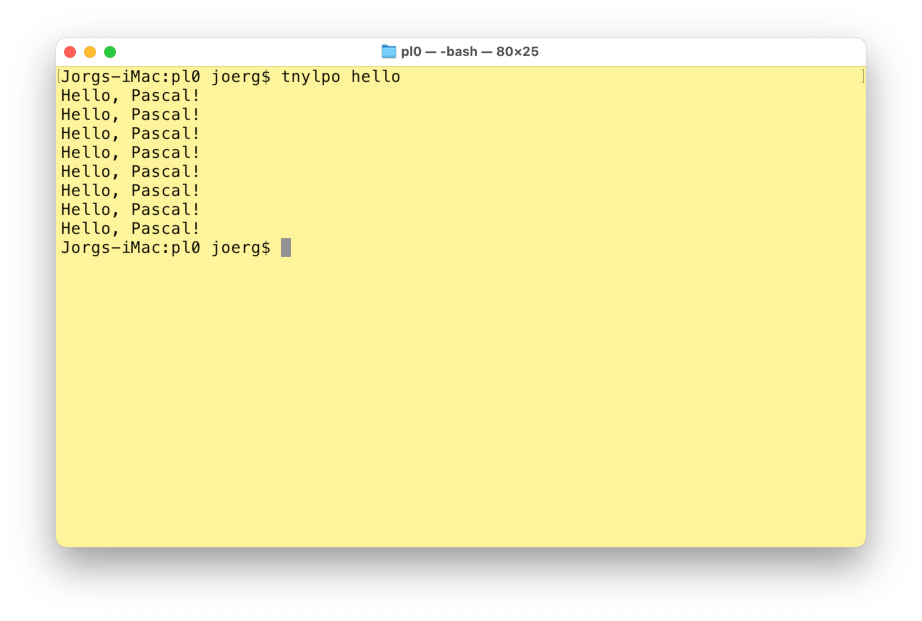
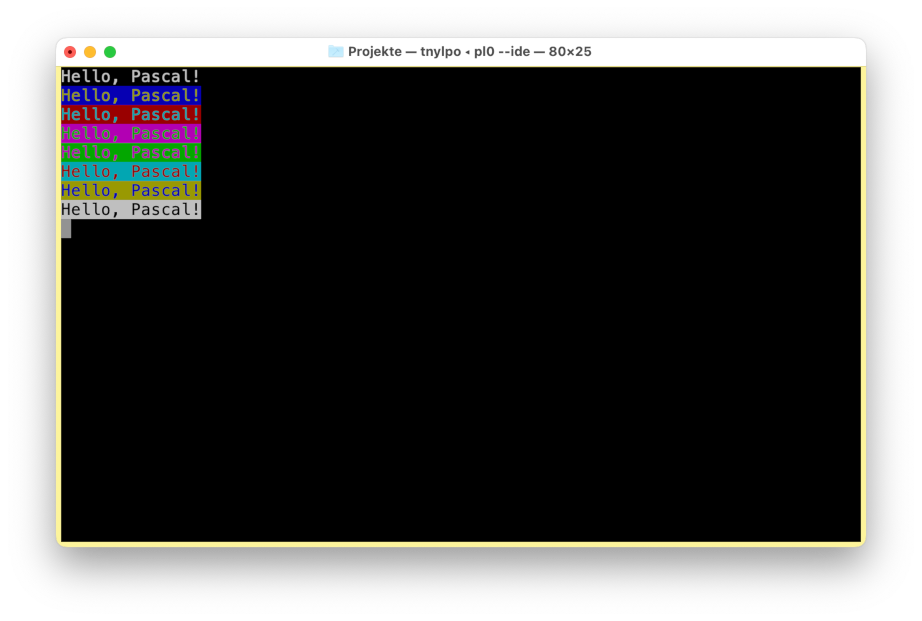
You can run the resulting .com files on a real CP/M machine or in a CP/M emulator. I recommend the excellent tnylpo (for which I provide binaries here). For programs that use VT52 control codes you have to start tnylpo in full-screen mode:
tnylpo hello                # Run in line-mode
tnylpo -s -t @ hello        # Monochrome full-screen, wait when finished
tnylpo -soy,4,0 -t @ hello # Color full-screen, wait when finished| "Hello, World" in line mode | "Hello, World" in full-screen |
|---|---|
 |
 |
ZX Spectrum targets
To generate binaries for the ZX Spectrum 48K, 128K and Next targets, use the --48, --128 and --next parameters, respectively. The long forms --zx48, --zx128 and --zxnext work as well.
pasta80 --48 hello.pas      # Compiles for ZX Spectrum 48K
pasta80 --128 hello.pas     # Compiles for ZX Spectrum 128K
pasta80 --next hello.pas    # Compiles for ZX Spectrum Next
The main difference between the three (currently) is that the ZX Spectrum Next target supports file IO (on the SD card), while the other two do not. The remaining routines are mostly the same. Screen output is handled via rst $10 in the ROM. In all three cases the binaries are expected to be run from address $8000 (by default, see below).
Tapes, snapshots and runnable directories
The default output format for the ZX Spectrum targets is a simple binary file that contains exactly the bytes of the compiled program. Use --3dos if you want a +3DOS header in front of it. In addition to that (and for more complex cases involving overlays), the compiler can also generate snapshot files or tape files, the latter including a suitable BASIC loader:
pasta80 --48 --snapshot examples/hello.pas # .sna file
pasta80 --48 --tape examples/jacques.pas   # .tap file with BASIC loader
The short forms --sna and --tap work as well.
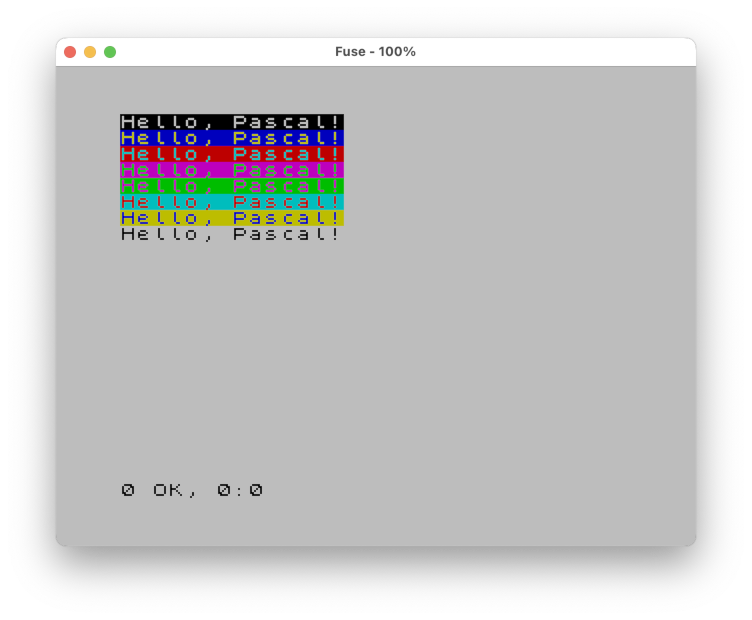
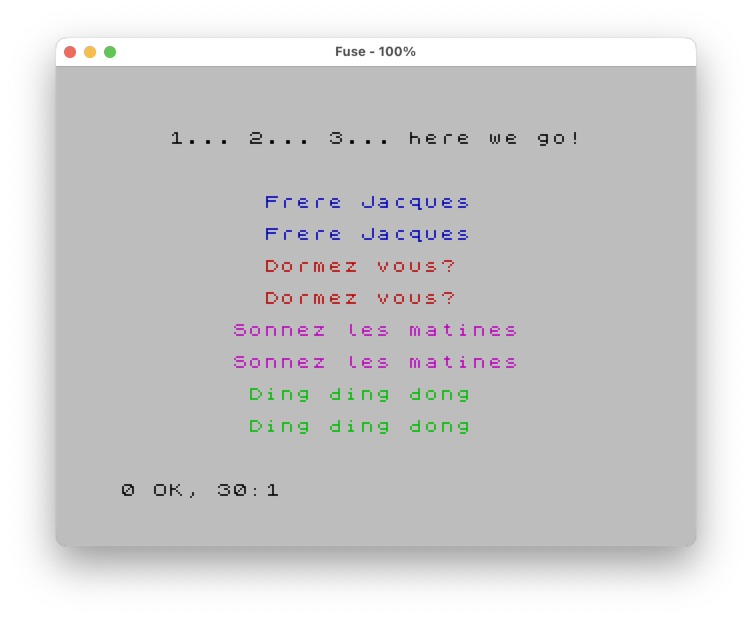
Being self-contained, snapshots and tapes are a convenient way to distribute your programs and to launch them in an emulator, such as Fuse:
open -a Fuse examples/hello.sna         # Launch .sna file in Fuse (on Mac)
open -a Fuse examples/jacques.tap # Launch .tap file in Fuse (on Mac)| Hello world in Fuse | Frere Jacques in Fuse (yes, with sound!) |
|---|---|
 |
 |
When compiling for the Next, another useful format is a runnable directory. It contains exactly the same files that would also be in the .tap file, including a BASIC loader named run.bas.
pasta80 --next --dir examples/pq.pas # Results in directory named pq.runThe directory has the suffix .run. When attempting to enter such a directory in the Next's file browser, the loader is started automatically (press Symbol Shift + Enter to really see the contents). If you are a Mac user: Yes, it's a bit like an .app bundle.
Should you ever want to write your own BASIC loader (for either --tape or --dir) because the provided ones are not fancy enough, use the --loader parameter. The file you provide there is expected to contain a BASIC program with a valid +3DOS header.
Setting your own start address
By default, programs on the Spectrum targets start at address $8000. If you need more space (for instance, on the 128K with overlays, where only $8000-$BFFF is resident), use --start to move the start address down to $6000 or anywhere above it. Keep in mind that code below $8000 lives in contended memory and runs a bit slower.
The address can be given in decimal or hex, e.g. --start 24576, --start 0x6000 or --start '$6000' (the quotes keep the shell from expanding $6000).
pasta80 --48 --tape --start 24576 examples/hello.pasFor --tape and --dir, the compiler then adjusts the loader accordingly: It expects the first line to start with CLEAR nnnnn (the start address minus one) and replaces that number. Everything else in the loader should be derived from RAMTOP (PEEK 23730+256*PEEK 23731), as the provided loaders do.
If you use your own loader that doesn't follow this convention, you get a warning and the loader is used as it is.
Agon Light/Console8 target
To generate a MOS binary for the Agon target(s), use the --agon parameter.
The Agon target is more or less on par with the CP/M target, supporting all the core features plus files (all three types of) and command line parameters. There are also a few graphics primitives that would allow you to run or port some of the graphics examples (like the 3D hat or the Mandelbrot set). It is fully integrated into the mini IDE and supports emulation and debugging (see below).
Note that the Agon's eZ80 processor extends the Z80 address space out to 24 bit. The code generated for the Agon target (currently) uses a 64K block of memory in classic Z80 mode (usually running from physical address $40000) because neither PASTA/80 nor sjasmplus directly support the flat 24 bit address space yet. You can, however, extend this via RAM-based overlays (see below), allowing a single program to be up to 440K in size.
PASTA/80 also supports the MOSlet format (--moslet, or --mos for short) for smaller programs that can be run
from $B0000 without overwriting a larger main (or BASIC) program running from
$40000. MOSlets cannot exceed 32K size and are not allowed to use overlays.
Note that MOS version 3 or newer is generally recommended, as some functions expect it. Some graphics primitives require VDP 2.16 or newer to work.
Overlays
The ZX Spectrum 128K, ZX Spectrum Next, and Agon targets support overlays. This means you can have larger programs than would normally fit into the 64K address space of a Z80 machine. The rules are the same as for Turbo Pascal 3.0:
- Overlays can be applied to global procedures and functions only, not to nested ones (though nested ones will be overlaid if the containing ones are, too).
- Overlays cannot be applied to global variables, that is, you cannot use them for data (at least not without tricks).
- All consecutive procedures and functions that are marked as
overlaygo into the same overlay. Use any declaration in between to separate overlays.
In the following example, there are three overlays: Overlay 0 contains A and B, overlay 1 contains D, and overlay 2 contains E.
overlay procedure A; (* Overlay 0 *)
begin
end;

overlay procedure B; (* Overlay 0 *)
begin
end;

procedure C; (* Not in an overlay *)
begin
end;

overlay procedure D; (* Overlay 1 *)
begin
end;

type
  Dummy = Integer;   (* Separator *)

overlay procedure E; (* Overlay 2 *)
begin
end;
In contrast to Turbo Pascal 3.0, overlays are not implemented via disk files. Instead, they use the additional RAM of the machines. Each overlay can have a maximum size of 8K. The compiler manages everything and generates special "far calls" whenever necessary.
- For the Sinclair machines, the uppermost 16K bank (ZX Spectrum 128K) or 8K page (ZX Spectrum Next) will be reserved for overlays. The overlays use RAM bank/page switching.
- For the Agon, a single, sparse overlay file is generated and loaded to physical address $50000. Overlays are copied to the physical address range $4E000-$4FFFF as needed (the upper 8K of the 64K area for non-ADL programs).
For the ZX targets, ideally combine overlays with the --tape parameter, as the tape loaders for 128K
and Next are fully overlay-aware.
pasta80 --128 --tape tests/core.pas # Test suite as 128K tapeThe compiler prints a report of which overlays go into which RAM banks or pages.
Program   : 10781 bytes ($8000-$AA1C)
Heap      :  1507 bytes ($AA1D-$AFFF)
Stack     :  4096 bytes ($B000-$BFFF)

Overlay  0:  7399 bytes ($C000-$DCE6) in bank  0
Overlay  1:  7185 bytes ($E000-$FC10) in bank  0
Overlay  2:  2725 bytes ($C000-$CAA4) in bank  1
Overlay  3:  6293 bytes ($E000-$F894) in bank  1
Overlay  4:  6392 bytes ($C000-$D8F7) in bank  3
Overlay  5:  6527 bytes ($E000-$F97E) in bank  3
Overlays are enabled by default and activate automatically when the first overlay procedure or function is encountered (assuming the target platform supports them). They are ignored for target platforms that do not support them (currently CP/M, Spectrum 48K and Agon MOSlets). To disable overlays explicitly for any platform, use the --no-ovr command line parameter.
Overlays reduce the resident memory available for code, heap and stack: it ends at $BFFF on the 128K and at $DFFF on the Next and Agon, instead of $FFFF. If a program needs a lot of heap and its code fits into resident memory anyway, --no-ovr may be the better choice. Programs that don't use overlay at all are not affected.
Caution: Overlays somewhat break the safety of the Pascal language. Be
careful when using pointers or var parameters for passing data between
overlays. The memory you refer to may have just been paged out! It might make
sense to compile your overlays with {$a-}, so that all local variables are
stored on the stack (which is always visible). This is also a good idea for
the Agon target when having overlays that call into each other. Otherwise
the values of local variables get reset when overlays are switched, which
can lead to weird effects.
Debugging and assertions
The compiler is able to generate breakpoints for Fuse (ZX Spectrum 48K/128K),
CSpect (ZX Spectrum Next), and the Fab Agon Emulator (Agon, obviously). To place
such a breakpoint, simply put a Debug statement into your source code. The
statement accepts an optional Boolean parameter for making the breakpoint
conditional.
var
  I: Integer;

begin
  Debug;                (* Triggers always when hit. *)

  for I := 1 to 20 do
  begin
    WriteLn(I);
    Debug(Odd(I));      (* Triggers for odd I only.  *)
  end;
end.
For Spectrum 48K/128K, the compiler generates a snippet (in a .brk file) you
can add to your Fuse command line. The file content is multiline, so it's a bit
tricky, but not impossible, to insert this on the command line. The IDE (see
below) handles all this for you conveniently. For Spectrum Next and Agon, the
compiler inserts special Z80 opcodes that will trigger the debuggers in CSpect
and the Fab Agon Emulator, respectively.
Assertions check a given condition and display an error message when the
condition is violated (i.e. does not evaluate to True). In contrast to other
languages, your program does not stop in this case. Instead, passed and failed
assertions are counted in the AssertPassed and AssertFailed variables.
var
  I: Integer;

begin
  for I := 1 to 20 do
  begin
    WriteLn(I);
    Assert(Odd(I));
  end;

  WriteLn('Passed: ', AssertPassed);
  WriteLn('Failed: ', AssertFailed);
end.
Once your program is sufficiently tested, compile it with --release to get
a binary that does not contain any generated code for Debug and Assert.
Compiler directives
Compiler directives control the way the compiler works. They can be used to include Pascal or Assembly files, turn certain features of the compiler on or off, and compile part of the source code only under certain conditions. The latter feature can help you to maintain a common source code for the various target platforms of PASTA/80 and, potentially, even original Turbo Pascal.
The following table shows the supported directives:
| Directive | Purpose |
|---|---|
{$i <file>} |
Includes the given Pascal file. |
{$l <file>} |
Includes the given Assembly file. |
{$m <size>} |
Sets the minimum stack size (in bytes). |
{$a+}, {$a-} |
Turns absolute addressing on or off. Default is on. |
{$i+}, {$i-} |
Turns IO checking on or off. Default is on. |
{$k+}, {$k-} |
Turns stack checking on or off. Default is off. |
{$u+}, {$u-} |
Turns break (Ctrl-C) checking on or off. Default is off. |
{$define <id>} |
Defines the conditional symbol <id>. |
{$undef <id>} |
Undefines the conditional symbol <id>. |
{$ifdef <id>} |
Compiles the following block only if <id> is defined. |
{$ifndef <id>} |
Compiles the following block only if <id> is not defined. |
{$else} |
Introduces an "else" branch in a conditional block (optional). |
{$endif} |
Finishes a conditional block (mandatory). |
{$error <msg>} |
Terminates the compilation with an error message. |
Several switches can be combined in one directive, separated by commas and without repeating the dollar sign, e.g. {$a-,k+}.
Some symbols are predefined to reflect the compiler itself, the current target platform, or compiler options:
| Directive | Defined |
|---|---|
PASTA |
Always |
CPU_Z80 |
For targets that use a standard Z80 processor |
CPU_Z80N |
For targets that use a Z80N processor |
CPU_EZ80 |
For targets that use an eZ80 processor |
SYS_AGON |
For the Agon Light/Console8 target |
SYS_CPM |
For the CP/M target |
SYS_ZX |
For all ZX Spectrum targets |
SYS_ZX48 |
For the ZX Spectrum 48K target |
SYS_ZX128 |
For the ZX Spectrum 128K target |
SYS_ZXNEXT |
For the ZX Spectrum Next target |
OPT_PRINTER |
Reflects --printer switch usage |
OPT_RELEASE |
Reflects --release switch usage |
As a simple example, the following code prints the CPU type using conditional compilation. Notice how conditional blocks can be nested.
{$ifdef CPU_EZ80}
  WriteLn('This is an eZ80.');
{$else}
  {$ifdef CPU_Z80N}
    WriteLn('This is a Z80N.');
  {$else}
    WriteLn('This is a Z80.');
  {$endif}
{$endif}
Optimization
The compiler automatically uses simple Z80 peephole optimizations. It also applies dependency analysis to eliminate unused Pascal procedures and functions from both the run-time library and your code. Should you, for any reason, want to disable these optimizations, the following will do it:
pasta80 --no-opt hello.pas          # Disables peephole optimizations
pasta80 --no-dep hello.pas          # Disables dependency analysis
pasta80 --no-opt --no-dep hello.pas # Disables both
Note this makes your programs both larger and slower, so it's not recommended unless you are debugging a problem that looks like it could be caused by either of the two optimizations and you want to compare the assembly outputs. Add --keep (or --keepint) to keep the intermediate files (the generated .z80 source and the .lst listing), which are deleted after a successful compilation otherwise.
Examples and tests
There is a folder containing examples and a folder containing tests for the compiler. The main test suite core.pas needs to be compiled with optimizations because of its size. Otherwise it won't fit into 64K. The Spectrum 128K and Next targets can (only) handle it using overlays, the Spectrum 48K target can't. Both the examples and the tests should give you a pretty good overview of what the compiler can do.
If you want to see the full output of the tests on the console instead of inside an emulator, compile them with --printer, which redirects everything from the screen to the printer (LST device on CP/M, "P" channel on Spectrum, and VDU 1 on Agon). Most emulators have a means of showing the printer output on the console or writing it to a file. This also works for your own programs.
The compiler is using that mechanism in its self-testing. To run the full test suite and generate a comprehensive report, start PASTA/80 with the parameter --selftest and (optionally) a target platform parameter:
pasta80 --selftest           # Runs all tests for CP/M
pasta80 --selftest --agon    # Runs all tests for Agon
pasta80 --selftest --128     # Runs all tests for the Spectrum 128K
pasta80 --selftest --next    # Runs all tests for the Spectrum Next
This requires the emulators to support capturing printer output, which is not yet the case in every official release:
- Fab Agon Emulator needs the
--printer-fileoption, which is available since version 1.2.6. - CSpect needs the printer plugin, which ships with version 3.4.0.0 (currently a beta for Patreon supporters). For older versions, copy
misc/Printer.dllinto CSpect's folder (next to CSpect.exe). - For Fuse, version 1.10.1 or newer is recommended to have all features working flawlessly on all platforms. Older releases have some issues on macOS and Windows. For Linux, version 1.9.x is fine.
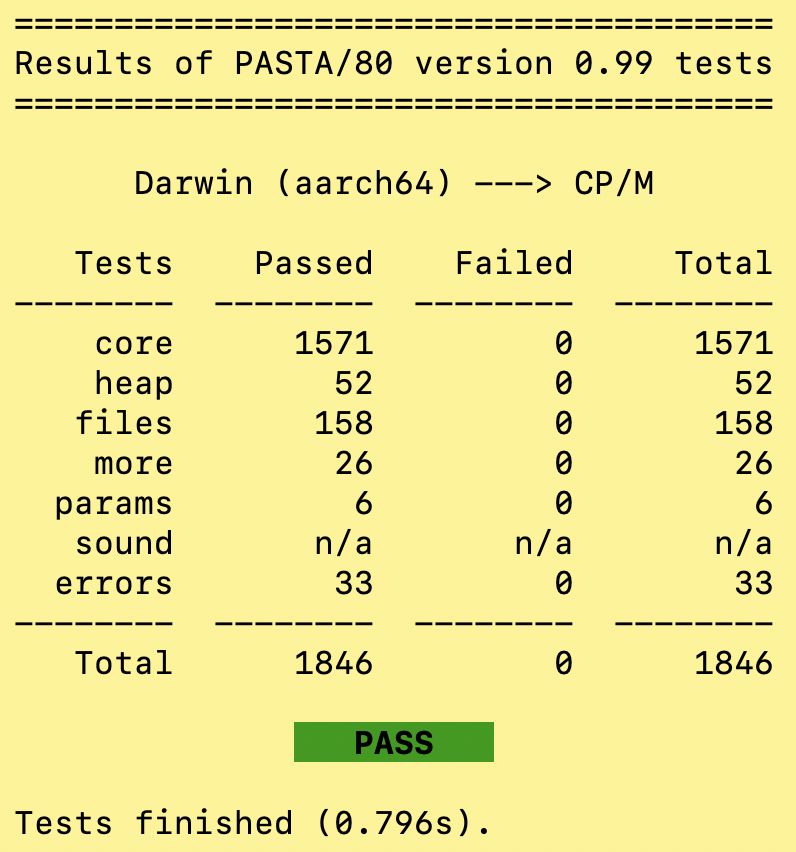
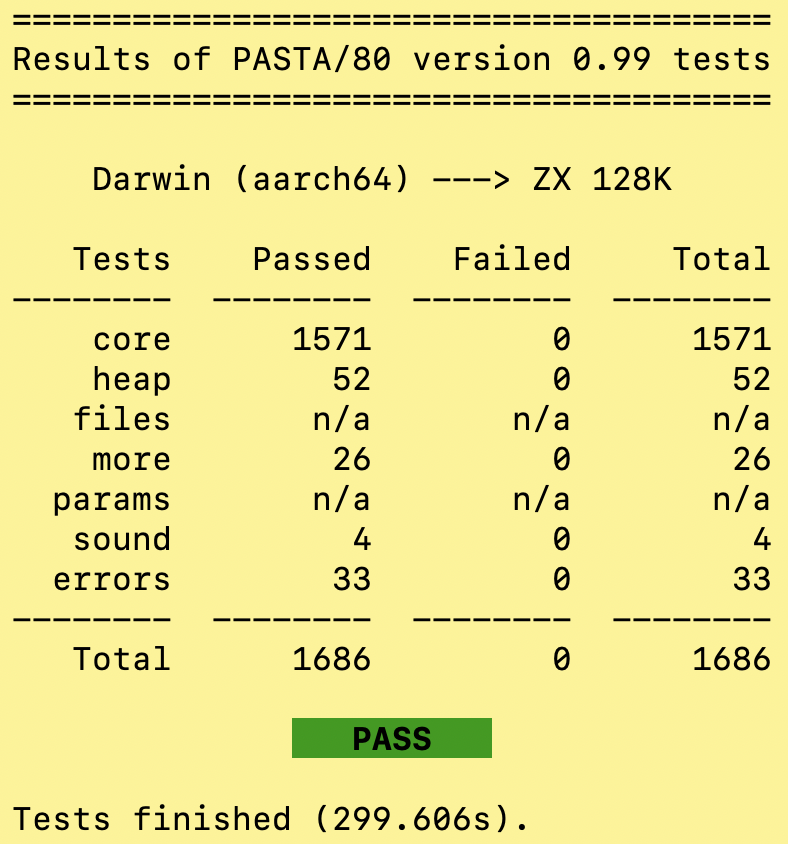
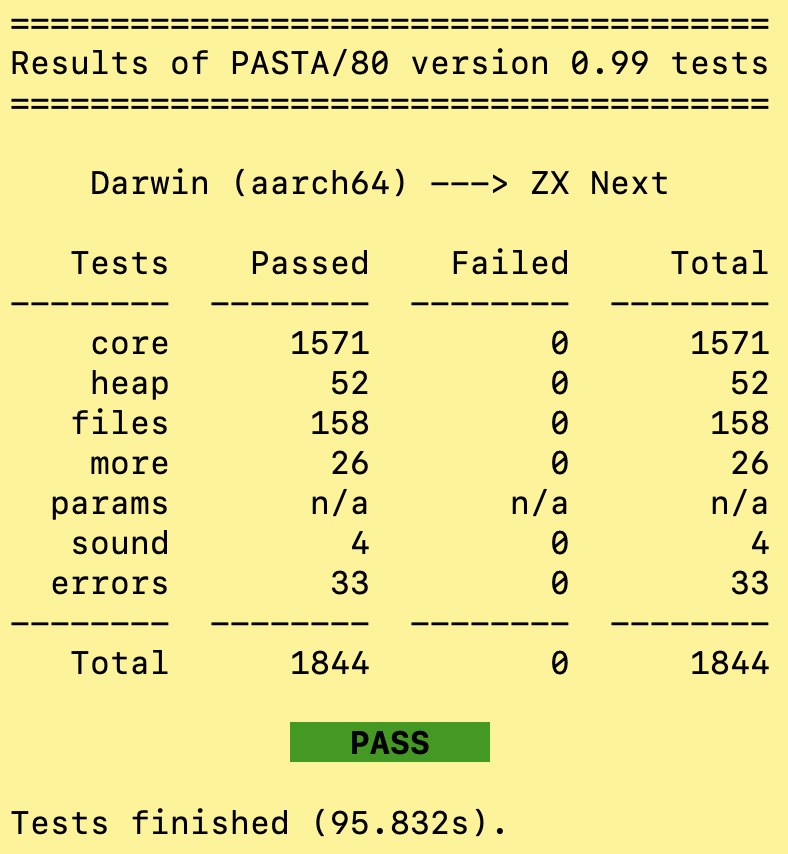
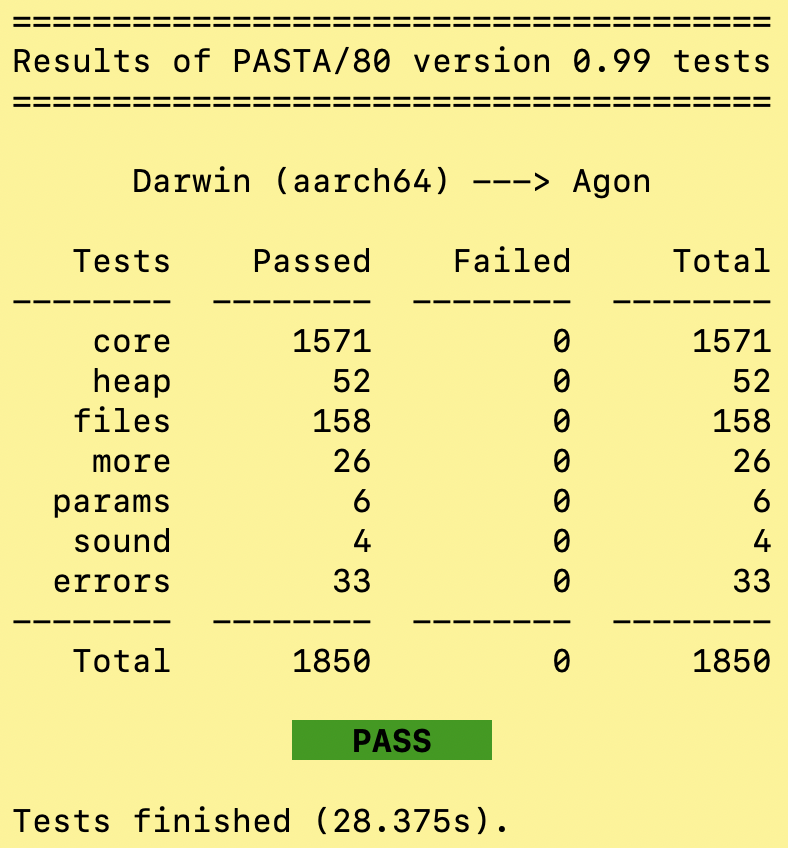
Assuming everything works correctly you should see a report like the following in the end:
| CP/M | Spectrum 128K | Spectrum Next | Agon |
|---|---|---|---|
 |
 |
 |
 |
The exit code tells you how the tests went, too, so the self test can also be used in scripts. If one of the test suites doesn't build, you get the same codes as for an ordinary build:
| Exit code | Meaning |
|---|---|
0 |
All tests passed |
1 |
General error |
2 |
Compile error |
3 |
Assembly error |
4 |
Emulator could not be started, or a test suite produced no output |
5 |
At least one test failed |
Minimalistic IDE
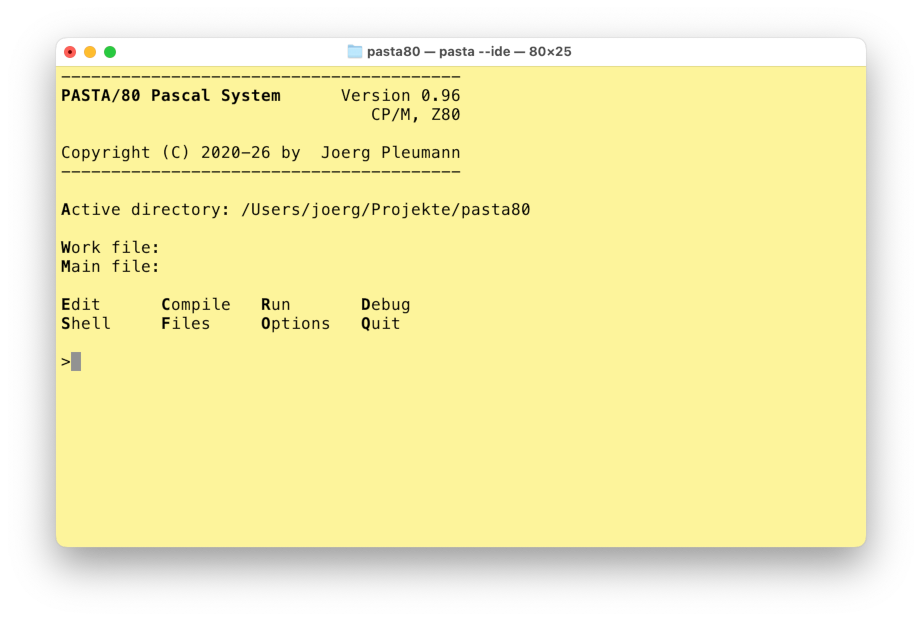
As a fun little gimmick the compiler can be started like this
pasta80 --ideto run it in an interactive mode that has an interface reminiscent of Turbo Pascal 3.0.
| Main menu | Editor |
|---|---|
 |
When started in an ordinary terminal, this mode relies on the editor nano being present on your system (on macOS you might want to install the real nano via a package manager because Apple sells you the much more limited pico editor as nano).
You can also run it in a shell within Visual Studio Code, in which case it would automatically use VSC's editor (via the code command, which, on a Mac, you might have to make available from VSC's settings) and act a bit like a plugin.
The following external tools are supported for running compiled programs on the host machine:
- tnylpo for CP/M programs (press <R> for line mode, <Shift-R> for full-screen mode).
- Some distros and package managers provide tnylpo.
- If yours doesn't or the version is outdated, try one of the binaries I provide here.
- I also provide a Windows binary there.
- Fuse for programs targeting the ZX Spectrum 48K and 128K machines.
- For macOS you can use this fork.
- CSpect for ZX Spectrum Next programs.
- Please have hdfmonkey ready for manipulating the SD card image.
- If you're on macOS or Linux, you also need
monobecause CSpect is a .NET application. - Even if you have all tools in your path, you probably need to configure at least the image location (
image) in.pasta80.cfg. - PASTA/80 will write files to a folder
pasta80.tmpand create a customautoexec.basto manage the automatic start (backing up and restoring your original file, if needed).
- Fab Agon Emulator for Agon Light/Console8 programs.
- Please note that in this case you need to configure the emulator location (
fabagon) in.pasta80.cfg, and it needs to point to the directory, not the binary. - PASTA/80 will write files to a folder
pasta80.tmpand create a customautoexec.txtto manage the automatic start (backing up and restoring your original file, if needed).
- Please note that in this case you need to configure the emulator location (
As mentioned before, everything that is in your PATH should be detected automatically. There are some exceptions, though, so it makes sense to copy misc/.pasta80.cfg to your home directory and adapt it. Use the --config parameter to let PASTA/80 check your setup and get feedback on what is in place and what is missing.
Application Gallery
The following screenshots show some applications compiled for the CP/M target and running in the tnylpo emulator.
| 2048 | Game of Life |
|---|---|
| Micro Calc | Galactic Empire |
|---|---|
These screenshots show some applications compiled for the ZX Spectrum 48K target and running in the Fuse emulator.
| 2048 | Game of Life |
|---|---|
| Graphics Demo | Equation Solver |
|---|---|
The following screenshots show two applications compiled for the ZX Spectrum Next target and running in the CSpect emulator.
| Recursive Maze | 3D Hat |
|---|---|
The final two screenshots show two applications compiled for the Agon target and running in the Fab Agon Emulator.
| Tale of Ancient Land | Mandelbrot Set |
|---|---|
I also solved all puzzles of Advent of Code 2022 with an earlier version of the compiler and made YouTube videos of the solutions running on the ZX Spectrum Next, in CP/M mode.
License
PASTA/80 Pascal Compiler
Copyright (c) 2020-2026 by Jörg Pleumann
The PASTA/80 compiler is free software: you can redistribute it and/or modify it under the terms of the GNU General Public License (GPL) as published by the Free Software Foundation, either version 3 of the License, or (at your option) any later version.
- The run-time library (folder
rtl) comes with a linking exception that makes sure the GPL does not transfer to binaries created using PASTA/80. - The examples (folder
examples) are considered public domain or whatever comes closest to that in your jurisdiction. - Individual files or folders may use different licenses, so you might want to double check.
Everything is distributed in the hope that it will be useful, but WITHOUT ANY WARRANTY; without even the implied warranty of MERCHANTABILITY or FITNESS FOR A PARTICULAR PURPOSE. See the GNU General Public License for more details.
What does this mean for you?
- You can use the compiler, free of charge, to build any application, open-source or proprietary, free or paid, and distribute the generated binary without restriction. You can distribute binaries created with PASTA/80 under a license of your choosing.
- You can modify the compiler according to your needs. If you distribute the compiler or parts of it, binary or source, modified or not, you have to comply with the rules laid out in the GPL (copyright info, source code, ...) unless the linking exception applies.
Acknowledgements
The math48 library is copyright (c) 1980 by Anders Hejlsberg, used by permission.
Some assembly routines adapted from Leventhal/Saville, "Z80 Assembly Subroutines", Osborne/McGraw-Hill 1983.
Turbo Pascal is a registered trademark of Code Gear LLC / Embarcadero.
Z80 is a registered trademark of Zilog, Inc.