

Catalog · How the catalog works
deploy-microsoft-office-extensions

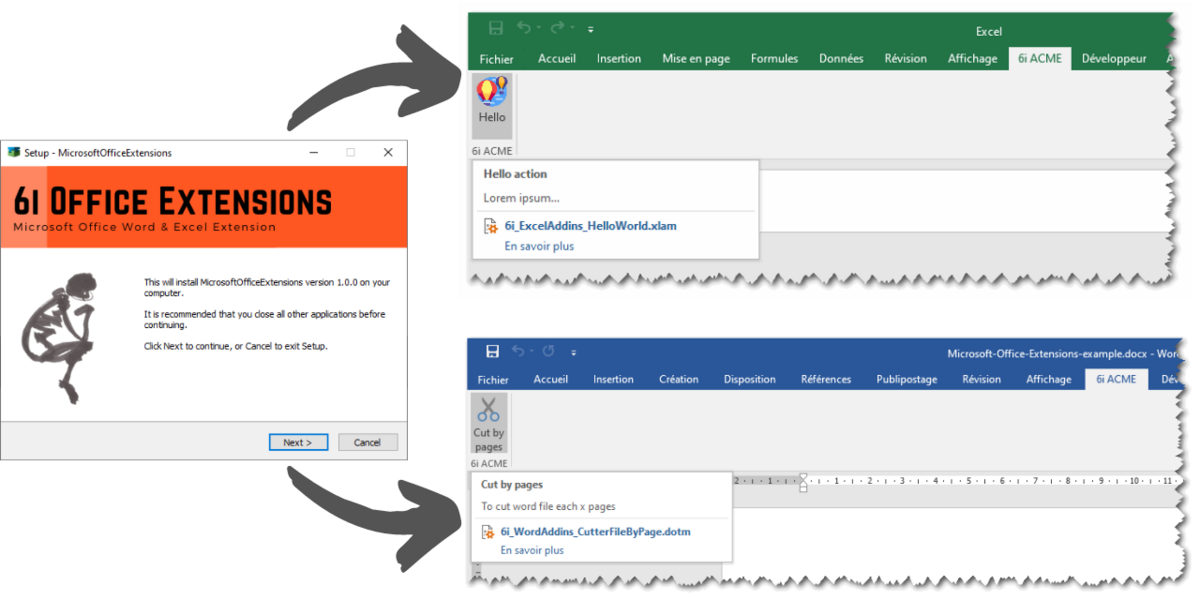
Helper to deploy Microsoft Office Extensions, like Excel or Word VBA macros, add custom actions in Office Ribbon, with InnoSetup. We use this solution in order to make easy installation and deployment of VBA macros stored in *.xlam or *.dotm files.
- ★ 9 on GitHub
Anyone may press Interesting, signed in or not. It helps others find this project.
README
Deploy Microsoft Office Extensions
Helper to deploy Microsoft Office Extensions, like Excel or Word VBA macros, add custom actions in Office Ribbon, with InnoSetup. We use this solution in order to make easy installation and deployment of VBA macros stored in *.xlam or *.dotm files.
Features
The deployment of addins and extensions of Microsoft Office Word & Exel, depends on shared libraries and VBA macro ... can be hard.
- Install Excel addins on a PC client. Excel macro must be stored in a *.xlam file, and saved in the appropriate folder. By convention, all Excel addins are saved in :
c:\users\[name]\AppData\Roaming\Microsoft\AddIns\; - Activates automatically all Excel addins, by updating the Windows registry.
- Install Word addins on a PC client. Word macro must be stored in a *.dotm file. In order to use shared Word VBA macro in all Word files, we have choosen to saved *.dotm file in this folder :
c:\users\[name]\AppData\Roaming\Microsoft\Word\STARTUP\ - Give a process to customize the Excel ribbon and Word ribbon for making easy interactions with office extensions.
Usages
- How to generate a new setup ?
- How to add new Microsoft Office extensions (Excel, Word) in setup ?
- how to customize the ribbon in Excel Or Word ?
About
Credits
This project is inspired by the work of Daniel Kraus, with ExcelAddinInstaller. More informations about how he used InnoSetup to install Excel Addins here.
Deploy Microsoft Office Extensions depends on :
- Microsoft®, Windows®, Office®, and Excel® are either registered trademarks or trademarks of Microsoft Corporation in the United States and/or other countries.
- InnoSetup v6, JRSoftware (https://jrsoftware.org/isinfo.phpp
License
Copyright (c) 6i by 2o1oo vb20100bv@gmail.com Release under MIT license.
It is free to use and available as open source under the terms of the MIT License, but if you want to support me, you can buy me a coffee here !