

RICKDialog

Customized Dialog Box (Message) for FMX
- Quiet · last change 10-27-2021
- ★ 6 on GitHub
README
[0]: https://github.com/ricksolucoes/boss "Site do BOOS"
RickDialog
RickDialog is a Delphi library designed to present a customized dialog screen. Using delphi's Fluent Interface.
⚙️ Pre-requisites
- Delphi FMX
- If you choose to use [BOOS][0]
https://github.com/ricksolucoes/boss or https://github.com/HashLoad/bossthe dependency manager, you will have the facility to install all frameworks that are Pre-requisites for the project.
💻 Installation
- By using BOOS
$ boss install https://github.com/ricksolucoes/RickDialog-
Manual Installation
- Download the RickDialog;
- Add the following folders to your project, in Project > Options > Resource Compiler > Directories and Conditionals > Include file search path
../RickDialog/src
⚡️ How to use the project
Example of using the RickDialog
-
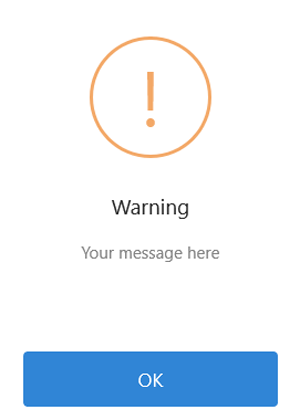
How to use Warning Dialog
  uses
    RICK.Dialog;
  begin
    TRickDialog
      .New
        .Form(Self)
          .MessageInfoText('Your message here')
          .MessagePrimaryButtonExecute('Info CallBack')
        .DisplayWarnig;
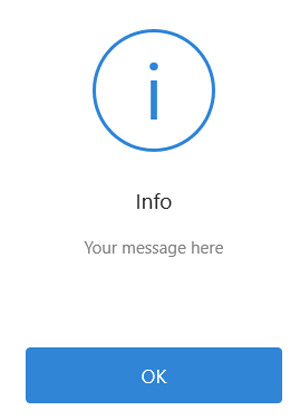
end;- How to use Info Dialog
  uses
    RICK.Dialog;
  begin
    TRickDialog
      .New
        .Form(Self)
          .MessageInfoText('Your message here')
          .MessagePrimaryButtonExecute('Info CallBack')
        .DisplayInfo;
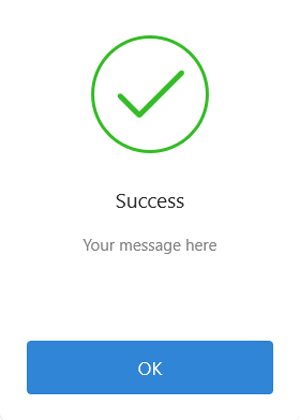
end;- How to use Success Dialog
  uses
    RICK.Dialog;
  begin
    TRickDialog
      .New
        .Form(Self)
          .MessageInfoText('Your message here')
          .MessagePrimaryButtonExecute('Info CallBack')
        .DisplaySuccess;
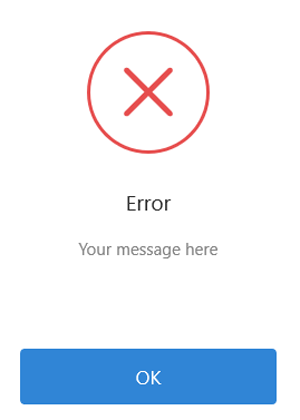
end;- How to use Error Dialog
  uses
    RICK.Dialog;
  begin
    TRickDialog
      .New
        .Form(Self)
          .MessageInfoText('Your message here')
          .MessagePrimaryButtonExecute('Info CallBack')
        .DisplayError;
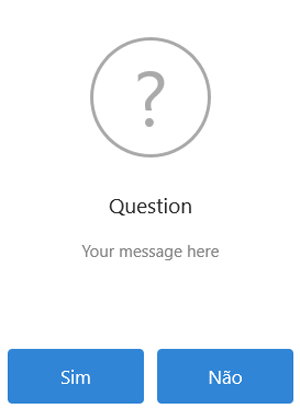
end;- How to use Question Dialog
  uses
    RICK.Dialog;
  begin
    TRickDialog
      .New
        .Form(Self)
          .MessageInfoText('Your message here')
          .MessagePrimaryButtonExecute('Info CallBack')
          .MessageSecondaryButtonExecute('Info CallBack2')
        .DisplayQuestion;
end;- Dialog Customization Options
  uses
    RICK.Dialog;
  begin
    TRickDialog
      .New
        .Form(Self)
          .BackgroundOpacity(0.7)
          .BackgroundColor(TAlphaColorRec.Black)
          .MessageBackgroundColor($FFFFFFFF)
          .MessageRectangleWidth(480)
          .MessageRectangleHeight(450)
          .MessageIconColor($FFAAAAAA)
          .MessageTitleText('Question')
          .MessageTitleFontSize(19)
          .MessageTitleFontColor($FF2C2C2C)
          .MessageInfoText('Fluent Interface')
          .MessageInfoFontSize(15)
          .MessageInfoFontColor($FF848484)
          .MessagePrimaryButtonColor($FF3085D6)
          .MessagePrimaryButtonText('OK')
          .MessagePrimaryButtonFontSize(17)
          .MessagePrimaryButtonFontColor($FF2C2C2C)
          .MessagePrimaryButtonExecute('Info CallBack')
          .MessageSecondaryButtonColor(TAlphaColorRec.Red)
          .MessageSecondaryButtonText('Cancel')
          .MessageSecondaryButtonFontSize(17)
          .MessageSecondaryButtonFontColor($FFFFFFFF)
          .MessageSecondaryButtonExecute('Info CallBack')
        .DisplayQuestion;
end;- Dialog Customization Options
  uses
    Rick.Dialog,
    Rick.Dialog.Interfaces;
  begin
    LRICKDialog:= TRICKDialog.New;
    LRickDialog.Form(Self);
    LRickDialog.BackgroundOpacity(0.7)
      .BackgroundColor(TAlphaColorRec.Black)
      .MessageBackgroundColor($FFFFFFFF)
      .MessageRectangleWidth(480)
      .MessageRectangleHeight(350)
      .MessageIconColor($FFAAAAAA)
      .MessageTitleText('Question')
      .MessageTitleFontSize(19)
      .MessageTitleFontColor($FF2C2C2C)
      .MessageInfoText('Use Interface')
      .MessageInfoFontSize(15)
      .MessageInfoFontColor($FF848484)
      .MessagePrimaryButtonColor(TAlphaColorRec.Blueviolet)
      .MessagePrimaryButtonText('OK')
      .MessagePrimaryButtonFontSize(17)
      .MessagePrimaryButtonFontColor($FF2C2C2C)
      .MessagePrimaryButtonExecute(CarregarUsuario)
      .MessageSecondaryButtonColor(TAlphaColorRec.Aqua)
      .MessageSecondaryButtonText('Cancel')
      .MessageSecondaryButtonFontSize(17)
      .MessageSecondaryButtonFontColor($FFFFFFFF)
      .MessageSecondaryButtonExecute(CancelarCarregamento);
    LRickDialog.DisplayQuestion;
  end;