

Catalog · How the catalog works
FMX-TrayIcon

firemonkey Windows / macOS trayicon
- ★ 7 on GitHub
Anyone may press Interesting, signed in or not. It helps others find this project.
README
FMX-TrayIcon
Add more feature base on https://bitbucket.org/JunHosokawa/trayicon
#TrayIcon
##Overview
The TrayIcon library displays an icon in TaskTray / StatusBar and sets up a popup menu.
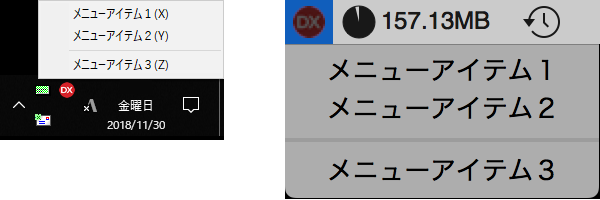
##Environment
| Item | Description |
|---|---|
| Environment | Delphi, RAD Studio |
| Version | Tokyo or later |
| Framework | FireMonkey |
| Support OS | Windows, macOS |
##Files
| Files | Description |
|---|---|
| LICENSE.txt | License |
| Readme.md | This file |
| sample.pngt | For readme file |
| PK.TrayIcon.pas | TrayIcon Source |
| PK.TrayIcon.Default.pas | TrayIcon Source for Windows |
| PK.TrayIcon.Win.pas | TrayIcon Source for macOS |
| PK.TrayIcon.Mac.pas | TrayIcon Source for macOS |
##Usage
1.
Add the folder of the above file to the search path.
Add PK.TrayIcon to the uses block.
uses
  System.SysUtils, System.Types, System.UITypes, System.Classes, System.Variants,
  FMX.Types, FMX.Controls, FMX.Forms, FMX.Graphics, FMX.Dialogs,
  PK.TrayIcon; // <- Add
2. Call TTrayIcon.Create to create a TTrayIcon instance and call Methods.
type
  TForm1 = class(TForm)
    procedure FormCreate(Sender: TObject);
  private
    FTrayIcon: TTrayIcon;
  public
  end;

implementation

procedure TForm1.FormCreate(Sender: TObject);
var
  Bmp: TBitmap;
begin
  // Generate TaskTray Icon library
  FTrayIcon := TTrayIcon.Create;

  // Event when the icon itself is clicked (Windows Only)
  FTrayIcon.RegisterOnClick(TrayIconClickHandler);
  FTrayIcon.RegisterOnDblClick(TrayIconClickHandler);

  // Menu setting
  FTrayIcon.AddMenu('MenuItem1', MenuClickedHandler);
  FTrayIcon.AddMenu('MenuItem2', MenuClickedHandler);
  FTrayIcon.AddMenu('-', nil);
  FTrayIcon.AddMenu('MenuItem3', MenuClickedHandler);

  // Icon registration
  // An icon is an instance of TBitmap. Here we are extracting from ImageList
  // Bmp := ImageList1.Bitmap(TSizeF.Create(24, 24), 0);
  // FTrayIcon.RegisterIcon('Normal', Bmp);

  // Bmp := ImageList1.Bitmap(TSizeF.Create(24, 24), 1);
  // FTrayIcon.RegisterIcon('Error', Bmp);

  // Specify the image to use (Please note that it is not displayed unless specified!)
  // FTrayIcon.ChangeIcon('Normal', 'HintText');

  // Displayed in TaskTray / StatusBar
  FTrayIcon.Apply('APPNAME');
end;

procedure TForm1.FormDestroy(Sender: TObject);
begin
  FTrayIcon.DisposeOf;
end;

procedure TForm1.MenuClickedHandler(Sender: TObject);
begin
  ShowMessage('The menu was clicked!');
end;

procedure TForm1.TrayIconClickHandler(Sender: TObject);
begin
  ShowMessage('TaskTray icon was clicked!');
end;
##Known issues H2161 comes out in Windows environment This is because FMX and VCL read the same cursor resources, there is no particular problem.
##Contact
freeonterminate@gmail.com
http://twitter.com/pik
#LICENSE
Copyright (c) 2018 HOSOKAWA Jun
Released under the MIT license
http://opensource.org/licenses/mit-license.php