

Catalog · How the catalog works
traymenu

Tray icon with a popup menu with your shortcuts
- ★ 8 on GitHub
Anyone may press Interesting, signed in or not. It helps others find this project.
README
Displays a tray icon with a popup menu populated with items from a given folder and subfolders.
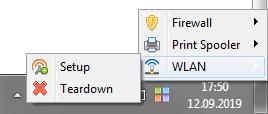
By default: %APPDATA%\TrayMenu
Override: /path "your own path"
Skips files and folders marked as hidden or starting with a dot (.folder).
Attribution: small_tiles.ico: Fatcow icon pack. large_tiles.ico: --//--
FAQ
Q: How are items sorted? A: Alphabetically. Add numeric prefixes to names ("10. My file") to sort in some other way.
Q: How to hide items from the menu? A: Set hidden flag in file properties, or start a name with a dot (".hidden").
Q: How to change an icon for an item? A: In any way you can do that in Explorer.
- For a shortcut: "Change icon" from shortcut properties.
- For a folder: "Change folder icon" from folder properties. You can change it manually by creating/editing desktop.ini too.
Q: How to close the app? A: Ctrl-Alt-Del, kill process.
Q: Can I have a menu entry for that? A: Sure you can. Add a shortcut to "taskkill /f /im traymenu.exe"
Q: How to refresh the menu after I change some files. A: You don't have to, it's done automatically on any changes next time you access the menu.
Q: I've configured a shortcut to run with administrative rights but it doesn't. A: Yes, that's a known problem, a workaround is possible but it's not done yet. Meanwhile, create a shortcut to a script that runs something like "elevate.exe" manually.