

Colored-Text

A small command-line utility which displays the TEXT specified on the command line (or redirected through a pipe) in the given colors. Optionally, it also highlights the given substrings in the input TEXT.
- Quiet · last change 10-16-2020
- ★ 9 on GitHub
README
Colored Text
Overview
Displays the TEXT specified on the command line (or redirected through a pipe) in the given colors. Optionally, it also highlights the given substrings in the input TEXT.
Download
Source: https://github.com/jackdp/Colored-Text
Compiled binaries (Windows 32-bit and 64-bit): http://www.pazera-software.com/products/colored-text/
Usage
clt TEXT [-c=COLORS] [-n=STR] [-nn] [-ht=STR] [-hc=COLORS] [-s=1|0] [-l] [-h] [-V] [--license] [--github] [--home]
Mandatory arguments to short options are mandatory for long options too.
Options are case-sensitive. Options and values in square brackets are optional.
You can use the -ht, -hc, and -s options multiple times.
Options
| Option | Description |
|---|---|
-c, |
|
--colors=FgColor[,BgColor] |
The foreground and background color of the TEXT specified on the command line. See the list of available colors below |
-n, |
|
--new-line=STR |
Replace the STR with a newline character in the input text. |
-nn |
Add a newline character at the end of the input text. |
-ht, |
|
--highlight-text=STR |
Text to be highlighted. |
-hc, |
|
--highlight-colors=FgColor[,BgColor] |
The foreground and background color used to highlight the text specified with the -ht option. See the list of available colors below. |
-s, |
|
--case-sensitive=1/0 |
Consider the character case when searching for the text to highlight. By default -s=0 (not case sensitive) |
-l, --log-colors |
Highlight some special words used in the logs such as Error, Failed, Warning, Success etc. |
-h, --help |
Show this help. |
--examples |
Display examples. |
-V, --version |
Show application version. |
--license |
Display program license. |
--home |
Opens program homepage in the default browser. |
--github |
Opens the GitHub page with the program's source files. |
TEXT
Text can be given on the command line or/and redirected from an external command via a pipe. You can provide multiple text values in any combination with the options.
Available colors
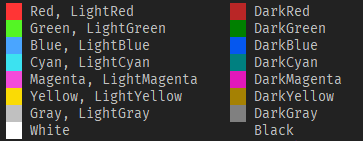
Fuchsia = LightMagenta
Purple = DarkMagenta
Lime = LightGreen
Aqua = LightCyan
Color names are case insensitive.
Exit codes
| Exit code | Description |
|---|---|
| 0 | OK (no error) |
| 1 | Other error |
| 2 | Syntax error |
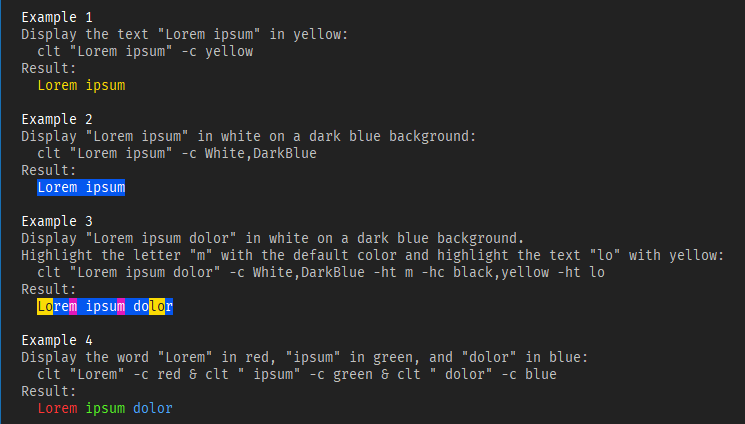
Examples
Compilation
To compile, you need the Lazarus IDE and several units from the JPLib package.
How to build:
- Install JPLib package in the Lazarus IDE.
- Open
src\ColoredText.lpifile with the Lazarus. - Build project (menu
Run->Build).
Releases
2020.10.16 - Version 1.0