Catalog · How the catalog works
ViewOnly

Extending TWinControls with a ViewOnly property
- ★ 5 on GitHub
Anyone may press Interesting, signed in or not. It helps others find this project.
README
Extending TWinControls with a ViewOnly property
ViewOnly property: a better mix of ReadOnly and Enabled
In Delphi, descendants of the TCustomEdit type, like TEdit, TMemo and TRichEdit, expose two properties you can use to make the editor not-editable. ReadOnly property determines whether the user can change the text of the edit control. To restrict the edit control to display only, set the ReadOnly property to true. When ReadOnly is true, a user cannot edit the contents of the edit control BUT he or she CAN select a block of text, activate the default context menu and, for example, copy the selected text.
Plus: When ReadOnly is true - a user can still enter the control. Enabled property controls whether the control responds to mouse, keyboard, and timer events. To disable a control, set Enabled to false. Disabled controls appear dimmed / grayed. ViewOnly?
How about a ViewOnly property that would be a mix or Enabled and ReadOnly where the control with ViewOnly set to true will not be grayed, will be read only but a user will not be able to set the input focus to the control?
ViewOnly = [+ReadOnly, +Disabled, -Grayed]
The idea is to somehow extend every TCustomEdit descendant with a ViewOnly property so that it is possible to write : <pre> Memo1.ViewOnly := True, or Edit1.ViewOnly := True. </pre>
Extend existing controls by adding new properties? Class helpers! Here's the interface part of the TWinControlHelper class helper for TWinControl (and descendants):
<pre> type TWinControlHelper = class Helper for TWinControl strict private function GetHookControl: TObject; function GetViewOnly: Boolean; procedure SetViewOnly(const Value: Boolean); function GetCanViewOnly: Boolean; procedure SetCanViewOnly(const Value: Boolean); public property ViewOnly: Boolean read GetViewOnly write SetViewOnly; property CanViewOnly: Boolean read GetCanViewOnly write SetCanViewOnly; end; </pre>
This unis adds the ViewOnly property to all TWinControl and descendants, so buttonns will becom unclickable, scrolbars un scrollable etc.
How to use it
- Add a ViewOnlyU to the uses part of the form where you want to use it.
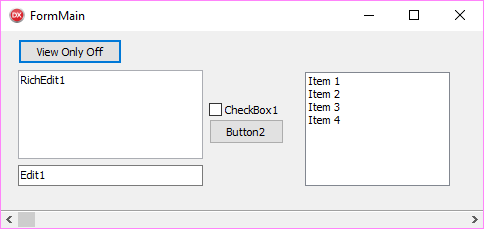
- Add a button to control the ViewOnly mode
- In FormCreate you omit this button from the ViewOnly Mode <pre> procedure TFormMain.FormCreate(Sender: TObject); begin Button1.CanViewOnly := false; end; </pre>
- add a click handler to your button <pre> procedure TFormMain.Button1Click(Sender: TObject); var i: Integer; const Captions: array [boolean] of string = ('Off', 'On'); begin Button1.Caption := 'View Only ' + Captions[Button2.ViewOnly]; for i := 0 to ComponentCount - 1 do if Components[i] is TWinControl then TWinControl(Components[i]).ViewOnly := not TWinControl(Components[i]).ViewOnly; end; </pre>