

Catalog · How the catalog works
pdfium4laz

Object Pascal bindings and visual components for the PDFium library, for Free Pascal and Lazarus. It lets you view, search, extract content from and edit PDF files without any external tools - only the PDFium shared library is required.
- ★ 12 on GitHub
Anyone may press Interesting, signed in or not. It helps others find this project.
In the Online Package Manager
Install it from inside Lazarus through Package, Online Package Manager.
README
pdfium4laz
Object Pascal bindings and visual components for the PDFium library, for Free Pascal and Lazarus. It lets you view, search, extract content from and edit PDF files without any external tools - only the PDFium shared library is required.
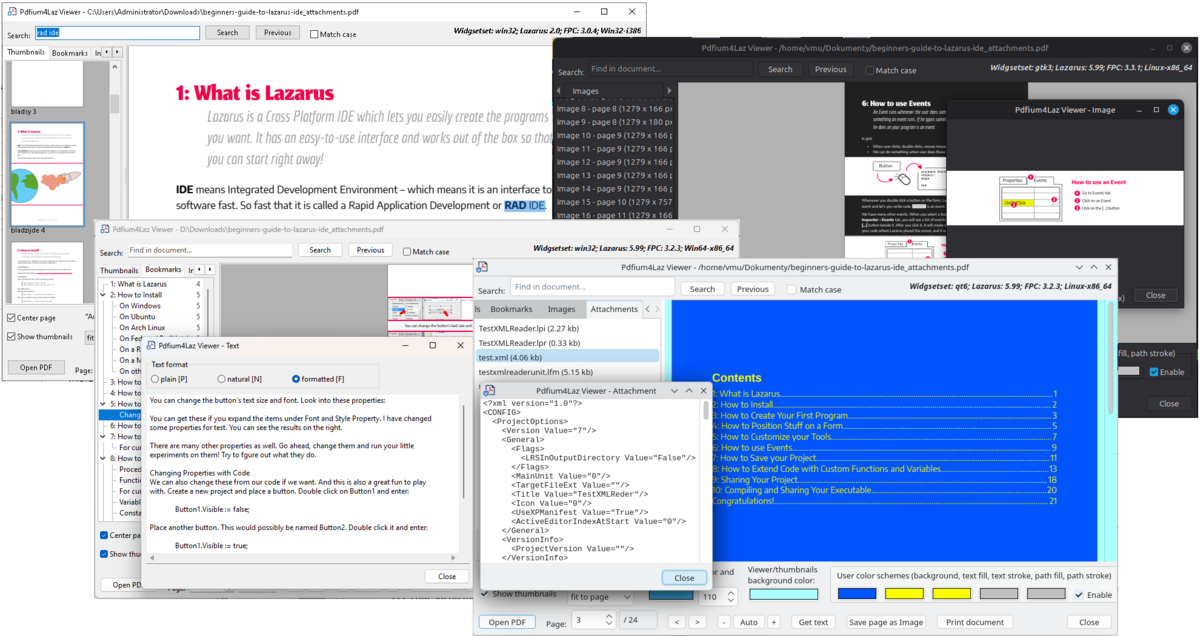
Features
The package contains 2 visual components (installed on the PDFium tab of the component palette):
- TPdfViewer - a scrollable single-page viewer with background (threaded) rendering, zoom modes (manual, fit width, fit height, fit page), text selection with mouse and keyboard (Ctrl+A, Ctrl+C), clickable links, bookmark navigation, an optional color scheme (e.g. dark mode) and image color inversion.
- TPdfThumbnailPanel - a page thumbnail strip (vertical or horizontal) rendered in a background thread, with page captions, selection and click events.
Reading PDF files
- Opening documents from a file or a stream, including password-protected documents
- Document information: metadata (title, author, ...), permissions, encryption, PDF version, file identifier, form type, language, page labels
- Rendering pages to a
TBitmap(also with a custom color scheme) - Text extraction in 3 formats (plain, natural reading order, layout preserving), text search, text selection, text from a rectangle
- Links (URI, go-to page, remote go-to, launch)
- Bookmarks (outline tree with target page, position and color)
- Embedded images - listing, metadata (pixel size, DPI), export to PNG, JPEG or BMP
- File attachments - listing, metadata, extraction
- Printing (synchronous or in a background thread), with page ranges like
1-3,5,8
Modifying PDF files
- Merging several PDF files into one
- Splitting a document - every page to its own file, a page range, or any selection of pages
- Moving (reordering) pages
- Rotating pages
- Adding and deleting file attachments
- Saving the document, optionally as a different PDF version (1.4, 1.5, 1.6, 1.7, 2.0)
- Setting the document language and the language of attachment descriptions
- Detecting the PDF/A-3 level (3a, 3u, 3b) and keeping it when saving, splitting and merging (see PDF/A-3)
Requirements
| Operating systems | Windows 32-bit, Windows 64-bit, Linux 64-bit, MacOS arm64 |
| Compiler | FPC 3.0.4 or newer |
| IDE | Lazarus 2.0 or newer |
| PDFium | build 6036 or newer |
Precompiled PDFium libraries can be downloaded from [https://github.com/bblanchon/pdfium-binaries/releases](https://github.com/bblanchon/pdfium-binaries/releases))
Installation
- Open
pdfium4laz.lpkin Lazarus (Package > Open Package File). - Compile it and choose Use > Install to put
TPdfViewerandTPdfThumbnailPanelon the component palette (Lazarus rebuilds itself). - Put the PDFium library (
pdfium.dllon Windows,libpdfium.soon Linux) next to your application executable - see Initialization.
If you use printing (PdfiumPrint unit), add the standard Printer4Lazarus package to your project.
Demos
demo/view- viewer: page view, thumbnails, bookmarks, search, text, images, attachments, printing, color schemedemo/edit- editing tools: merge, split, move pages, attachments, PDF version
License and author
pdfium4laz is released under the MIT License - see LICENSE.
Author: Paweł Dmitruk (paweld)
Getting started
Units
| Unit | Contents |
|---|---|
PdfiumLib |
low-level PDFium API, library loading, EPdfiumError |
PdfiumCore |
TPdfDocument, TPdfPage |
PdfiumViewer |
TPdfViewer |
PdfiumThumbnails |
TPdfThumbnailPanel |
PdfiumText |
text extraction, search, selection |
PdfiumImages |
embedded images |
PdfiumAttachments |
file attachments |
PdfiumBookmarks |
bookmarks (outline) |
PdfiumLinks |
links |
PdfiumMerge |
merging and splitting |
PdfiumPrint |
printing |
PdfiumPdfA |
PDF/A-3 support (TPdfA3Conformance, TPdfAFRelationship, PDF_LANGUAGES) |
Page indices are 0-based everywhere (the only exception is the print page specification string, which uses 1-based page numbers, like a print dialog).
Initialization
The PDFium library must be loaded before it is used. You can do it explicitly with PdfiumInitialize,
optionally passing the full path to the library:
uses
  PdfiumLib;

PdfiumInitialize;                              // automatic search
PdfiumInitialize('/opt/myapp/libpdfium.so');   // explicit location
When no path is given, the library is searched for in:
- the application executable's directory,
- the
libsubdirectory of the executable's directory, - the standard search path of the operating system.
Accepted file names are pdfium.dll, pdfium-x64.dll / pdfium_x64.dll (x86 for 32-bit) on Windows and
libpdfium.so, libpdfium-x64.so / libpdfium_x64.so on Linux.
TPdfDocument.Create also initializes the library, so calling PdfiumInitialize yourself is optional -
the constructor accepts the library path as well:
Doc := TPdfDocument.Create;                      // automatic search
Doc := TPdfDocument.Create('C:\MyApp\pdfium.dll'); // explicit location
Initialization is reference-counted: every PdfiumInitialize must be paired with PdfiumFinalize, and
TPdfDocument.Destroy does that for its own constructor. A path is only used when the library is not loaded yet.
Freeing objects
All objects created by you (TPdfDocument, TPdfTextPage, TPdfImageList, TPdfAttachmentList,
TPdfBookmarkTree, TPdfLinkList, TPdfSearch, ...) must be freed by you. Objects that belong to a document
(pages, text pages, image and attachment lists, bookmark trees) must be freed before the document itself.
TPdfPage objects returned by Doc.Pages[] are owned and freed by the document - do not free them.
Before freeing a document that is shown in a visual component, detach it first:
PdfViewer1.Document := nil;
PdfThumbnailPanel1.Document := nil;
FreeAndNil(Doc);
Opening a file
Errors are reported with EPdfiumError. When the document is encrypted, its ErrorCode is FPDF_ERR_PASSWORD
and you can try again with a password:
uses
  PdfiumLib, PdfiumCore;

var
  Doc: TPdfDocument;
  Pwd: String;
begin
  Doc := TPdfDocument.Create;
  try
    try
      Doc.LoadFromFile(FileName);
    except
      on E: EPdfiumError do
      begin
        if (E.ErrorCode = FPDF_ERR_PASSWORD) and InputQuery('PDF', 'Password:', True, Pwd) then
          Doc.LoadFromFile(FileName, Pwd)  // raises EPdfiumError again if the password is wrong
        else
          raise;
      end;
    end;
  except
    FreeAndNil(Doc);
    raise;
  end;
  ShowMessage(Format('%d pages, PDF %d.%d', [Doc.PageCount, Doc.FileVersion div 10, Doc.FileVersion mod 10]));
end;
LoadFromStream(AStream, APassword) works the same way. The stream (and, for LoadFromFile, the file) is read
lazily, so it must stay available and unchanged while the document is open.
Displaying a page
Drop a TPdfViewer (and optionally a TPdfThumbnailPanel) on a form and assign the document:
PdfViewer1.Document := Doc;
PdfViewer1.ZoomToFitWidth;          // or ZoomToFitHeight, ZoomToFitPage, ZoomToActualSize, Zoom := 1.5

PdfThumbnailPanel1.Document := Doc;
Navigation and useful events:
PdfViewer1.GotoPage(2);              // or PdfViewer1.PageIndex := 2
PdfViewer1.ZoomIn;                   // ZoomOut

procedure TForm1.PdfThumbnailPanel1PageClick(Sender: TObject; APageIndex: Integer);
begin
  PdfViewer1.GotoPage(APageIndex);
end;

procedure TForm1.PdfViewer1PageChanged(Sender: TObject);
begin
  PdfThumbnailPanel1.SelectedIndex := PdfViewer1.PageIndex;
  PdfThumbnailPanel1.ScrollToPage(PdfViewer1.PageIndex);
end;

procedure TForm1.PdfViewer1LinkClick(Sender: TObject; const ALink: TPdfLink);
begin
  case ALink.Kind of
    lkURI: OpenURL(ALink.URI);
    lkGoto: PdfViewer1.GotoPage(ALink.PageIndex);
  end;
end;
Dark mode: set UseColorScheme := True and the Scheme*Color properties on both components.
To render a page without the viewer (e.g. to save it as an image):
Page := Doc.Pages[0];
Bmp := Page.RenderToBitmap(Round(Page.Width * 150 / 72), Round(Page.Height * 150 / 72)); // 150 DPI
try
  Bmp.SaveToFile('page1.bmp');
finally
  Bmp.Free;
end;
Getting text from a page
uses
  PdfiumText;

Memo1.Text := PdfGetText(Doc.Pages[0], tfNatural);
There are 3 text formats:
| Format | Result |
|---|---|
tfPlain |
Text exactly as PDFium returns it, in the order it is stored in the page content. Fast, but for multi-column or unusually generated documents the order may not match the visual layout. |
tfNatural |
Reading order rebuilt from character positions: characters are grouped into lines by their baseline, each line is sorted left to right, words are separated by single spaces and an empty line is inserted between paragraphs. Best for reading or further processing. |
tfFormatted |
Like tfNatural, but also keeps the horizontal layout: lines are indented and gaps between words are filled with a matching number of spaces, so columns and tables stay roughly aligned (best viewed with a monospaced font). |
For more control (search, character positions, text from a rectangle) use TPdfTextPage:
TextPage := TPdfTextPage.Create(Doc.Pages[0]);
try
  S := TextPage.ExtractTextInRect(RectF(0, 800, 600, 700)); // PDF points, Y axis goes up
  Search := TPdfSearch.Create(TextPage, 'invoice', [sfMatchCase]);
  try
    if Search.FindNext(Match) then
      PdfViewer1.SelectTextRange(Match.StartIndex, Match.Count); // when the viewer shows that page
  finally
    Search.Free;
  end;
finally
  TextPage.Free;
end;
Getting images
uses
  PdfiumImages;

var
  Images: TPdfImageList;
  i: Integer;
begin
  Images := TPdfImageList.CreateForDocument(Doc);   // or CreateForPage(Doc.Pages[0])
  try
    for i := 0 to Images.Count - 1 do
    begin
      Memo1.Lines.Add(Format('page %d: %d x %d px', [Images[i].PageIndex + 1, Images[i].PixelWidth, Images[i].PixelHeight]));
      Images[i].SaveToFile(Format('image_%d.png', [i + 1]));  // format from extension: .png, .jpg, .bmp
    end;
  finally
    Images.Free;
  end;
end;
ToBitmap returns a TBitmap (to be freed by the caller) and SaveToStream(Stream, ifJpeg) writes to a stream.
Getting attachments
uses
  PdfiumAttachments;

var
  Attachments: TPdfAttachmentList;
  Item: TPdfAttachmentItem;
begin
  Attachments := TPdfAttachmentList.Create(Doc);
  try
    for Item in Attachments do
    begin
      Memo1.Lines.Add(Format('%s (%d bytes) %s', [Item.Name, Item.Size, Item.Description]));
      Item.SaveToFile(OutputDir + Item.Name);    // or GetData: TBytes, SaveToStream
    end;
  finally
    Attachments.Free;
  end;
end;
Getting bookmarks
TPdfBookmarkTree reads the whole outline at once. Each TPdfBookmark has a Title, a target PageIndex
(-1 when it has none), a vertical position PageY and its child bookmarks:
uses
  PdfiumBookmarks;

procedure TForm1.AddNodes(AParent: TTreeNode; ABookmark: TPdfBookmark);
var
  Child: TPdfBookmark;
begin
  AParent := TreeView1.Items.AddChildObject(AParent, ABookmark.Title, ABookmark);
  for Child in ABookmark do
    AddNodes(AParent, Child);
end;

procedure TForm1.LoadBookmarks;
var
  Root: TPdfBookmark;
begin
  FBookmarks := TPdfBookmarkTree.Create(Doc);   // keep it alive as long as the tree nodes point to it
  for Root in FBookmarks do
    AddNodes(nil, Root);
end;

procedure TForm1.TreeView1SelectionChanged(Sender: TObject);
begin
  if TreeView1.Selected <> nil then
    PdfViewer1.GotoBookmark(TPdfBookmark(TreeView1.Selected.Data));
end;
Editing PDF files
Changes made to a TPdfDocument exist only in memory until the document is saved with SaveToFile or
SaveToStream. A document opened with LoadFromFile cannot be saved over its own source file directly
(the file is read lazily) - save it to another file, or save to a TMemoryStream, close the document and
then write the stream to the file.
Merging
uses
  PdfiumMerge;

PdfMergeFiles(['part1.pdf', 'part2.pdf', 'part3.pdf'], 'merged.pdf');
PdfMergeStreams does the same with streams. The output file must not be one of the source files.
Splitting
uses
  PdfiumMerge;

// every listed page to its own file: OutputDir\page_0001.pdf, page_0003.pdf, ...
PdfSplitPages('source.pdf', 'C:\Output', [0, 2, 4]);

// pages 2-5 (0-based indices 1..4) to one file
PdfSplitRange('source.pdf', 'pages_2-5.pdf', 1, 4);

// any selection of pages, in the given order, to a stream
PdfSplitToStream(SourceStream, [4, 0, 1], DestStream);
Moving pages
MovePages moves the given pages (0-based) so they start at the destination index of the resulting document:
Doc.LoadFromFile('source.pdf');
Doc.MovePages([4], 0);          // the 5th page becomes the first one
Doc.MovePages([0, 1], 3);       // the first two pages move to positions 4 and 5
Doc.SaveToFile('reordered.pdf');
Pages can also be rotated - Doc.Pages[0].SetRotation(90) (0, 90, 180 or 270 degrees). If the document is
shown in a TPdfViewer, call PdfViewer1.RefreshPage afterwards (and PdfThumbnailPanel1.InvalidateCache).
Adding attachments
uses
  PdfiumAttachments;

var
  Attachments: TPdfAttachmentList;
  Item: TPdfAttachmentItem;
begin
  Attachments := TPdfAttachmentList.Create(Doc);
  try
    Item := Attachments.Add('data.xml');            // the name must be unique
    Item.SetData(FileBytes);                        // TBytes with the file content
    Item.SetDescription('Invoice data');
    Item.SetStringValue(PDF_ATTACHMENT_KEY_CREATIONDATE, FormatDateTime('"D:"yyyymmddhhnnss', Now));
    // Attachments.Delete(0);                       // removing an attachment
  finally
    Attachments.Free;
  end;
  Doc.SaveToFile('with_attachment.pdf');
end;
Saving as a different PDF version
The second parameter of SaveToFile / SaveToStream forces the version of the saved file, using the same
encoding as FileVersion (14 = 1.4, 17 = 1.7, 20 = 2.0). 0 (the default) keeps the document's own version.
Doc.LoadFromFile('source.pdf');
Doc.SaveToFile('source_pdf17.pdf', 17);
This does not work for PDF/A-3 output - a PDF/A-3 file is always saved as PDF 1.7 (see Saving as PDF/A-3).
PDF/A-3
PDF/A-3 support is in the unit PdfiumPdfA. The conformance level is a TPdfA3Conformance value: pdfaNone,
pdfa3b, pdfa3u or pdfa3a. The values are ordered by increasing requirements, so levels can be compared with
< / >=. PDFA3_CONFORMANCE_NAMES[Level] gives a display name ('PDF/A-3a', ...).
Checking the conformance level
Doc.PdfA3Conformance returns the level declared in the XMP metadata, confirmed by the structural prerequisites:
- a PDF 1.0-1.7 file header (PDF 2.0 files are never PDF/A-3),
- the document is not encrypted,
- a PDF/A output intent (all levels),
- tagging (
/MarkInfo) and a structure tree (3a only).
When any prerequisite of the declared level is missing the result is pdfaNone. The overload with an out
parameter also returns the reason why the document is not PDF/A-3:
uses
  PdfiumCore, PdfiumPdfA;

var
  Level: TPdfA3Conformance;
  Reason: string;
begin
  Doc.LoadFromFile('invoice.pdf');
  Level := Doc.PdfA3Conformance(Reason);
  if Level = pdfaNone then
    ShowMessage('Not PDF/A-3: ' + Reason)            // e.g. 'the document is encrypted'
  else
    ShowMessage('Conforms to ' + PDFA3_CONFORMANCE_NAMES[Level]);
end;
This is not a full validation of the content (colors, transparency, fonts, ...) - use veraPDF for that. Fonts can be checked with the two functions below.
Checking embedded fonts
Doc.HasAllFontsEmbedded is a separate, optional and slower check that every font used by the pages - including
form XObjects, patterns, soft masks, Type3 glyph resources and annotation appearances - has an embedded font
program (required by every PDF/A level). Reason names the first missing font and its page index:
if not Doc.HasAllFontsEmbedded(Reason) then
  ShowMessage(Reason);  // 'font "Helvetica" used on page index 0 is not embedded'
Checking the Unicode mapping of fonts
Doc.HasUnicodeMapping is a second optional check, for the text requirement of PDF/A-3u and 3a: every used font
must map its character codes to Unicode (ISO 32000-1, 9.10.2) through a /ToUnicode CMap, a standard encoding
(WinAnsiEncoding, ...), /Differences with Adobe Glyph List names, or the built-in encoding of an embedded Type1
font program with such names (simple fonts), or a predefined non-Identity CMap of the Adobe GB1/CNS1/Japan1/Korea1
collections (Type0 fonts). It does not check the individual values inside a /ToUnicode CMap (veraPDF rule
- .11.7.2-2) - on 36 sample files it agreed with veraPDF's 3u result on 35, the remaining one being exactly that case.
if (Doc.PdfA3Conformance >= pdfa3u) and not Doc.HasUnicodeMapping(Reason) then
  ShowMessage('Declared 3u/3a, but: ' + Reason);  // 'font "Symbol" used on page index 0 has no Unicode mapping'
Neither check is part of PdfA3Conformance - a document declared as 3u/3a is reported as such even when
HasUnicodeMapping fails, and saving never embeds a font or adds a missing mapping, it only changes the
declaration.
Saving as PDF/A-3
The last parameter of SaveToFile / SaveToStream (AConformance, default pdfaNone) writes a PDF/A-3 file of
the given level after simple edits - reordering pages, rotating pages, adding/deleting attachments. Conditions:
- the source document must itself be PDF/A-3 (
PdfA3Conformance <> pdfaNone), - the requested level must not be higher than the source's own level - a lower one is allowed (a 3a file can be
saved as 3u or 3b, a 3b file cannot be saved as 3a); pass
Doc.PdfA3Conformanceto keep the source's level, - a PDF/A-3 file is always written as PDF 1.7, so choosing another version (see
Saving as a different PDF version) does not work in this mode:
AVersionmust be0(the default - 1.7 is then used whatever the source's own version) or17.
Otherwise EPdfiumError is raised.
Doc.LoadFromFile('invoice.pdf');                         // PDF/A-3a
Doc.MovePages([1], 0);
Doc.SaveToFile('invoice_3a.pdf', 0, Doc.PdfA3Conformance); // keeps the source's level (3a)
Doc.SaveToFile('invoice_3b.pdf', 0, pdfa3b);               // lower level - allowed
Doc.SaveToFile('invoice_20.pdf', 20, pdfa3b);              // EPdfiumError - PDF/A-3 is always PDF 1.7
When saving it:
- completes every embedded file (
/AFRelationship,/F+/UF, MIME type, modification date,/Desc) and lists it in the catalog/AFarray; deleted attachments are removed from/AF, - updates
ModDatein the Info dictionary together withxmp:ModifyDate/xmp:MetadataDate, - declares the requested level in
pdfaid:conformance.
With pdfaNone (also the default of a plain SaveToFile(FileName)) a PDF/A identification in the XMP metadata
(pdfaid:part, conformance, ...) is removed, because the result is no longer guaranteed to conform; files
without one are written exactly as before.
Splitting PDF/A-3 files
The same AConformance parameter of PdfSplitPages, PdfSplitRange and PdfSplitToStream writes the selected
pages as PDF/A-3, with the same conditions as saving (the source must be PDF/A-3 of at least the requested level).
The structure tree, bookmarks and destinations are kept for the selected pages only (a page may not be selected
twice).
uses
  PdfiumMerge, PdfiumPdfA;

PdfSplitRange('invoice.pdf', 'page1.pdf', 0, 0, pdfa3a);   // invoice.pdf must be PDF/A-3a
PdfSplitPages('invoice.pdf', 'C:\Output', [0, 2], pdfa3b); // a 3a, 3u or 3b source
Merging PDF/A-3 files
When merging with AConformance set, every source file must be PDF/A-3 of at least the requested level, so
the result can have at most the level of the lowest source file (e.g. 3a + 3b -> pdfa3b; requesting pdfa3a
raises EPdfiumError). All files must also use output intents with the same number of color components. Merging
combines the structure trees (one root element), bookmarks, attachments, form fields and page labels; XMP metadata
and the output intent come from the first file. Without AConformance (pdfaNone) the files are merged by PDFium
and the result is not PDF/A.
uses
  PdfiumCore, PdfiumMerge, PdfiumPdfA;

function LowestPdfA3Level(const AFiles: array of string): TPdfA3Conformance;
var
  Doc: TPdfDocument;
  i: Integer;
begin
  Result := pdfa3a;
  for i := 0 to High(AFiles) do
  begin
    Doc := TPdfDocument.Create;
    try
      Doc.LoadFromFile(AFiles[i]);
      if Doc.PdfA3Conformance < Result then
        Result := Doc.PdfA3Conformance;
    finally
      Doc.Free;
    end;
  end;
end;
...
Level := LowestPdfA3Level(['a.pdf', 'b.pdf']);
if Level = pdfaNone then
  PdfMergeFiles(['a.pdf', 'b.pdf'], 'merged.pdf')         // at least one file is not PDF/A-3
else
  PdfMergeFiles(['a.pdf', 'b.pdf'], 'merged.pdf', Level); // the lowest level of all files
Attachments and language in PDF/A-3
PDF/A-3 allows any embedded file, but each one must describe its relationship to the document
(/AFRelationship, e.g. Factur-X / ZUGFeRD invoices use afrAlternative), its MIME type and description:
uses
  PdfiumCore, PdfiumAttachments, PdfiumPdfA;
...
Attachments := TPdfAttachmentList.Create(Doc);
try
  Item := Attachments.Add('factur-x.xml');
  Item.SetData(XmlBytes);
  Item.SetDescription('Factur-X invoice');
  Item.SetAFRelationship(afrAlternative);  // default: afrUnspecified
  Item.SetSubtype('text/xml');             // default: derived from the file extension
  Item.SetLanguage('en-GB');               // language of the description
finally
  Attachments.Free;
end;
Doc.SetLanguage('pl-PL');                                  // catalog /Lang
Doc.SaveToFile('invoice.pdf', 0, Doc.PdfA3Conformance);SetAFRelationship, SetSubtype and SetLanguage of an attachment are also written by a normal save (with
pdfaNone). Item.GetAFRelationship(Rel) returns the relationship set with SetAFRelationship or, if none, the
one stored in the document (False when there is neither - PDFium cannot read it, so the list reads it once
through its own copy of the document); Item.Subtype returns the MIME type the same way.
Language codes are case-insensitive and accept - or _ ('EN_gb' becomes 'en-GB'); Language always returns
the canonical form. PdfiumPdfA has a dictionary of common languages, e.g. for a combo box:
for i := 0 to High(PDF_LANGUAGES) do
  ComboBox1.Items.Add(PDF_LANGUAGES[i].Code + ' - ' + PDF_LANGUAGES[i].Name);  // 'pl-PL - Polish (Poland)'
Code := PdfNormalizeLanguage('PL_pl');                                       // 'pl-PL', '' if invalid
Index := PdfFindLanguage('pl-pl');                                           // index into PDF_LANGUAGES or -1