

VCL-ActiveDirectory4Delphi

Delphi basic library for validation and authentication of LDAP users in Active Directory.
- Quiet · last change 4-21-2023
- ★ 88 on GitHub
README

ActiveDirectory4Delphi
Delphi basic library for validation and authentication of LDAP users in Active Directory.
⚙️ Installation
- Manual installation: Add the following folders to your project, in Project > Options > Resource Compiler > Directories and Conditionals > Include file search path
../VCL-ActiveDirectory4Delphi/src/Core
../VCL-ActiveDirectory4Delphi/src/Interfaces
../VCL-ActiveDirectory4Delphi/src/Winapi
⚡️ Quickstart
You need to use ActiveDirectory.Client
uses ActiveDirectory.Client;- Authenticate current user
procedure Authenticate(UserPass: string);
var
  CurrentUserName: string;
  CurrentDomainName: string;
  CurrentLDAPDomainName: string;
begin
  if (not ActiveDirectoryClient.GetActiveDirectoryEnabled) then
    Exit;

  CurrentUserName := ActiveDirectoryClient.GetCurrentUserName;
  CurrentDomainName := ActiveDirectoryClient.GetCurrentDomainName(CurrentUserName);
  CurrentLDAPDomainName := ActiveDirectoryClient.GetCurrentLDAPDomainName(CurrentDomainName);

  if ActiveDirectoryClient.AuthenticateUser(CurrentLDAPDomainName, CurrentUserName, UserPass) then
    ShowMessage('ok')
  else
    ShowMessage('Fail');
end;- Validation user active
procedure ValidationUserActive(DomainName, UserName: string);
begin
  if ActiveDirectoryClient.GetUserActive(DomainName, UserName) then
    ShowMessage('ok')
  else
    ShowMessage('Fail');
end;
more information look at the unit ActiveDirectory.Client
✨ App demo using library
Application of example of using the library and information that could be recovered.
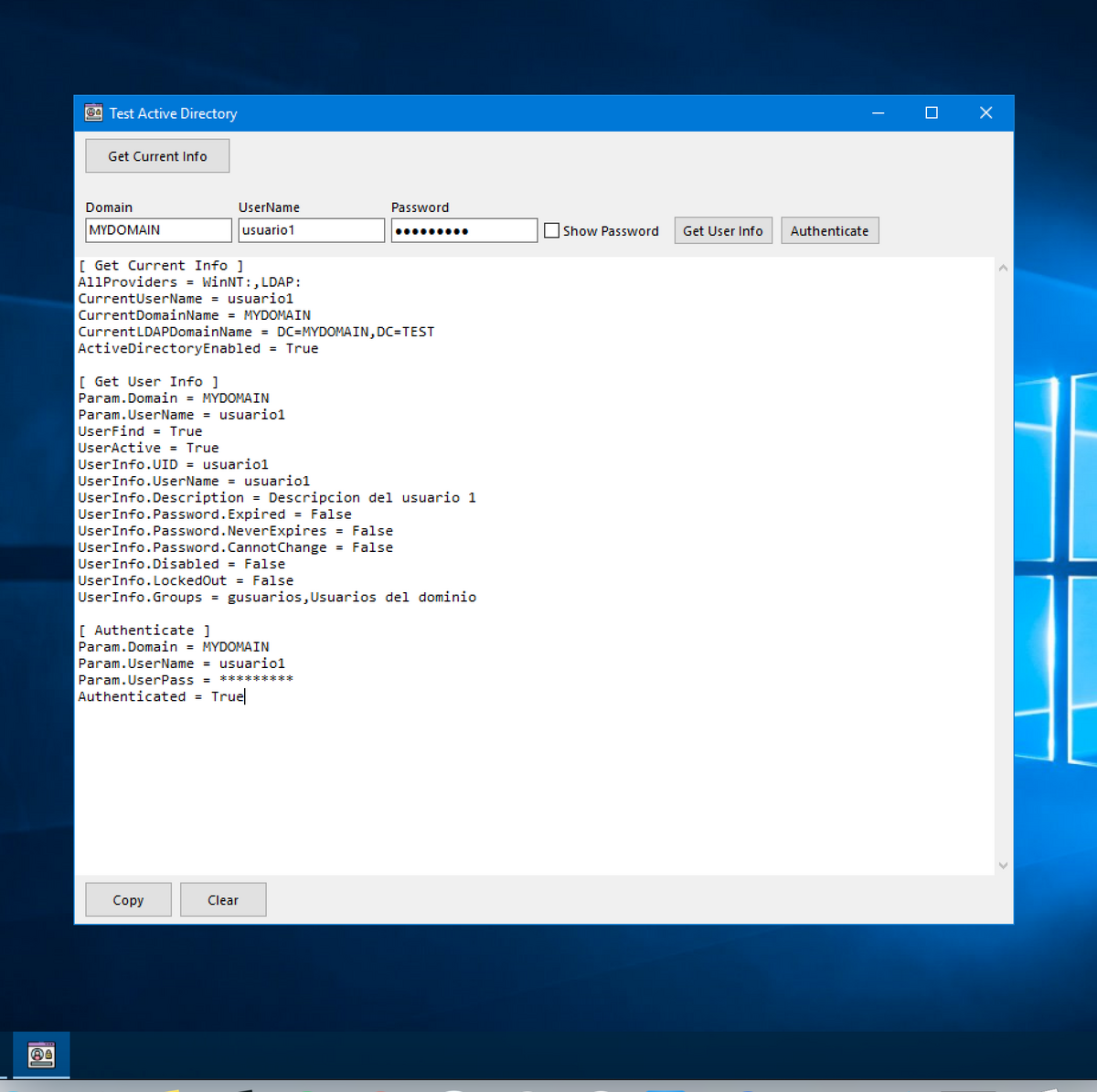
Get Current Info
Retrieve the information of the current section.
AllProviders = WinNT:,LDAP:
CurrentUserName = usuario1
CurrentDomainName = MYDOMAIN
CurrentLDAPDomainName = DC=MYDOMAIN,DC=TEST
ActiveDirectoryEnabled = True
Get User Info
Retrieve user information using the domain and user indicated in the text boxes.
Param.Domain = MYDOMAIN
Param.UserName = usuario1
UserFind = True
UserActive = True
UserInfo.UID = usuario1
UserInfo.UserName = usuario1
UserInfo.Description = Descripcion del usuario 1
UserInfo.Password.Expired = False
UserInfo.Password.NeverExpires = False
UserInfo.Password.CannotChange = False
UserInfo.Disabled = False
UserInfo.LockedOut = False
UserInfo.Groups = gusuarios,Usuarios del dominio
Authenticate
Authenticate using the domain and user indicated in the text boxes.
Param.Domain = MYDOMAIN
Param.UserName = usuario1
Param.UserPass = *********
Authenticated = True
Author
👤 Zava
- Twitter: @ZavaDev
Show your support
Give a ⭐️ if this project helped you!
License
ActiveDirectory4Delphi is MIT licensed.