

winpacho

All in one file: Apache, PHP, MariaBD or MySQL for Windows with default SSL-Cert for localhost
- Active · last change 11-2-2026
- ★ 10 on GitHub
README

winpacho
Portable WAMP server for Windows — the maintained successor of The Uniform Server, continued as an independent project with its own version line.
Looking for Uniform Server Reload? You found it: the project was renamed to winpacho with version 2.0.0. Everything else stays the same — same code, same releases, same issues; old links to
uniserver-reloadredirect here. Existing installations keep working and update as before.
No external dependencies, no installation, no configuration: the complete WAMP stack — Apache, MariaDB, PHP 8.3/8.4/8.5, Adminer and the updated controller — ships as a single archive (winpacho.zip). Unpack it anywhere and everything is immediately ready to run. Nothing needs to be downloaded from SourceForge or windows.php.net, no modules need to be added, no settings need to be changed. Portable as ever: no installer, no registry entries.
⚡ Current PHP versions — upstream never made it past 8.3
The original server is stuck on PHP 8.3 (no updates since November 2023) — a dealbreaker for modern apps and frameworks. This fork ships PHP 8.3, 8.4 and 8.5 preinstalled and switchable in the controller (PHP > Select PHP version), repackaged from the official windows.php.net builds. CI packages new PHP releases automatically, so future versions reach the bundle quickly — and every build is smoke-tested with each installed PHP version before it is published.
🎉 Multiple virtual hosts finally work — including HTTPS
One of the most notorious problems of the original Uniform Server is fixed in this fork: creating more than one virtual host silently failed. The controller handed the Windows hosts file entry to the interactive EdHost utility as a command line call — but EdHost has no command line interface, so nothing was ever written and the new host name simply did not resolve. It looked like a broken Apache configuration and was masked whenever an entry already existed from another tool. winpacho writes the hosts entries itself — deduplicated, elevated only when needed, and verified with a clear message if anything fails. Create as many vhosts as you like:
http://andhttps://work for every one of them.
The original project — a free lightweight WAMP server solution for Windows — has seen no commits since November 2023. This fork continues the source of the two original control programs (UniController and UniService, since 2.1.0 named WinpachoController and WinpachoService) as a clean starting point for further development.
- Upstream repository: https://github.com/iamola/uniserver (imported at commit
1704fa1, 2023-11-25) - Upstream downloads: https://sourceforge.net/projects/miniserver/
- License: BSD (see LICENSE) — all credit for the original work goes to The Uniform Server Development Team.
- Fork initiated by Rob de Roy, who gave the impulse to revive the project.
Repository contents
This repository contains the source code of the controllers only, written in Free Pascal and compiled with Lazarus:
- WinpachoController — the main GUI that starts, stops and configures Apache, MariaDB and PHP (see its README for build instructions)
- WinpachoService — the service module that runs the servers as Windows services (see its README)
The actual server binaries are not part of this repository. Apache, PHP, MariaDB and Adminer are fetched from their vendors by the packaging scripts in scripts/ on every CI build; the Apache configuration and the remaining pieces come from the Uniform Server ZeroXV 15.0.2 base package.
Downloads
Every push triggers a build that updates the rolling release with fixed download links (no login required):
| File | Description |
|---|---|
winpacho.zip |
Recommended. All-in-one, zero-setup package: the complete server (Apache, MariaDB, Adminer, PHP 8.3/8.4/8.5 with 8.5 preselected, updated controller) as a plain zip — extract it into an empty folder, start WinpachoController.exe and it runs, no further downloads or configuration |
winpacho.7z |
The same bundle as a .7z (LZMA, solid): about half the download size — the footprint the former self-extracting exe had, without the exe stub Defender flagged. Windows 11 23H2+ extracts it with Explorer, older Windows needs 7-Zip |
winpacho_php83_module.zip |
PHP 8.3 module — for adding to or updating an existing installation |
winpacho_php84_module.zip |
PHP 8.4 module (latest official thread-safe x64 build, winpacho module layout) — for adding to an existing installation |
winpacho_php85_module.zip |
PHP 8.5 module — for adding to an existing installation |
winpacho_mariadb_module.zip |
The bundle's database engine (MariaDB LTS) as a separate module — for installations that still run MySQL (1.3.5 or older, or the MySQL module up to 2.1.x), see Databases |
Archive downloads only. Until releases are code-signed there are no bare exe downloads: Windows Defender's machine-learning heuristic quarantined the unsigned self-extracting archive right after download as Trojan:Win32/Wacatac.B!ml (a known false positive), and SmartScreen warns on downloaded exes in general. A zip needs no extra tool on Windows, and the binaries inside are not flagged. To update only the controller of an existing installation, take WinpachoController.exe and utils\WinpachoService.exe out of the bundle zip (see Upgrading).
Quick start: extract winpacho.zip into an empty folder without spaces in the path (e.g. C:\winpacho), then start WinpachoController.exe from it — the server lives directly in the chosen folder (no UniServerZ subfolder since 1.3.0) and is ready to go. The newest bundled PHP version (8.5) is preselected; to switch stop Apache first, then use PHP > Select PHP version.
Support the project
winpacho is free and open source. If it saves you time, you can support its development with a donation: Donate via PayPal — thank you!
Upgrading
There is no in-place updater — the package is portable by design. Two paths:
-
Controller-only upgrade (e.g. 1.2.0 → 1.2.1): extract the new
winpacho.zipsomewhere temporary and copy justWinpachoController.exe(into the server folder) andutils\WinpachoService.exe(into itsutilssubfolder) over the old ones. Yourwwwcontent, databases and configuration stay untouched. (The version shown on the splash and test pages comes fromAppVersion=inhome\us_config\us_config.ini; update it by hand if you want the pages to match.) -
Full upgrade (new Apache/PHP/database builds): unpack the new bundle into a fresh folder and move over your
wwwcontent, your databases and any configuration you changed (e.g.home\us_config\us_user.ini,core\msmtp\msmtprc.ini, certificates incore\apache2\server_certs). Databases move as a folder (core\mysql\data) only between installations with the same engine; from an installation that still runs MySQL into MariaDB they move as dumps, see Databases. -
Server tuning for an existing installation (log rotation, OPcache, load limits, see Sized for a small-business server): with Apache stopped, run from a checkout of this repository
powershell -ExecutionPolicy Bypass -File scripts\tune-server-config.ps1 -Root C:\winpachoIt changes only what is not in place yet, keeps existing logs, and stops with a clear message if a file does not look as expected.
-
Coming from 2.0.0 or older (new program names): the controller is
WinpachoController.exesince 2.1.0, the service moduleutils\WinpachoService.exe(before:UniController.exeandutils\UniService.exe). Stop Apache and the database, close the controller, copy the two new files into place and delete the oldUniController.exeandutils\UniService.exe, so nobody starts the old controller by mistake. Configuration, databases,wwwand installed Windows services stay as they are. Used Extra → Start with Windows? The new controller detects the old start-up entry and explains the one-time conversion (one start as administrator). Own shortcuts and scripts that callUniController.exeneed the new name. -
Coming from 1.3.3 (a terminal window per log writer on every Apache start): replace the controller exe with the 1.3.4 build and start Apache once, the controller converts the configuration itself. Running the tuning script does the same.
Versioning
winpacho follows its own version line starting at 1.0.0 (MAJOR.MINOR.PATCH), independent of upstream's 15.x numbering — the origin stays credited, but the project evolves on its own.
- Stable releases are built from git tags (
vX.Y.Z) and published as versioned GitHub releases with versioned file names (e.g.winpacho-2.0.0.zip). - The rolling
latestrelease continues to be updated on every push with development builds. - The version is visible everywhere: the About dialog,
WinpachoController.exe versionon the command line, the splash page, the exe file properties andhome\version.txtin the bundle (which also records the ZeroXV base package the bundle was built from). - Single source of truth is
WinpachoController/reload_version.inc: CI stamps it into the exe VersionInfo and the bundle, and refuses to build a release tag that does not match it.
Release procedure: bump the version in reload_version.inc, commit, tag the commit vX.Y.Z, push branch and tag — CI builds, verifies and publishes the versioned release.
HTTPS (https://localhost without browser warning)
The controller generates a self-signed localhost certificate on first start and enables SSL automatically — https://localhost works right away, but browsers mark self-signed certificates as "not secure" until they are trusted. To get the padlock without a warning:
- Upgrading from an older install? Delete
core\apache2\server_certs\server.crtandserver.keyfirst (with Apache stopped), then start the controller — certificates created by the old generator lack the subjectAltName entries Chrome requires and are rejected even when trusted. Fresh installs skip this step. - On its first interactive start the controller asks right away whether to trust the certificate — answer Yes and confirm the Windows security prompt. (Any time later or again: Apache → Apache SSL → Trust certificate in Windows — this entry stays available while Apache is running, since it only writes to the Windows certificate store; the other entries of that submenu edit
httpd.confor the certificate files and say stop Apache first while Apache runs.) - Restart the browser completely (Chrome: enter
chrome://restartin the address bar — closing the tab is not enough, and check the system tray for background instances). - Open
https://localhost— the padlock now shows without a warning.
The certificate covers localhost, 127.0.0.1 and ::1, is valid for 10 years and is only trusted for the current Windows user.
Firefox: unlike Chrome and Edge, Firefox ignores the Windows certificate store by default and keeps warning even after the certificate is trusted. When Firefox is installed, the controller therefore offers (once, after trusting) to enable Mozilla's official ImportEnterpriseRoots policy for the current user, which makes Firefox use the Windows store too — undo any time by deleting the value under HKCU\Software\Policies\Mozilla\Firefox\Certificates. Alternatively import the certificate manually in Firefox's certificate settings.
Note: In this fork HTTP and HTTPS serve the same www folder — apps placed in www work on both http://localhost/... and https://localhost/.... (Upstream serves HTTPS from a separate ssl folder, which makes apps 404 over HTTPS.) To restore the classic split set US_ROOTF_SSL=./ssl in home\us_config\us_user.ini. With virtual hosts both ports also behave identically: requests with unknown host names (e.g. access by IP address) fall back to www on http and https instead of landing in the first vhost.
Databases: MariaDB and Adminer
Since 1.3.6 the bundle ships MariaDB as its database engine instead of MySQL 8.2, and since 2.2.0 it is the only engine. It sits where MySQL sat (core\mysql, port 3306, root password root), the controller menus and buttons say MariaDB, and mysqli/pdo_mysql and the command line tools (mysql.exe, mysqldump.exe) work as they did with MySQL. Why MariaDB:
- Everything is in the free build: thread pool, audit plugin (
lib\plugin\server_audit.dll), encryption at rest, and hot physical backups withcore\mysql\bin\mariadb-backup.exe --backup --target-dir=.... MySQL keeps these in its paid Enterprise edition. - Lighter on Windows: about a third of MySQL 8's size, faster start, less memory at rest.
- No password-plugin trouble: MySQL 8.4 switched off
mysql_native_passwordby default, which breaks older tools and drivers. MariaDB stays compatible with them. - Owned by a foundation with an open-source guarantee, no Community/Enterprise split.
Which MariaDB: the packaging script picks the stable long-term-support series with the longest remaining support (MariaDB's REST API publishes the end-of-life dates), at its newest patch level, and moves to a newer series only once its support outlasts the current one. The exact version is on the splash page (http://localhost/us_splash/) and in the release notes. The module is built by CI from MariaDB's download (scripts\package-mariadb-module.ps1) and is the same file the bundle uses; its data folder went through one start and a clean shutdown.
Adminer instead of phpMyAdmin (2.2.0)
The controller's database tool button opens Adminer (home\us_opt1, http://localhost/us_opt1/): a single PHP file instead of phpMyAdmin's 54 MB and 4,100 files, fetched unmodified in its newest release by every CI build. It also opens SQLite databases. The button works whenever Apache runs with a PHP version selected; MariaDB is only needed for MariaDB databases.
- MariaDB: the button logs in as root by itself (password from
htpasswd\mysql\passwd.txt, which the controller keeps up to date) and lands on the server overview. After Logout the normal login form appears: system MySQL / MariaDB, server127.0.0.1:3306, userroot, the root password. If MariaDB is not running, the form says so. - SQLite: on the login form choose system SQLite, enter the full path of the database file (e.g.
C:\winpacho\www\app\data.sqlite) as Database, leave the user empty and enter the MariaDB root password. SQLite has no passwords of its own, so Adminer checks this one itself before it opens a file. - This computer only: the folder answers with
Require local- Apache listens on all network interfaces, and the automatic login would open the databases to the whole network. To reach Adminer from another computer, protect it with a password of its own first; do not just open the folder. - No calls home: Adminer's version check is off and adminer.org is removed from its Content-Security-Policy.
- The winpacho additions live in
home\us_opt1\index.phpandwinpacho-adminer.php(source:bundle/adminer/);adminer.phpstays the upstream file.
Updating an existing installation to Adminer: stop Apache, rename home\us_opt1 (the old phpMyAdmin) to e.g. us_opt1-phpmyadmin, copy home\us_opt1 from the new bundle, and limit the folder to this computer: run scripts\tune-server-config.ps1 (see Upgrading), or in core\apache2\conf\httpd.conf change Require all granted to Require local inside the <Directory "${US_ROOTF}/home/us_opt1/"> block. (Adminer itself only logs in automatically for requests from this computer to localhost, but the folder should not be open to the network either way.) The phpMyAdmin leftovers in MariaDB (database phpmyadmin, user pma) do no harm and can be dropped in Adminer.
Still running MySQL?
Bundles up to 1.3.5 ran MySQL 8.2, and up to 2.1.x MySQL 8.4 was available as winpacho_mysql_module.zip. Since 2.2.0 MySQL is no longer shipped and the controller has no MySQL-specific code left: a MySQL installation keeps starting, but the root password functions are written for MariaDB, and the controller asks at every start to move. The two engines cannot open each other's data folder, so the data travels as SQL dumps:
- Export every database you need: MySQL > Database backup in the controller, or
core\mysql\bin\mysqldump.exe --user=root --password=root --databases <name> > <name>.sqlper database. - Stop the database. Delete
core\mysqlcompletely (mixing the two engines' files corrupts the data folder). - Unzip
winpacho_mariadb_module.zipinto the server folder. It bringscore\mysqlwith a fresh data folder and root passwordroot. - Start MariaDB and import the dumps: MariaDB > Database restore in the controller, or
core\mysql\bin\mysql.exe --user=root --password=root < <name>.sql. Recreate application users (MariaDB > Create restricted MariaDB user) - dumps of single databases do not carry them.
E-mail: PHP mail() with a real SMTP account
PHP's mail() is wired to the bundled msmtp SMTP client. Enter your real SMTP access in core\msmtp\msmtprc.ini (ready-made blocks for port 587/465 and Gmail are included), set account default : <name> at the bottom, and your apps send real mail. Test with core\msmtp\Send_test_email.bat; errors are logged to core\msmtp\msmtp.log.
Spam-filter friendliness built in: outgoing mails automatically get the standard headers spam filters check for (Date, Message-ID, MIME-Version, Content-Type) via a small wrapper, and TLS certificate verification is on by default (Mozilla CA bundle included). What remains on your side: send through an authenticated provider account (it DKIM-signs your mail), keep the From: address aligned with that account, and for your own domain set up SPF/DMARC DNS records. Gmail/Outlook need an app password.
Development-friendly defaults
The stock configuration is extremely conservative (2 MB PHP uploads, 1 MB database packets, 32 MB InnoDB pool). This fork ships with limits sized for development machines:
| Setting | Upstream | winpacho |
|---|---|---|
PHP memory_limit |
128M | 512M |
PHP upload_max_filesize / post_max_size |
2M / 8M | 256M / 256M |
PHP max_execution_time / max_input_time |
30s / 60s | 120s / 120s |
PHP max_input_vars / max_file_uploads |
1000 / 20 | 5000 / 50 |
MariaDB max_allowed_packet |
1M | 256M |
MariaDB innodb_buffer_pool_size |
32M | 512M |
MariaDB table_open_cache, buffers, tmp_table_size |
minimal | raised accordingly |
| PHP OPcache | off | on (256M, 20000 files) |
Apache ThreadsPerChild (concurrent connections) |
150 | 400 |
MariaDB max_connections |
151 | 500 |
All values remain editable: PHP via PHP > Edit selected configuration file, MariaDB via core\mysql\my.ini.
Sized for a small-business server
Beyond the developer limits above, every bundle is tuned so a whole team can work on it all day. The same tuning goes onto an existing installation with scripts/tune-server-config.ps1 (see Upgrading); it is idempotent and verifies every change.
- OPcache is on in every PHP version (256M cache, 20000 files; file changes are picked up within 2 s, immediately with
php_development.ini). Without OPcache PHP recompiles every file on every request, the classic bottleneck once several people click at the same time. Upstream shipped it off, and for the 8.4 module the PHP > Accelerator > Zend OpCache toggle could not even switch it on: the ini line used a short form the controller does not recognise. PHP 8.5 has OPcache built in; the menu shows that instead of a mute disabled entry. - Apache logs can no longer fill the disk. Every log goes through Apache's
rotatelogs:logs\access.log,logs\error.log, the SSL logs and every vhost error log always show the current file, whilelogs\rotated\keeps a ring of older parts (10 x 20 MB for access logs, 5 x 10 MB for error logs). Apache > Delete all logs clears the ring too. Existing logs are carried over as the first part of their ring when the tuning script runs. The writer isbin\rotatelogs_z.exe, a copy ofrotatelogs.exewith the PE subsystem set to GUI: Apache spawns log writers without console flags, so the console version opens a terminal window per log when Apache runs without a console (1.3.3 did exactly that). The controller creates the copy at Apache start when it is missing and moves 1.3.3 configurations to it. - Every other log rolls too. PHP errors need no ring of their own: without an
error_logsetting PHP (FastCGI) writes them to Apache's error log. The three logs outside Apache are rotated by the controller once they pass 10 MB, keeping four older parts next to them (<log>.1newest ..<log>.4oldest, together at most 5 x 10 MB like Apache's error logs):core\mysql\data\mysql.err(MariaDB error log),core\msmtp\msmtp.log(mail log) andhome\us_cron\cron.log. The controller checks at start-up and every 10 minutes; the database error log is held open by a running database, so it rotates right before each database start. A log that is busy at that moment is skipped without touching the ring and rotated on the next round. The Clear button of the msmtp utility removes the older parts as well. - Few log writers. Apache runs every log writer twice (its parent and its worker process both open all logs), so the layout keeps pipes rare: a vhost gets one error log shared by its http and https block, and no access log of its own. Its requests go to
logs\access.log, where every line starts withhost:port(Apache'svhost_combinedformat), sofindstr crm.local access.loggives the per-host view. That is 8 writer processes for the server plus 2 per vhost. The tuning script converts vhosts of earlier versions. - Apache serves 400 concurrent connections (was 150; chat apps that keep a long-polling request open per user eat them fast) with 8 MB thread stacks, the PHP-on-Windows recommendation. MariaDB accepts 500 connections and keeps larger table and thread caches and a 256M redo log.
What stays yours to size is the InnoDB buffer pool (innodb_buffer_pool_size in core\mysql\my.ini): it should hold the data the apps touch every day. The bundle default of 512M suits a laptop; on a server give it a share of the RAM:
| Server RAM | Shared box (Apache + PHP + database) | Dedicated database server |
|---|---|---|
| 8 GB | 1G to 2G | 4G to 5G |
| 16 GB | 2G to 4G | 8G to 10G |
| 32 GB | 4G to 8G | 16G to 20G |
A CRM with a few hundred customers, tickets, chats and a document archive is a few gigabytes of data after years; 2G to 4G keeps that working set in memory. If documents are stored in the database as BLOBs, count them separately and prefer the file system for them.
Extensions enabled by default in every PHP version (all ini variants including php-cli.ini, so CLI scripts and cron jobs get the same set): on top of the stock set (gd, mbstring, exif, mysqli, openssl, pdo_mysql) this fork also enables pdo_sqlite, sqlite3, fileinfo and curl — the ones small PHP apps most often need but that upstream ships commented out. Every build's smoke test starts Apache once per installed PHP version and fails unless PHP executes and all of these extensions actually load, so a version switch in the controller can never silently drop them.
The controller is the medallion: the main window is the round 3D winpacho medallion itself, with the start buttons, utilities and status LEDs sitting on the metal. There is no title bar: drag the window by any free spot of the coin, use the small – / × buttons (or Alt+F4) to minimize and close, and open the menus from the tab row (General, Extra, Apache, ...). All menu entries are the same as before, only their home moved from a menu bar to the tabs. Minimizing with the tray option enabled parks the medallion in the notification area (see Minimize below); since 1.3.6 the tray icon has a right-click menu (Show / Exit), so the controller can be quit from there, and Extra > Edit Win hosts file no longer hides the window when the hosts editor opens.
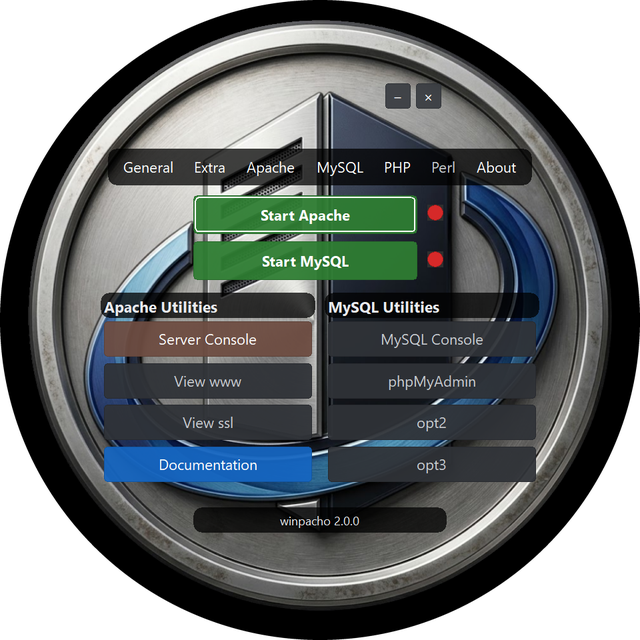
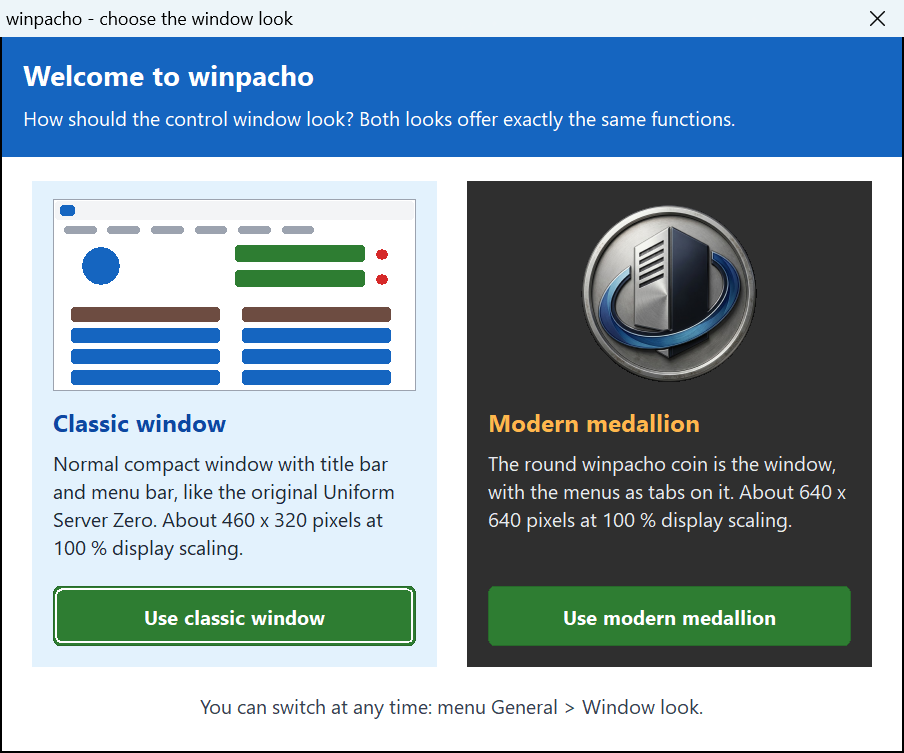
Prefer a normal window? Since 1.3.14 there is a classic look. At the first start the controller asks which look you want: the Classic window (a compact normal window with title bar and menu bar, laid out like the original Uniform Server Zero, about 460 x 320 pixels at 100 % display scaling) or the Modern medallion (about 640 x 640 pixels). Both offer exactly the same functions. Switch at any time, without a restart, in the menu General > Window look. The choice is stored as GuiStyle=classic or GuiStyle=modern in home\us_config\us_config.ini (section [APP]); delete that line to be asked again. Existing installations are asked once after the update.
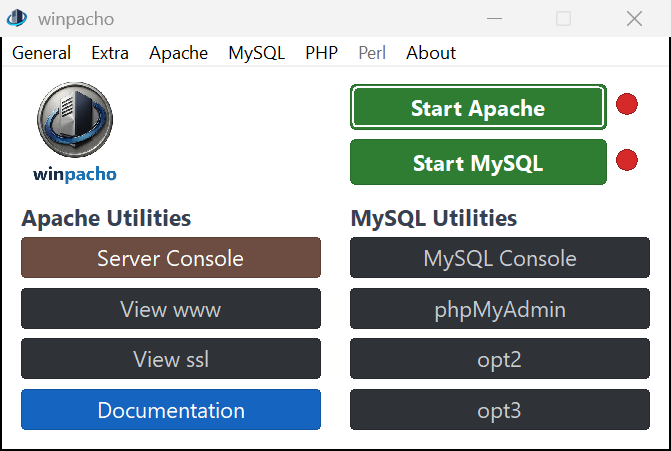
Minimize: taskbar or notification area, the same in both looks. By default the controller behaves like any other Windows program: minimizing keeps it on the taskbar, and a click on its taskbar button brings it back. If you prefer to park it next to the clock, switch on General > Minimize button minimizes to system tray. Then the window's own minimize button (the - on the medallion, the title bar button of the classic window) hides it into the notification area; click the tray icon or use its right-click menu (Show / Exit) to get it back. A click on the taskbar button always minimizes normally. The setting is stored as TrayIconEnabled=True / False in home\us_config\us_config.ini (section [APP]); before 1.3.15 the tray was on by default, and existing installations keep their setting.
Consoles in winpacho look: Server Console and MariaDB Console open in Windows Terminal with a translucent black acrylic background and the winpacho icon in the tab (Windows Terminal ships with Windows 11; on Windows 10 install it from the Microsoft Store). The opacity is set in home\us_config\us_user.ini: CONSOLE_OPACITY=50 (50–100; 100 restores the classic opaque cmd window, which is also used automatically when Windows Terminal is not installed). The controller registers the profile winpacho Console as a Windows Terminal fragment in %LOCALAPPDATA%\Microsoft\Windows Terminal\Fragments\winpacho\, so the profile also appears in the terminal's own dropdown; delete that folder to remove it.
Running as a Windows service
Extra → Run Apache/MariaDB as Windows service opens WinpachoService, which installs, starts and stops the servers as Windows services (us_apache_1, us_mysql_1; the number is the AppNumber from home\us_config\us_config.ini). While a server runs as a service its process belongs to Windows, not to the controller, so the plain Stop used to fail silently ("Failed to stop Apache") and Start would launch a second copy. The controller now detects the installed services itself:
- The start buttons read Start Apache service / Stop Apache service (same for MariaDB) whenever the service is installed, and the tooltip names the service.
- Clicking them starts or stops the Windows service via
sc.exe— Windows shows the administrator (UAC) prompt, the controller waits for the new state and reports a clear message if it is not reached. - The status LEDs and menus follow the service state, refreshed every few seconds, so changes made in WinpachoService or
services.mscshow up without restarting the controller. - To go back to running the servers as normal programs, uninstall the services in WinpachoService; the buttons return to Start Apache / Start MariaDB.
Development goals
- [x] Support for current PHP versions (8.4 / 8.5) in the controller's version switching
- [x] HTTPS out of the box: the controller auto-generates a
localhostcertificate on first start, enables SSL and proactively offers to trust the certificate on the first start (also available any time via Apache > Apache SSL > Trust certificate) to remove the browser warning - [x] Vhosts with a folder picker: Apache > Apache Vhosts > Create Apache Vhost now takes either a portable name (created under
vhosts\) or a full path via Browse… — point a host straight atD:\projects\appwith no copying intowww, no duplicated project folders - [x] Multiple vhosts actually work — fixed the long-standing upstream bug that only one vhost ever resolved: the controller now writes the Windows hosts file entries itself (deduplicated, verified, elevation only when needed) instead of handing off to the interactive EdHost utility, which never wrote anything
- [x] Per-vhost HTTPS: creating a vhost also writes a matching
:443block and rebuilds the server certificate so its subjectAltName covers every vhost domain (plus*.domain).https://app.testworks likehttps://localhost— the controller offers to re-trust the rebuilt certificate right after creating the vhost. Default vhosts guard both ports: unknown host names fall back towwwon http and https alike - [x] Vhost names explain themselves: any ending is allowed, but browsers send a bare
buchhaltung.wolfto the search engine because they do not know the ending, which looks like a broken vhost. The Create Vhost dialog now shows a live hint under the server name: reserved endings (.test,.localhost,.example) open directly, an unknown ending says to typehttp://buchhaltung.wolf/in full,.dev/.appwarn that browsers force HTTPS,.localthat it belongs to mDNS. The same note is repeated after the vhost is created - [x] Automated builds via CI (Lazarus build on Windows runners)
- [x] Package current PHP versions as ready-to-use modules (built by CI, see Downloads)
- [x] Automatic rolling GitHub release with fixed download links
- [x] Package current Apache / MariaDB / Adminer versions (bundle ships the latest Apache Lounge 2.4.x build, the MariaDB LTS with the longest support and the newest Adminer) — every bundle is smoke-tested in CI: Apache is started on the runner and must serve a PHP-rendered page, MariaDB is started, PHP must connect to it and Adminer must log in to MariaDB and to an SQLite file
- [x] Command-line control of the servers: start/stop/restart/status/version with exit codes, safe for unattended scripts (see the bundled manual page Command line parameters)
- [x] Own version line with tagged stable releases (see Versioning)
- [x] Reduce build-time dependencies on upstream infrastructure: the ZeroXV base package is mirrored automatically into the
base-packagerelease on first CI build; builds prefer the mirror and fall back to SourceForge - [x] Remove dead upstream services from the controller: the DtDNS updater and the Server Internet status window relied on services (dtdns.com, uniformserver.com version file) that no longer exist or are unmaintained
- [ ] Work through the open issues of the upstream repository (see below)
Privacy
winpacho collects no data: no telemetry, no crash reports, no update check, no account. Everything it creates stays in your installation folder. Details in the privacy policy.
Bugs & feature requests (this fork)
Found a problem in winpacho, or missing a feature? Please use this repository's issue tracker:
➡ Known issues and reports — every currently known problem of the fork lives there.
Please do not report fork problems to the original project; its tracker is unmaintained.
Upstream issue triage (original project)
For reference — what this fork did about the issues that remain open in the original repository:
| Issue | Status | Notes |
|---|---|---|
| #18 PHP 8.4 & 8.5 modules | Done | PHP 8.4 and 8.5 ship preinstalled in the all-in-one bundle and as standalone modules, built by CI from the official windows.php.net releases. |
| #20 Future PHP versions | Partially addressed | php84/php85 added following the existing per-version pattern, and CI packages new PHP releases automatically; a fully dynamic version discovery in the controller remains future work. |
| #21 Host editor rejects TLDs > 3 letters | Fixed | Server-name and e-mail validation accepts TLDs of 2–63 letters (.test, .online, .museum, …), and the controller no longer depends on EdHost for vhosts — it writes the Windows hosts file itself. The bundled stand-alone EdHost.exe utility is unchanged upstream code. |
| #14 Command console customization | Partially addressed | Console windows were restyled (white on black instead of black on aqua); user-configurable colours remain future work. |
| #17 Update modules/plugins | Partially addressed | The bundle ships the latest Apache Lounge build, current PHP versions, MariaDB LTS as the database engine and the newest Adminer via CI (Adminer replaced the base package's phpMyAdmin in 2.2.0). |
| #19 Forum captcha broken | Not applicable | Concerns the upstream project's forum infrastructure, not this code base. |
Origin and credits
winpacho is based on The Uniform Server Zero XV (base package 15.0.2) by The Uniform Server Development Team, published under the BSD license (see LICENSE). The controller and the service module started as the upstream programs UniController and UniService (XV 2.5.2).
- Original project: https://github.com/iamola/uniserver
- Original downloads: https://sourceforge.net/projects/miniserver/