

cassotis-ime-mac

Cassotis IME for macOS - a native InputMethodKit/AppKit Chinese Pinyin IME with a Free Pascal engine. 言泉输入法 macOS 版 —— 采用 Free Pascal 引擎与 InputMethodKit/AppKit 原生界面的开源中文拼音输入法,支持全拼、简拼、六种双拼,并通过语料训练的本地语言模型与神经重排提升输入质量。
- Active · last change 11-3-2026
- ★ 10 on GitHub
README
Cassotis IME for macOS

English | 简体中文 | 繁體中文 | Windows version | Linux version
Cassotis IME for macOS (言泉输入法 macOS 版) is an experimental Chinese Pinyin input method for macOS on Apple silicon. A native InputMethodKit / AppKit frontend talks to a separate engine process written in Free Pascal, ported from Cassotis IME for Windows, with dictionaries generated by Cassotis Lexicon. Candidate ranking runs entirely on the local CPU, around a single character-level language model trained by the project.
macOS 2.6.0 (build 7) follows Cassotis IME and Cassotis Lexicon v2.6.0: the engine and dictionaries follow the published v2.6.0 release tags. The language model and compact ranking units remain shared with Windows. It supports Apple silicon and macOS 14 or later. See COMPATIBILITY.md for the tested environments and known limitations, and the website for an overview.
Download the v2.6.0 installer or read the release notes.
The project focus is:
- keep the macOS engine aligned with each Windows release and verify the alignment on the same benchmarks,
- integrate natively with macOS text input through public InputMethodKit and AppKit interfaces, without Accessibility or Input Monitoring permission,
- ship a signed and notarized installer that runs without network access or a GPU.
Name Origin
The English name Cassotis comes from the sacred spring inside the Temple of Delphi. Before delivering oracles, the priestess Pythia was said to drink from this spring to enter a prophetic state. The spring was regarded as the true source of prophecy and inspiration, where oracles were born, which resonates with the path from Delphi to human language.
The Chinese name 言泉 (Yanquan, "Spring of Words") matches Cassotis as a prophetic spring, while also carrying the meaning of 言如泉涌 ("words flowing like a spring"), reflecting our expectation of a fluent and intelligent input experience.
Features
-
Native input method. An InputMethodKit input source with an AppKit candidate window that never takes input focus from the application. Composition, partial selection and commitment work in native text fields, WebKit, Chrome, Electron and Terminal; secure password fields keep the system's behavior.
-
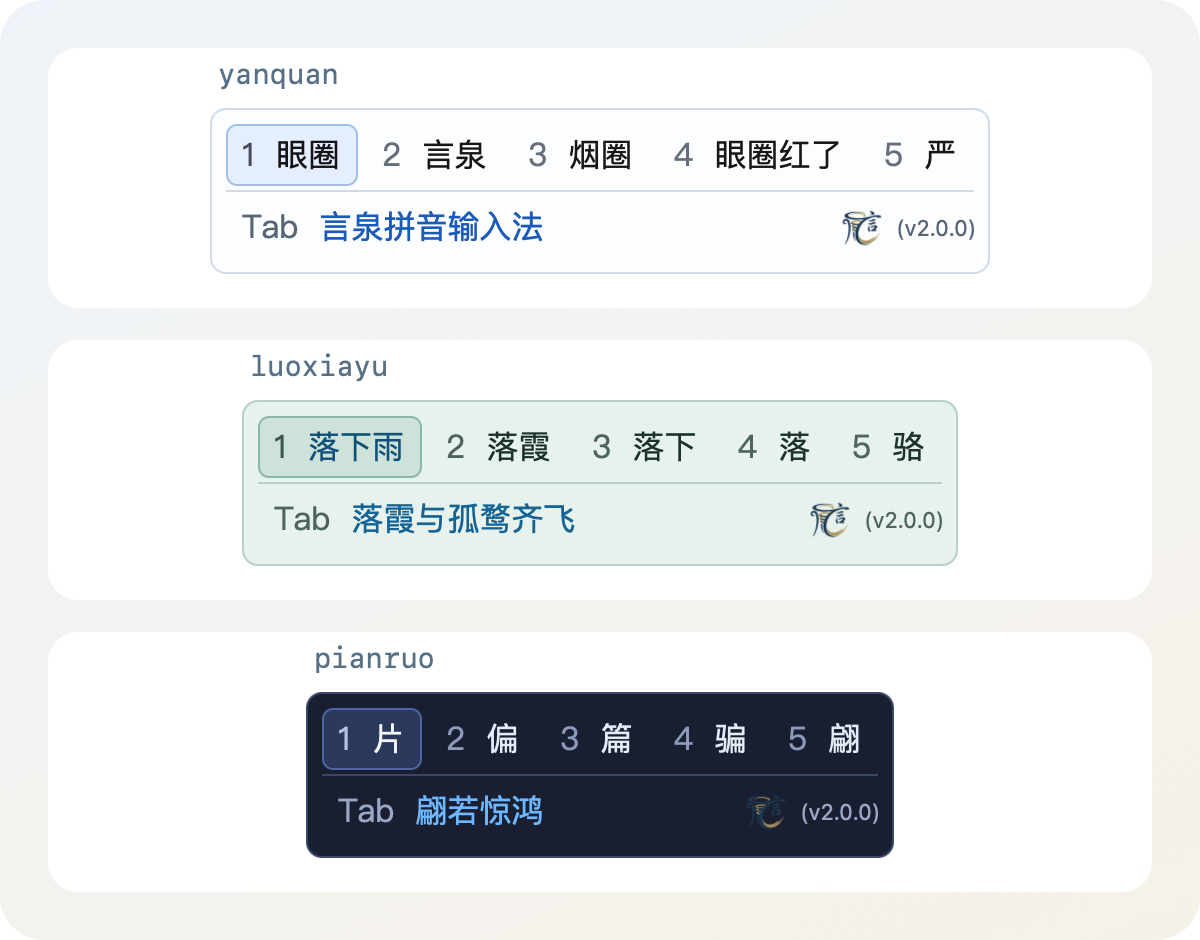
Candidate window. Two rows by default: up to nine numbered candidates without wrapping, and a Tab completion row that always stays, with the logo and version. Paging can expand the window to three candidate rows; numbers and Space select from the active row and the mouse from any visible row. All characters for a complete syllable remain reachable by paging, including readings with more than 256 characters. A small red × beside a learned word removes it. Eight color options, fonts from 12 to 32 points (14 by default) and live previews.
-
Chinese/English mode. A bare Shift switches modes, and a short bubble beside the caret shows the logo with 中 or 英. The bubble can be turned off in Appearance. It also shows the mode when switching to Cassotis, and reminds you of English mode on entering a text field. Caps Lock can optionally replace Shift; this binding currently does not distinguish a short tap from a long hold (see configuration). Each application remembers its own mode by default. A modifier-only shortcut is cancelled when another key or a click happened while the modifier was held; the frontend compares system-wide event counts for this and reads no key contents.
-
English recognition. In Chinese full-Pinyin, half-width mode, letters that are an English word or name (
pro,markdown,Effie), that are typed with a capital, or that were committed as letters before appear before the numbered candidates, keeping their capitalization. When the input has no Chinese reading as a whole they are selected and Space commits them as typed; when it has one (bug,mac), the language model weighs the letters against it with the preceding text. Arrow keys and the mouse move between the letters and the Chinese candidates, Chinese selection numbers stay unchanged, and choosing the letters is remembered without adding a user word. Enabled by default and optional in Settings; Double Pinyin keeps its normal behavior. -
One-key completion. Exactly one trusted continuation is shown in the Tab row and accepted with the configured key. Exact completions from the user and base dictionaries and offline-vetted strong-transition completions appear at once; the language model then reranks them in the background, using the text before the cursor when there is any. In a long sentence it finishes the current word or continues with the next phrase, and shows nothing when its confidence is insufficient. Predictions use the theme's accent color; a plain join of the words already typed uses the ordinary text color. Classical verses can complete from their opening syllables; entering a full line can offer the next line, such as 春眠不觉晓,处处闻啼鸟.
-
Long sentences. Lexicon-constrained path search builds complete candidates (for example
womenjintian→我们今天) while keeping prefix candidates for partial commitment. The language model chooses among the complete candidates. In simplified full-Pinyin mode, it also corrects small homophone errors in the chosen sentence against the typed Pinyin and the text before the input. -
Short words. The language model resolves competing exact candidates using prior text and general-text word frequencies. Without context, a much rarer word cannot displace a common first choice.
-
Short phrases. In simplified mode, an input of three to five syllables that the dictionary does not contain (for example
jiuguize→旧规则) gets whole phrases put together from dictionary words. The language model picks one, using the text before the cursor when there is any, and corrects its homophones against the typed Pinyin; when the choice is close, up to two more whole phrases follow the first. -
Pinyin schemes. Full Pinyin and six selectable Double Pinyin schemes (Microsoft, Xiaohe, Ziranma, Sogou, Ziguang, and Pinyin Jiajia) share the same candidate ranking and user-learning data. Fuzzy Pinyin is configurable, initial-letter abbreviations are supported (for example
jt→今天), andvtypes ü (lv,nv;lue/nueandjv/qv/xvare accepted too). -
Dictionaries and learning. Separate simplified and traditional base dictionaries and a user dictionary. Learned words are shown in the active script without being learned again. Specialist vocabulary appears only for its exact input. Letters that no syllable explains are marked in red without changing the input.
-
Quick input.
ufhsymbols,uxhnumbered markers,usxmathematical symbols,urq/usjthe current date and time, and more;i123.45orv123.45offers Chinese numbers and uppercase currency amounts, selected with the displayeda/b/c/dkeys while digits keep entering the number. Double Pinyin enters these modes with Shift+U/I/V. See the quick-input guide (Chinese). -
Chinese punctuation. With Chinese punctuation and half-width input, a full stop typed right after digits becomes a decimal point, and the symbols that stay as typed can be edited in Settings, set to the Markdown preset or to standard Chinese punctuation. The default Markdown preset keeps
-#*+_=`~[]<>|@; commas, full stops, parentheses and quotation marks stay Chinese, and the backslash gives the enumeration comma、. -
Custom phrases. Define ordered letter shortcuts and commit literal, multiline text with Tab, without changing numbered candidates or Space. Import and export JSON compatible with Windows. Fill in the shortcut and text, then click 添加短语 (Add Phrase); editing an existing entry uses 保存修改 (Save Changes) or 取消编辑 (Cancel Edit).
-
Settings. A sidebar settings window that saves every confirmed change at once, with direct shortcut recording and font-name completion. Logging is off by default.
-
Local by design. No network and no GPU. Keys typed while the engine starts are kept and converted once it is ready; while the language model is loading or unavailable, candidates are ranked without it.
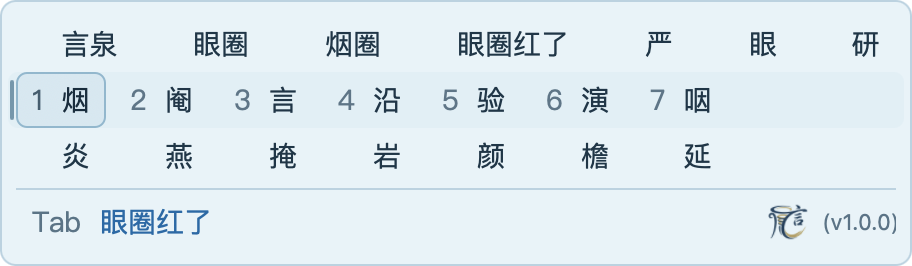
Three-row candidate view, with selection numbers on the active row.
Improvements in 2.6.0
- More reliable long sentences. Word-frequency evidence helps choose complete sentences. Pinyin correction and the shared language model weigh each rewrite together, including plausible same-Pinyin word replacements.
- Better use of context and the second choice. Short-word ranking uses policies fitted to typing contexts and can retain a clearly stronger runner-up using scores already computed.
- Single characters follow usage. Without preceding text, characters keep their dictionary frequency order. A character selected at the end of a longer composition is no longer learned as a standalone choice.
- Alternative syllable splits stay available. After the characters of
shua, candidates fromshuremain available for partial selection. The model filters unlikely split phrases such as “多数啊” forduoshuawhen they would lead the page. - Updated dictionaries. Cassotis Lexicon v2.6.0 adds everyday words, revises word frequencies and separates simplified/traditional reading corrections. The same single neural model is retained.
Changes in 2.5.0
- More useful short-word choices. General-text word frequencies now help the language model rank short words; common choices are better protected without context. Short phrases can use word transitions when an exact dictionary entry is missing.
- Complete single-syllable pages. Keep every stored character reachable, including syllables with more than 256 readings. Paging no longer repeats filtered candidates, and
ng/hmcan select 嗯 / 噷. - Clearer mode reminders. Keep the caret bubble when switching input sources or handing focus to the text field. Entering a field in English mode also shows a reminder; turn these hints off in Appearance if preferred.
- Optional Caps Lock binding. Choose Caps Lock as the Chinese/English key; an unfinished composition is committed as typed before switching. This binding does not yet distinguish a short tap from a long hold.
- Updated dictionaries, unchanged neural model. Use Cassotis Lexicon v2.5.0 and load word-transition scores as needed instead of reading the whole table on startup.
Changes in 2.1.0
- Bring your word preferences. Import words, full Pinyin and usage counts from another input method in Advanced, from comma- or Tab-separated text. Review the format and ranking effects before choosing the file; the result reports the number actually imported. See the frequency import guide (Chinese).
- More reliable common words and unfinished phrases. Without preceding text, keep a common first choice when corpus evidence strongly favors it. Phrase scoring also considers text without a final comma, so the input can continue naturally. The lexicon adds everyday expressions.
- More dependable phrases and prefixes. Keep a word whose last syllable is still being typed ahead of generated phrases. Check alternative syllable boundaries, re-score corrections, and remove weak or nearly duplicate secondary phrases. Longer words with untyped syllables stay in Tab completion.
- Better traditional Chinese. Score the simplified equivalents with the shared model, then keep Taiwan traditional forms throughout candidates, paging, committed text and Tab completion. Words such as 著名 retain their proper reading.
- Cleaner Tab suggestions. Prefer well-supported general words over rare specialist terms and reject suggestions that misread the typed keys. The updated lexicon adds everyday expressions and corrects readings.
- Context diagnostics when needed. Advanced → Debug mode shows the ranking context and its source in the candidate footer without resizing the panel. It is off by default and independent of logging.
Download and Install
- Download. Get
cassotis-ime-macos-<version>-arm64-installer-signed.dmgfrom the Releases page. The disk image is about 340 MB and includes the simplified and traditional base dictionaries and the language model. Release images are signed with the Sunisoft Limited Developer ID and notarized by Apple. - Requirements. A Mac with Apple silicon and macOS 14 or later. No Terminal commands, compiler, Python installation, network or GPU are needed.
- Install. Open the disk image, double-click 言泉输入法安装器 (Cassotis IME Installer) and click 安装 (Install). The installer asks macOS to enable the input source; click Allow if a confirmation appears. Once 安装完成 (Installation Complete) appears, select 言泉输入法 from the input menu in the menu bar and type
nihaofollowed by Space to enter “你好”. If enabling is still pending, click 重试启用 (Retry Enablement), or 打开键盘设置 (Open Keyboard Settings) to add the input source by hand. - macOS 27. The system may open Keyboard Settings without a confirmation. Add 言泉输入法 under Text Input → Edit → + → Chinese, Simplified, then return to the installer; it checks that the input source is enabled.
- Upgrade. Run the installer of the new version over the installed one. It keeps the settings and learned words, shows its progress, and offers the log and a retry when something fails.
- Uninstall. Remove the input source in System Settings first, then use the uninstall option of the installer. Settings and learned words are kept.
Architecture
src/macos: InputMethodKit input controller and AppKit candidate window, mode bubble and settings window (Objective-C++).src/service,src/ipc: the engine process service and its Unix-socket protocol.src/engine,src/dictionary: Pinyin parsing, candidate generation, ranking and user learning, ported from Windows.src/host: language-model hosting;src/host/nativeholds the C++ bridge to ONNX Runtime and the attention operator.src/common: configuration, types and platform adaptation.src/installer: the graphical installer.tools/dictionary,tools/control: the dictionary importer and the input-source control tool.data: the language model (data/models/char_lm, stored as numbered parts), its checksums and the lexicon input hashes.scripts,resources: build, installation and packaging scripts; icons and bundle resources.third_party: ONNX Runtime headers and version, and the licenses and notices of bundled components.
See the architecture document (Chinese) for the processes, the protocol and recovery.
Runtime Files
Cassotis.app/Contents/MacOS/Cassotis: the input-method frontend; macOS starts it for the input source.Cassotis.app/Contents/MacOS/cassotis-engine: the engine process; it loads the dictionaries and the language model. The frontend starts it with--serveand talks to it over a private Unix socket.Cassotis.app/Contents/Frameworks/libcassotis_ort.dylibandlibonnxruntime.1.20.1.dylib: the language-model bridge and its runtime; only the engine process loads them.Cassotis.app/Contents/Resources/models/char_lm: the language model, its vocabulary, Pinyin readings and manifest.Cassotis.app/Contents/Resources/dictionaries: the simplified and traditional base dictionaries (dict_sc.db,dict_tc.db).
Without the engine process no input is converted. When a request fails or times out, the frontend commits the last visible composition, passes the key on to the application and starts the engine again. Without the model files the input method still works and ranks candidates without the language model.
Build and Install (Quick Start)
Prerequisites: a Mac with Apple silicon, Free Pascal 3.2.2, the Xcode command-line tools and Python 3.11 or later. Lazarus/LCL is not required. Obtain the generated artifacts of Cassotis Lexicon v2.6.0 and point CASSOTIS_LEXICON_ROOT to that checkout (/path/to/... is a placeholder):
./scripts/check_environment.sh
export CASSOTIS_LEXICON_ROOT="/path/to/cassotis-lexicon"
./build_all.sh
./install.sh
The application is built at build/arm64/Cassotis.app and installed for the current user in ~/Library/Input Methods/Cassotis.app; run the scripts without sudo. Add 言泉输入法 under System Settings → Keyboard → Text Input, then select it from the input menu. If the input-source list does not refresh, log out and log back in.
build_all.sh builds the language-model bridge, the engine, both dictionaries, the frontend and the installer, and joins the numbered parts in data/models/char_lm into the char_lm.onnx the application carries, after checking their SHA-256 values. The first build downloads the official ONNX Runtime 1.20.1 arm64 package and checks its pinned hash. ./rebuild_all.sh cleans and rebuilds everything, ./uninstall.sh removes the input method and keeps the learned words, and ./scripts/package.sh builds the installer disk image. See BUILD.md (Chinese) for the options, packaging and signing.
Dictionary Workflow
The base dictionaries are the schema-24 SQLite databases of Cassotis Lexicon, built from the 28 generated files under its data/generated/:
- the word lists
dict_unihan_sc.txt,dict_unihan_tc.txt,dict_clean_sc.txtanddict_clean_tc.txt(pinyin<TAB>text<TAB>weight), - the tables trained from corpora in the same directory: word-transition priors, completion priors, general-text word frequencies and the short-word promotion table.
The build checks each file against data/lexicon-inputs.json and imports them into dict_sc.db and dict_tc.db, which go into the application bundle. The v2.6.0 dictionaries hold 261,809 simplified and 262,686 traditional reading records, single characters included. The user dictionary, the engine settings and learned data are in ~/Library/Application Support/CassotisIME/; replacing the application never overwrites them.
Models and Ranking
2.0.0: one language model
macOS 1.0.0 carried the separate models of Windows v1.31.0: eleven neural graphs for rankers, scorers, generators and correction, each for one stage of one input path. macOS 2.0.0 takes over the consolidation of Windows v2.0.0 and v2.2.0:
- One model. A character-level autoregressive language model of about 150 million parameters (11 layers, 1,024 dimensions, a 12,017-character vocabulary, 8-bit quantized), trained by the project on independent Chinese corpora both as a plain language model and conditioned on Pinyin. It scores complete long-sentence candidates, corrects the chosen sentence against the typed syllables, chooses among short words, reranks one-key completions, and proposes and selects long-sentence Tab continuations. Version 2.6.0 retains this model, whose weights are byte-identical to those of Windows v2.6.0; the retired graphs, indexes and hosts are gone from the application.
- Nine compact units in 2.6.0. Three structural rankers serve long-sentence search and the complete-candidate pool. Six small gradient-boosted policies decide long-sentence ranking, short-word ranking with and without context, a conservative context detail check, one-key completion and Tab continuation. They use the same compiled parameters as Windows. The dictionary’s precomputed short-word promotion table remains part of candidate ordering.
- Scores that do not depend on the call. The model is quantized with fixed activation ranges and computes attention with an operator of its own, whose Apple-silicon NEON kernel keeps the summation order of the Windows kernel. A text gets the same scores however it is batched and whatever was computed before, so a long sentence typed key by key gets the same candidates as the same Pinyin entered at once.
- One place to improve. A better language model now improves every input path at once, and the decision policies are refit from engine traces on Windows.
How candidates are ranked
For traditional input, the model scores the corresponding simplified text and the engine converts generated completions to Taiwan traditional forms. Foreground selection and background completion share the same model.
- Long sentences. Lexicon-constrained search builds complete candidates; two rankers decide which paths survive pruning and a third orders the pool of complete candidates. The language model scores the leading candidates and the long-sentence policy picks the first and the second. For full-Pinyin input in the simplified variant, the model then rewrites the chosen sentence against the typed syllables and up to 48 characters before the input, which repairs small homophone errors; user words and exact full-query dictionary matches are left alone.
- Short words. Exact candidates keep their dictionary order unless the language model's scores, with the text before the cursor when there is any, give the short-word policy a clear reason to change it. Where nothing but the dictionary decides, the precomputed table sets the order.
- Phrases outside the dictionary. For an input of three to five syllables that is neither a dictionary entry nor a user word, the dictionary supplies whole-phrase drafts for every way of cutting the input. The language model scores each by how well it stands as a clause of its own, with the text before the cursor when there is any, and picks one; it then corrects the chosen draft against the typed syllables. This also runs for Double Pinyin; with fuzzy Pinyin, a separator
'in the input or the traditional dictionary it does not. A phrase the user picks from behind the first one is kept as a user word. - English letters. Where typed letters are also a Chinese reading, the language model compares the letters with the page's first readings in one call, with the preceding text; the letters go first only with a clear lead.
- One-key completion. Dictionary and strong-transition completions are shown at once. The language model reranks a wider set of dictionary words in the background and replaces the shown completion only when the gain is clear.
- Tab continuation in long sentences. The language model proposes the next characters and scores the ways to finish the current word or continue with the next phrase; the Tab policy picks one or shows nothing.
Runtime behavior
- Everything is computed locally on the CPU with the bundled ONNX Runtime; no network and no GPU are used.
- Only the engine process loads the model, in the background. Ordinary candidates, selection, commitment and dictionary completion do not wait for it.
- A language-model call has a 100 ms deadline and a long-sentence Tab result 80 ms; a late result is dropped and the existing result stays.
- The model sizes its thread pool from the fastest CPU tier, with four to eight workers. It falls back to the physical or system CPU count when tier information is unavailable.
- Only the text before the cursor is read as context, at most 1,024 UTF-16 code units, and never from secure fields.
Benchmarks
The test methods, the corpus and the scoring rules are in BENCHMARK.md. The cases are those of Cassotis IME for Windows, taken from the developer's own novel Elegance in Timelessness (永恒的舞动) and kept separate from all training data. Version numbers in the tables are macOS releases.
This run uses native arm64 on an Apple M2 Pro with 32 GiB RAM and macOS 27.0.1, the simplified dictionary and six model threads (versions before 2.5.0 used eight). All suites run serially. Latency is in milliseconds and excludes InputMethodKit, IPC and drawing. User applications and screen sharing were left running; system load affects comparisons between runs. BENCHMARK.md records the complete measurements and repeats.
The tables report macOS v2.6.0 against the preceding release, v2.5.0. Older rows retain their published results. The cases retain the corrections to 51 long-sentence and 217 short-word Pinyin readings introduced during 2.1.0 preparation. For v2.0.0, regular values are the October 23 remeasurement with its original runtime and Lexicon v2.2.0 on these identical corrected cases; italic values retain the original release results. A single value is unchanged. The v1.0.0 rows remain historical measurements. Detailed methods and upstream reference counts are in BENCHMARK.md.
Long Sentence Benchmark-16300
| Version | Top1 | Top2 | Mean (ms) | P50 (ms) | P95 (ms) | Max (ms) |
|---|---|---|---|---|---|---|
v2.6.0 |
13743/16300 (84.31%) | 14689/16300 (90.12%) | 82.148 | 77 | 143 | 499 |
v2.5.0 |
13441/16300 (82.46%) | 14358/16300 (88.09%) | 86.055 | 81 | 146 | 512 |
v2.1.0 |
13435/16300 (82.42%) | 14314/16300 (87.82%) | 87.889 | 84 | 147 | 519 |
v2.0.0 |
13390/16300 (82.15%) | |||||
| 13397/16300 (82.19%) | 14273/16300 (87.56%) | |||||
| 14281/16300 (87.61%) | 90.024 | |||||
| 94.084 | 86 | |||||
| 90 | 149 | |||||
| 154 | 517 | |||||
| 523 | ||||||
v1.0.0 |
12941/16300 (79.39%) | 13534/16300 (83.03%) | 85.043 | 79 | 148 | 567 |
Accuracy comes from a deterministic run in which no model call is cut off, latency from a separate production run. Latency is the time to decode a whole query at once, not keystroke-to-display latency.
Short-word Context Benchmark-65000
| Version | Top1 | Top2 | Contested Top1 | Contested Top2 | Mean (ms) | P50 (ms) | P95 (ms) | Max (ms) |
|---|---|---|---|---|---|---|---|---|
v2.6.0 |
63455/65000 (97.62%) | 64521/65000 (99.26%) | 10516/11685 (90.00%) | 11283/11685 (96.56%) | 6.744 | 5 | 18 | 99 |
v2.5.0 |
63463/65000 (97.64%) | 64436/65000 (99.13%) | 10512/11685 (89.96%) | 11223/11685 (96.05%) | 7.202 | 5 | 20 | 66 |
v2.1.0 |
63455/65000 (97.62%) | 64423/65000 (99.11%) | 10539/11685 (90.19%) | 11225/11685 (96.06%) | 7.652 | 5 | 21 | 70 |
v2.0.0 |
63348/65000 (97.46%) | |||||||
| 63362/65000 (97.48%) | 64346/65000 (98.99%) | |||||||
| 64291/65000 (98.91%) | 10504/11685 (89.89%) | |||||||
| 10533/11728 (89.81%) | 11228/11685 (96.09%) | |||||||
| 11244/11728 (95.87%) | 7.281 | |||||||
| 7.232 | 5 | 20 | 79 | |||||
| 62 | ||||||||
v1.0.0 |
63036/65000 (96.98%) | 64103/65000 (98.62%) | 10488/11728 (89.43%) | 11196/11728 (95.46%) | 6.801 | 6 | 17 | 40 |
The table uses preceding text. Contested is the subset whose Pinyin belongs to at least two target words in the corpus. Without preceding text, v2.6.0 scores 61360/63763 (Top1/Top2). The current and previous counts are retained separately; see BENCHMARK.md for all subsets.
One-key Completion Context Benchmark-12831
| Version | Completion Hit | Avg Keys Saved | Stability | Keystroke P95 (ms) | Final P95 (ms) |
|---|---|---|---|---|---|
v2.6.0 |
10513/12831 (81.93%) | 2.635 | 2153/2216 (97.16%) | 2.000 | 16.493 |
v2.5.0 |
10513/12831 (81.93%) | 2.635 | 2153/2216 (97.16%) | 2.137 | 19.915 |
v2.1.0 |
10513/12831 (81.93%) | 2.636 | 2154/2217 (97.16%) | 2.035 | 18.451 |
v2.0.0 |
10466/12831 (81.57%) | ||||
| 10457/12831 (81.50%) | 2.633 | ||||
| 2.632 | 2134/2198 (97.09%) | ||||
| 2133/2195 (97.18%) | 1.982 | ||||
| 2.035 | 19.357 | ||||
| 21.352 | |||||
v1.0.0 |
10331/12831 (80.52%) | 2.638 | 2117/2180 (97.11%) | 1.213 | 9.385 |
The 65,000 short-word cases give 12,831 completion opportunities. Savings are per correct completion, after charging one key to accept it. The final P95 includes the background rerank when it changes the shown completion.
Long-sentence One-key Completion Benchmark-16300
| Version | Local Completion Hit | Predictive Prompt Coverage | Total Keys Saved | P95 (ms) |
|---|---|---|---|---|
v2.6.0 |
3955/16300 (24.26%) | 16152/16300 (99.09%) | 9724 | 137 |
v2.5.0 |
3903/16300 (23.94%) | 16144/16300 (99.04%) | 9627 | 146 |
v2.1.0 |
3877/16300 (23.79%) | 16139/16300 (99.01%) | 9597 | 148 |
v2.0.0 |
3771/16300 (23.13%) | |||
| 3768/16300 (23.12%) | 16111/16300 (98.84%) | |||
| 16113/16300 (98.85%) | 9303 | |||
| 9293 | 143 | |||
| 149 | ||||
v1.0.0 |
3539/16300 (21.71%) | 15812/16300 (97.01%) | 7539 | 131 |
Each case leaves the last four complete syllables of a sentence untyped and checks the single continuation shown; a hit extends the typed prefix correctly without having to finish the sentence. All releases use the 80 ms result budget. The v2.6.0 deadline-free control has 3,957 hits and 9,727 net saved keys; the production run has 3,955 hits and 9,724 net saved keys. 他 and 她 count as equal at the same position. Predictive Prompt Coverage counts the prompts that predict a continuation, not plain joins of typed Pinyin, and is not a precision figure.
Configuration
Open Settings… from the input menu, or press Ctrl+Shift+F10. Every confirmed change is saved and applied at once.
Important options include:
- simplified or traditional dictionary and the Pinyin scheme (Full Pinyin or one of six Double Pinyin schemes)
- individual fuzzy-Pinyin rules
- candidates per page (3 to 9), paging and completion keys, and five individually switchable shortcuts
- remembering the Chinese/English mode per application (on by default)
- English recognition in Chinese mode (on by default)
- whether a full stop typed after digits becomes a decimal point (on by default)
- symbols kept half-width in Chinese punctuation (the Markdown preset by default)
- font, size, color theme and the optional three-row view
- Chinese/English mode hints beside the caret (on by default)
- custom phrases, with explicit Add / Save Changes actions, duplicate priority and JSON import/export
- logging in Advanced (off by default; logs go to
~/Library/Logs/CassotisIME/) - ranking-context debug display in Advanced (off by default, independent of logging)
Display preferences are kept in the UserDefaults of org.cassotis.inputmethod.Cassotis; engine settings and learned data in ~/Library/Application Support/CassotisIME/. See the configuration guide (Chinese) for every key and option.
Documentation
- Simplified Chinese documentation: README.zh-Hans.md
- Traditional Chinese documentation: README.zh-Hant.md
- Benchmark methodology and results: BENCHMARK.md
- Configuration and keys (Chinese): CONFIGURATION.md
- Quick input (Chinese): QUICK_INPUT.md
- Build, packaging and signing (Chinese): BUILD.md
- Tested environments and limitations: COMPATIBILITY.md
- Changes per release: CHANGELOG.md
- Processes, protocol and recovery (Chinese): docs/ARCHITECTURE.md
- Licenses and provenance: NOTICE.md
Roadmap
- follow Windows engine, language-model and dictionary releases, validate quality on the shared cases, and publish complete macOS measurements
- qualify macOS 14 and 15 on real machines, clean installations, several displays, and sleep and wake
- test more third-party applications
- shorten the time from a keystroke to its candidates, above all in long sentences
Version History
Each paragraph records what a release introduced at the time. The separate models named here were retired in 2.0.0; the section “Models and Ranking” above describes what runs today.
Cassotis IME for macOS v0.1.0 (build 1) is the first release, on the Cassotis IME and Lexicon v1.27.0 baseline: a native InputMethodKit / AppKit input method with a Free Pascal engine process, local ONNX inference and simplified and traditional dictionaries; full Pinyin, abbreviations, six Double Pinyin schemes, fuzzy Pinyin, local learning and Tab completion; a two-row candidate window with eight color options, a Chinese/English bubble at the caret, settings that save automatically, and a signed graphical installer that keeps settings and learned words.
Cassotis IME for macOS v0.2.0 (build 2) ports v1.29.0: context-aware short-word reranking, literary phrase recovery for long sentences, the optional three-row candidate view with mouse selection across rows, and exact specialist vocabulary. Comparisons against the minimum integer and floating-point intermediates are written so that Free Pascal on Apple silicon keeps the candidate paths and scores of Delphi.
Cassotis IME for macOS v1.0.0 (build 3) ports v1.31.0: a shared character language model replaces the RBT3 short-context model for long sentences, contextual short words, mixed abbreviations and Tab continuation; short completion is reranked in the background, and long completion compares finishing the current word with following phrases and predicted characters.
Cassotis IME for macOS v2.0.0 (build 4) ports v2.2.0 and replaces the eleven neural graphs with one character language model and seven compact units. Phrases of three to five syllables outside the dictionary are composed by the language model and corrected against the typed Pinyin. It adds English recognition in Chinese mode, U/I/V quick input, decimal periods after digits, the Markdown punctuation preset and a per-application Chinese/English mode; partial correction and undo keep the original keystrokes, and single characters stay selectable at ambiguous nasal boundaries. It also adds ordered custom phrases, keeps completions while the final syllable is still being typed, and improves context-free short-phrase scoring. The base dictionaries include the 389 earlier additions plus 67 reply, set and repository phrases per script.
License
The application code is licensed under GPL-3.0; see LICENSE. The bundled dictionaries are licensed under CC BY-SA 4.0 as declared by Cassotis Lexicon. Licenses and provenance of the model, ONNX Runtime and the other components are in NOTICE.md; model and schema checksums are in data/runtime-assets.sha256.