

VittixReport

- Active · last change 11-4-2026
- ★ 11 on GitHub
README
VittixReport
A modern reporting framework and standalone visual designer for Delphi VCL applications.
VittixReport is a comprehensive reporting suite built entirely from the ground up for Delphi. It provides developers with a robust runtime engine, a band-oriented report model, and a full-featured visual designer.
Unlike legacy reporting tools, the VittixReport runtime relies on the standard Delphi RTL and VCL plus one vendored, MIT-licensed QR-code library (source/ThirdParty/QRCodeGenLib). Reports are serialized into a clean, source-control-friendly JSON format (.vrt).
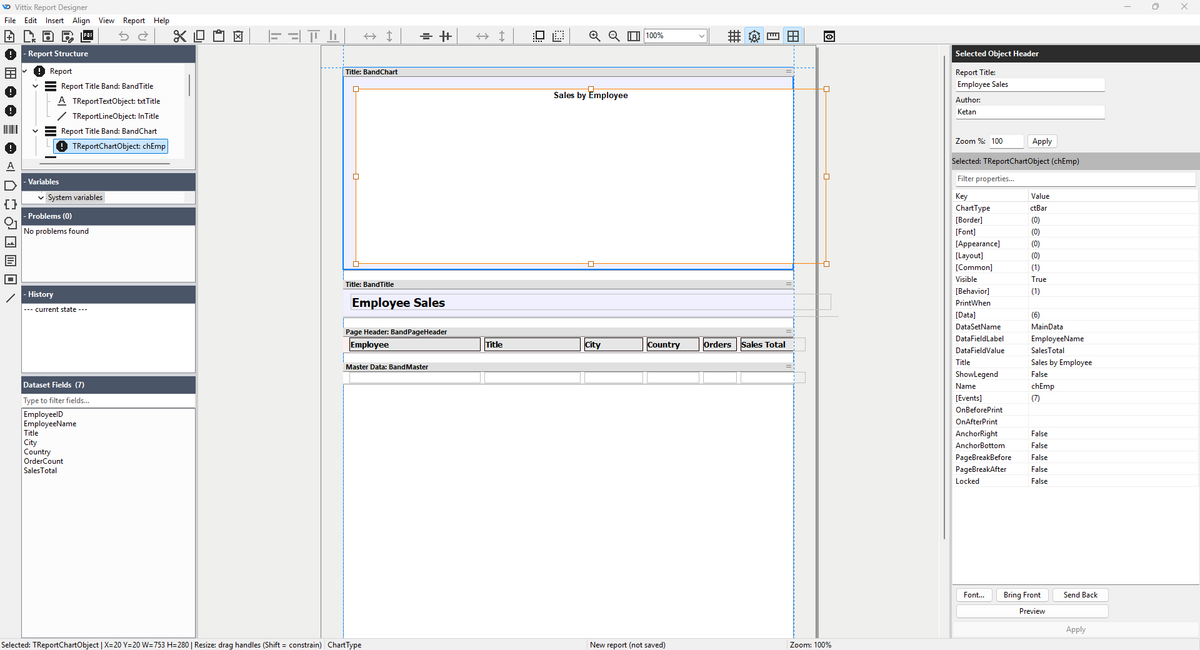
The standalone visual designer - structure tree, dataset fields, design canvas and property inspector, with a sample report open.
Features
- 🎨 Standalone Visual Designer: A powerful desktop application featuring drag-and-drop object placement, a property inspector, band management, and a live print preview.
- ⚡ Self-Contained Core: The core runtime is the standard Delphi 12.2 RTL and VCL plus the vendored, MIT-licensed QR-code generator library (
source/ThirdParty/QRCodeGenLib) - no external component packs to install. (Note: the standalone visual designer application additionally requires madExcept and uses the FireDAC/ADO data-access components that ship with RAD Studio; its SVG-sourced icons are compiled to PNG resources, so no external SVG component library is needed.) - 🔄 Unlimited Undo/Redo: The designer implements a deep undo/redo stack for every action, including complex multi-object alignments, property changes, and band management.
- 📄 JSON Report Format (
.vrt): Say goodbye to binary blobs. Reports are stored in a human-readable, easily diffable JSON format. - 🧩 Rich Object Library: Out-of-the-box support for text labels, data fields, rich text (HTML memos), images, shapes, lines, barcodes (Code 39, Code 128, EAN-13 and QR), tables, charts, crosstabs, and nested sub-reports.
- 🚀 Runtime Event Scripting: Hook into the engine's rendering pipeline with
OnBeforePrint/OnAfterPrintevents at both the band and object level, driven by your host application's Delphi code. - 📊 Band-Oriented Layout: Supports standard structural bands including Report Title, Page Header/Footer, Group Header/Footer, Master Data (with runtime
TDataSetbinding), Detail bands, and Report Summary. - 🖨️ Print & Export: Built-in Vector PDF export (the default - no printer driver required), a printer-based PDF compatibility path, HTML, XLSX and text export, and native system printing capabilities. The Designer and component preview provide Save PDF... with a user-selected destination and atomic replace; direct Simple MAPI email export has been retired.
Project Structure
source/- The core framework (engine, object model, serializer, components, and designer UI controls).vittixdesigner/- The standalone Windows report designer application.packages/- Delphi runtime and design-time package files (.dpk).docs/- Additional technical documentation (e.g., Event Scripting Rules).
Requirements
- Delphi 12.2 or later
- VCL application target
- Windows 10 or later
- Win32 or Win64 target platform (packages and CI gate build Win32; the standalone designer also builds Win64 via
build.bat)
The default Vector PDF export needs no printer driver. The printer-based compatibility path requires the Windows printing system, such as Microsoft Print to PDF.
Getting Started
Building and testing from the command line
build.bat- builds the packages and the designertools\ci_gate.ps1(PowerShell) - the full quality gate. On the uncommitted v1.0.1 candidate working tree based onc33b7e97b0346de83fca6bbf785c75f468d1e95a,ci_gate.ps1 -IncludePackagesexited 0: DUnitX 899/899 passed (including 12/12 Firebird tests), with 0 failed, 0 errored, and 0 leaked; the strict runner matched 41/41 reports with one intentional policy skip; USER delta 0 and GDI delta +8; runtime/design packages, Designer, and Demo built successfully. These results apply to the candidate working tree, not the base commit alone. Seedocs/release-notes-v1.0.1.mdfor evidence paths and details.TESTING.md- the gate contract and the manual test checklistsreports/- 45.vrtregression fixtures with pinned page-count baselines- See
DEVELOPMENT_PLAN.mdfor the current work programme
Building the Standalone Designer
- Open the project:
vittixdesigner/VittixDesigner.dproj - Build the project in Delphi.
- Run the designer.
Use the designer to:
- Create reports
- Add bands
- Place report objects
- Bind fields
- Edit properties
- Preview reports
- Save
.vrtfiles
Using the Runtime Components
To use VittixReport in your own Delphi VCL application:
- Add the
source/folder to your Delphi library/search path. - Install the runtime/design-time packages from
packages/, if required. - Load a
.vrtreport file usingTReportSerializer. - Attach your dataset.
- Prepare and preview, print, or export the report.
Example: Export a Report to PDF
The default PDF export is the native Vector PDF writer (no printer driver required, silent/server capable). The printer-based exporter is retained as a compatibility path.
uses
  Vittix.Report.Model,
  Vittix.Report.Engine,
  Vittix.Report.Serializer,
  Vittix.Report.Export.Commands,
  Vittix.Report.Export.VectorPDF;

procedure GenerateInvoicePDF;
var
  Report: TReportModel;
  Engine: TReportEngine;
  ExportDoc: TReportExportDocument;
begin
  Report := TReportSerializer.LoadFromFile('C:\Reports\Invoice.vrt');
  ExportDoc := TReportExportDocument.Create;
  try
    Engine := TReportEngine.Create(Report, qryInvoiceData);
    try
      Engine.ExportDocument := ExportDoc;
      Engine.Prepare;

      TReportVectorPDFExporter.ExportDocument(
        ExportDoc,
        'C:\Output\Invoice_001.pdf'
      );
    finally
      Engine.Free;
    end;
  finally
    ExportDoc.Free;
    Report.Free;
  end;
end;
On the TVittixReport component the same is ExportToPDF(...); the
printer-based compatibility path is ExportToPrinterPDF(...).
File Format
- Reports are saved as JSON (
.vrt). SeeVittix.Report.Serializerfor details.
License
See LICENSE.
Documentation
Development plan (source of truth)
VittixReport_FullCodeAnalysis.md- the full code-analysis report and the single source of truth for development planning: §5 (Issues by Severity) is the working bug queue, §12 (Refactoring Plan) is the backlog of parked work.DEVELOPMENT_PLAN.md- the execution schedule derived from the report: work items (DP-xx) in waves, each with fix approach, test plan and completion status.- Superseded planning documents are archived under
docs/archive/(historical record only).
Manuals and guides
- See
USER_MANUAL.mdfor end-user instructions - See
DEVELOPER_MANUAL.mdfor developer integration and extension - See
TESTING.mdfor the test gates and manual checklists - The full documentation site lives in
docs/(MkDocs;docs/index.mdis the map)