

Delphi_Firewall_Component

An easy to use Drag and drop VCL Windows (WFP) Firewall component!
- Active · last change 3-10-2026
- ★ 11 on GitHub
README
Delphi Firewall Component for VCL (WFP)
Professional Windows firewall component suite for Delphi VCL, powered by the Windows Filtering Platform (WFP).
Preview

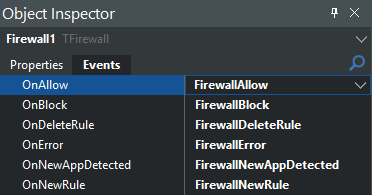
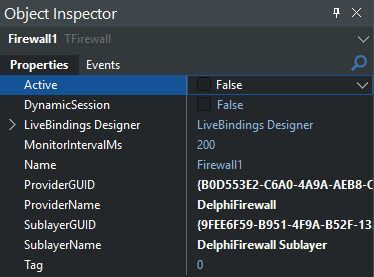
Overview
TFirewall is a native Delphi VCL component for application-level allow/block control and real-time network activity monitoring using WFP.
Core capabilities:
- Detect new applications attempting network activity.
- Apply per-application ALLOW/BLOCK rules.
- Receive real-time allow/block events with connection metadata.
- Manage rule lifecycle (create, delete, clear, count).
- Customize provider/sublayer identity for managed filters.
This repository includes both runtime/design-time packages and two demos:
Demo/SimpleFirewallDemoDemo/Polished Demo(SQLite + FireDAC persistence, modern UI)
Key Features
Native WFP integration
- Uses
FwpmEngine*, provider/sublayer registration, and app-id filters. - No external DLL dependencies beyond Windows system APIs.
Real-time monitoring
- WFP net event subscription.
- Connection snapshot polling via IP Helper API as a secondary signal path.
Rule management API
AllowApplication(...)BlockApplication(...)DeleteRule(...)ClearRulesGetRuleCount
Event-driven design
OnNewAppDetectedOnAllowOnBlockOnNewRuleOnDeleteRuleOnError
Repository Layout
Source/
  FW.Component.pas
  FW.Types.pas
  FW.Monitor.pas
  FW.WFP.API.pas
  FW.IpHelper.API.pas
  FW.Notification.pas
  ...

Package/
  DelphiFirewallRT.dpk   (runtime)
  DelphiFirewallDT.dpk   (design-time)

Demo/
  SimpleFirewallDemo/
  Polished Demo/
Installation (Delphi IDE)
- Open
Package/DelphiFirewallRT.dpkand build it. - Open
Package/DelphiFirewallDT.dpk. - Build and install
DelphiFirewallDT. - The component appears in the Firewall palette category as
TFirewall.
Quick Start
uses FW.Component, FW.Types;

procedure TForm1.FormCreate(Sender: TObject);
begin
  Firewall1.Active := False;
  Firewall1.DynamicSession := False;
  Firewall1.MonitorIntervalMs := 200;

  Firewall1.OnNewAppDetected := FirewallNewAppDetected;
  Firewall1.OnAllow := FirewallAllow;
  Firewall1.OnBlock := FirewallBlock;
  Firewall1.OnError := FirewallError;

  Firewall1.Active := True;
end;

procedure TForm1.FirewallNewAppDetected(Sender: TObject;
  const Event: TFirewallEvent; const FileDetails: TFirewallFileDetails);
begin
  // Example: create an allow rule for this executable
  Firewall1.AllowApplication(Event.ApplicationPath);
end;
Rule operations
var
  AllowID, BlockID: TGUID;
begin
  AllowID := Firewall1.AllowApplication('C:\Path\App.exe');
  BlockID := Firewall1.BlockApplication('C:\Path\OtherApp.exe');
  Firewall1.DeleteRule(BlockID);
end;
Component Properties
Active: Starts/stops engine integration and monitoring.DynamicSession: Uses a dynamic WFP session when enabled.MonitorIntervalMs: Poll interval for connection snapshots.ProviderName,ProviderGUID: WFP provider identity.SublayerName,SublayerGUID: WFP sublayer identity.
Operational Notes
- Administrator privileges are required to open/manage WFP engine state.
- Managed filters are installed under this component's provider/sublayer.
- The component installs a default block baseline when active, then applies explicit app rules (allow/block) on top.
- Load/persist your app rules before activating whenever possible to avoid transient blocking behavior at startup.
Demo Notes
SimpleFirewallDemo
- Two-pane management UI.
- Auto-defaults unknown apps to BLOCK until changed.
- SQLite rule persistence (
firewall_rules.db).
Polished Demo
- Grid-based app cards with ON/OFF allow/block toggle.
- SQLite persistence (
polished_rules.db) using FireDAC. - Optional new-app notification prompts.
- Minimize-to-tray behavior.
Requirements
- Delphi VCL (tested with modern Delphi releases, 12+ recommended)
- Windows 10/11
- Administrator rights at runtime
- FireDAC SQLite drivers for demo projects that persist rules
Author
Made by BitmasterXor, with love for the Delphi community.
Malware Researcher • Delphi Developer