

Catalog · How the catalog works
LazarusCodeExplorerPlugin

Plugin for show procedures and functions on source code
- ★ 12 on GitHub
Anyone may press Interesting, signed in or not. It helps others find this project.
README

LazarusCodeExplorerPlugin
🔎 A plugin for navigating and searching procedures and functions in Pascal source files within Lazarus IDE.
✨ Features
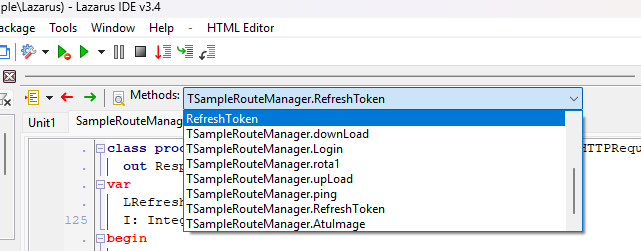
- Combobox in the editor toolbar: Lists all procedures and functions in the active Pascal file.
- Instant search: Type in the combobox to filter methods in real time, matching any part of the name.
- Quick navigation: Select a method to jump directly to its definition in the code.
- Automatic highlighting: The current method is highlighted according to the cursor position.
⚠️ Important Note
For the plugin to appear correctly, make sure the "Editor Toolbar is visible" option is enabled in the Lazarus IDE settings.

Enable the Editor Toolbar to use the plugin!
📸 Example
🚀 How to use
- Install the plugin in Lazarus.
- Make sure the Editor Toolbar is visible (see the note above).
- Open a Pascal file and use the combobox to quickly search or navigate between methods.
🤝 Contributing
Contributions are welcome! Feel free to open issues or submit pull requests.
Developed by Anderson Fiori