

Catalog · How the catalog works
Delphi_Simple_VOIP_-TCP-

A Simple Project showcasing how easy it is to write a VOIP calling app using AudioLink Components and Netcom7 Sockets!
- ★ 12 on GitHub
Anyone may press Interesting, signed in or not. It helps others find this project.
README
📞 Delphi VOIP Phone
Minimal Peer-to-Peer Voice Calling Application for Delphi
A lightweight, fully-functional VOIP phone application using NetCom7 TCP sockets and WASAPI audio components
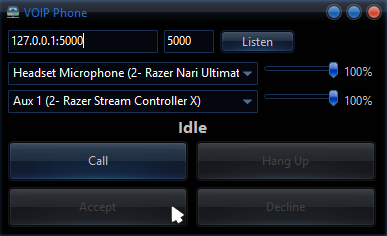
🚀 Overview
Delphi VOIP Phone is a minimal yet complete peer-to-peer voice calling application. It demonstrates how to build real-time audio communication using TCP sockets with surprisingly little code. Each instance can act as both a server (receive calls) and client (make calls), enabling true peer-to-peer communication.
🎯 What's Included
- 📞 Full VOIP Functionality - Make and receive voice calls over TCP/IP
- 🔄 Dual-Mode Operation - Acts as both server and client simultaneously
- 🎤 Device Selection - Choose from available microphones and speakers
- 🔊 Volume Controls - Independent mic and speaker volume sliders
- 📱 Minimal UI - Clean, simple interface with all essential controls
- 📝 Fully Commented Code - Human-readable, well-documented source
⭐ Key Features
📞 Call Management
- Listen Mode - Start server to receive incoming calls on specified port
- Outgoing Calls - Connect to remote peer using IP:Port format
- Accept/Decline - Handle incoming calls with user interaction
- Hang Up - End active calls cleanly from either side
🎤 Audio System
- WASAPI Integration - Low-latency audio capture and playback
- Device Enumeration - List all available microphones and speakers
- Real-time Streaming - Continuous audio transmission during calls
- Volume Control - Independent sliders for input and output (0-100%)
🌐 Network Protocol
- Simple Protocol - 5 single-byte commands for all operations
- TCP Reliability - Guaranteed delivery using NetCom7 sockets
- Minimal Overhead - 1-byte header for command identification
📡 Protocol Specification
Command Bytes
| Command | Value | Direction | Description |
|---|---|---|---|
| CALL_REQUEST | 1 | Client to Server | I want to call you |
| CALL_ACCEPT | 2 | Server to Client | I accept the call |
| CALL_DECLINE | 3 | Server to Client | I decline the call |
| HANGUP | 4 | Bidirectional | Ending the call |
| AUDIO | 5 | Bidirectional | Audio data follows |
📦 Installation
Prerequisites
- Delphi 12.2 Athens (or compatible version)
- Windows Vista+ (WASAPI requirement)
Required Components
| Project | Description | Repository |
|---|---|---|
| NetCom7 | TCP Sockets | GitHub |
| Audio-Link | WASAPI Audio | GitHub |
Installation Steps
- Install NetCom7 components in Delphi IDE
- Install Audio-Link components in Delphi IDE
- Open
VOIPPhone.dprojin Delphi - Add component source paths to Project Search Path
- Build and Run!
🚀 Usage
Making a Call
Instance A: Click "Listen" (starts server on port 5000) Instance B: Enter "192.168.1.100:5000" in Call IP field Instance B: Click "Call" Instance A: Sees "Incoming Call..." - Click "Accept" Both instances: Now in active voice call! Either instance: Click "Hang Up" to end
🎛️ Audio Configuration
| Parameter | Value | Description |
|---|---|---|
| Sample Rate | 16000 Hz | Optimized for voice |
| Channels | 1 (Mono) | Single channel |
| Bit Depth | 16-bit | Standard PCM |
| Bandwidth | ~260 kbps | Per direction |
🔧 Code Structure
| File | Description |
|---|---|
VOIPPhone.dpr |
Project file |
uMain.pas |
Main unit (~300 lines, fully commented) |
uMain.dfm |
Form definition |
📝 License
MIT License
👨💻 Author
BitmasterXor
- GitHub: @BitmasterXor
⭐ Star this repository if you find it useful!
Made with ❤️ By BitmasterXor For the Delphi Community