

tc-logviewer

Logviewer for Total Commander - standalone and lister
- Active · last change 11-2-2026
- ★ 12 on GitHub
README
WLX LogViewer (64-bit) for Total Commander
Fast, feature-rich log viewer plugin for Total Commander Lister/Quick View.
This project ports the original TC\LogViewer behavior to a 64-bit WLX plugin and keeps the focus on high performance for very large log files.
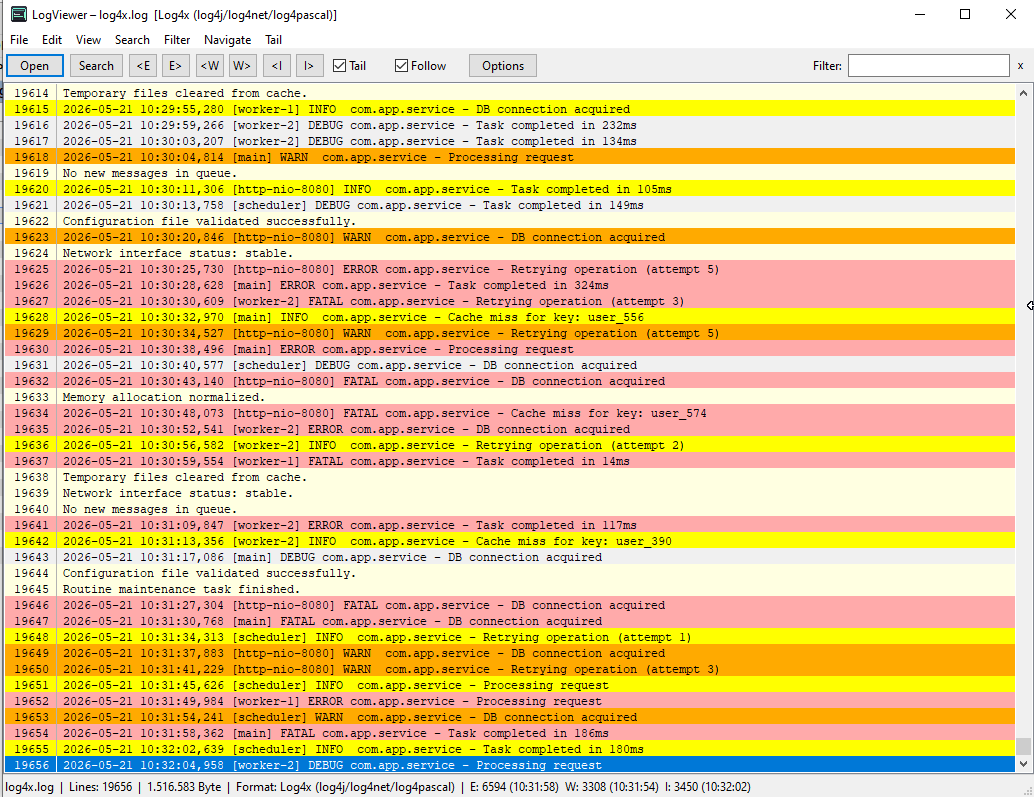
Highlights
- Native WLX plugin (
.wlx64) for Total Commander - No LCL runtime required (Win32 API based UI)
- Optimized for speed with large files
- Incremental tailing and filtering
- Color-aware log level visualization
- Toolbar, context menu, and options dialog aligned with the original LogViewer workflow
Core Features
Viewing & Navigation
- Open logs in Lister and Quick View
- Jump to:
- Next/previous
ERROR - Next/previous
WARN - Next/previous
INFO - Line number
- Date/time
- Next/previous
- Optional line numbers with configurable digit width
- Vertical separator line between line number and log text
- Word wrap mode
Search & Filter
- Quick filter field in toolbar (right aligned)
- Find support integrated with Lister behavior:
Ctrl+F/F7forwards to Lister searchF3find nextShift+F3find previous
- Context menu actions:
Copy lineCopy all visibleLine numbersWord wrapGo to date/timeGo to line
Tailing
- Live tail mode with configurable interval
Followmode to stay at end of file- Optional “Enable tail when opening fileâ€
- Non-exclusive file access (compatible with actively written logs)
- Preserves selection/current line while file updates
Formats & Parsing
- Auto-detection and forced format support
- Parsing support includes plain logs and CSV-style formats
- Custom format options including delimiter/field-role style mapping
- Correct severity handling from dedicated severity columns (no false override from free text)
Colors, Themes, and Rules
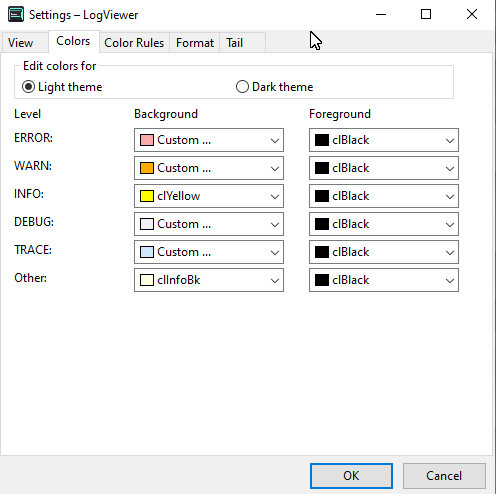
- Configurable colors for levels (
Error,Warn,Info,Debug,Trace,Custom) - Color preview in options (normal/dark variants)
- Dark mode control:
- Auto
- Always light
- Always dark
- Color Rules (pattern-based highlighting) like in original project
UI/UX Details
- Toolbar with original-style navigation controls
- Status bar with:
- Lines / bytes / detected format
- Right-aligned E/W/I stats with timestamps
- Latest updated class emphasized (bold)
- Consistent normal-weight fonts in toolbar and popup dialogs
- ESC behavior configurable for Lister mode (
CloseOnEscInLister, defaulttrue) - Number keys
1..8forwarded to Total Commander
Performance Notes
The plugin is designed for large logs and responsive interaction:
- Raw log text is stored in compact shared buffers
- Fast incremental append path for tail updates
- ASCII fast-path for case-insensitive filtering
- Wrap-height caching and measurement reuse
- Word wrap rendering path focuses work on visible content
Configuration
Settings are persisted to INI and synchronized across:
- Toolbar state
- Options dialog
- View behavior
This includes line number settings, font settings, wrap mode, theme mode, tail settings, and color rules.
Build
Requirements
- Lazarus / Free Pascal with Win64 target
- Total Commander WLX SDK units (already included in this project)
Build Command
C:\Users\Alexander\lazarus\lazbuild.exe LogViewerPlugin.lpiBuild output:
LogViewer.wlx64
Install in Total Commander
- Open Total Commander configuration for Plugins > Lister (WLX).
- Add
LogViewer.wlx64. - Associate it with desired extensions (e.g.
.log,.txt,.csv,.json) if needed.
Project Structure
LogViewerPlugin.lpr- plugin entry pointuWLXExports.pas- exported WLX API functionsuWin32LogWindow.pas- main viewer window, UI, rendering, interactionuLogLoader.pas- fast file loadinguLogParser.pas- line parsing and format logicuLogModel.pas- in-memory log storageuLogFilter.pas- filter operationsuPluginOptions.pas- options dialoguSettings.pas- settings/INI handling
Compatibility
- Target: Windows x64
- Plugin type: WLX (Lister)
- Host: Total Commander 64-bit