

Delphi_Low_Level_Windows_Keyboard_Hook_Example

A Delphi application showing how to hook and track windows Keyboard Events in realtime.
- Active · last change 3-10-2026
- ★ 12 on GitHub
README
Delphi Low Level Keyboard Hook
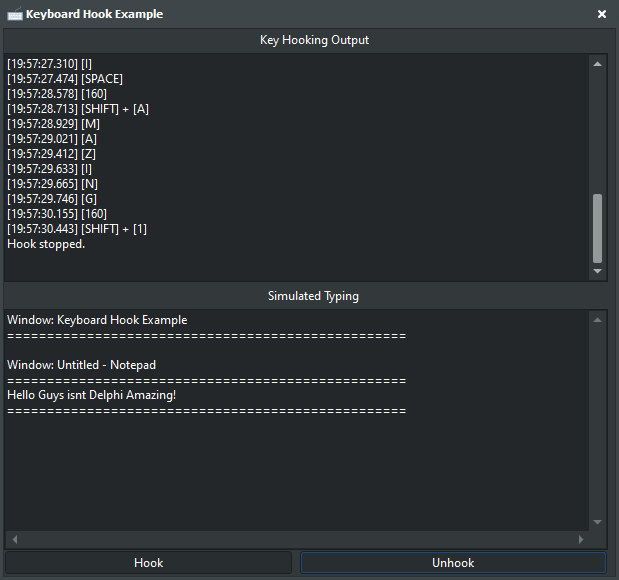
Delphi project showcasing low-level keyboard capture on Windows in two complete forms:
- Standalone VCL source application and demo UI.
- Reusable VCL drag-and-drop component (
TKeyboardHook) with its own demo project.
Both implementations use WH_KEYBOARD_LL, include window-context tracking, and clean up hooks correctly on shutdown.
What Is Included
- Original source app (manual hook control)
Path:
keyboardhook.dpr,Unit1.pas,Unit1.dfm - Original app demo assets
Path:
preview.png,Images and Media/ - New installable VCL component package
Path:
KeyboardHookComponent/KeyboardHookComponent.dpk - Component source unit
Path:
KeyboardHookComponent/uKeyboardHook.pas - Component palette icon resource
Path:
KeyboardHookComponent/uKeyboardHook.dcr - Dedicated component demo project
Path:
KeyboardHookComponent/Demo/KBHookDemo.dpr
Features
- Dual output modes for technical logging and typing simulation.
- Active window title tracking with context-aware events.
- Full key coverage including Ctrl, Alt, Shift, and Win keys.
- Millisecond-level event timing metadata.
- Event-driven component API for rapid form integration.
- Safe shutdown behavior that removes hooks reliably.
Quick Start
Option A: Run the original standalone app
- Open
keyboardhook.dprin Delphi. - Build and run.
- Use Start Hook and Stop Hook in the UI.
Option B: Install and use the VCL component
- Open
KeyboardHookComponent/KeyboardHookComponent.dproj(or.dpk) in Delphi. - Build the package.
- Install the package from the IDE package manager.
- Find
TKeyboardHookon theKeyboardHookcomponent palette tab. - Drop it onto a form and set
Active := Trueor callStartHook.
Option C: Run the component demo
- Open
KeyboardHookComponent/Demo/KBHookDemo.dpr. - Build and run.
- Interact with the demo form to test
TKeyboardHookevents.
Component API (TKeyboardHook)
Published properties:
ActiveTrackWindowChanges
Published events:
OnKeyDownOnKeyUpOnWindowChange
Public methods:
StartHookStopHook
Technical Notes
- Uses Windows
WH_KEYBOARD_LLhook infrastructure. - Designed for one active component hook instance per process.
- Intended for authorized testing, tooling, and accessibility scenarios.
- Keep event handlers lightweight to avoid hook timeout removal by Windows.
Contributing
Pull requests are welcome for bug fixes, performance improvements, and additional demo scenarios.
License
Provided as-is without warranty. Use at your own risk.
Contact
Discord: bitmasterxor
Built by BitmasterXor with Delphi RAD Studio