

Delphi_Crypto_Payment_Components

Easy to use Drag and drop VCL (No-Middleman) Crypto Payment components!
- Active · last change 3-10-2026
- ★ 12 on GitHub
README
Delphi Crypto Payment Components for VCL
Accept cryptocurrency payments directly in your Delphi applications. No third-party payment processors, no middlemen, no API keys required.
Supported Cryptocurrencies
Overview
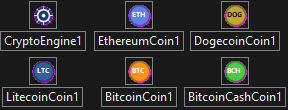
Drop-in VCL component suite for accepting cryptocurrency payments. Each coin is a standalone component that monitors the blockchain for incoming transactions matching an exact expected amount. A central engine component coordinates polling across all coins and fires events as payments progress through their lifecycle.
Core capabilities:
- Exact-amount payment detection — matches transaction outputs to expected amounts in the smallest unit (satoshi, wei, litoshi, koinu).
- Confirmation tracking — monitors transaction confirmations until the required threshold is reached.
- ERC-20 token support — the Ethereum component supports any ERC-20 token (USDT, USDC, etc.) via contract address configuration.
- Expiration handling — payments automatically expire after a configurable timeout.
- Duplicate protection — prevents the same transaction from being matched to multiple payment requests.
- Event-driven architecture — fires events at each payment lifecycle stage (Created, Detected, Confirmed, Expired).
All blockchain queries use free public APIs with no registration, API keys, or signup required.
Key Features
No middlemen
- Payments go directly to your wallet address.
- No third-party payment processor takes a cut.
- No account creation or KYC required.
Free blockchain APIs
| Coin | API Provider | Rate Limits |
|---|---|---|
| BTC | Mempool.space | Reasonable use |
| ETH | Ethplorer (built-in freekey) |
2 req/sec, 200/hr |
| LTC | BlockCypher | 3 req/sec, 100/hr |
| DOGE | BlockCypher | 3 req/sec, 100/hr |
| BCH | Blockchair | 30 req/min |
Event-driven design
OnPaymentCreated— new payment request initializedOnPaymentDetected— matching transaction found on the blockchainOnPaymentConfirmed— required number of confirmations reachedOnPaymentExpired— payment window closed without receiving fundsOnError— API or processing error occurred
Events fire both on individual coin components and globally on the engine. Honestly I advise you guys to stick to the Engine Events!
Repository Layout
Source/
  CPC.Types.pas              Shared types, records, enumerations
  CPC.Engine.pas             TCryptoEngine - central polling coordinator
  CPC.Coin.Base.pas          TCPCCoinBase - abstract base for all coins
  CPC.Coin.Bitcoin.pas       TBitcoinCoin (BTC)
  CPC.Coin.Ethereum.pas      TEthereumCoin (ETH + ERC-20)
  CPC.Coin.Litecoin.pas      TLitecoinCoin (LTC)
  CPC.Coin.Dogecoin.pas      TDogecoinCoin (DOGE)
  CPC.Coin.BitcoinCash.pas   TBitcoinCashCoin (BCH)
  CPC.Register.pas           Design-time registration
  Glyphs/                    Component palette icons

Package/
  CryptoPaymentComponentsRT.dpk   (runtime)
  CryptoPaymentComponentsDT.dpk   (design-time)

Demo/
  CryptoPaymentDemo/              Full working demo application
Installation (Delphi IDE)
-
Open
Package/CryptoPaymentComponentsRT.dpkand build it. -
Open
Package/CryptoPaymentComponentsDT.dpk. -
Build and install
CryptoPaymentComponentsDT. -
Six components appear in the Crypto Payments palette category:
TCryptoEngine·TBitcoinCoin·TEthereumCoin·TLitecoinCoin·TDogecoinCoin·TBitcoinCashCoin
Quick Start
uses
  CPC.Types, CPC.Engine, CPC.Coin.Bitcoin;

procedure TForm1.FormCreate(Sender: TObject);
begin
  // Set your wallet address
  BitcoinCoin1.ReceiveAddress := 'bc1q...your_btc_address...';

  // Configure confirmation requirements
  BitcoinCoin1.RequiredConfirmations := 3;

  // Wire up events
  CryptoEngine1.OnPaymentDetected := OnPaymentDetected;
  CryptoEngine1.OnPaymentConfirmed := OnPaymentConfirmed;

  // Start polling
  CryptoEngine1.PollingIntervalMs := 15000;
  CryptoEngine1.Active := True;
end;

procedure TForm1.btnPayClick(Sender: TObject);
var
  PaymentID: string;
begin
  // Create a payment request for exactly 0.005 BTC
  PaymentID := BitcoinCoin1.CreatePayment(0.005, 'ORDER-1234');
  ShowMessage('Send exactly 0.00500000 BTC to complete your payment.');
end;

procedure TForm1.OnPaymentDetected(Sender: TObject; const ACoin: TObject;
  const APayment: TCPCPayment);
begin
  ShowMessage(Format('Transaction detected! Waiting for %d confirmations...',
    [APayment.RequiredConfirmations]));
end;

procedure TForm1.OnPaymentConfirmed(Sender: TObject; const ACoin: TObject;
  const APayment: TCPCPayment);
begin
  ShowMessage('Payment confirmed! Order ' + APayment.ExternalRef + ' is complete.');
end;
ERC-20 Token Payments
// Accept USDT payments
EthereumCoin1.ReceiveAddress := '0x...your_eth_address...';
EthereumCoin1.TokenContract := '0xdAC17F958D2ee523a2206206994597C13D831ec7'; // USDT
EthereumCoin1.TokenDecimals := 6;
EthereumCoin1.TokenSymbol := 'USDT';
Component Properties
TCryptoEngine
| Property | Description | Default |
|---|---|---|
Active |
Enable/disable automatic polling | False |
PollingIntervalMs |
Polling interval in milliseconds (minimum 5000) | 15000 |
Coin Components (BTC, ETH, LTC, DOGE, BCH)
| Property | Description | Default |
|---|---|---|
Engine |
Link to the TCryptoEngine coordinator |
— |
ReceiveAddress |
Your wallet address for receiving payments | — |
RequiredConfirmations |
Confirmations needed before marking confirmed | 3 (ETH: 12) |
ExpirationMinutes |
Minutes before a pending payment expires (0 = never) | 60 |
Payment Lifecycle
CreatePayment()
      ???
      ???
  ?????????????????????????????????     timeout     ?????????????????????????????????
  ??? Pending  ?????????????????????????????????????????????????????? Expired ???
  ????????????????????????????????????                ?????????????????????????????????
       ???
       ??? exact amount detected
       ???
  ????????????????????????????????????
  ??? Detected ???  (unconfirmed or partially confirmed)
  ????????????????????????????????????
       ???
       ??? required confirmations reached
       ???
  ???????????????????????????????????????
  ??? Confirmed ???  ??? Payment complete
  ???????????????????????????????????????
How Payment Detection Works
- You call
CreatePayment(Amount)with the exact amount expected. - The engine polls the blockchain on each timer tick.
- Each coin scans recent transactions to your
ReceiveAddress. - If a transaction output exactly matches the expected amount (compared in the smallest unit), the payment transitions to
Detected. - The component then tracks the transaction's confirmation count.
- Once confirmations reach
RequiredConfirmations, the payment transitions toConfirmed.
Important: The customer must send the exact amount specified. Even a 1-satoshi difference will not match. This is by design — it allows the component to reliably distinguish between multiple payment requests to the same address.
Demo Application
The included demo (Demo/CryptoPaymentDemo) provides a full working interface:
- Setup tab — configure wallet addresses and polling interval
- Payments tab — create payment requests and monitor their status
- Log tab — real-time event log showing all API activity
Requirements
- Delphi VCL (tested with Delphi 12+)
- Windows 10/11
- Internet access (for blockchain API queries)
- No API keys, no accounts, no dependencies beyond standard Delphi RTL
Author
Made by BitmasterXor, with love for the Delphi community.
Malware Researcher • Delphi Developer