

Catalog · How the catalog works
ft

A widget toolkit?
- ★ 12 on GitHub
Anyone may press Interesting, signed in or not. It helps others find this project.
README
Floria Toolkit (Ft)
A lightweight, high-performance native GUI toolkit engineered with Free Pascal, Anti-Grain Geometry (AGG) subpixel vector rendering, modern CSS theming, smooth 60 FPS transitions, and a clean C ABI for universal language interoperability (C, C++, Python, Rust, Zig, Go).
Why "Floria"?
The name Floria pays tribute to Free Pascal creator Florian Klämpfl.
The short moniker isFt, pronounced "Feat".
Highlights
- Hardware-Accelerated GPU & Vector Rendering:
- Dual rendering architecture: high-performance EGL / OpenGL ES 2.0 hardware pipeline (
TFtHardwareCanvas, dynamic vertex batching, AOT shaders, SDF pills and drop shadows) alongside mathematically rigorous Anti-Grain Geometry (AggPas) subpixel vector rasterization. - AggPas serves as the premier software fallback and reference engine, guaranteeing pixel-perfect rendering across virtual machines, headless CI, and legacy hardware.
- Subpixel-accurate antialiasing for vector curves, text, and surfaces.
- True 2D Gaussian drop shadows with configurable offsets, blur, and opacity.
- Subpixel gamma-corrected font rendering and native display DPI scaling.
- Raster bitmap decoding and scalable vector SVG asset rendering (
TFtImage).
- Dual rendering architecture: high-performance EGL / OpenGL ES 2.0 hardware pipeline (
- Pure CSS Theming Engine:
- Standards-based
.cssstylesheets powered byFloria.CSSfromflorialib. - First-class
:rootCSS custom properties (var(--token)) with automatic cascading and baseline defaults fallback. - Bundled themes: Amamizu (雨水) (macOS Liquid Glass, frosted blur, pill capsules), Default (Breeze/Fusion), Nord, Dracula, Gruvbox, GTK2, and Classic.
- First-class Light & Dark mode with runtime hot-swapping and multi-window broadcasting.
- Full support for element selectors, class selectors (
.dark), ID selectors (#id), and pseudo-classes (:hover,:active,:focus,:checked,:disabled).
- Standards-based
- CSS Transitions & Animation:
- Smooth 60 FPS state transitions (e.g. hover effects, dark mode switches, window caption button glowing halos) with easing functions (
ease,ease-in,ease-out,ease-in-out,linear).
- Smooth 60 FPS state transitions (e.g. hover effects, dark mode switches, window caption button glowing halos) with easing functions (
- Modern Desktop Widgets:
- Window (
TFtWindow): Platform-agnostic window abstraction with double-buffered rendering, modal event loops (ft_window_show_modal), dirty rectangle tracking, and pluggable platform backends (TFtX11Windowon native X11/XCB with optional EGL hardware acceleration; WinAPI and Cocoa abstractions). - Window Button (
TFtWindowButton): Titlebar and tab caption buttons (Close, Minimize, Maximize/Restore, Custom) with OS styles (Mac, GTK, Windows), glowing radial hover transitions, standalone rendering export (ft_window_button_draw), and dark mode adaptation. - Button & Toggle Button: Interactive push and latching buttons with hover transitions and strict release-within-bounds primary action semantics.
- Switch (
TFtSwitch): Modern toggle switch with circular thumb slider, pill geometry (border-radius: 9999px), and accent highlights. - URL Omnibox (
TFtUrlEntry): Google Chrome-style address bar with SSL padlock / security badge, bookmark action button, HTTPS auto-prefixing, and selection controls. - Breadcrumb PathBar (
TFtPathBar): Nautilus-style dual-mode file system navigation bar with clickable path pills, dropdown menu, and instant toggle to text input with vector edit icons. - Native File Dialog (
TFtFileDialog): Modal file chooser and folder picker with quick-access bookmarks, directory tree browsing, filename filtering, and double-click activation (ft_dialog_open_file,ft_dialog_save_file,ft_dialog_select_folder). - CheckBox: Crisp vector checkboxes with checkmark glyph and keyboard toggle.
- RadioButton: Mutually exclusive options with grouping support and circular indicator.
- ComboBox: Dropdown selection menu with popup list and optional editable entry.
- Slider: Horizontal and vertical continuous or stepped sliders with dragging and keyboard arrows.
- ProgressBar: Determinate percentage progress and 60 FPS indeterminate animated activity bar.
- Text / Label (
TFtText): Dual-mode text with selectable mouse-drag highlight, clipboard copy, multiline word wrapping, and bounds clipping. - Entry: Single-line text input with blinking caret, selection, and clipboard support.
- TextArea: Multi-line text area with line navigation and dynamic scrollbars.
- Notebook & Tabs (
TFtNotebook,TFtTabs): Tabbed multi-page containers with close buttons, active tab indicators, and page switching. - Splitter (
TFtSplitter): Resizable dual-pane container with horizontal or vertical splitter bar, grip handle, and live mouse dragging. - TreeView (
TFtTreeView): Hierarchical tree viewer with expand/collapse vector carets, arbitrary node nesting, and selection tracking. - Table / DataGrid (
TFtTable,TFtGrid): Multi-column tabular data grid with column headers, text alignment, zebra striping, cell selection, multi-row selection (Ctrl/Shiftmulti-select), and row double-click handlers. - Image (
TFtImage): Raster image decoding (BMP, PNG, JPG) and scalable vector SVG rendering with scaling modes (fit,fill,stretch,center). - ScrollBar: Standalone vector scrollbars with proportional thumb sizing and drag physics.
- Container: Scrolled viewport frame with automatic scrollbars and viewport scissor clipping.
- Window (
- Desktop-First Ergonomics & Productivity:
- Unapologetically desktop-first: dense data layouts, high-precision cursor interactions, menu bars, dockable splitters, and persistent scrollbars (no tablet/mobile hybrid compromises).
- Full keyboard focus traversal (
Tab/Shift+Tab) with theme focus rings and mnemonic accelerators.
- First-Class Native X11 & WM Infrastructure:
- Premier native X11/XCB integration with microsecond event dispatch, EWMH window management (
_NET_WM_WINDOW_TYPE_DOCK), and desktop struts (_NET_WM_STRUT_PARTIAL). - Pointer grab APIs (
ft_window_grab_input,ft_window_ungrab_input), process-wide event filters (ft_register_event_filter), frame ticks (ft_set_tick_callback), frame-rate-independent timers (ft_set_timer), and direct backend handle access (ft_window_get_native_handle,ft_window_get_egl_display). - Pluggable
TFtWindowabstraction ready for future WinAPI and Cocoa backends.
- Premier native X11/XCB integration with microsecond event dispatch, EWMH window management (
- Internationalization, BiDi & Script Shaping:
- Full UTF-8 Unicode text rendering across global writing systems (Latin, Cyrillic, Greek, CJK, Thai, Indic/Devanagari, Arabic, Hebrew).
- Unicode Bidirectional Algorithm (UAX #9) visual reordering and bracket mirroring for RTL scripts.
- Pure-Pascal contextual Arabic cursive shaping supporting isolated, initial, medial, and final forms and Lam-Alef ligatures.
- Universal C ABI & Rock-Solid Stability:
- Standalone shared library (
libft.so) exposing a frozen, append-only C ABI viainclude/ft.h. - Adopts the Windows API standard of stability: zero ABI churn between minor releases, opaque pointer handles, and permanent backward compatibility across language bindings (C, C++, Python, Rust, Zig, Go, Pascal).
- Standalone shared library (
Documentation
Comprehensive documentation is available in the docs/ directory:
- 📖 C API Reference: Complete function listings, signatures, and descriptions for all toolkit APIs.
- 🎨 Theming & CSS Guide: Guide to writing CSS stylesheets, selectors, properties, transitions, and dark mode.
- 🧱 Widgets Architecture: Widget hierarchy, coordinate systems, container clipping, and design patterns.
- 🏗️ Architecture & Internals: Overview of the AGG graphics pipe, X11 backend, animation scheduler, and FFI layer.
- 💡 Design Rationale & Invariants: Desktop-first philosophy, first-class X11 priority, Win32-grade ABI stability (avoiding GTK churn), and compositor integration invariants.
Visual Showcase
Creative Viewport, Rulers & Interactive Canvas
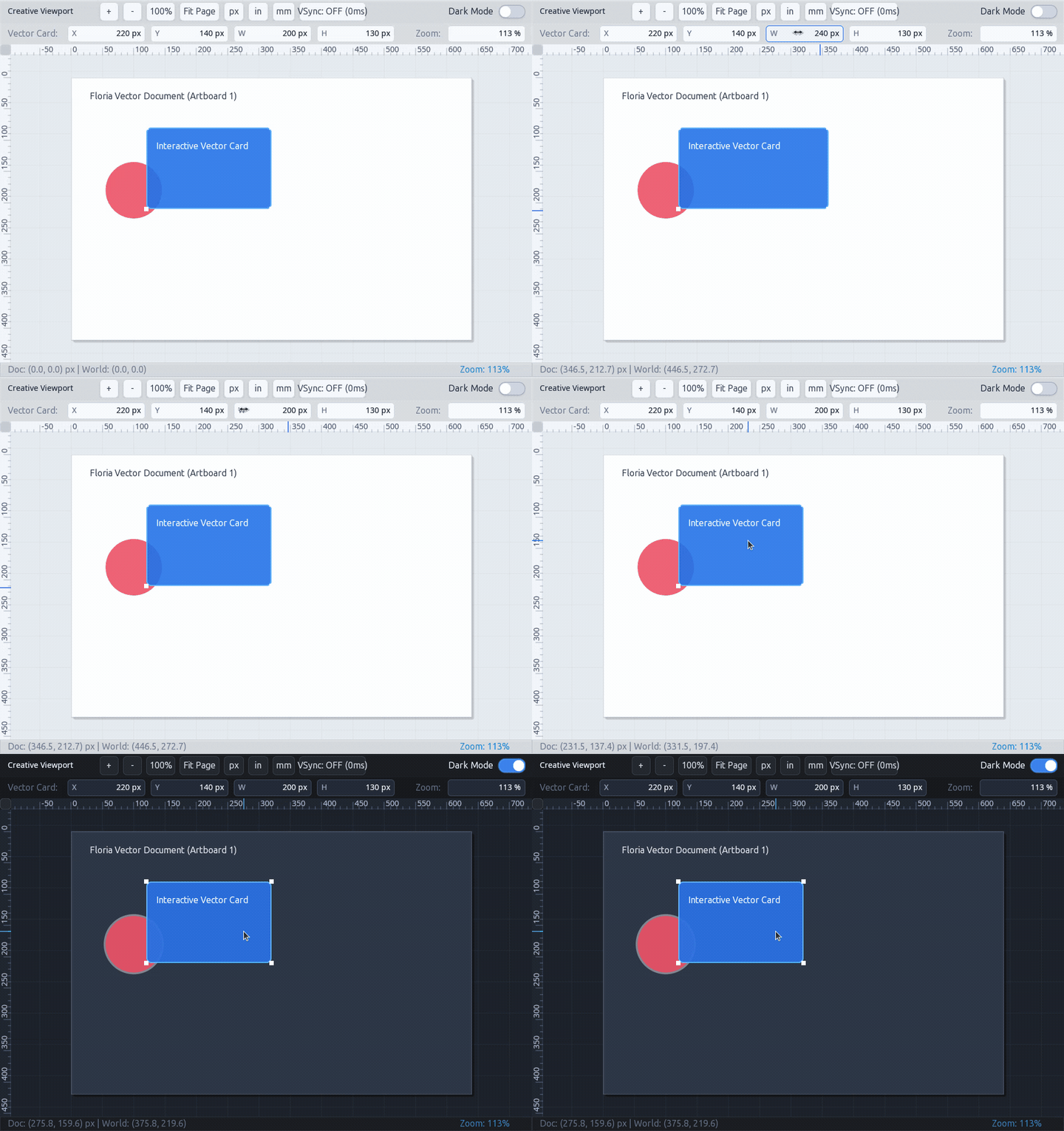 Infinite 2D vector workspace with native subpixel horizontal & vertical rulers (
TFtRuler), camera zoom & pan navigation, dynamic number scrubbers (TFtNumberScrubber) with live mouse scrubbing and cursor cues, interactive vector shapes, and instant CSS dark mode switching.
Hardware-Accelerated GPU Vector Core & Stress Test
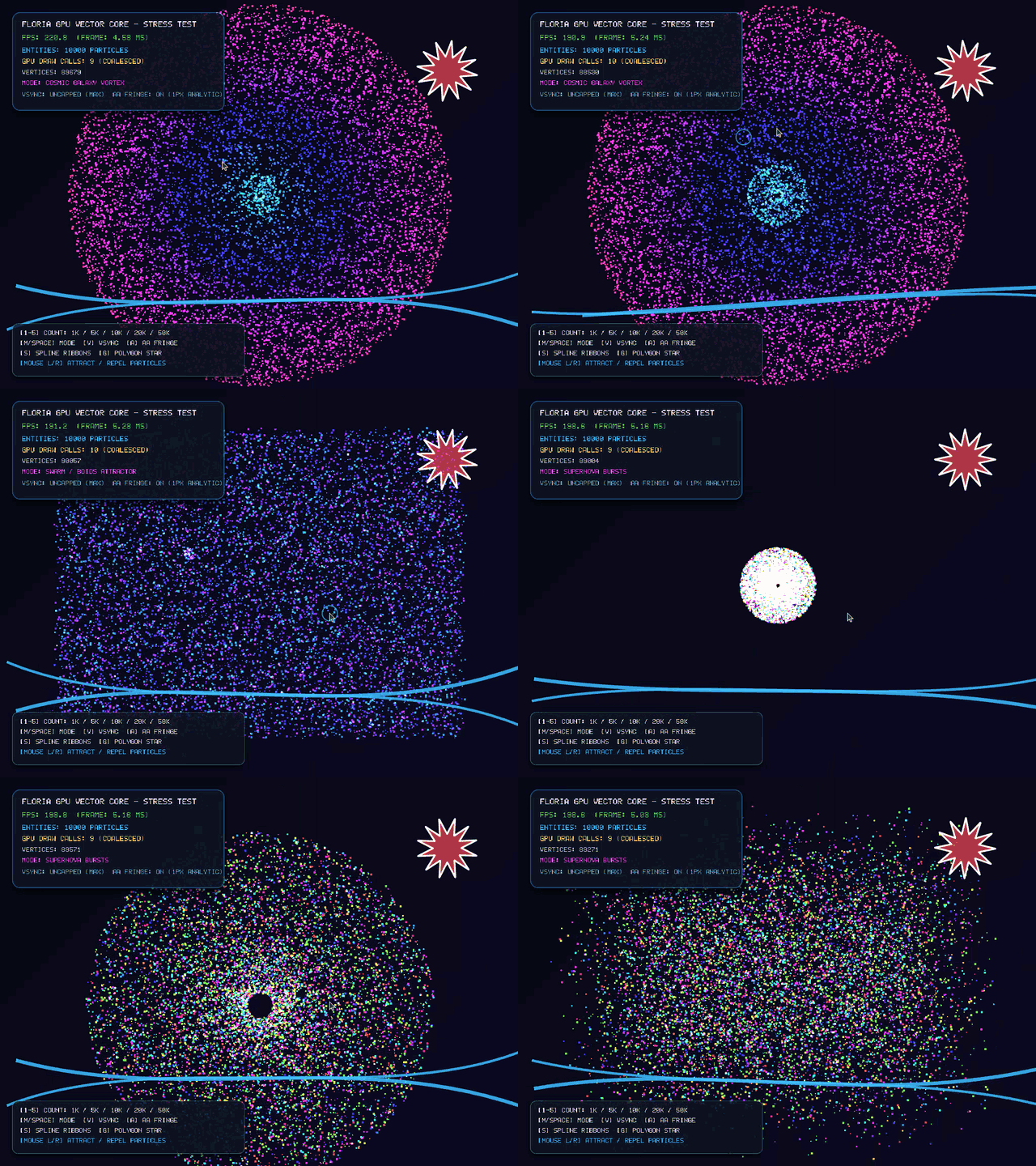 Direct EGL hardware rendering pipeline (
TFtHardwareCanvas, GLES2 batching) managing 10,000+ interactive particles at 200+ FPS, real-time GPU tessellator for cubic Bezier ribbons, analytic antialiased polygon stars, and interactive vortex attractors.
Advanced Desktop Widgets
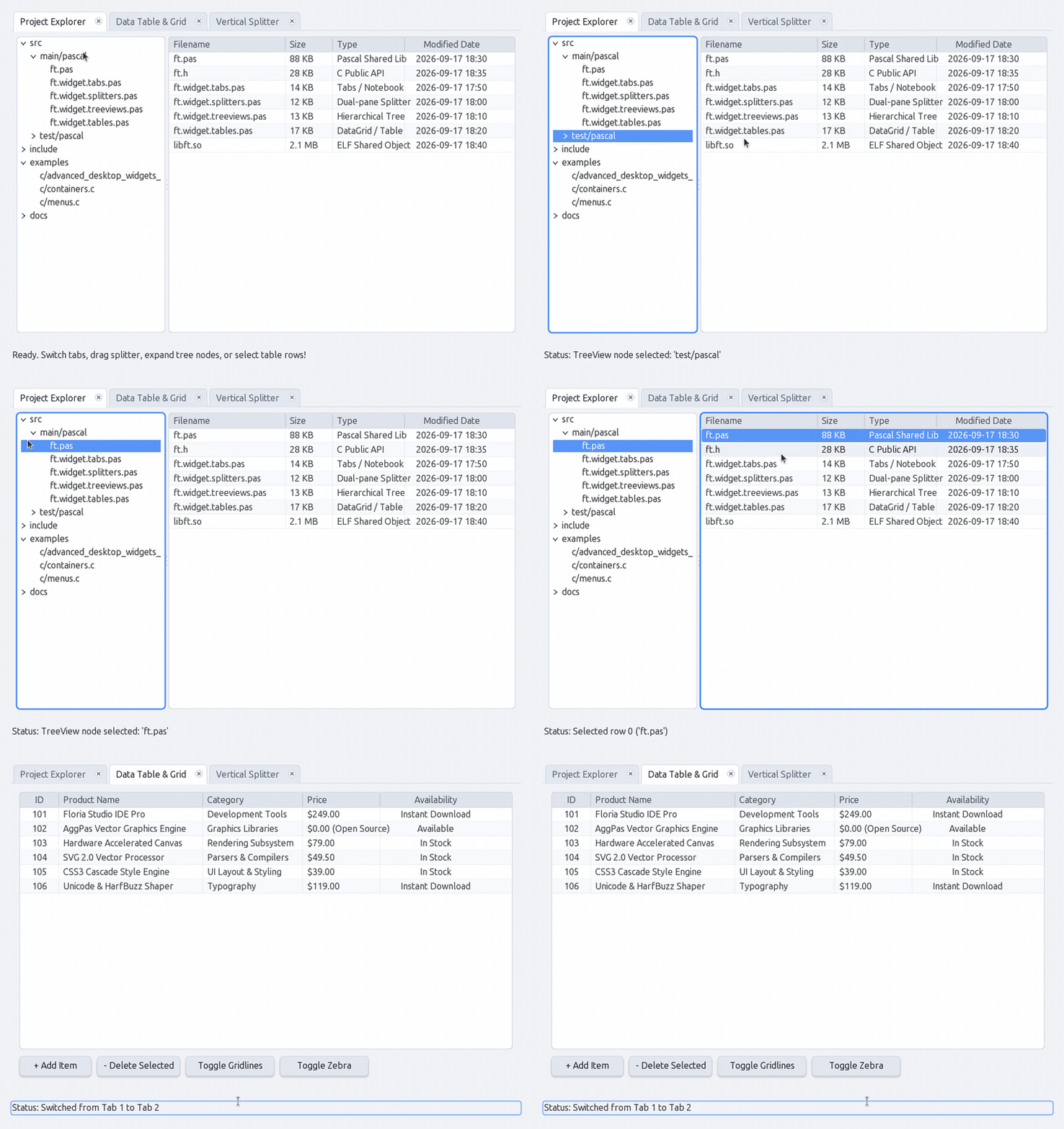 Multi-tab Notebook with close buttons and glowing halos, dual-pane Splitters with live dragging, hierarchical TreeView with expander arrows, and multi-column Data Table with selection and zebra striping.
Form Controls & Meters
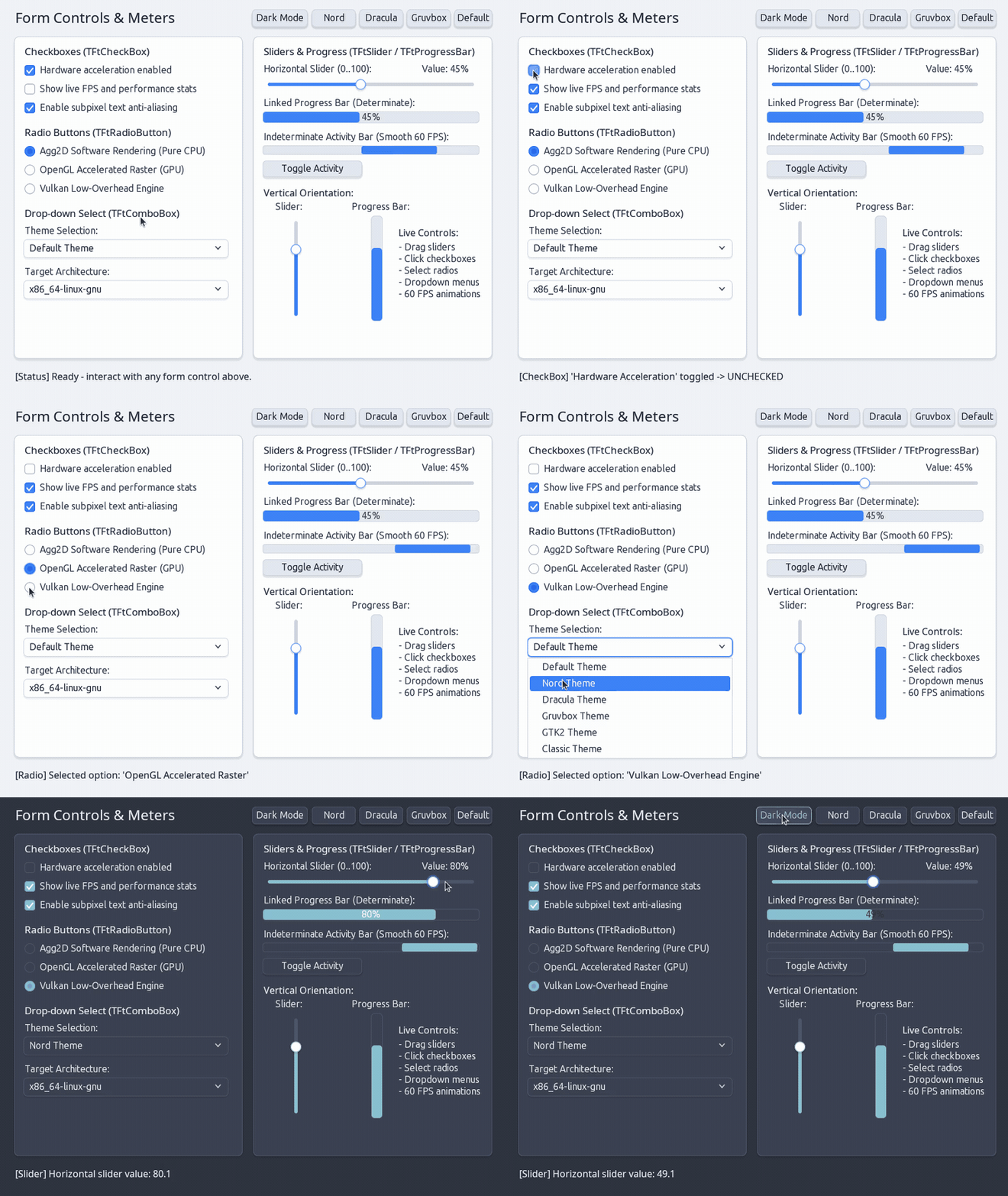 Interactive CheckBoxes, RadioButtons, ComboBox dropdowns, live Slider dragging, and smooth 60 FPS indeterminate progress bar.
Window Main Menu & Pop-up Context Menus
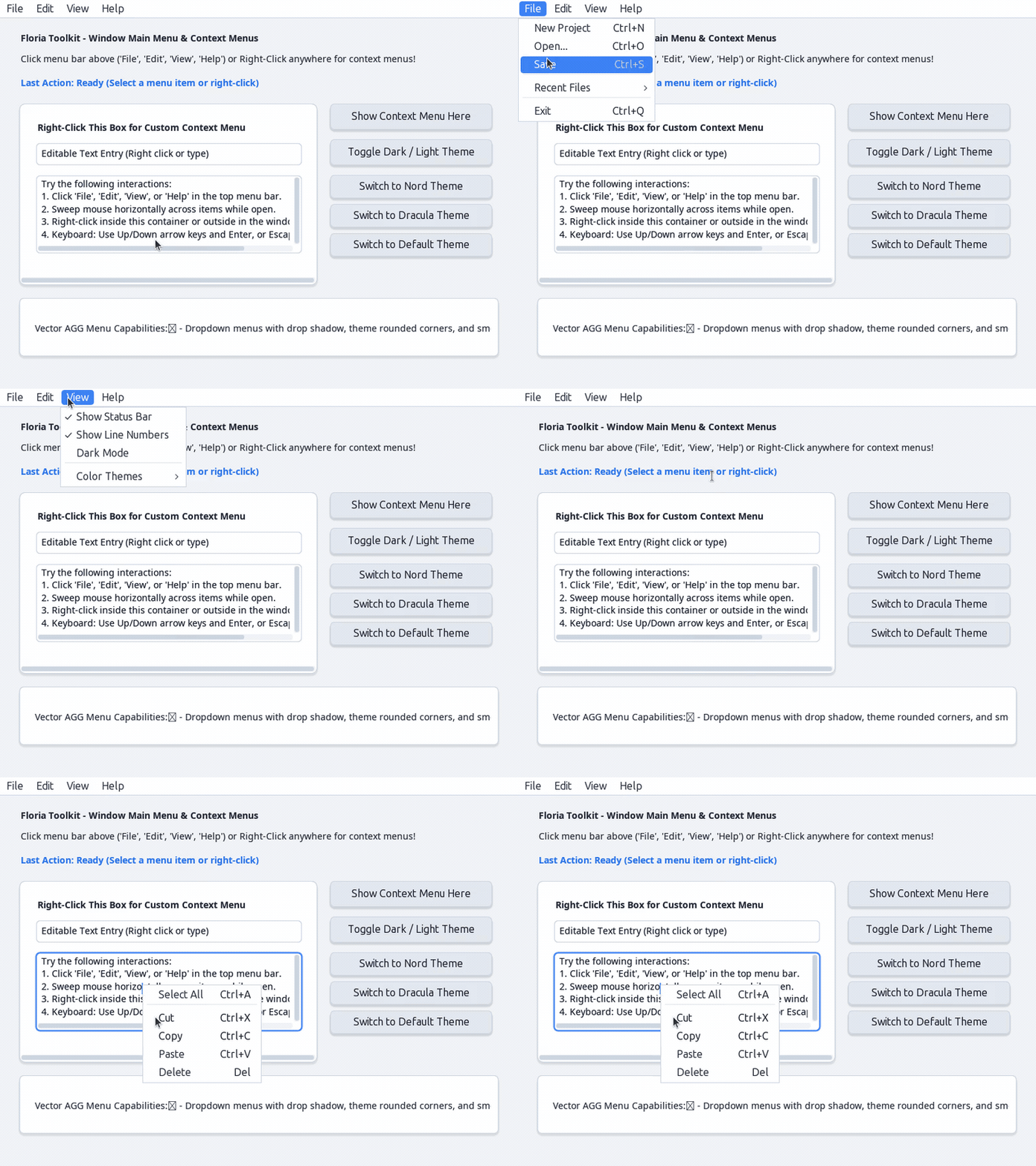 Window Main Menu bar with hover sweep tracking, cascading submenus with subtle vector chevrons, checkmarks, dynamic theming, and floating context menus.
Reusable Containers & Scrolled Viewports
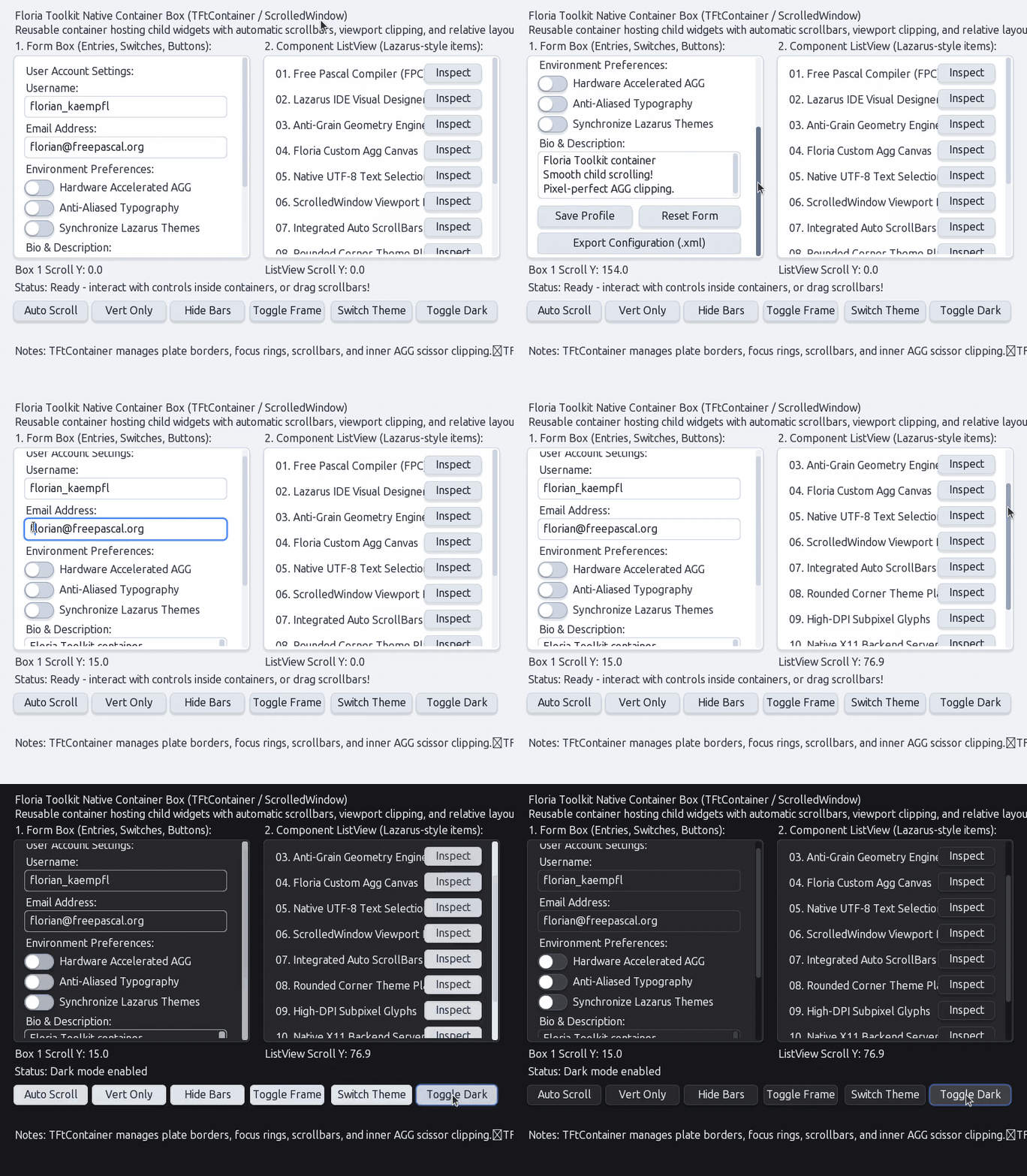
TFtContainer hosting heterogeneous child widgets with relative layout, dynamic render area conformance, auto scrollbars, and AGG viewport clipping.
Themes & Dynamic CSS Transitions
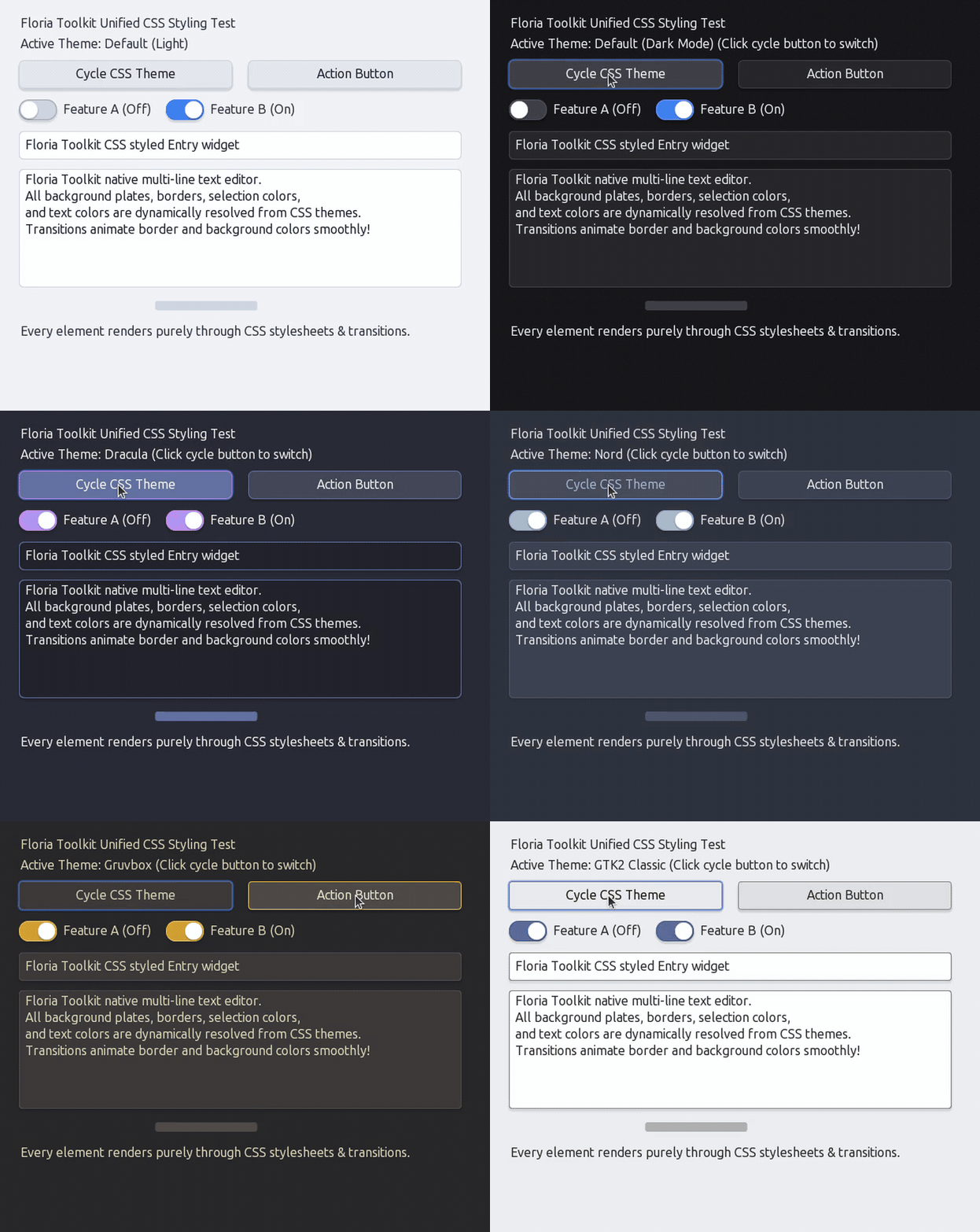 Pure CSS theming engine with runtime hot-swapping between Default, Dark Mode, Dracula, Nord, Gruvbox, GTK2, and Classic themes.
60 FPS CSS Transitions & Animations
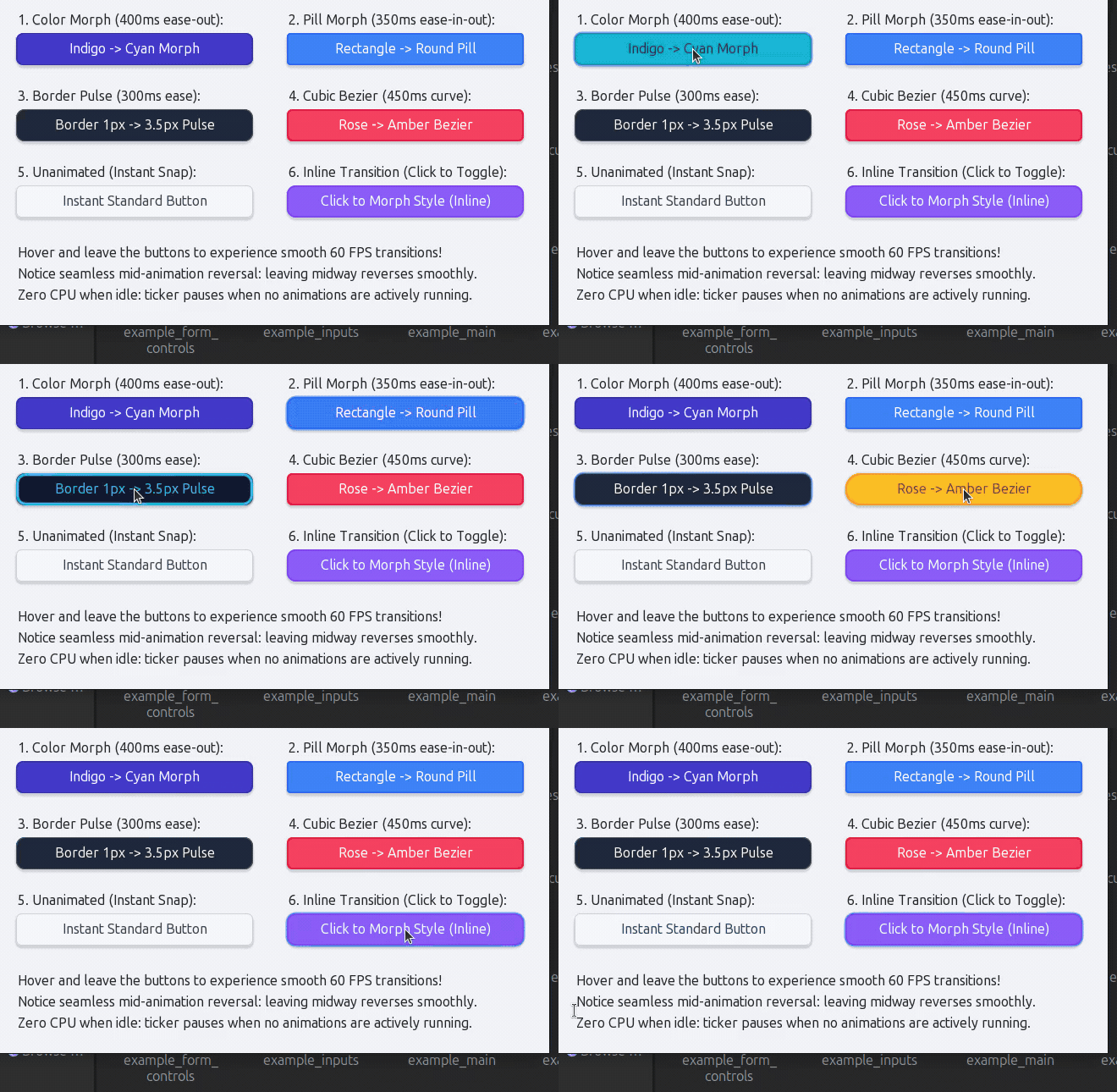 Smooth 60 FPS CSS transition engine showcasing color morphing, border radius morphing (rectangle to pill), pulsating border outlines, cubic-bezier timing functions, and dynamic inline style transitions with zero CPU usage when idle.
Multilingual Typography, BiDi & Script Shaping
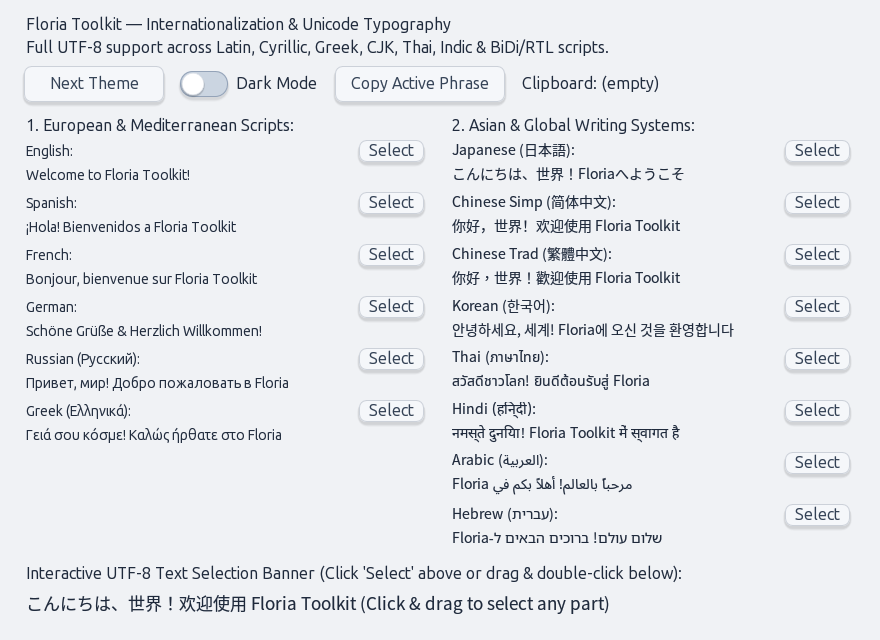 Full UTF-8 internationalization featuring CJK (Japanese, Simplified & Traditional Chinese, Korean), Thai, Indic (Hindi), and Right-to-Left (RTL) Bidirectional text layout with contextual Arabic cursive shaping and Hebrew bracket mirroring.
Quickstart
C Example
#include "ft.h"
#include <stdio.h>

static void on_btn_click(FtWidget widget, void* user_data) {
    printf("Button clicked! Data: %s\n", (const char*)user_data);
}

static void on_dark_toggle(FtWidget widget, int32_t checked, void* user_data) {
    ft_theme_set_dark_mode(checked);
}

int main(void) {
    ft_init();

    FtWidget win = ft_window_create(500, 320, "Floria Toolkit Quickstart");

    FtWidget btn = ft_button_create(win, 30, 40, 200, 44, "Click Me");
    ft_button_on_click(btn, on_btn_click, (void*)"SampleData");

    FtWidget sw = ft_switch_create(win, 30, 110, 200, 26, "Dark Mode");
    ft_switch_set_checked(sw, ft_theme_get_dark_mode());
    ft_switch_on_toggle(sw, on_dark_toggle, NULL);

    ft_widget_show(win);
    ft_main_loop();
    ft_quit();
    return 0;
}
Python Example (ctypes)
import ctypes

ft = ctypes.CDLL("./target/libft.so")
ft.ft_init()

win = ft.ft_window_create(400, 250, b"Python Floria App")
btn = ft.ft_button_create(win, 50, 50, 180, 40, b"Click Me")

# Hot-swap to Dracula theme with Dark Mode
ft.ft_theme_set(b"dracula")
ft.ft_theme_set_dark_mode(1)

ft.ft_widget_show(win)
ft.ft_main_loop()
ft.ft_quit()
Building & Compiling
Prerequisites
- Free Pascal Compiler (
fpc3.2.0+) or PasBuild / Lazarus - GCC or Clang (for C examples)
- Python 3 (for Python examples)
- X11 Development Headers (
libX11,libXext,libxcb) - EGL & OpenGL ES 2.0 (
libEGL,libGLESv2for hardware acceleration) - aggpas:2.4.0-SNAPSHOT (via PasBuild repository)
- florialib:0.0.1-SNAPSHOT (via PasBuild repository)
1. Build the Shared Library (libft.so)
Using PasBuild:
pasbuild compile
# or
./build.sh
Or running unit tests:
pasbuild test
# or
./build.sh test
2. Build & Run C Examples
./build_examples.sh

# Run any example binary built in target/
./target/example_c_main
./target/example_c_amamizu_showcase
./target/example_c_egl_gpu_showcase
./target/example_c_gpu_vector_stress_test
./target/example_c_url_entry
./target/example_c_pathbar
./target/example_c_file_dialog
./target/example_c_advanced_desktop_widgets
./target/example_c_window_button
./target/example_c_form_controls
./target/example_c_menus
./target/example_c_widget_context_menus
./target/example_c_containers
./target/example_c_container_render_area
./target/example_c_css_button
./target/example_c_css_animation
./target/example_c_chinese
./target/example_c_multilingual
3. Run Python Examples
python3 examples/python/app.py
python3 examples/python/fastfetch_ui.py
python3 examples/python/blur_showcase.py
python3 examples/python/terminal_transparency.py
Directory Layout
floria-toolkit/
????????? docs/                     # Detailed documentation & guides
???   ????????? api-reference.md      # Full C API Reference
???   ????????? theming.md            # CSS theming & transitions guide
???   ????????? widgets.md            # Widget catalog & architecture
???   ????????? architecture.md       # Graphics pipe & backend design
???   ????????? design-rationale.md   # Architectural invariants & design rationale
????????? include/
???   ????????? ft.h                  # C/C++ API header
????????? src/main/pascal/
???   ????????? ft.pas                # Library entry point & C exports
???   ????????? ft.window.pas         # Abstract window base class (TFtWindow), window factory & focus logic
???   ????????? ft.css.pas            # CSS stylesheet engine, variable resolver & cascade
???   ????????? ft.animation.pas      # Transition & animation interpolation engine
???   ????????? ft.backend.x11.pas    # Native X11/XCB window backend & 60 FPS event loop (TFtX11Window)
???   ????????? ft.backend.egl.pas    # EGL 1.4/1.5 hardware presentation driver
???   ????????? ft.canvas.hardware.pas# Hardware-accelerated GPU canvas (TFtHardwareCanvas, GLES2 batching)
???   ????????? ft.theme.pas          # Theme manager & stylesheet loader
???   ????????? ft.dialogs.file.pas   # Native modal file & directory chooser (TFtFileDialog)
???   ????????? ft.widget.pas         # Base widget abstraction (uses florialib for vector canvas & fonts)
???   ????????? ft.widget.buttons.pas # Push, toggle, and window caption buttons (TFtWindowButton)
???   ????????? ft.widget.switches.pas# Animated toggle switch (TFtSwitch)
???   ????????? ft.widget.selectors.pas# CheckBox, RadioButton, ComboBox
???   ????????? ft.widget.meters.pas  # Slider and ProgressBar
???   ????????? ft.widget.texts.pas   # Selectable & static text labels with word wrapping & clipping
???   ????????? ft.widget.entries.pas # Single-line text input
???   ????????? ft.widget.urlentries.pas# Google Chrome-style Omnibox URL entry (TFtUrlEntry)
???   ????????? ft.widget.pathbars.pas# Nautilus-style dual-mode breadcrumb navigation (TFtPathBar)
???   ????????? ft.widget.textareas.pas# Multi-line text area
???   ????????? ft.widget.scrollbars.pas# Scrollbar widget
???   ????????? ft.widget.containers.pas# Container box & viewport
???   ????????? ft.widget.tabs.pas    # Notebook & tabbed container (TFtNotebook, TFtTabs)
???   ????????? ft.widget.splitters.pas# Resizable dual-pane splitter (TFtSplitter)
???   ????????? ft.widget.treeviews.pas# Hierarchical tree view (TFtTreeView)
???   ????????? ft.widget.tables.pas  # Tabular data grid with multi-row selection (TFtTable, TFtGrid)
???   ????????? ft.widget.images.pas  # Raster image & SVG viewer (TFtImage)
???   ????????? ft.widget.menus.pas   # Main menu bar & popup menus
????????? themes/                   # Bundled CSS theme stylesheets (*.css)
│   ├── amamizu.css           # macOS Liquid Glass theme (frosted glass, pill capsules, cyan accents)
│   ├── default.css           # Modern Breeze/Fusion theme (with :root variables)
│   ├── nord.css              # Arctic frosty slate theme
│   ├── dracula.css           # Dracula dark theme
│   ├── gruvbox.css           # Retro warm Gruvbox theme
│   ├── gtk2.css              # Industrial GTK2 gray theme
│   └── classic.css           # Slate with emerald accents theme
├── examples/
│   ├── c/                    # C demo applications (*.c)
│   │   ├── amamizu_showcase.c # Amamizu theme showcase with frosted glass & switches
│   │   ├── egl_gpu_showcase.c # EGL hardware-accelerated GPU compositor demo
│   │   ├── gpu_vector_stress_test.c # 1,000+ shape GPU tessellation & batching stress test
│   │   ├── url_entry.c       # Google Chrome Omnibox URL entry demo
│   │   ├── pathbar.c         # Nautilus dual-mode breadcrumb pathbar demo
│   │   ├── file_dialog.c     # Native modal file & directory chooser demo
│   │   ├── advanced_desktop_widgets.c # Notebook, Splitter, TreeView, Table demo
│   │   ├── custom_table.c    # Multi-column table with multi-row selection
│   │   ├── window_button.c   # OS-styled window caption buttons & halos
│   │   ├── form_controls.c   # CheckBoxes, RadioButtons, ComboBox, Sliders
│   │   ├── menus.c           # Main menu bar & cascading submenus
│   │   ├── outside_menu.c    # Floating popup context menus
│   │   ├── widget_context_menus.c # Widget-attached right-click menus
│   │   ├── containers.c      # Dynamic containers & scrolled viewports
│   │   ├── container_render_area.c # Padding & custom render areas
│   │   ├── css_button.c      # Pure CSS styled buttons & hover effects
│   │   ├── css_animation.c   # 60 FPS CSS transitions & color morphing
│   │   ├── squircle_button.c # Superellipse squircle shaped buttons
│   │   ├── multilingual.c    # International Unicode text rendering
│   │   ├── chinese.c         # CJK font rendering showcase
│   │   ├── inputs.c          # Single-line entry & multiline text area
│   │   ├── scrollbars.c      # Standalone vector scrollbars
│   │   └── test_all_widgets_css.c # Comprehensive widget styling suite
│   └── python/               # Python ctypes applications (*.py)
│       ├── app.py            # Python quickstart application
│       ├── fastfetch_ui.py   # Desktop system info viewer GUI
│       ├── blur_showcase.py  # Window blur behind & elevation showcase
│       ├── opacity.py        # Alpha transparency & window opacity demo
│       ├── terminal_transparency.py # Translucent terminal mock-up
│       ├── svg_vector.py     # Scalable vector SVG graphics demo
│       ├── image_emoji.py    # Raster image decoding & emoji rendering
│       ├── multilingual.py   # Multi-language Python GUI
│       └── test_chinese.py   # CJK UTF-8 Python showcase
└── project.xml               # PasBuild package manifest (dependencies: aggpas, florialib)
Roadmap
Floria Toolkit is continuously evolving. High-priority initiatives include:
- Pluggable Graphics Architecture (
TFtCanvas):- Abstracting the vector canvas to support Hardware-Accelerated GPU backends (OpenGL / Vulkan) alongside AggPas as the premier Software Fallback & Reference Engine (ensuring zero-driver reliability in VMs, headless CI, and remote sessions).
- X11 Desktop Environment & Window Manager (DE/WM):
- First-class infrastructure for building an X11 Desktop Environment and Window Manager (comparable to KDE and GNOME): ICCCM/EWMH window reparenting, styled titlebars with
TFtWindowButton, panels, docks, taskbars, application launchers, system tray, and compositing. - Cross-platform standalone app backends for Windows (Win32) and macOS (Cocoa).
- First-class infrastructure for building an X11 Desktop Environment and Window Manager (comparable to KDE and GNOME): ICCCM/EWMH window reparenting, styled titlebars with
- Standard Dialogs & Modals: Themed File Chooser, Directory Selector, Color Picker, and Alert/Confirmation dialogs (
ft_message_box). - Typography & i18n: HarfBuzz complex text shaping, BiDi support, and IME integration (
ibus/fcitx5). - System Integration: Cross-application drag-and-drop (XDnD) and desktop notification daemon integration.
See the complete ROADMAP.md for full architectural details and technical milestones.
License & Commercial Use
Floria Toolkit is open-source software licensed under the Mozilla Public License 2.0 (MPL-2.0).
Copyright (c) Floria Project / Dio Affriza.
Developer & Linking Freedom (Static and Dynamic Linking)
Unlike viral copyleft licenses (such as GPL) or restrictive library licenses (such as LGPL with strict static linking caveats), the MPL 2.0 is a file-level copyleft license specifically chosen to empower application developers:
- Static and Dynamic Linking Allowed: You may freely link Floria Toolkit into your applications—either statically (e.g. bundled directly into a standalone binary) or dynamically (as a shared library
libft.so/libft.dll/libft.dylib). - Keep Your Application Proprietary or Open Source: The MPL 2.0 explicitly treats your application code as a "Larger Work". You are not required to release or open-source your own application code, business logic, or proprietary assets.
- File-Level Copyleft: The copyleft requirements apply solely to the source files of Floria Toolkit itself. If you modify any existing Floria Toolkit source files (
src/main/pascal/*), you must make those modified Floria source files available under the MPL 2.0. Any new, separate files you author for your application remain entirely under your own license terms. - Commercial & Proprietary Friendly: Floria Toolkit is fully suited for commercial products, closed-source enterprise software, indie games, open-source projects, and desktop environments alike.
Support This Project
If you find this project useful and want to support its ongoing development, consider buying me a coffee! Your support helps me dedicate more time to maintaining the project, fixing bugs, and adding new features.