

Catalog · How the catalog works
Tulip_Method_Separators

"Tulip Method Separators" project is a Delphi IDE (RAD Studio) plugin designed to enhance code readability by visually separating methods and class members within the code editor.
- ★ 13 on GitHub
Anyone may press Interesting, signed in or not. It helps others find this project.
README
Tulip Method Separators
Tulip Method Separators is a lightweight Delphi IDE (RAD Studio) plugin designed to enhance source code readability by drawing subtle horizontal separators between methods, classes, and records directly within the code editor.
By providing clear visual boundaries, this plugin helps developers navigate long units more efficiently, making the structure of the code instantly recognizable.
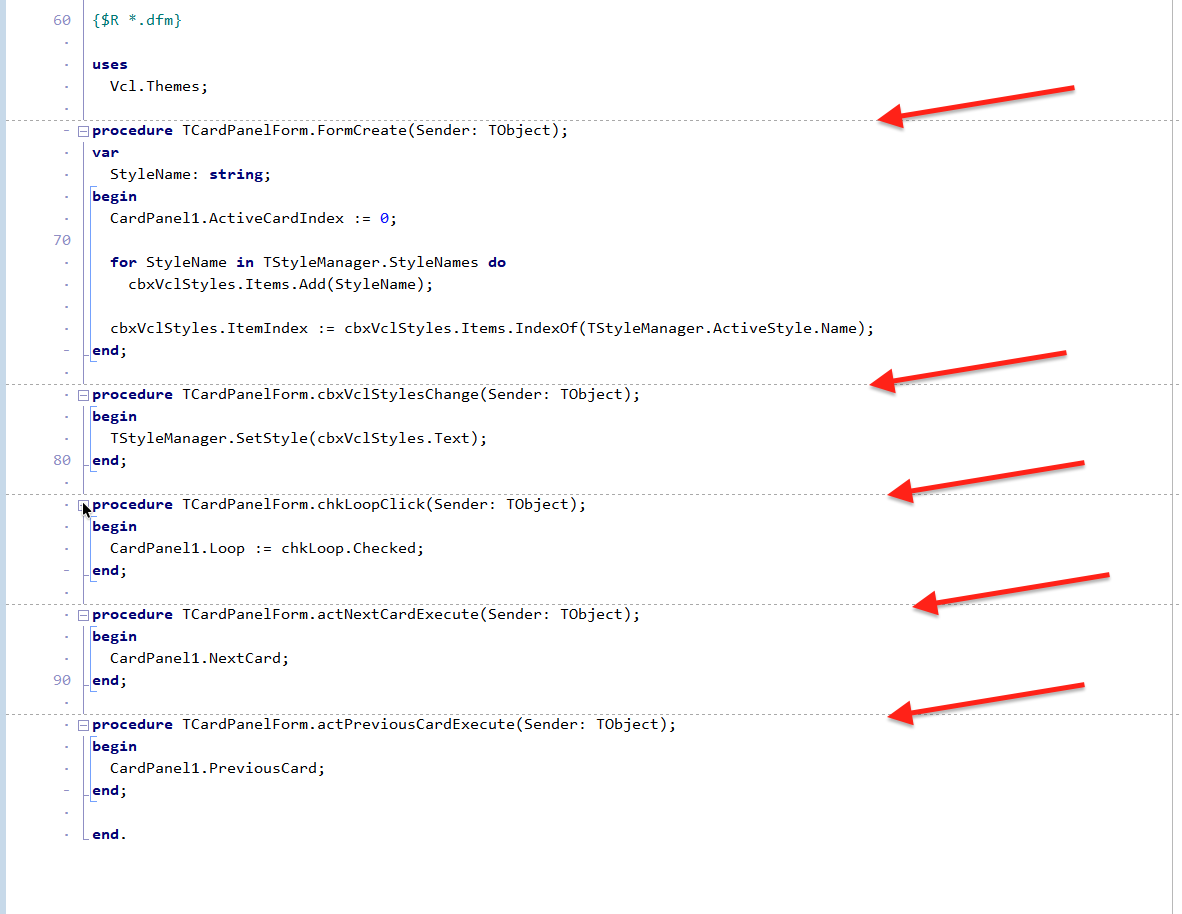
✨ Features
- Visual Method Separation: Automatically draws dotted horizontal lines between procedures, functions, constructors, and destructors.
- Structural Awareness: Identifies and separates class, record, initialization, and finalization blocks.
- Smart Context Detection: Intelligently identifies the implementation section to ensure separators are only drawn where they provide the most value, avoiding clutter in the interface section.
- Theme-Aware & Custom Colors: Dynamically adjusts separator color based on your IDE's background theme (Light or Dark) using HLS luminance calculations, or choose your own custom color with contrast protection.
- Configurable Options: Choose line colors, styles (Dotted, Dashed, Solid), and section scope via Tools > Tulip Method Separators Settings....
- Native ToolsAPI Integration: Built using the standard Delphi Open Tools API (INTACodeEditorEvents) for seamless performance and stability.
🚀 Installation
- Clone this repository to your local machine.
- Open the TulipMethodSeparators.dproj project in RAD Studio.
- Right-click on the project in the Project Manager and select Build.
- Right-click again and select Install.
- The plugin is now active! Open any .pas file to see the separators.
- (Optional) Customize colors and line styles under Tools > Tulip Method Separators Settings....
🛠️ Technical Overview
📝 Requirements
- Embarcadero RAD Studio.
- Delphi 11.x and above ( Tested on Delphi 13.1 ).
🤝 Contributing
Contributions are welcome! If you have ideas for new features, better styling, or bug fixes, feel free to open an issue or submit a pull request.
Developed with ❤️ for the Delphi Community.