

Catalog · How the catalog works
Tensorium

A platform agnostic fast tensor manipulation library using SIMD when possible, written in pascal and can be imported to other languages
- ★ 14 on GitHub
Anyone may press Interesting, signed in or not. It helps others find this project.
README
Tensorium
A platform agnostic fast tensor manipulation library using SIMD instructions when possible, written in pascal and can be imported to other languages
Quick examples
make sure to have the source folder in the units search path, or optionally if using FreePascal then use the fpc switch -Fu./source
include the nTensors unit in the uses section
uses {other units.., } SysUtils, nTensors;the generic TTensor<T> is a record not a class, thus, it will always reside in the stack,
all the heap allocation or disposal operations will automatically follow the life time of the TTensor variable scope, no need for any memory management.
- Tensor creation
to create/initialize a tensor there are two ways :
- Direct creation and initialization by assigning an array :
var
  tensor1 : TTensor<int32>;
  tensor2 : TTensor<Single>;
begin
  tensor1 := [1, 2, 3, 4]; // one dimension tensor
  tensor2 := [ [1.0, 2, 3, 4], [5, 6, 7, 8] ];    // two dimensions tensor
  tensor1.print;
  tensor2.print;
  // your code ....
end;
Note : the ".print" method will print the tensor content to the console, to use it, make sure your project settings allows that or just by adding {$APPTYPE CONSOLE} line to the project head
Output :
LongInt Tensor (4)
[1,2,3,4]Single Tensor (2 X 4)
[[1.000,2.000,3.000,4.000]
,[5.000,6.000,7.000,8.000]
]- using a constructor (it's etter to use the predefined
TSingleTensorinstead of specializing the genericTTensor<Single>)
function sine(const val:single; const index:SizeInt):single;
begin
  exit(sin(index*0.1))
end;

var tensor1, tensor2, tensor3 : TSingleTensor;
begin
  tensor1 := TSingleTensor.Create([100]); // one dimension tensor of size [100], will always be initialized with zero
  tensor1.fill(3.14159); //  filling a tensor with a number
  tensor1.printStat;

  tensor2 := TSingleTensor.Create([20, 20]);    // two dimensions tensor (100 X 100) filled with zeros
  tensor2.UniformDistribution(0, 100);  // fill the tensor with random numbers uniformly between 0 and 100 (but not 100)
  tensor2.printStat;

// you can also create a tensor by calling '.resize' method
  tensor3.resize([100]);  // three dimensional (100 X 100 X 100) tensor
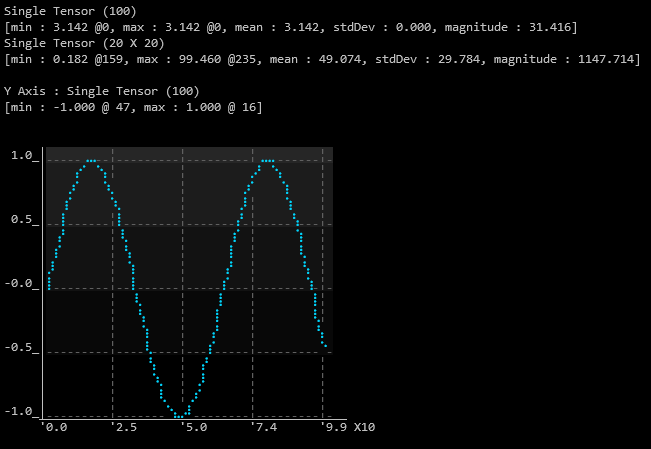
  tensor3.map(sine, tensor3);  // use the custom function named "sine" above to fill the tensor
  tensor3.plot;
  // your code ....
end;
Output :
Notes
- the ".resize" method will attempt to resize and reshape the an existing tensor keeping it's contents, if the tensor was not created it will create a new one.
- the ".printStat" method will print the tensor short meta data only such as dimensions and statistics not the content.
- the ".plot()" method is designed to rougly interrigate the tensor valuess over indecies it will plot on the consol.
Neural networks
check the "Examples/FPC" folder :
if you are using make with fpc then from the example directory cd examples/fpc/<example_name> just type make to compile
Examples included:
- MNIST dataset training example
- CIFAR10 training example
- YOLO3 inferance example
- RNN shakespear generative text example
GPU and OpenCL usage
in the neural network examples you can turn on the "USE_OPENCL" switch or if you are using make with fpc then just edit the Makefile to and set USE_OPENCL to 1
there will be further examples to upload soon Contibutions are are welcome