

Catalog · How the catalog works
mORMot2-Socket-VCL-Components-For-Delphi

mORMot2 VCL Drag And Drop Socket Components For RAD Studio! Newest Version Release V1.0.3
- ★ 14 on GitHub
Anyone may press Interesting, signed in or not. It helps others find this project.
README
🚀 mORMot Socket Components v1.0.3
High-Performance Async Socket Components for Delphi
🎬 Component Preview
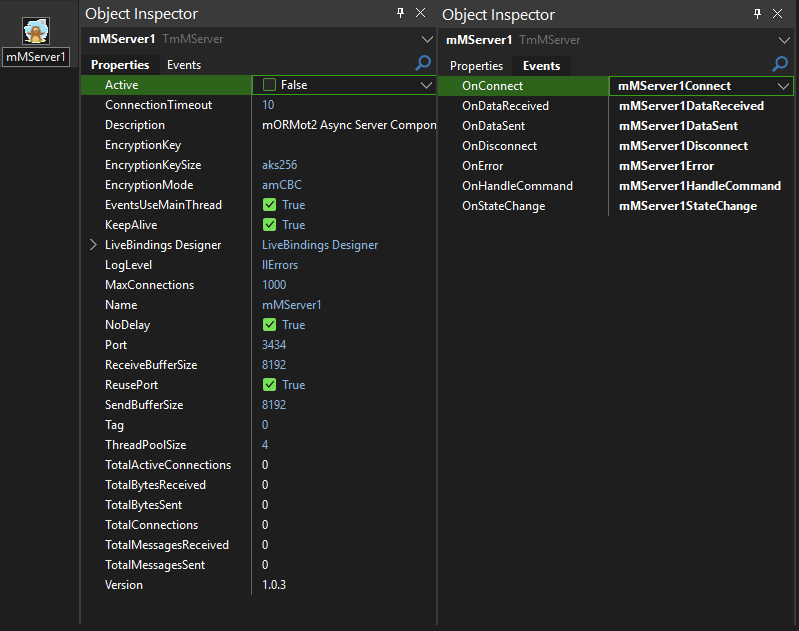
🖥️ Server Component
💻 Client Component
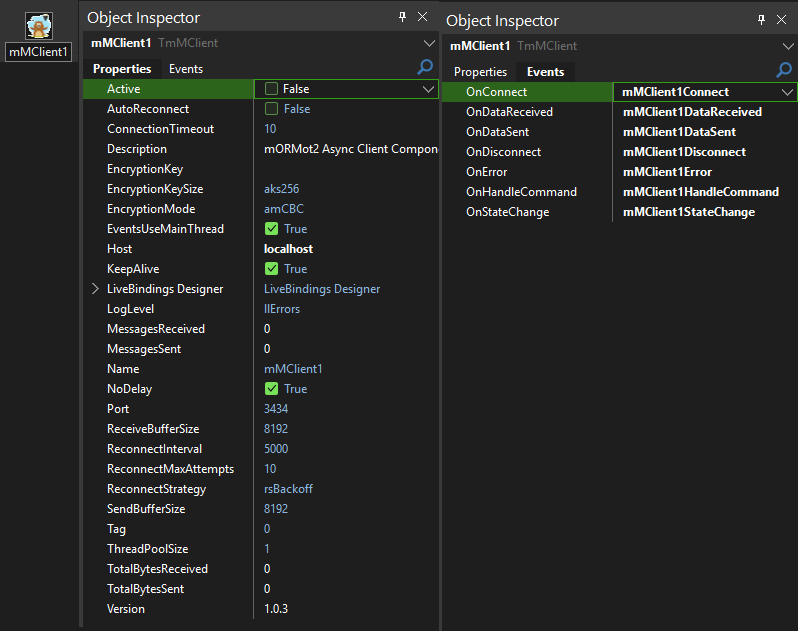
See the components in action with real-time statistics, connection management, and bulletproof performance!
✨ Why Choose mORMot Socket Components?
🎯 Built for Performance
- mORMot2's Async Framework: Leverages the lightning-fast mORMot2 async socket architecture
- Thousands of Concurrent Connections: Handle massive client loads with ease
- Minimal Memory Allocation: Optimized for enterprise-grade performance
- Binary Protocol: Efficient data transmission with magic markers
🔧 Developer-Friendly
- NetCom7-Compatible API: Drop-in replacement with familiar methods and events
- Thread-Safe Design: Bulletproof multi-threaded operation
- Auto-Reconnection: Intelligent reconnection strategies with backoff algorithms
- Per-Message Encryption: Choose encryption on a per-message basis
🛡️ Enterprise Features
- AES Encryption: Full AES support (ECB, CBC, CFB, OFB, CTR, GCM, CFC, OFC, CTC)
- Connection Management: Advanced client management and statistics
- Robust Error Handling: Comprehensive error propagation and handling
- Professional Logging: Configurable logging levels for debugging and monitoring
📦 Quick Installation
🔨 3-Step Installation
- Build the Package
Open MorMotComponents.dproj ??? Build ??? Install - Add Library Path
Tools ??? Options ??? Library Path ??? Add source folder path - Start Building!
Find components in Tool Palette under "mORMot Socket"
🏗️ Components Overview
🖥️ TMorMotServer - Server Component
The powerhouse server component that accepts and manages multiple simultaneous client connections with enterprise-grade performance.
📋 Key Properties
| Property | Type | Default | Description |
|---|---|---|---|
Active |
Boolean | False | ⚡ Start/stop the server |
Port |
Integer | 3434 | 🔌 Server listening port |
MaxConnections |
Integer | 1000 | 👥 Maximum concurrent connections |
ThreadPoolSize |
Integer | 4 | 🧵 Async thread pool size |
ConnectionTimeout |
Integer | 10 | ⏱️ Connection timeout (seconds) |
EventsUseMainThread |
Boolean | True | 🎯 Fire events in main thread |
EncryptionKey |
String | "" | 🔐 AES encryption key |
EncryptionMode |
TAESMode | amCBC | 🛡️ AES encryption mode |
EncryptionKeySize |
TAESKeySize | aks256 | 🔑 Key size (128/192/256) |
KeepAlive |
Boolean | True | 💓 TCP keep-alive |
NoDelay |
Boolean | True | ⚡ TCP_NODELAY for low latency |
📊 Statistics Properties (Read-Only)
| Property | Type | Description |
|---|---|---|
ClientCount |
Integer | 👥 Current active connections |
TotalConnections |
Int64 | 📈 Total connections since start |
TotalActiveConnections |
Int64 | 🔴 Live connection count |
TotalBytesReceived |
Int64 | 📥 Total bytes received |
TotalBytesSent |
Int64 | 📤 Total bytes sent |
UpTime |
Integer | ⏰ Server uptime in seconds |
🎪 Events
| Event | Description |
|---|---|
OnConnect |
🎉 Client connected |
OnDisconnect |
👋 Client disconnected |
OnHandleCommand |
📨 Process incoming data |
OnError |
❌ Error occurred |
OnStateChange |
🔄 Server state changed |
OnDataSent |
📤 Data transmission complete |
OnDataReceived |
📥 Data reception complete |
💻 TMorMotClient - Client Component
The intelligent client component with bulletproof auto-reconnection and flexible connection strategies.
📋 Key Properties
| Property | Type | Default | Description |
|---|---|---|---|
Active |
Boolean | False | ⚡ Connect/disconnect |
Host |
String | "localhost" | 🌐 Server hostname/IP |
Port |
Integer | 3434 | 🔌 Server port |
ConnectionTimeout |
Integer | 10 | ⏱️ Connection timeout |
AutoReconnect |
Boolean | False | 🔄 Enable auto-reconnection |
ReconnectStrategy |
TmMReconnectStrategy | rsBackoff | 📈 Reconnection strategy |
ReconnectInterval |
Integer | 5000 | ⏰ Base reconnection interval (ms) |
ReconnectMaxAttempts |
Integer | 10 | 🔢 Maximum reconnection attempts |
EventsUseMainThread |
Boolean | True | 🎯 Fire events in main thread |
🔄 Reconnection Strategies
| Strategy | Description |
|---|---|
rsNone |
❌ No automatic reconnection |
rsImmediate |
⚡ Reconnect immediately (100ms) |
rsBackoff |
📈 Exponential backoff (smart) |
rsFixedInterval |
⏰ Fixed interval reconnection |
📊 Statistics Properties (Read-Only)
| Property | Type | Description |
|---|---|---|
ConnectedTime |
Integer | ⏰ Time connected (seconds) |
ReconnectAttempts |
Integer | 🔢 Current reconnection attempts |
RemoteIP |
String | 🌐 Server IP address |
TotalBytesReceived |
Int64 | 📥 Total bytes received |
TotalBytesSent |
Int64 | 📤 Total bytes sent |
🎪 Events
| Event | Description |
|---|---|
OnConnect |
🎉 Connected to server |
OnDisconnect |
👋 Disconnected from server |
OnHandleCommand |
📨 Process incoming data |
OnError |
❌ Error occurred |
OnStateChange |
🔄 Connection state changed |
🚀 Quick Start Examples
🖥️ Basic Server Setup
// 1. Drop TMorMotServer on form
// 2. Configure basic properties
procedure TServerForm.FormCreate(Sender: TObject);
begin
  MorMotServer1.Port := 8080;
  MorMotServer1.MaxConnections := 500;
  MorMotServer1.Active := True;  // Start server
end;

// 3. Handle incoming data
function TServerForm.MorMotServer1HandleCommand(Sender: TObject;
  Client: TmMServerClient; aData: TBytes): TBytes;
var
  ReceivedText: string;
begin
  // Convert received bytes to string
  ReceivedText := StringOf(aData);
  ShowMessage('Received: ' + ReceivedText);

  // Echo back with confirmation
  Result := BytesOf('Echo: ' + ReceivedText);
end;

// 4. Handle client connections
procedure TServerForm.MorMotServer1Connect(Sender: TObject;
  Client: TmMServerClient);
begin
  Memo1.Lines.Add(Format('Client connected: %s:%d',
    [Client.PeerIP, Client.PeerPort]));
end;
💻 Basic Client Setup
// 1. Drop TMorMotClient on form
// 2. Configure connection
procedure TClientForm.FormCreate(Sender: TObject);
begin
  MorMotClient1.Host := '127.0.0.1';
  MorMotClient1.Port := 8080;
  MorMotClient1.AutoReconnect := True;
  MorMotClient1.ReconnectStrategy := rsBackoff;
end;

// 3. Connect to server
procedure TClientForm.ButtonConnectClick(Sender: TObject);
begin
  MorMotClient1.Active := True;
end;

// 4. Send data
procedure TClientForm.ButtonSendClick(Sender: TObject);
var
  Data: TBytes;
begin
  Data := BytesOf('Hello Server!');
  MorMotClient1.SendData(Data, False);  // Unencrypted
end;

// 5. Handle connection events
procedure TClientForm.MorMotClient1Connect(Sender: TObject);
begin
  ShowMessage('Connected to server!');
end;
🔐 Encryption Examples
🛡️ Server with Encryption
procedure TServerForm.FormCreate(Sender: TObject);
begin
  // Configure encryption
  MorMotServer1.EncryptionKey := 'MySecretKey123!';
  MorMotServer1.EncryptionMode := amCBC;
  MorMotServer1.EncryptionKeySize := aks256;
  MorMotServer1.Active := True;
end;

// Send encrypted response
function TServerForm.MorMotServer1HandleCommand(Sender: TObject;
  Client: TmMServerClient; aData: TBytes): TBytes;
begin
  // Process data...
  Result := BytesOf('Encrypted response');

  // Response will be encrypted automatically if client sent encrypted data
end;

// Send encrypted data to specific client
procedure TServerForm.SendEncryptedMessage(Client: TmMServerClient);
var
  Data: TBytes;
begin
  Data := BytesOf('Secret message');
  Client.SendData(Data, True);  // Encrypted = True
end;
🔑 Client with Encryption
procedure TClientForm.FormCreate(Sender: TObject);
begin
  // Must match server encryption settings
  MorMotClient1.EncryptionKey := 'MySecretKey123!';
  MorMotClient1.EncryptionMode := amCBC;
  MorMotClient1.EncryptionKeySize := aks256;
end;

// Send encrypted message
procedure TClientForm.SendEncryptedData;
var
  Data: TBytes;
begin
  Data := BytesOf('Top secret data');
  MorMotClient1.SendData(Data, True);  // Encrypted = True
end;

// Send unencrypted message (mixed mode)
procedure TClientForm.SendPlainData;
var
  Data: TBytes;
begin
  Data := BytesOf('Public data');
  MorMotClient1.SendData(Data, False);  // Encrypted = False
end;
👥 Client Management Examples
📋 Loop Through All Clients
procedure TServerForm.LoopAllClients;
var
  Client: TmMServerClient;
  ClientInfo: string;
begin
  Memo1.Lines.Clear;

  // Thread-safe iteration
  MorMotServer1.PropertyLock.Enter;
  try
    for Client in MorMotServer1.Clients.Values do
    begin
      ClientInfo := Format('Handle: %d, IP: %s, Connected: %s, Bytes: %d/%d',
        [Client.Handle, Client.PeerIP,
         FormatDateTime('hh:nn:ss', Client.ConnectedAt),
         Client.BytesReceived, Client.BytesSent]);

      Memo1.Lines.Add(ClientInfo);
    end;
  finally
    MorMotServer1.PropertyLock.Leave;
  end;

  Caption := Format('Server - %d clients connected',
    [MorMotServer1.ClientCount]);
end;
📤 Broadcasting Messages
// Broadcast unencrypted message to all clients
procedure TServerForm.BroadcastPlainMessage;
var
  Data: TBytes;
begin
  Data := BytesOf('Broadcast message to all!');
  MorMotServer1.BroadcastData(Data, False);  // Unencrypted
end;

// Broadcast encrypted message to all clients
procedure TServerForm.BroadcastEncryptedMessage;
var
  Data: TBytes;
begin
  Data := BytesOf('Secret broadcast!');
  MorMotServer1.BroadcastData(Data, True);   // Encrypted
end;

// Send to specific client by IP
procedure TServerForm.SendToClientByIP(const IP: string; const Msg: string);
var
  Client: TmMServerClient;
  Data: TBytes;
begin
  Client := MorMotServer1.FindClientByIP(IP);
  if Assigned(Client) then
  begin
    Data := BytesOf(Msg);
    Client.SendData(Data, False);
  end;
end;
🚫 Disconnecting Clients
// Disconnect all clients
procedure TServerForm.DisconnectAllClientsClick(Sender: TObject);
begin
  MorMotServer1.DisconnectAllClients;
  ShowMessage('All clients disconnected');
end;

// Disconnect specific client by IP
procedure TServerForm.DisconnectClientByIP(const IP: string);
var
  Client: TmMServerClient;
begin
  Client := MorMotServer1.FindClientByIP(IP);
  if Assigned(Client) then
  begin
    Client.Disconnect;
    ShowMessage('Client ' + IP + ' disconnected');
  end;
end;

// Disconnect client by handle
procedure TServerForm.DisconnectClientByHandle(Handle: TPollAsyncConnectionHandle);
begin
  MorMotServer1.DisconnectClient(Handle);
end;
🔧 Advanced Features
📊 Real-Time Statistics
// Update statistics display
procedure TServerForm.Timer1Timer(Sender: TObject);
begin
  StatusBar1.Panels[0].Text := Format('Clients: %d', [MorMotServer1.ClientCount]);
  StatusBar1.Panels[1].Text := Format('Total Connections: %d', [MorMotServer1.TotalConnections]);
  StatusBar1.Panels[2].Text := Format('Bytes Sent: %d', [MorMotServer1.TotalBytesSent]);
  StatusBar1.Panels[3].Text := Format('Bytes Received: %d', [MorMotServer1.TotalBytesReceived]);
  StatusBar1.Panels[4].Text := Format('Uptime: %d sec', [MorMotServer1.UpTime]);
end;
🔄 Smart Reconnection
// Configure bulletproof reconnection
procedure TClientForm.SetupReconnection;
begin
  MorMotClient1.AutoReconnect := True;
  MorMotClient1.ReconnectStrategy := rsBackoff;
  MorMotClient1.ReconnectInterval := 1000;      // 1 second base
  MorMotClient1.ReconnectMaxAttempts := 20;     // 20 attempts
end;

// Manual reconnection reset
procedure TClientForm.ResetReconnectionClick(Sender: TObject);
begin
  MorMotClient1.ResetReconnectionState;
  ShowMessage('Reconnection state reset');
end;

// Handle reconnection events
procedure TClientForm.MorMotClient1Error(Sender: TObject;
  const Error: string; ErrorCode: Integer);
begin
  if ErrorCode = -99 then  // Max attempts reached
  begin
    ShowMessage('Auto-reconnection disabled after max attempts');
  end
  else
  begin
    Memo1.Lines.Add('Error: ' + Error);
  end;
end;
🎯 Event Management
// Configure event threading
procedure TForm1.FormCreate(Sender: TObject);
begin
  // Events fired in main thread (safe for UI updates)
  MorMotServer1.EventsUseMainThread := True;

  // Or handle events in background threads (faster)
  // MorMotServer1.EventsUseMainThread := False;
end;

// Handle state changes
procedure TServerForm.MorMotServer1StateChange(Sender: TObject;
  OldState, NewState: TmMServerState);
const
  StateNames: array[TmMServerState] of string =
    ('Disconnected', 'Starting', 'Listening', 'Stopping');
begin
  Memo1.Lines.Add(Format('State: %s → %s',
    [StateNames[OldState], StateNames[NewState]]));
end;
🛠️ Protocol Details
📦 Message Structure
+----------------+----------------+---------------+------------------+
| Magic (4 bytes)| DataSize (4)   | Encrypted (1) | Data (DataSize)  |
+----------------+----------------+---------------+------------------+
| 0xCAFEBABE     | Length of Data | 1=Yes, 0=No   | Actual Data      |
+----------------+----------------+---------------+------------------+
🔐 Encryption Modes Available
| Mode | Description | Use Case |
|---|---|---|
amECB |
Electronic Codebook | Simple, fast |
amCBC |
Cipher Block Chaining | Default, secure |
amCFB |
Cipher Feedback | Stream-like |
amOFB |
Output Feedback | Stream cipher |
amCTR |
Counter Mode | Parallel processing |
amGCM |
Galois/Counter Mode | Authenticated encryption |
amCFC |
CFC Mode | Advanced |
amOFC |
OFC Mode | Advanced |
amCTC |
CTC Mode | Advanced |
🎪 Complete Working Example
🖥️ Echo Server
unit ServerMainForm;

interface

uses
  Winapi.Windows, Winapi.Messages, System.SysUtils, System.Variants,
  System.Classes, Vcl.Graphics, Vcl.Controls, Vcl.Forms, Vcl.Dialogs,
  Vcl.StdCtrls, Vcl.ExtCtrls, mMServer;

type
  TForm1 = class(TForm)
    MorMotServer1: TMorMotServer;
    Memo1: TMemo;
    Panel1: TPanel;
    ButtonStart: TButton;
    ButtonStop: TButton;
    ButtonDisconnectAll: TButton;
    Timer1: TTimer;
    StatusBar1: TStatusBar;

    procedure FormCreate(Sender: TObject);
    procedure ButtonStartClick(Sender: TObject);
    procedure ButtonStopClick(Sender: TObject);
    procedure ButtonDisconnectAllClick(Sender: TObject);
    procedure Timer1Timer(Sender: TObject);

    // Server events
    function MorMotServer1HandleCommand(Sender: TObject;
      Client: TmMServerClient; aData: TBytes): TBytes;
    procedure MorMotServer1Connect(Sender: TObject; Client: TmMServerClient);
    procedure MorMotServer1Disconnect(Sender: TObject; Client: TmMServerClient);
    procedure MorMotServer1Error(Sender: TObject; Client: TmMServerClient;
      const Error: string; ErrorCode: Integer);
  end;

var
  Form1: TForm1;

implementation

{$R *.dfm}

procedure TForm1.FormCreate(Sender: TObject);
begin
  // Configure server
  MorMotServer1.Port := 8080;
  MorMotServer1.MaxConnections := 1000;
  MorMotServer1.EncryptionKey := 'MySecretKey123!';
  MorMotServer1.EncryptionMode := amCBC;

  // Start timer for statistics
  Timer1.Interval := 1000;
  Timer1.Enabled := True;

  Memo1.Lines.Add('Echo Server Ready - Click Start to begin');
end;

procedure TForm1.ButtonStartClick(Sender: TObject);
begin
  MorMotServer1.Active := True;
  Memo1.Lines.Add('Server started on port ' + IntToStr(MorMotServer1.Port));
end;

procedure TForm1.ButtonStopClick(Sender: TObject);
begin
  MorMotServer1.Active := False;
  Memo1.Lines.Add('Server stopped');
end;

procedure TForm1.ButtonDisconnectAllClick(Sender: TObject);
begin
  MorMotServer1.DisconnectAllClients;
  Memo1.Lines.Add('All clients disconnected');
end;

function TForm1.MorMotServer1HandleCommand(Sender: TObject;
  Client: TmMServerClient; aData: TBytes): TBytes;
var
  ReceivedText: string;
  Response: string;
begin
  ReceivedText := StringOf(aData);
  Response := 'Echo: ' + ReceivedText;

  Memo1.Lines.Add(Format('[%s] %s', [Client.PeerIP, ReceivedText]));

  // Return echo response
  Result := BytesOf(Response);
end;

procedure TForm1.MorMotServer1Connect(Sender: TObject; Client: TmMServerClient);
begin
  Memo1.Lines.Add(Format('✅ Client connected: %s:%d (Handle: %d)',
    [Client.PeerIP, Client.PeerPort, Client.Handle]));
end;

procedure TForm1.MorMotServer1Disconnect(Sender: TObject; Client: TmMServerClient);
begin
  Memo1.Lines.Add(Format('❌ Client disconnected: %s (Handle: %d)',
    [Client.PeerIP, Client.Handle]));
end;

procedure TForm1.MorMotServer1Error(Sender: TObject; Client: TmMServerClient;
  const Error: string; ErrorCode: Integer);
begin
  if Assigned(Client) then
    Memo1.Lines.Add(Format('⚠️ Error [%s]: %s', [Client.PeerIP, Error]))
  else
    Memo1.Lines.Add('⚠️ Server Error: ' + Error);
end;

procedure TForm1.Timer1Timer(Sender: TObject);
begin
  Caption := Format('Echo Server - %d clients, %d total connections',
    [MorMotServer1.ClientCount, MorMotServer1.TotalConnections]);
end;

end.
🏆 Performance & Compatibility
⚡ Performance Specs
- Concurrent Connections: 1000+ simultaneous clients
- Throughput: Optimized binary protocol with minimal overhead
- Memory Usage: Efficient memory management with object pooling
- CPU Usage: Multi-threaded async architecture for maximum performance
🔧 Compatibility
- Delphi Versions: XE2, XE3, XE4, XE5, XE6, XE7, XE8, 10 Seattle, 10.1 Berlin, 10.2 Tokyo, 10.3 Rio, 10.4 Sydney, 11 Alexandria, 12 Athens, 12.2
- Platforms: Windows 32-bit & 64-bit
- Frameworks: VCL, Console applications
- Dependencies: mORMot2 framework (included)
📋 Requirements
- ✅ mORMot2 framework properly installed
- ✅ Windows platform (32/64-bit)
- ✅ Delphi XE2 or later
🎯 Why v1.0.3 is Special
🛡️ BULLETPROOF Features
- Active Connection Counting: Foolproof live connection tracking using dictionary count
- Force Disconnect Recovery: Aggressive reconnection strategies for network interruptions
- Memory Leak Prevention: Centralized cleanup procedures prevent resource leaks
- Thread-Safe Operations: All operations properly synchronized for multi-threaded safety
🆕 Version 1.0.3 Improvements
- ✅ Fixed RemoteIP property to properly capture client/server IPs
- ✅ Enhanced reconnection timer with minimum intervals
- ✅ Bulletproof client disconnect handling
- ✅ Live connection count using dictionary instead of manual counters
- ✅ Improved error handling and event management
- ✅ Enhanced encryption context management
📞 Support & Community
💬 Get Help
- Issues: Report bugs via GitHub Issues
- Questions: Community support available
- Contributing: Pull requests welcome!
- Discord: bitmasterxor
📜 License
Open Source - Free to distribute and use in commercial and personal projects!
🚀 Ready to Build High-Performance Socket Applications?
Download • Install • Build Amazing Apps!
Made By BitmasterXor And Friends With ❤️ for the Delphi Community