

Catalog · How the catalog works
OneAgent-SDK-Delphi

Unofficial SDK for Dynatrace OneAgent for Delphi
- ★ 15 on GitHub
Anyone may press Interesting, signed in or not. It helps others find this project.
README
OneAgent SDK for Delphi
Delphi bindings for the Dynatrace OneAgent SDK for C/C++, enabling distributed tracing and observability in Delphi applications that run on a host monitored by Dynatrace OneAgent.
The wrapper exposes the C SDK through a small, interface-based Delphi API: tracers for custom services, remote calls, HTTP requests and SQL database requests, plus tag propagation, custom request attributes and W3C trace-context access for log enrichment.
⚠️ Disclaimer — this is an unofficial, community project
This repository is NOT affiliated with, endorsed by, sponsored by, or supported by Dynatrace LLC in any way.
- It is an independent, community-maintained project that provides Delphi language bindings on top of the publicly available, Apache-2.0-licensed Dynatrace OneAgent SDK for C/C++.
- "Dynatrace", "OneAgent", and related names and logos are trademarks of Dynatrace LLC. They are used here only for descriptive/identification purposes to explain what this library integrates with. Their use does not imply any affiliation with or endorsement by Dynatrace LLC.
- Dynatrace LLC provides no support, warranty, or maintenance for this repository. Do not open support tickets with Dynatrace for issues related to this Delphi wrapper — use this project's issue tracker instead.
- This project is provided "AS IS", without warranty of any kind. You use it at your own risk. See the LICENSE for full terms.
For the official, Dynatrace-maintained SDKs, see the Dynatrace OneAgent SDK on GitHub.
Why this exists
Dynatrace OneAgent already auto-instruments native Windows processes, so a lot is captured without touching your code. This SDK is for what automatic instrumentation cannot infer on its own:
- Define custom service boundaries around business operations (e.g.
processOrderonOrderService). - Trace outgoing and incoming remote calls and propagate the Dynatrace tag, so calls link across process and host boundaries into a single distributed trace.
- Trace SQL database requests with the statement, returned row count, and the database that was hit.
- Trace outgoing HTTP requests, and enrich your logs with the active W3C trace/span IDs.
There are official OneAgent SDKs for C/C++, Java, .NET, Node.js, PHP, Python, and Go — but none for Delphi. This project provides Delphi-idiomatic bindings on top of the C/C++ SDK so Delphi applications can take part in Dynatrace distributed tracing without hand-writing the native C interop.
What it looks like in Dynatrace
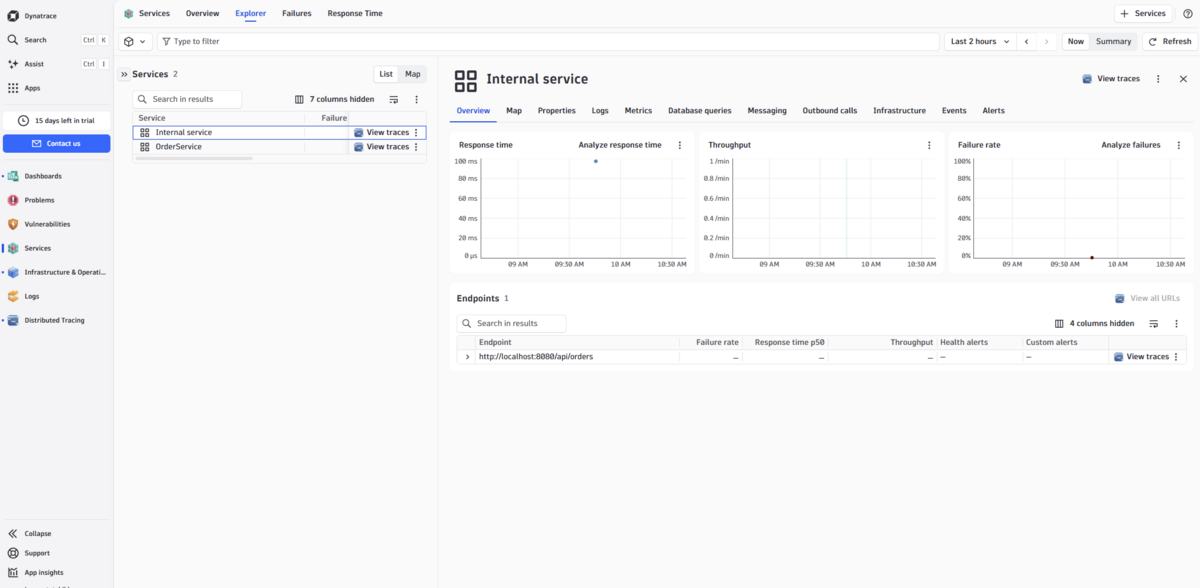
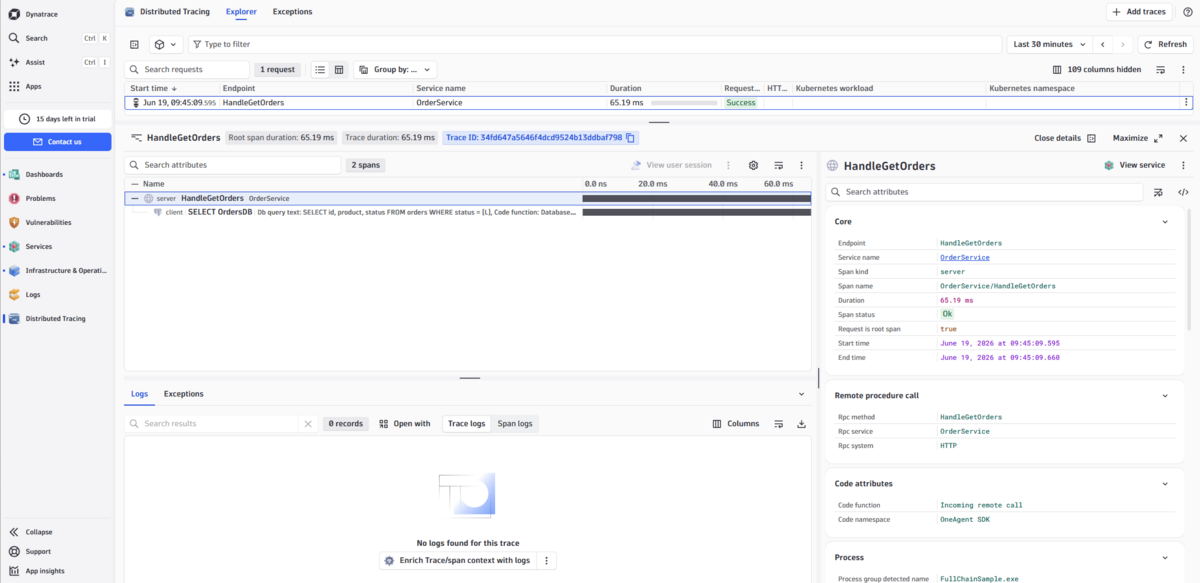
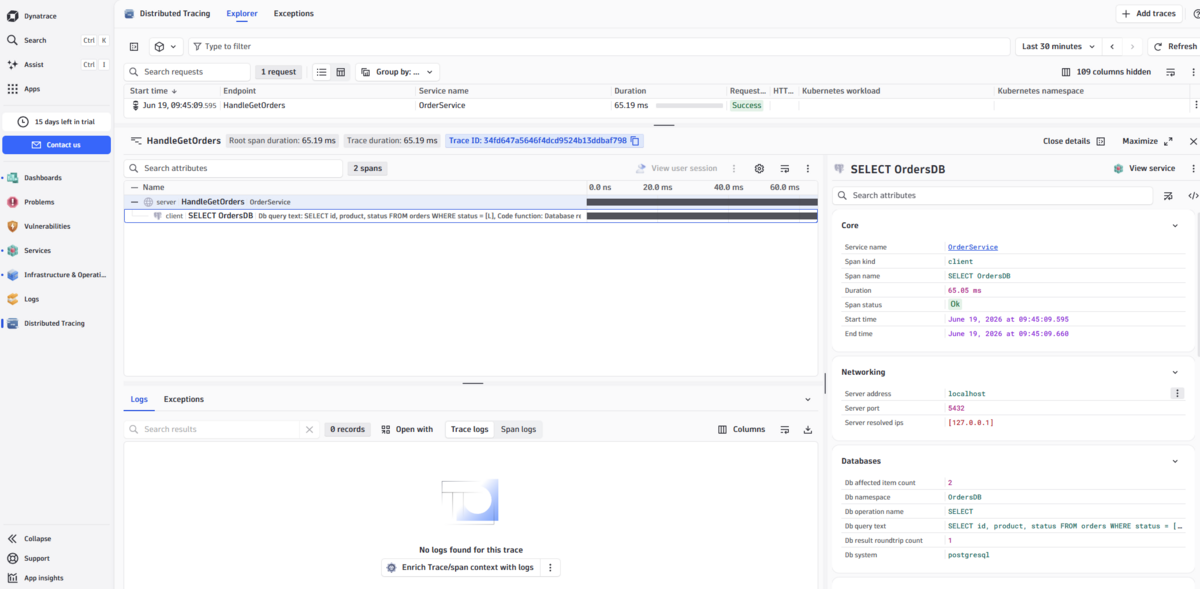
The screenshots below show traces produced by the FullChainSample
(client → HTTP server → database) as they appear in the Dynatrace UI.
Services automatically discovered from the SDK tracers:
A full distributed trace — from the incoming remote call through to the SQL database request:
Database request detail captured by the SDK (statement, endpoint, row count):
Prerequisites
- Delphi 10.2 Tokyo or later (Unicode strings; tested on Windows targets)
- Windows x86-64 (primary target) or x86-32
- Dynatrace OneAgent installed and running on the host to capture data. Without an agent the SDK is a safe no-op — your code keeps working, nothing is captured.
Repository layout
| Path | Contents |
|---|---|
src\ |
The SDK units (the wrapper itself) |
lib\windows-x86_64\ |
Prebuilt onesdk_shared.dll (64-bit) from the C SDK |
lib\windows-x86_32\ |
Prebuilt onesdk_shared.dll (32-bit) from the C SDK |
samples\ |
Runnable example applications |
OneAgentSDK.dpk / OneAgentSDKGroup.groupproj |
Package and project group for building in the IDE |
The
onesdk_shared.dllfiles underlib\are unmodified binaries from the Dynatrace OneAgent SDK for C/C++, redistributed here under the Apache License 2.0 for convenience. See Licensing.
Adding to your project
- Add
src\to your project's search path (or add the units directly to your project, as the samples do). - Copy the matching
onesdk_shared.dllnext to your executable, or ensure it is on thePATH:- 64-bit:
lib\windows-x86_64\onesdk_shared.dll - 32-bit:
lib\windows-x86_32\onesdk_shared.dll
- 64-bit:
- Add
OneAgentSDK(and usuallyOneAgentSDK.Types) to yourusesclause.
Quick start
uses
  OneAgentSDK, OneAgentSDK.Types;

var
  SDK    : IOneAgentSDK;
  Tracer : ITracer;
begin
  SDK := CreateOneAgentSDK;

  Tracer := SDK.TraceCustomService('processOrder', 'OrderService');
  Tracer.Start;
  try
    // ... your business logic ...
  except
    on E: Exception do
    begin
      Tracer.SetError(E.ClassName, E.Message);
      raise;
    end;
  end;
  Tracer.Finish;
end;
SDK state
CreateOneAgentSDK always returns a safe, usable interface. When no compatible
agent is present, every tracer factory transparently returns a no-op tracer, so
no nil-checks or conditional compilation are needed. Use GetCurrentState to
inspect what is actually happening:
case SDK.GetCurrentState of
  sdkActive             : // agent is monitoring, data is captured
  sdkTemporarilyInactive: // agent present but temporarily inactive; check again later
  sdkPermanentlyInactive: // agent will not become active (e.g. fork child, or no agent)
  sdkNotInitialized     : // initialization failed
  sdkError              : // unexpected state
end;
Tracer types
Custom service
Tracer := SDK.TraceCustomService('methodName', 'ServiceName');Outgoing remote call (with tag propagation)
var OutTracer: IOutgoingRemoteCallTracer;
OutTracer := SDK.TraceOutgoingRemoteCall(
  'GetUser', 'UserService', 'grpc://users:9090', ctTcpIp, 'users:9090');
OutTracer.Start;
// Send the DYNATRACE_HTTP_HEADERNAME header with OutTracer.GetDynatraceStringTag value.
Incoming remote call (server side)
var InTracer: IIncomingRemoteCallTracer;
InTracer := SDK.TraceIncomingRemoteCall('GetUser', 'UserService', 'grpc://users:9090');
InTracer.SetDynatraceStringTag(ReceivedHeaderValue); // before Start
InTracer.Start;
Outgoing HTTP web request
var WebTracer: IOutgoingWebRequestTracer;
WebTracer := SDK.TraceOutgoingWebRequest('https://api.example.com/v1/orders', 'GET');
WebTracer.AddRequestHeader('Accept', 'application/json'); // before Start
WebTracer.Start;
// Send DYNATRACE_HTTP_HEADERNAME header with WebTracer.GetDynatraceStringTag value.
// ... after the response ...
WebTracer.SetStatusCode(Response.StatusCode);
WebTracer.Finish;
Database request
var DbInfo: IDatabaseInfo;
DbInfo := SDK.CreateDatabaseInfo('mydb', DB_VENDOR_POSTGRESQL, ctTcpIp, 'db:5432');

var DbTracer: IDatabaseRequestTracer;
DbTracer := SDK.TraceSQLDatabaseRequest(DbInfo, 'SELECT * FROM users');
DbTracer.Start;
// ... execute query ...
DbTracer.SetReturnedRowCount(Count);
DbTracer.Finish;
Log enrichment (W3C trace context)
var Info: TTraceContextInfo;
Info := SDK.GetTraceContextInfo;
if Info.IsValid then
  Logger.Info(Format('[dt.trace_id=%s dt.span_id=%s] %s',
    [Info.TraceId, Info.SpanId, Message]));
Custom request attributes
SDK.AddCustomRequestAttribute('user.id', UserId);
SDK.AddCustomRequestAttribute('order.amount', Amount);  // Double overload
SDK.AddCustomRequestAttribute('retry.count', Int64(3)); // Int64 overload
Thread affinity
All tracer interfaces have strict thread affinity: they must be created,
used (Start, SetError, Finish), and released on the same thread.
Do not pass tracer instances across threads.
Samples
Each sample is a standalone Delphi project that includes the SDK units directly
from src\. Build and run them from the Delphi IDE (RAD Studio). The console
samples run safely even without an agent (they report state and exercise the API).
| Sample | What it shows |
|---|---|
samples\CustomServiceSample\ |
TraceCustomService with error handling and custom attributes |
samples\RemoteCallSample\ |
Outgoing + incoming remote call with tag propagation |
samples\DatabaseSample\ |
CreateDatabaseInfo + TraceSQLDatabaseRequest inside a service span |
samples\HttpRequestSample\ |
VCL app tracing an outgoing HTTP request |
samples\FullChainSample\ |
End-to-end client → HTTP server → database chain (Indy TIdHTTPServer) |
Tracing data only appears in the Dynatrace UI when the OneAgent is active on the host. Database and outgoing-call traces additionally need an active PurePath (e.g. wrapped in an incoming remote call or custom service trace).
Source files
| File | Purpose |
|---|---|
src\OneAgentSDK.pas |
Public interfaces, CreateOneAgentSDK factory, propagation-header constants |
src\OneAgentSDK.Types.pas |
Enums, TTraceContextInfo, DB_VENDOR_* string constants |
src\OneAgentSDK.Native.pas |
external DLL declarations, TOnesdk_string, string helpers |
src\OneAgentSDK.Impl.pas |
Live implementation (wraps the C SDK) |
src\OneAgentSDK.NullImpl.pas |
No-op implementation (safe when the agent is absent) |
Pointing the SDK at an agent without the installer
For local testing you can set stub variables before calling CreateOneAgentSDK:
SetOneAgentSDKVariable('home', 'C:\oneagent');
SDK := CreateOneAgentSDK;
See the documentation comments on SetOneAgentSDKVariable for the supported keys.
Licensing
This project is licensed under the Apache License 2.0 — see LICENSE and NOTICE.
The prebuilt onesdk_shared.dll binaries under lib\ are part of the
Dynatrace OneAgent SDK for C/C++,
copyright Dynatrace LLC, and are likewise distributed under the Apache License 2.0.
They are included unmodified for convenience; refer to the upstream repository for
their authoritative license and notices.
Trademarks
"Dynatrace" and "OneAgent" are trademarks of Dynatrace LLC. All other trademarks are the property of their respective owners. This project is not affiliated with or endorsed by Dynatrace LLC (see the disclaimer at the top of this document).
Discussion
Feel free to discuss the project:
- onforum - https://en.delphipraxis.net/topic/15601-dynatrace-oneagent-sdk-wrapper-for-delphi/
- linkedin - https://www.linkedin.com/posts/petetskih_delphi-objectpascal-dynatrace-ugcPost-7473667354716049408-WZXM/ or here in PRs, issues, etc
Thank you