

Catalog · How the catalog works
pasc

pasc is a command line tool to help the developer manage free pascal projects with boiler plate tasks like git repository config, launch tasks, test projects creation and others.
- ★ 17 on GitHub
Anyone may press Interesting, signed in or not. It helps others find this project.
README
pasc
The pasc is a cross-platform command line tool that is intended to help with the development process of Free Pascal / Lazarus projects, assisting during development, testing, build and documentation.
It allows you to create projects, add tests, add automation to documentation, in addition to providing a watch command to monitor the projects folder for changes and thereby trigger the build and test report process.
An interesting feature is the ease with which a new project can be configured to work with vscode providing configuration files for build, to run tests, and even for watch project folder and to trigger build and tests.
Install
Release binaries are published for Linux and Windows (x86_64). On other platforms, such as macOS, build from source.
With mise (recommended)
mise installs pasc from the GitHub releases, and also upgrades and uninstalls it:
mise use -g github:laprado/pasc
mise upgrade github:laprado/pasc   # later, to upgrade
Manual
Without a package manager, download the zip for your platform from the latest release, check it against pasc_checksums.txt, and extract it to a folder in your PATH.
Linux:
curl -fsSLO https://github.com/laprado/pasc/releases/latest/download/pasc-linux-amd64.zip
curl -fsSLO https://github.com/laprado/pasc/releases/latest/download/pasc_checksums.txt
sha256sum -c --ignore-missing pasc_checksums.txt
unzip pasc-linux-amd64.zip -d ~/.local/bin
Windows (PowerShell):
$release = "https://github.com/laprado/pasc/releases/latest/download"
Invoke-WebRequest "$release/pasc-windows-amd64.zip" -OutFile pasc-windows-amd64.zip
Invoke-WebRequest "$release/pasc_checksums.txt" -OutFile pasc_checksums.txt
$expected = (Select-String "pasc-windows-amd64.zip" pasc_checksums.txt).Line.Split(" ")[0]
if ((Get-FileHash pasc-windows-amd64.zip -Algorithm SHA256).Hash -ne $expected) { throw "checksum mismatch" }
Expand-Archive pasc-windows-amd64.zip -DestinationPath "$env:LOCALAPPDATA\Programs\pasc"
Then add %LOCALAPPDATA%\Programs\pasc to your user PATH. The checksums file is published for the releases after 1.2.1.
Build from source
Requirements: Free Pascal 3.2.2, Lazarus 4.x (for lazbuild), boss 3.x and git.
git clone https://github.com/laprado/pasc.git
cd pasc
boss install
lazbuild apps/pasc/pasc.lpi --build-mode=Release
The executable is apps/pasc/pasc (pasc.exe on Windows). Copy it to a folder in your PATH.
Upgrading from pasc install
Versions up to 1.2.1 installed themselves with pasc install, copying pasc to ~/.pasc and changing the PATH. That command is deprecated: it now only shows these instructions, and how to remove an old install (the ~/.pasc folder and its PATH entry).
Documentation
Check the pasc docs for a quick start and the details of available commands.
pasc on vscode
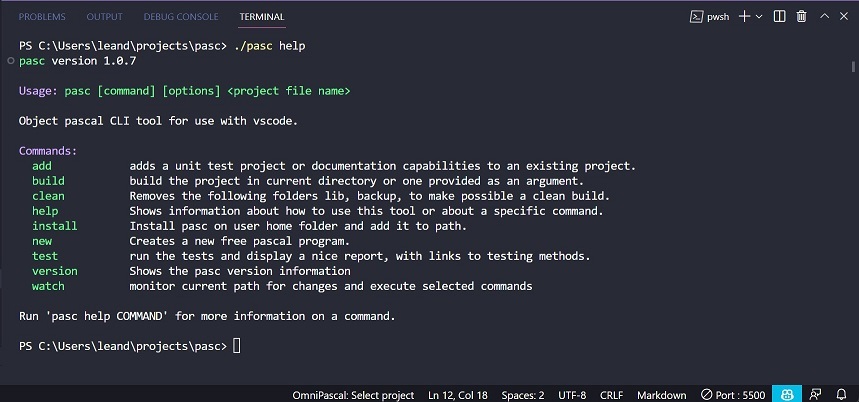
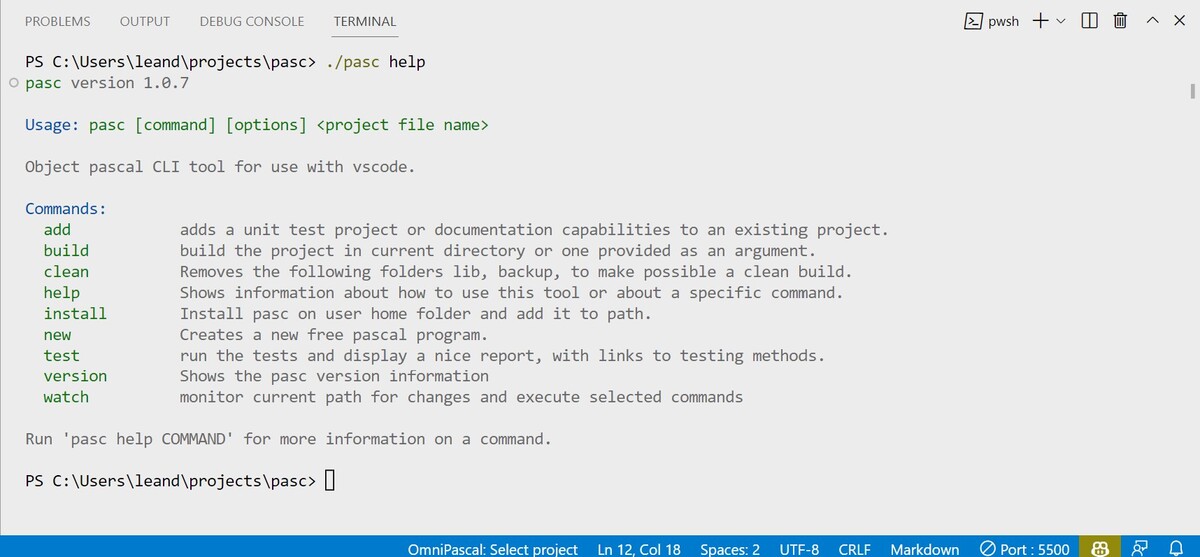
Take a look of how pasc works in vscode integrated terminal, you can see also a list of available commands:
License
pasc is free and open-source software licensed under the MIT License.
The third-party software included in the executable, and the tools pasc runs but does not distribute (Free Pascal, Lazarus, boss, git and PasDoc), are listed in THIRD-PARTY-NOTICES.md, which pasc licenses also shows.
The files that pasc generates in your projects, such as the templates of pasc new --template, are not covered by the pasc license: you can use, change and distribute them with no restriction and no attribution.