

LazIdeSearchPanel

Search panel plugin for the Lazarus IDE.
- Active · last change 6-11-2025
- ★ 11 on GitHub
In the Online Package Manager
Install it from inside Lazarus through Package, Online Package Manager.
README
Lazarus IDESearchPanel
Search panel plugin for the Lazarus IDE
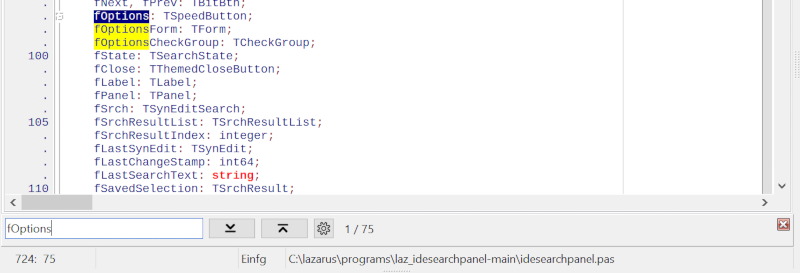
Advantages over the standard "Find" window of the IDE (Ctrl+F)
- Modern, convenient, accessible and intuitive interface.
- No forms and message boxes popping up.
- Function keys such as F3, which are often difficult to reach on notebook-computers, are not required. For the next occurrence of the search term, simply press "Enter" again.
- Search as you type: See directly whether and how often the search term was found.
- Correct your search term easily with the backspace key without having to open a search form again.
- Incremental search: Marks all occurrences of the search term in the visible area.
Advantages over the "Incremental Find" function of the IDE (Ctrl+E)
- User-friendly, intuitive interface.
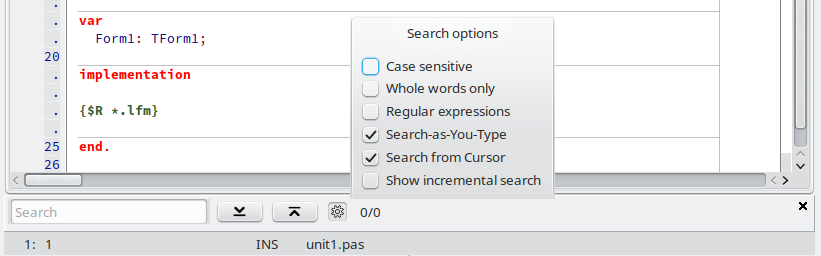
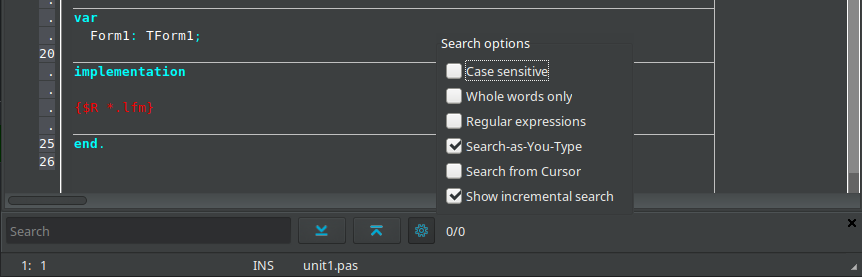
- Search options.
Installation:
Like any other Package. Rebuild the IDE. https://wiki.lazarus.freepascal.org/Install_Packages
How to use:
To toggle the Search Panel on and off, there is a menu item called "Show Search Panel" under "Search".
You can also use CTRL+P.
"Find Next" can be performed by the button or by simply pressing "Enter" again, while the focus is on the search edit.
Ctrl+F, F3 etc. are reserved for the standard search window of the IDE and are not used by the Search Panel.
If you encounter conflicts with CTRL+P, for example if "printers4lazide" is installed, you can:
- Uninstall printers4lazide OR
- Change the Key Mappings in "Tools -> Options -> Editor -> Key Mappings" OR
- Add a line to the "idesearchpanelconfig.xml" to define a different shortcut:
<SPConfig ShortCut="Ctrl+P"/>
Use non-localized names for shiftstates, like Ctrl, Shift, Alt.., or "Unknown" for no shortcut.
idesearchpanelconfig.xml can be usually found in places like:
- Fpcupdeluxe: <fpcupdeluxe>/config_lazarus/
- Windows: C:\users\<your_name>\appdata\lazarus
- Linux: ~/.lazarus
If you prefer blue instead of black icons, add to idesearchpanelconfig.xml:
<SPConfig ShortCut="Ctrl+P" BlackIcons="False"/>
Options:
Please Note: "Regular Expressions" and "Search-as-you-type" are mutually exclusive.
Search in selected text only works if "Search-as-you-type" is deactivated.
The rest should be self-explanatory.
HAVE FUN!