

ZenGL Tutorial 2: what changed
Revision 0 to 1. Removed lines have a minus sign; added lines have a plus sign.
Title: ZenGL Tutorial 2
| Old | New | Line | |
|---|---|---|---|
| 1 | + | This tutorial show how to create a ZenGL Font (.zfi) and how to draw text. | |
| 2 | + | ||
| 3 | + | ## Create ZenGL Font | |
| 4 | + | ||
| 5 | + | To create a ZenGL Font you need to download [ZenFont](http://zengl.org/download.html) that is a Font generator. | |
| 6 | + | ||
| 7 | + | When you got ZenFont open it and you will see something like this: | |
| 8 | + | ||
| 9 | + | 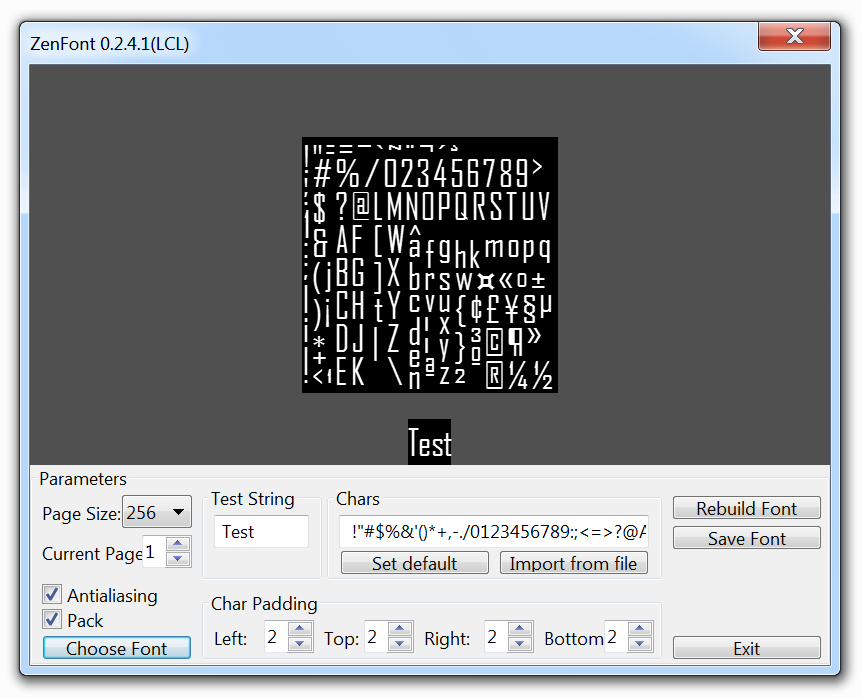 | |
| 10 | + | ||
| 11 | + | *Agency FB-Regular-18pt.zfi* | |
| 12 | + | ||
| 13 | + | Use the options to customize your font and then press "Save font" and chose the filename you want (some filename is generated automatically with | |
| 14 | + | ||
| 15 | + | the font name and size). The files generated are the .zfi file with some .tga images. | |
| 16 | + | ||
| 17 | + | Once we have a font created we need to follow those steps to draw in the ZenGL window. | |
| 18 | + | ||
| 19 | + | ## Create program | |
| 20 | + | ||
| 21 | + | - Create a new pascal program and add reference to ZenGL like was explained in the first tutorial. | |
| 22 | + | ||
| 23 | + | - Create those directories: | |
| 24 | + | ||
| 25 | + | projectname\bin | |
| 26 | + | ||
| 27 | + | projectname\data | |
| 28 | + | ||
| 29 | + | projectname\project | |
| 30 | + | ||
| 31 | + | - Save your project in "*projectname\project*". | |
| 32 | + | ||
| 33 | + | - Put the font you has created in "*projectname\data*" | |
| 34 | + | ||
| 35 | + | - Go to *Project \> Options \> Paths* in *Target file name* write "*..\bin\project1*". | |
| 36 | + | ||
| 37 | + | ## Add code | |
| 38 | + | ||
| 39 | + | Variables: | |
| 40 | + | ||
| 41 | + | ``` pascal | |
| 42 | + | var | |
| 43 | + | dirRes : String {$IFNDEF DARWIN} = '../data/' {$ENDIF}; // this is the directory where resources are placed | |
| 44 | + | fnt : zglPFont; // this is the font we will use | |
| 45 | + | ``` | |
| 46 | + | ||
| 47 | + | Load the font in a variable: | |
| 48 | + | ||
| 49 | + | ``` pascal | |
| 50 | + | procedure Init; | |
| 51 | + | begin | |
| 52 | + | fnt := font_LoadFromFile( dirRes + 'Agency FB-Regular-18pt.zfi' ); | |
| 53 | + | end; | |
| 54 | + | ``` | |
| 55 | + | ||
| 56 | + | Draw procedure (here we will draw our text with the loaded font): | |
| 57 | + | ||
| 58 | + | ``` pascal | |
| 59 | + | procedure Draw; | |
| 60 | + | var | |
| 61 | + | rect: zglTRect; | |
| 62 | + | begin | |
| 63 | + | text_Draw( fnt, 0, 0, 'Sample Text. Press ESC to EXIT.' ); | |
| 64 | + | ||
| 65 | + | text_DrawEx( fnt, 32, 32, 1.5, 0, 'Sample Text with DrawEx - Scale 1.5 - Alpha 150', 150 ); | |
| 66 | + | ||
| 67 | + | rect.H:=128; | |
| 68 | + | rect.W:=400; | |
| 69 | + | rect.X:=0; | |
| 70 | + | rect.Y:=96; | |
| 71 | + | ||
| 72 | + | pr2d_rect(rect.X,rect.Y,rect.W,rect.H,$FFFFFF,100); | |
| 73 | + | ||
| 74 | + | text_DrawInRect(fnt,rect, | |
| 75 | + | 'Sample multiline text in rect.' + #10 + | |
| 76 | + | 'Sample multiline text in rect.'+ #10 + | |
| 77 | + | 'Sample multiline text in rect.'); | |
| 78 | + | end; | |
| 79 | + | ``` | |
| 80 | + | ||
| 81 | + | This is some code to exit our application pressing ESC: | |
| 82 | + | ||
| 83 | + | ``` pascal | |
| 84 | + | procedure Timer; | |
| 85 | + | begin | |
| 86 | + | if key_Press( K_ESCAPE ) Then zgl_Exit(); | |
| 87 | + | key_ClearState(); | |
| 88 | + | end; | |
| 89 | + | ``` | |
| 90 | + | ||
| 91 | + | ## Result | |
| 92 | + | ||
| 93 | + | You can see text with the font we created and other text scaled with alpha. | |
| 94 | + | ||
| 95 | + | 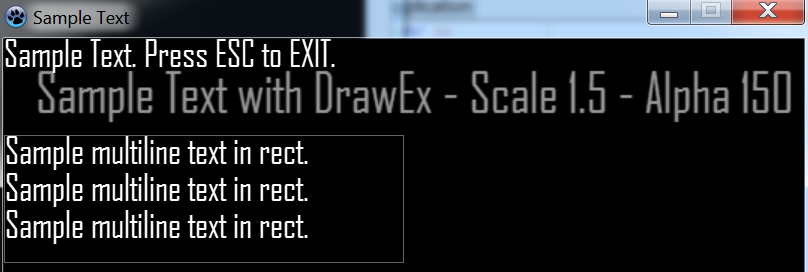 | |
| 96 | + | ||
| 97 | + | The resulting code is something like this: | |
| 98 | + | ||
| 99 | + | ``` pascal | |
| 100 | + | program project1; | |
| 101 | + | ||
| 102 | + | {$IFDEF WINDOWS} | |
| 103 | + | {$R *.res} | |
| 104 | + | {$ENDIF} | |
| 105 | + | {$DEFINE STATIC} | |
| 106 | + | ||
| 107 | + | uses | |
| 108 | + | {$IFNDEF STATIC} | |
| 109 | + | zglHeader | |
| 110 | + | {$ELSE} | |
| 111 | + | zgl_main, | |
| 112 | + | zgl_screen, | |
| 113 | + | zgl_window, | |
| 114 | + | zgl_timers, | |
| 115 | + | zgl_keyboard, | |
| 116 | + | zgl_font, | |
| 117 | + | zgl_text, | |
| 118 | + | zgl_textures, | |
| 119 | + | zgl_textures_tga, | |
| 120 | + | zgl_primitives_2d, | |
| 121 | + | zgl_utils, | |
| 122 | + | zgl_math_2d | |
| 123 | + | {$ENDIF} | |
| 124 | + | ; | |
| 125 | + | ||
| 126 | + | var | |
| 127 | + | dirRes : String {$IFNDEF DARWIN} = '../data/' {$ENDIF}; | |
| 128 | + | fnt : zglPFont; | |
| 129 | + | ||
| 130 | + | procedure Init; | |
| 131 | + | begin | |
| 132 | + | fnt := font_LoadFromFile( dirRes + 'Agency FB-Regular-18pt.zfi' ); | |
| 133 | + | end; | |
| 134 | + | ||
| 135 | + | procedure Draw; | |
| 136 | + | var | |
| 137 | + | rect: zglTRect; | |
| 138 | + | begin | |
| 139 | + | text_Draw( fnt, 0, 0, 'Sample Text. Press ESC to EXIT.' ); | |
| 140 | + | ||
| 141 | + | text_DrawEx( fnt, 32, 32, 1.5, 0, 'Sample Text with DrawEx - Scale 1.5 - Alpha 150', 150 ); | |
| 142 | + | ||
| 143 | + | rect.H:=128; | |
| 144 | + | rect.W:=400; | |
| 145 | + | rect.X:=0; | |
| 146 | + | rect.Y:=96; | |
| 147 | + | ||
| 148 | + | pr2d_rect(rect.X,rect.Y,rect.W,rect.H,$FFFFFF,100); | |
| 149 | + | ||
| 150 | + | text_DrawInRect(fnt,rect, | |
| 151 | + | 'Sample multiline text in rect.' + #10 + | |
| 152 | + | 'Sample multiline text in rect.'+ #10 + | |
| 153 | + | 'Sample multiline text in rect.'); | |
| 154 | + | end; | |
| 155 | + | ||
| 156 | + | procedure Timer; | |
| 157 | + | begin | |
| 158 | + | if key_Press( K_ESCAPE ) Then zgl_Exit(); | |
| 159 | + | key_ClearState(); | |
| 160 | + | end; | |
| 161 | + | ||
| 162 | + | Begin | |
| 163 | + | {$IFNDEF STATIC} | |
| 164 | + | zglLoad( libZenGL ); | |
| 165 | + | {$ENDIF} | |
| 166 | + | ||
| 167 | + | timer_Add( @Timer, 16 ); | |
| 168 | + | ||
| 169 | + | zgl_Reg( SYS_LOAD, @Init ); | |
| 170 | + | zgl_Reg( SYS_DRAW, @Draw ); | |
| 171 | + | ||
| 172 | + | zgl_Enable( APP_USE_UTF8 ); | |
| 173 | + | ||
| 174 | + | wnd_SetCaption( 'Sample Text' ); | |
| 175 | + | ||
| 176 | + | wnd_ShowCursor( TRUE ); | |
| 177 | + | ||
| 178 | + | scr_SetOptions( 800, 600, REFRESH_MAXIMUM, FALSE, FALSE ); | |
| 179 | + | ||
| 180 | + | zgl_Init(); | |
| 181 | + | End. | |
| 182 | + | ``` | |
| 183 | + | ||
| 184 | + | --- | |
| 185 | + | *From the Free Pascal wiki, page "ZenGL Tutorial 2", as it stood on 2020-03-03 after a change by Trev, out of the wiki's dump of 2024-05-26. Copyright stays with the author who wrote it, according to the old wiki's [[Licensing]] page. If you have concerns about this material, [message the admin](/wiki-contact).* |