

ZenGL Tutorial 2/fr: what changed
Revision 0 to 1. Removed lines have a minus sign; added lines have a plus sign.
Title: ZenGL Tutorial 2/fr
| Old | New | Line | |
|---|---|---|---|
| 1 | + | Ce tutoriel vous montre comment créer une fonte ZenGL (.zfi) et comment dessiner du texte. | |
| 2 | + | ||
| 3 | + | ## Créer une fonte ZenGL | |
| 4 | + | ||
| 5 | + | Pour créer une fonte ZenGL, vous avez besoin télécharger [ZenFont](http://zengl.org/download.html) qui est un générateur de fonte. | |
| 6 | + | ||
| 7 | + | Après l'avoir obtenu, ouvrez-le et vous verrez quelque chose comme ceci : | |
| 8 | + | ||
| 9 | + | 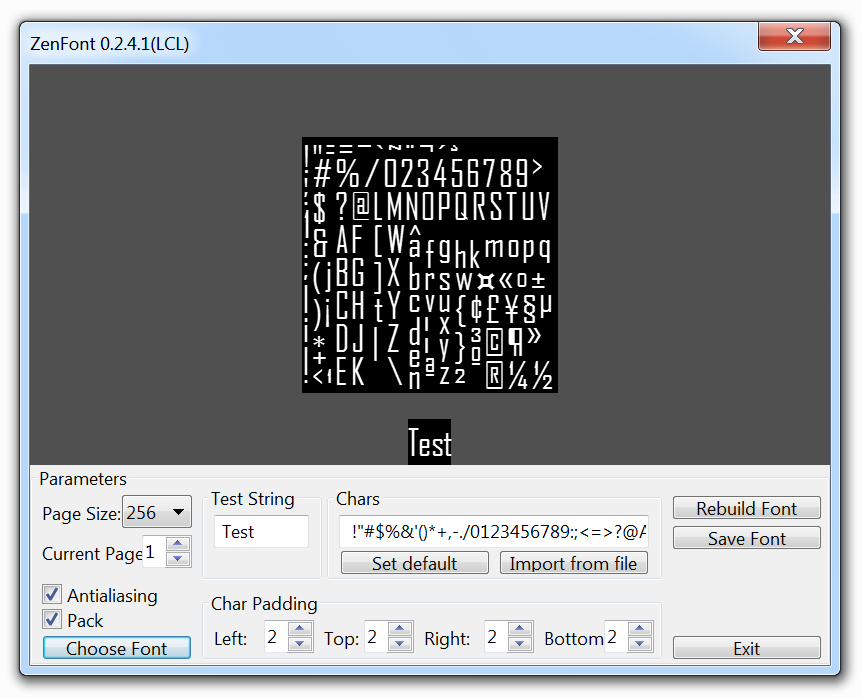 | |
| 10 | + | ||
| 11 | + | *Agency FB-Regular-18pt.zfi* | |
| 12 | + | ||
| 13 | + | Utilisez les options pour personnaliser votre fonte puis pressez sur "Save font" et choisissez le nom de fichier que vous voulez (certain nom de fichier sont générés automatiquement avec le nom de la fonte et sa taille. Les fichiers générés sont le fichier .zfi et quelques images .tga. | |
| 14 | + | ||
| 15 | + | Une fois que vous avez créé une fonte, vous avez besoin de suivre ces étapes pour dessiner dans la fenêtre ZenGL. | |
| 16 | + | ||
| 17 | + | ## Créer un programme | |
| 18 | + | ||
| 19 | + | - Créez un nouveau programme Pascal et ajouter une référence à ZenGL comme expliqué dans le premier tutoriel. | |
| 20 | + | ||
| 21 | + | - Créez ces dossiers : | |
| 22 | + | ||
| 23 | + | projectname\bin | |
| 24 | + | ||
| 25 | + | projectname\data | |
| 26 | + | ||
| 27 | + | projectname\project | |
| 28 | + | ||
| 29 | + | - Enregistrez votre projet dans "*projectname\project*". | |
| 30 | + | ||
| 31 | + | - Mettez la font que vous avez créée dans "*projectname\data*" | |
| 32 | + | ||
| 33 | + | - Allez à *Project \> Options \> Paths* dans *Target file name* écrivez "*..\bin\project1*". | |
| 34 | + | ||
| 35 | + | ## Ajouter du code | |
| 36 | + | ||
| 37 | + | Variables: | |
| 38 | + | ||
| 39 | + | ``` pascal | |
| 40 | + | var | |
| 41 | + | dirRes : String {$IFNDEF DARWIN} = '../data/' {$ENDIF}; // this is the directory where resources are placed | |
| 42 | + | fnt : zglPFont; // this is the font we will use | |
| 43 | + | ``` | |
| 44 | + | ||
| 45 | + | Chargement de la fonte dans dans un variable : | |
| 46 | + | ||
| 47 | + | ``` pascal | |
| 48 | + | procedure Init; | |
| 49 | + | begin | |
| 50 | + | fnt := font_LoadFromFile( dirRes + 'Agency FB-Regular-18pt.zfi' ); | |
| 51 | + | end; | |
| 52 | + | ``` | |
| 53 | + | ||
| 54 | + | Procédure de dessin (là nous allons dessinez notre texte avec la fonte chargée) : | |
| 55 | + | ||
| 56 | + | ``` pascal | |
| 57 | + | procedure Draw; | |
| 58 | + | var | |
| 59 | + | rect: zglTRect; | |
| 60 | + | begin | |
| 61 | + | text_Draw( fnt, 0, 0, 'Sample Text. Press ESC to EXIT.' ); | |
| 62 | + | ||
| 63 | + | text_DrawEx( fnt, 32, 32, 1.5, 0, 'Sample Text with DrawEx - Scale 1.5 - Alpha 150', 150 ); | |
| 64 | + | ||
| 65 | + | rect.H:=128; | |
| 66 | + | rect.W:=400; | |
| 67 | + | rect.X:=0; | |
| 68 | + | rect.Y:=96; | |
| 69 | + | ||
| 70 | + | pr2d_rect(rect.X,rect.Y,rect.W,rect.H,$FFFFFF,100); | |
| 71 | + | ||
| 72 | + | text_DrawInRect(fnt,rect, | |
| 73 | + | 'Sample multiline text in rect.' + #10 + | |
| 74 | + | 'Sample multiline text in rect.'+ #10 + | |
| 75 | + | 'Sample multiline text in rect.'); | |
| 76 | + | end; | |
| 77 | + | ``` | |
| 78 | + | ||
| 79 | + | C'est un peu de code pour sortir de notre application en pressant ESC : | |
| 80 | + | ||
| 81 | + | ``` pascal | |
| 82 | + | procedure Timer; | |
| 83 | + | begin | |
| 84 | + | if key_Press( K_ESCAPE ) Then zgl_Exit(); | |
| 85 | + | key_ClearState(); | |
| 86 | + | end; | |
| 87 | + | ``` | |
| 88 | + | ||
| 89 | + | ## Résultat | |
| 90 | + | ||
| 91 | + | Vous pouvez voir le texte avec la fonte que nous avons créé et un autre texte mis à l'échelle et avec de l'alpha. | |
| 92 | + | ||
| 93 | + | 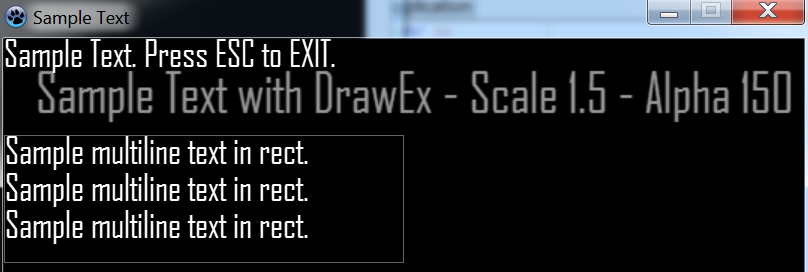 | |
| 94 | + | ||
| 95 | + | Le code résultant est quelque chose comme ceci : | |
| 96 | + | ||
| 97 | + | ``` pascal | |
| 98 | + | program project1; | |
| 99 | + | ||
| 100 | + | {$IFDEF WINDOWS} | |
| 101 | + | {$R *.res} | |
| 102 | + | {$ENDIF} | |
| 103 | + | {$DEFINE STATIC} | |
| 104 | + | ||
| 105 | + | uses | |
| 106 | + | {$IFNDEF STATIC} | |
| 107 | + | zglHeader | |
| 108 | + | {$ELSE} | |
| 109 | + | zgl_main, | |
| 110 | + | zgl_screen, | |
| 111 | + | zgl_window, | |
| 112 | + | zgl_timers, | |
| 113 | + | zgl_keyboard, | |
| 114 | + | zgl_font, | |
| 115 | + | zgl_text, | |
| 116 | + | zgl_textures, | |
| 117 | + | zgl_textures_tga, | |
| 118 | + | zgl_primitives_2d, | |
| 119 | + | zgl_utils, | |
| 120 | + | zgl_math_2d | |
| 121 | + | {$ENDIF} | |
| 122 | + | ; | |
| 123 | + | ||
| 124 | + | var | |
| 125 | + | dirRes : String {$IFNDEF DARWIN} = '../data/' {$ENDIF}; | |
| 126 | + | fnt : zglPFont; | |
| 127 | + | ||
| 128 | + | procedure Init; | |
| 129 | + | begin | |
| 130 | + | fnt := font_LoadFromFile( dirRes + 'Agency FB-Regular-18pt.zfi' ); | |
| 131 | + | end; | |
| 132 | + | ||
| 133 | + | procedure Draw; | |
| 134 | + | var | |
| 135 | + | rect: zglTRect; | |
| 136 | + | begin | |
| 137 | + | text_Draw( fnt, 0, 0, 'Sample Text. Press ESC to EXIT.' ); | |
| 138 | + | ||
| 139 | + | text_DrawEx( fnt, 32, 32, 1.5, 0, 'Sample Text with DrawEx - Scale 1.5 - Alpha 150', 150 ); | |
| 140 | + | ||
| 141 | + | rect.H:=128; | |
| 142 | + | rect.W:=400; | |
| 143 | + | rect.X:=0; | |
| 144 | + | rect.Y:=96; | |
| 145 | + | ||
| 146 | + | pr2d_rect(rect.X,rect.Y,rect.W,rect.H,$FFFFFF,100); | |
| 147 | + | ||
| 148 | + | text_DrawInRect(fnt,rect, | |
| 149 | + | 'Sample multiline text in rect.' + #10 + | |
| 150 | + | 'Sample multiline text in rect.'+ #10 + | |
| 151 | + | 'Sample multiline text in rect.'); | |
| 152 | + | end; | |
| 153 | + | ||
| 154 | + | procedure Timer; | |
| 155 | + | begin | |
| 156 | + | if key_Press( K_ESCAPE ) Then zgl_Exit(); | |
| 157 | + | key_ClearState(); | |
| 158 | + | end; | |
| 159 | + | ||
| 160 | + | Begin | |
| 161 | + | {$IFNDEF STATIC} | |
| 162 | + | zglLoad( libZenGL ); | |
| 163 | + | {$ENDIF} | |
| 164 | + | ||
| 165 | + | timer_Add( @Timer, 16 ); | |
| 166 | + | ||
| 167 | + | zgl_Reg( SYS_LOAD, @Init ); | |
| 168 | + | zgl_Reg( SYS_DRAW, @Draw ); | |
| 169 | + | ||
| 170 | + | zgl_Enable( APP_USE_UTF8 ); | |
| 171 | + | ||
| 172 | + | wnd_SetCaption( 'Sample Text' ); | |
| 173 | + | ||
| 174 | + | wnd_ShowCursor( TRUE ); | |
| 175 | + | ||
| 176 | + | scr_SetOptions( 800, 600, REFRESH_MAXIMUM, FALSE, FALSE ); | |
| 177 | + | ||
| 178 | + | zgl_Init(); | |
| 179 | + | End. | |
| 180 | + | ``` | |
| 181 | + | ||
| 182 | + | --- | |
| 183 | + | *From the Free Pascal wiki, page "ZenGL Tutorial 2/fr", as it stood on 2020-03-03 after a change by Trev, out of the wiki's dump of 2024-05-26. Copyright stays with the author who wrote it, according to the old wiki's [[Licensing]] page. If you have concerns about this material, [message the admin](/wiki-contact).* |