

Xtensa: what changed
Revision 1 to 2. Removed lines have a minus sign; added lines have a plus sign.
| Old | New | Line | |
|---|---|---|---|
| 1 | 1 | > **Warning:** The Xtensa support is highly experimental and prone to be broken. This description is work in progress. | |
| 2 | 2 | ||
| 3 | 3 | ------------------------------------------------------------------------ | |
| 4 | 4 | ||
| 5 | 5 | So far Linux and macOS hosts only, currently most of the work concentrates on the ESP32 variant with the lx6 cores. | |
| 6 | 6 | ||
| 7 | 7 | ------------------------------------------------------------------------ | |
| 8 | 8 | ||
| 9 | 9 | ## Xtensa-FreeRTOS | |
| 10 | 10 | ||
| 11 | 11 | ### Preparing FPC | |
| 12 | 12 | ||
| 13 | 13 | A native FPC development branch ("main" in git; formerly "trunk" in svn) must be installed and working on the system and will be used to compile the xtensa cross compiler. Download the latest development source code for FPC. One straightforward option is to download the code directly from [GitLab](https://gitlab.com/freepascal.org/fpc/source). Click on the download button the the landing page, this will show different archive file formats to be downloaded. Click on your preferred file format to start downloading: | |
| 14 | 14 | ||
| 15 | 15 | 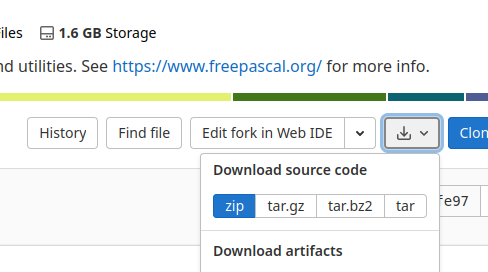 | |
| 16 | 16 | ||
| 17 | 17 | Once downloaded, extract all the files into a folder, such as `~/fpc/main`. | |
| 18 | 18 | ||
| 19 | 19 | Or use [git to clone the FPC source repository](https://wiki.freepascal.org/FPC_git). Although the clone operation will download a large amount of data, subsequent updates to later revisions will only consume a small amount of data. | |
| 20 | 20 | ||
| 21 | 21 | Another alternative is to use [fpcupdeluxe](https://wiki.freepascal.org/fpcupdeluxe) which automates all the steps below (not extensively tested). | |
| 22 | 22 | ||
| 23 | 23 | ### ESP32 | |
| 24 | 24 | ||
| 25 | 25 | #### Preparations | |
| 26 | 26 | ||
| 27 | 27 | Install esp-idf based on the instructions given here: | |
| 28 | 28 | ||
| 29 | 29 | [Get Started (for Stable Release)](https://docs.espressif.com/projects/esp-idf/en/stable/get-started/index.html) | |
| 30 | 30 | ||
| 31 | 31 | Follow the instructions to a least step 8 where you build the hello_word demo project. | |
| 32 | 32 | ||
| 33 | 33 | Copy all the freshly compiled .a files from the current project directory to a directory of your choice: | |
| 34 | 34 | ||
| 35 | - | ||
| 36 | - | ||
| 37 | - | ||
| 35 | + | ```text | |
| 36 | + | mkdir ~/esp/xtensa-esp32-elf-libs | |
| 37 | + | find . -path ./build/bootloader -prune -o -name "*.a" -exec cp {} ~/esp/xtensa-esp32-elf-libs \; | |
| 38 | + | find ~/esp/esp-idf/components -name "*.a" -exec cp {} ~/esp/xtensa-esp32-elf-libs \; | |
| 39 | + | ``` | |
| 38 | 40 | ||
| 39 | 41 | Optionally (but recommended) also copy the *esp32_out.ld* and *esp32.project.ld* files from the */build/esp32/* folder, or *./build/esp-idf/esp32* and *./build/esp-idf/esp32/ld* folders, into *~/esp/xtensa-esp32-elf-libs* (with the rest of the SDK libraries). These linker scripts are required when linking a fpc project and needs to be reconstructed if not found by fpc. | |
| 40 | 42 | ||
| 41 | 43 | Notes: | |
| 42 | 44 | ||
| 43 | 45 | - Make sure that you are in the directory where you have built the hello_world demo project when executing the find commands above. | |
| 44 | 46 | - One should not copy libraries from the project/build/bootloader directory, since these libraries do not contain full functionality. | |
| 45 | 47 | - Some of the required libraries are located in the esp-idf/components folder. Important to also copy the libraries in the ~/esp/esp-idf/components directory if the demo project was copied to outside the esp-idf directory. | |
| 46 | 48 | ||
| 47 | 49 | Now you are ready to compile fpc and rtl. | |
| 48 | 50 | ||
| 49 | 51 | execute | |
| 50 | 52 | ||
| 51 | - | ||
| 52 | - | ||
| 53 | + | ```text | |
| 54 | + | export IDF_PATH=~/esp/esp-idf | |
| 55 | + | source ~/esp/esp-idf/export.sh | |
| 56 | + | ``` | |
| 53 | 57 | ||
| 54 | 58 | to get the path and environment set (namely tools path and \$IDF_PATH are needed) | |
| 55 | 59 | ||
| 56 | 60 | #### Build FPC | |
| 57 | 61 | ||
| 58 | 62 | Change into the fpc (e.g. ~/fpc/main) directory and run | |
| 59 | 63 | ||
| 60 | - | ||
| 64 | + | ```text | |
| 65 | + | make FPC=fpc CPU_TARGET=xtensa OS_TARGET=freertos SUBARCH=lx6 "CROSSOPT=-XPxtensa-esp32-elf- -Cfhard" all -j | |
| 66 | + | ``` | |
| 61 | 67 | ||
| 62 | 68 | #### Tips & Tricks | |
| 63 | 69 | ||
| 64 | 70 | If linking fails due to missing libraries, you can search them by (replace missing_symbol by the missing symbol): | |
| 65 | 71 | ||
| 66 | - | ||
| 72 | + | ```text | |
| 73 | + | xtensa-esp32-elf-objdump -t ~/esp/xtensa-esp32-elf-libs/*.a | grep 'missing_symbol\|xtensa-esp32-elf-libs' | |
| 74 | + | ``` | |
| 67 | 75 | ||
| 68 | 76 | fpc doesn't automatically allocate heap space for this target. When using dynamic memory allocation remember to specify a heap size (for example -Ch1024). | |
| 69 | 77 | ||
| 70 | 78 | #### Compile and run test program | |
| 71 | 79 | ||
| 72 | 80 | Create a hello world program: | |
| 73 | 81 | ||
| 74 | 82 | ``` pascal | |
| 75 | 83 | program hello; | |
| 76 | 84 | begin | |
| 77 | 85 | WriteLn('Hello world.'); | |
| 78 | 86 | end. | |
| 79 | 87 | ``` | |
| 80 | 88 | ||
| 81 | 89 | in a new folder and compile it with: | |
| 82 | 90 | ||
| 83 | - | ||
| 91 | + | ```text | |
| 92 | + | ~/fpc/main/compiler/ppcrossxtensa -Fu~/fpc/main/rtl/units/xtensa-freertos/ -Tfreertos -XPxtensa-esp32-elf- -O3 -Wpesp32 -Fl~/esp/xtensa-esp32-elf-libs -Fl~/.espressif/tools/xtensa-esp32-elf/esp-2021r2-8.4.0/xtensa-esp32-elf/xtensa-esp32-elf/lib/ hello | |
| 93 | + | ``` | |
| 84 | 94 | ||
| 85 | 95 | > **Note:** You may need to change "esp-2021r2-8.4.0" in the above command to the appropriate release name for your installation. | |
| 86 | 96 | ||
| 87 | 97 | > **Note:** Different versions of esp-idf require different libraries to link. Use the -WP command line option to specify the version number, e.g. *-WP4.3.2*. | |
| 88 | 98 | ||
| 89 | 99 | Get partition-table.bin and bootloader.bin from the hello_world example compiled above and copy them into the same directory as the compiled hello.bin. For the default setup, use: | |
| 90 | 100 | ||
| 91 | - | ||
| 101 | + | ```text | |
| 102 | + | cp ~/esp/hello_world/build/partition_table/partition-table.bin ~/esp/hello_world/build/bootloader/bootloader.bin . | |
| 103 | + | ``` | |
| 92 | 104 | ||
| 93 | 105 | Flash with: | |
| 94 | 106 | ||
| 95 | - | ||
| 107 | + | ```text | |
| 108 | + | esptool.py -p /dev/ttyUSB0 -b 460800 --before default_reset --after hard_reset --chip esp32 write_flash --flash_mode dio --flash_size detect --flash_freq 40m 0x1000 bootloader.bin 0x8000 partition-table.bin 0x10000 hello.bin | |
| 109 | + | ``` | |
| 96 | 110 | ||
| 97 | 111 | - The maximum feasible baud rate depends on the USB-serial chip interfacing with the ESP32 chip, see [this link](https://www.esp32.com/viewtopic.php?t=420). A baud rate of 921600 has worked successfully for flashing over a CP210x chip. | |
| 98 | 112 | ||
| 99 | 113 | Monitor the output with: | |
| 100 | 114 | ||
| 101 | - | ||
| 115 | + | ```text | |
| 116 | + | idf_monitor.py --port /dev/ttyUSB0 hello.elf | |
| 117 | + | ``` | |
| 102 | 118 | ||
| 103 | 119 | Note: | |
| 104 | 120 | ||
| 105 | 121 | - Once the bootloader and partition table has been flashed once one could also just flash the application only: | |
| 106 | 122 | ||
| 107 | - | ||
| 123 | + | ```text | |
| 124 | + | esptool.py -p /dev/ttyUSB0 -b 460800 --before default_reset --after hard_reset --chip esp32 write_flash --flash_mode dio --flash_size detect --flash_freq 40m 0x10000 hello.bin | |
| 125 | + | ``` | |
| 108 | 126 | ||
| 109 | 127 | ### ESP8266 | |
| 110 | 128 | ||
| 111 | 129 | #### Preparations | |
| 112 | 130 | ||
| 113 | 131 | Install the ESP8266-RTOS-SDK (currently up to v3.4 supported by FPC) based on the instructions given here: [Get Started](https://docs.espressif.com/projects/esp8266-rtos-sdk/en/v3.4/get-started/) | |
| 114 | 132 | ||
| 115 | 133 | Follow the tutorial till the test of the hello world program so it is ensured, that everything works. | |
| 116 | 134 | ||
| 117 | 135 | Copy all the freshly compiled .a files from the current project directory to a directory of your choice: | |
| 118 | 136 | ||
| 119 | - | ||
| 120 | - | ||
| 137 | + | ```text | |
| 138 | + | mkdir ~/esp/xtensa-lx106-elf-libs | |
| 139 | + | find . -path ./build/bootloader -prune -o -name "*.a" -exec cp {} ~/esp/xtensa-lx106-elf-libs \; | |
| 140 | + | ``` | |
| 121 | 141 | ||
| 122 | 142 | Optionally (but recommended) also copy the *esp8266_out.ld* and *esp8266.project.ld* files from the */build/esp8266/* folder into *~/esp/xtensa-lx106-elf-libs* (with the rest of the SDK libraries). These linker scripts are required when linking a fpc project and needs to be reconstructed if not found by fpc. | |
| 123 | 143 | ||
| 124 | 144 | Notes: | |
| 125 | 145 | ||
| 126 | 146 | - Make sure that you are in the directory where you have built the hello_world demo project when executing the find commands above. | |
| 127 | 147 | - One should not copy libraries from the project/build/bootloader directory, since these libraries do not contain full functionality. | |
| 128 | 148 | ||
| 129 | 149 | Now you are ready to compile fpc and rtl. | |
| 130 | 150 | ||
| 131 | 151 | #### Build FPC | |
| 132 | 152 | ||
| 133 | 153 | Change into the fpc (e.g. `~/fpc/main`) directory and run: | |
| 134 | 154 | ||
| 135 | - | ||
| 155 | + | ```text | |
| 156 | + | make FPC=fpc CPU_TARGET=xtensa OS_TARGET=freertos SUBARCH=lx106 BINUTILSPREFIX=xtensa-lx106-elf- all -j | |
| 157 | + | ``` | |
| 136 | 158 | ||
| 137 | 159 | #### Tips & Tricks | |
| 138 | 160 | ||
| 139 | 161 | fpc doesn't automatically allocate heap space for this target. When using dynamic memory allocation remember to specify a heap size (for example -Ch1024). | |
| 140 | 162 | ||
| 141 | 163 | #### Compile and run test program | |
| 142 | 164 | ||
| 143 | 165 | Create a hello world program: | |
| 144 | 166 | ||
| 145 | 167 | ``` pascal | |
| 146 | 168 | program hello; | |
| 147 | 169 | begin | |
| 148 | 170 | WriteLn('Hello world.'); | |
| 149 | 171 | end. | |
| 150 | 172 | ``` | |
| 151 | 173 | ||
| 152 | 174 | in a separate directory and compile it with: | |
| 153 | 175 | ||
| 154 | - | ||
| 176 | + | ```text | |
| 177 | + | ~/fpc/main/compiler/ppcrossxtensa -Fu~/fpc/main/rtl/units/xtensa-freertos/ -Tfreertos -XPxtensa-lx106-elf- -O3 -Wpesp8266 hello -Fl~/esp/xtensa-lx106-elf-libs/ -Fl$IDF_PATH/components/esp8266/lib -Fl$IDF_PATH/components/newlib/newlib/lib -Fl~/esp/xtensa-lx106-elf/xtensa-lx106-elf/lib/ -WP3.4 | |
| 178 | + | ``` | |
| 155 | 179 | ||
| 156 | 180 | Get partitions_singleapp.bin and bootloader.bin from the hello_world example compiled above and copy them into the same dir as the compiled hello.bin | |
| 157 | 181 | ||
| 158 | 182 | Flash with: | |
| 159 | 183 | ||
| 160 | - | ||
| 184 | + | ```text | |
| 185 | + | $IDF_PATH/components/esptool_py/esptool/esptool.py --chip esp8266 --port "/dev/ttyUSB0" --baud 921600 --before "default_reset" --after "hard_reset" write_flash -z --flash_mode "dio" --flash_freq "40m" --flash_size "2MB" 0x0 bootloader.bin 0x10000 hello.bin 0x8000 partitions_singleapp.bin | |
| 186 | + | ``` | |
| 161 | 187 | ||
| 162 | 188 | Monitor the output with: | |
| 163 | 189 | ||
| 164 | - | ||
| 190 | + | ```text | |
| 191 | + | $IDF_PATH/tools/idf_monitor.py --baud 74880 --port /dev/ttyUSB0 hello.elf | |
| 192 | + | ``` | |
| 165 | 193 | ||
| 166 | 194 | Note: | |
| 167 | 195 | ||
| 168 | 196 | - Different versions of the SDK may require different libraries to link. Use the -WP command line option to specify the SDK version number, e.g. *-WP3.4*. | |
| 169 | 197 | ||
| 170 | 198 | ### Using both ESP32 and ESP8266 | |
| 171 | 199 | ||
| 172 | 200 | Both controllers use the same ppcrossxtensa compiler, but different versions of the RTL. The default folder structure of fpc does not cater for this, so each time the cross compiler is built, it will overwrite the RTL files in rtl/units/xtensa-freertos. To use both ESP32 and ESP8266 in parallel (i.e. without rebuilding the RTL to switch to a different compiler), the following approach can be used: | |
| 173 | 201 | ||
| 174 | 202 | 1\. Once the cross compiler is built, rename the rtl/units/xtensa-freertos folder to rtl/units/xtensa-freertos/\$subarch, where \$subarch is either lx6 or lx106. | |
| 175 | 203 | ||
| 176 | 204 | 2\. Edit fpc.cfg. Locate the line with the path to the rtl (e.g. -Fu~/fpc/main/rtl/units/\$fpctarget) and modify it as follows: | |
| 177 | 205 | ||
| 178 | - | ||
| 179 | - | ||
| 180 | - | ||
| 181 | - | ||
| 182 | - | ||
| 206 | + | ```text | |
| 207 | + | #ifdef cpuxtensa | |
| 208 | + | -Fu~/fpc/main/rtl/units/$fpctarget/$fpcsubarch | |
| 209 | + | #else | |
| 210 | + | -Fu~/fpc/main/rtl/units/$fpctarget | |
| 211 | + | #endif | |
| 212 | + | ``` | |
| 183 | 213 | ||
| 184 | 214 | Both esp-idf and ESP8266-RTOS-SDK use an environment variable named IDF_PATH to point to the path of the respective SDK. If both SDKs are installed, the path to the desired SDK can be passed to the compiler using the -Ff command line switch. This path is used to locate scripts and linker configuration files - the location of library files still need to be specified using -Fl. | |
| 185 | 215 | ||
| 186 | 216 | ## Xtensa-Linux | |
| 187 | 217 | ||
| 188 | 218 | ### To use with QEMU | |
| 189 | 219 | ||
| 190 | 220 | #### Build binutils | |
| 191 | 221 | ||
| 192 | 222 | Get binutils-gdb sources, e.g. by | |
| 193 | 223 | ||
| 194 | - | ||
| 224 | + | ```text | |
| 225 | + | git clone git://sourceware.org/git/binutils-gdb | |
| 226 | + | ``` | |
| 195 | 227 | ||
| 196 | 228 | Binutils 2.34 is known to work, so optionally do | |
| 197 | 229 | ||
| 198 | - | ||
| 230 | + | ```text | |
| 231 | + | git checkout binutils-2_34 | |
| 232 | + | ``` | |
| 199 | 233 | ||
| 200 | 234 | Copy <https://github.com/FPK/binutils-xtensa-config/blob/master/lx6/xtensa-config.h> into binutils-gdb/include to configure binutils for the CPU type support by FPC for xtensa-linux. This replaces the original file. | |
| 201 | 235 | ||
| 202 | 236 | Configure and build binutils with | |
| 203 | 237 | ||
| 204 | - | ||
| 205 | - | ||
| 206 | - | ||
| 238 | + | ```text | |
| 239 | + | ./configure --target=xtensa-linux --disable-gdb --disable-sim --disable-readline --disable-libdecnumber | |
| 240 | + | make -j `nproc` | |
| 241 | + | sudo make install | |
| 242 | + | ``` | |
| 207 | 243 | ||
| 208 | 244 | #### Build FPC | |
| 209 | 245 | ||
| 210 | 246 | Get latest trunk and build it with: | |
| 211 | 247 | ||
| 212 | - | ||
| 248 | + | ```text | |
| 249 | + | make FPC=fpc all -j "CROSSOPT=-Cfhard" OS_TARGET=linux CPU_TARGET=xtensa | |
| 250 | + | ``` | |
| 213 | 251 | ||
| 214 | 252 | #### Test FPC | |
| 215 | 253 | ||
| 216 | 254 | Create a hello world in the FPC top level directory. Compile it with: | |
| 217 | 255 | ||
| 218 | - | ||
| 256 | + | ```text | |
| 257 | + | compiler/ppcrossxtensa hello.pp -Tlinux -Furtl/units/xtensa-linux | |
| 258 | + | ``` | |
| 219 | 259 | ||
| 220 | 260 | Run it with: | |
| 221 | 261 | ||
| 222 | - | ||
| 262 | + | ```text | |
| 263 | + | qemu-xtensa ./hello | |
| 264 | + | ``` | |
| 223 | 265 | ||
| 224 | 266 | ## Xtensa-Embedded | |
| 225 | 267 | ||
| 226 | 268 | ## Emulation and debugging using qemu (ESP32) | |
| 227 | 269 | ||
| 228 | 270 | ### Install qemu (from source) | |
| 229 | 271 | ||
| 230 | 272 | The official release of qemu supports the xtensa architecture but lacks support for the ESP32 and ESP8266 boards. To use qemu with ESP32 (ESP8266 support is not yet officially available) one can use Espressif's port of qemu (refer to this for detail information: <https://github.com/espressif/esp-toolchain-docs/blob/main/qemu/README.md>). | |
| 231 | 273 | ||
| 232 | 274 | ### Automated testing with qemu | |
| 233 | 275 | ||
| 234 | 276 | For automated testing one needs to return an exit code from qemu to indicate the outcome of a test. One way to achieve this is to call the simcall instruction passing 1 in register a2 and the exit code in register a3: | |
| 235 | 277 | ||
| 236 | 278 | ``` asm | |
| 237 | 279 | procedure qemu_exit(const exitcode: uint32); assembler; noreturn; | |
| 238 | 280 | asm | |
| 239 | 281 | mov a3, a2 // copy exitcode value into a3 | |
| 240 | 282 | movi a2, 1 // set a2 to 1 - exit request | |
| 241 | 283 | simcall | |
| 242 | 284 | end; | |
| 243 | 285 | ``` | |
| 244 | 286 | ||
| 245 | 287 | --- | |
| 246 | 288 | *From the Free Pascal wiki, page "Xtensa", as it stood on 2024-01-13 after a change by Ccrause, out of the wiki's dump of 2024-05-26. Copyright stays with the author who wrote it, according to the old wiki's [[Licensing]] page. If you have concerns about this material, [message the admin](/wiki-contact).* | |
| 247 | 289 | Category: Embedded |