

Working With TSQLQuery/zh CN: what changed
Revision 0 to 1. Removed lines have a minus sign; added lines have a plus sign.
Title: Working With TSQLQuery/zh CN
| Old | New | Line | |
|---|---|---|---|
| 1 | + | ## 概述 | |
| 2 | + | ||
| 3 | + | TSQLQuery 对象用来操作数据库 (RDBMS,即关系数据库管理系统 使用 SQL,像 Firebird,、MS SQL Server、Oracle...);设置 TSQLQuery 的 SQL 属性为 SELECT 语句,这将用于从数据库中检索数据集。随着数据被用户(程序)修改,结果将被提交到数据库中。 | |
| 4 | + | ||
| 5 | + | TSQLQuery 也可以直接修改数据:设置 TSQLQuery 的 SQL 属性为所需要的,像 INSERT, UPDATE, DELETE 等等SQL语句,并调用 ExecSQL 方法,这将发送查询到数据库服务器,它不会有检索结果。 | |
| 6 | + | ||
| 7 | + | 除了使用 FPC, Lazarus 还提供了些组件: | |
| 8 | + | ||
| 9 | + |  | |
| 10 | + | ||
| 11 | + | ## 官方文档 | |
| 12 | + | ||
| 13 | + | 查看 [TSQLQuery 文档](http://www.freepascal.org/docs-html/fcl/sqldb/tsqlquery.html) | |
| 14 | + | ||
| 15 | + | Lazarus 有很多上下文相关的文档。不幸的是,TSQLQuery 不会出现在 Lazarus 1.0 的帮助索引中。如果将光标放在 TSQLQuery 方法或属性后,试着按 F1,看看有没有相关帮助。将这样: | |
| 16 | + | ||
| 17 | + | ``` pascal | |
| 18 | + | var | |
| 19 | + | Q: TSQLQuery | |
| 20 | + | ... | |
| 21 | + | Q.Open; //<--- 将光标放在这里按 F1 键 | |
| 22 | + | ``` | |
| 23 | + | ||
| 24 | + | ## 常用控件 | |
| 25 | + | ||
| 26 | + | 由 TSQLQuery 返回的数据集,可以方便的在TDBGrid实例中 *查看*,但它不适合 *编辑* 字段和单元格中的数据。为此,你需要把一些数据感知组件,如 TDBEdit 控件放置到窗体上。并设置其 DataSource 属性为正在使用的数据源。DataField 属性设置为一个字段名(如 'IDENTITY'),或者是表达式返回一个合适的字符串。 | |
| 27 | + | ||
| 28 | + | 添加 TDBNavigator 工具栏可以很方便的浏览数据,并选择记录进行编辑。通过工具栏或在数据网络中移动鼠标来选择记录。对于选择的数据,将出现在 TDBEdit 框中,如果点击 'Edit' ,在编辑框中的内容可以修改。点击 'Post' 将确认更改,点击 'Cancel' 将取消更改。 | |
| 29 | + | ||
| 30 | + | 一般来说,流程如下: | |
| 31 | + | ||
| 32 | + | 1. 拖放 TSQLQuery 组件到窗体上,并设置 *Database*, *Transaction* 和 *SQL* 属性。 | |
| 33 | + | 2. 拖放 TDatasource 组件,并设置其 *Dataset*属性为 TSQLQuery 实例。 | |
| 34 | + | 3. 拖放 TDBGrid 组件,并设置其 *Datasource*属性为 TDatasource 实例。 | |
| 35 | + | 4. 或者,在窗体中放置 TDBNavigator 实例,并设置 *Datasource* 属性为 TDatasource 实例。 | |
| 36 | + | ||
| 37 | + | 在此之后,*Active* 属性可以被设置为 *True*,则可以通过查询检索到数据。 | |
| 38 | + | ||
| 39 | + | (使 *TSQLConnection* 和 *TSQLTransaction* 组件处于活动状态) | |
| 40 | + | ||
| 41 | + | ## 更新数据 | |
| 42 | + | ||
| 43 | + | 如果需要删除或修改记录,数据库需要: | |
| 44 | + | ||
| 45 | + | 1. 包含一个主键列。 | |
| 46 | + | 2. 有一组确定该记录唯一的字段。通常情况下,他们应该是索引的一部分,这不是必须,但会加快查询速度 | |
| 47 | + | ||
| 48 | + | 如果没有主键字段,则应该添加一个。当表创建时,以添加主键,这样做最好;也可以,以后添加。 | |
| 49 | + | ||
| 50 | + | 例如,下面的示例代码,将在表中添加一个唯一索引: | |
| 51 | + | ||
| 52 | + | ``` sql | |
| 53 | + | alter table testrig | |
| 54 | + | add column autoid int | |
| 55 | + | primary key auto_increment; | |
| 56 | + | ``` | |
| 57 | + | ||
| 58 | + | 添加此字段没坏处,这将允许你的应用程序更新该字段。 | |
| 59 | + | ||
| 60 | + | ## 缓存更新 | |
| 61 | + | ||
| 62 | + | *TSQLQuery* 组件会缓存所有更新。即,更新不立即发送到数据库,被保持存储器中,直到 *ApplyUpdates* 方法被调用。在这点上,该更新将被转换为SQL更新语句,并将应用到数据库。如果你不调用 *ApplyUpdates* 方法,那么对数据的更新将不会应用到数据库。 | |
| 63 | + | ||
| 64 | + | ## 主键字段 | |
| 65 | + | ||
| 66 | + | When updating records, *TSQLQuery* needs to know which fields comprise the primary key that can be used to update the record, and which fields should be updated: based on that information, it constructs an SQL UPDATE, INSERT or DELETE command. | |
| 67 | + | ||
| 68 | + | The construction of the SQL statement is controlled by the *UsePrimaryKeyAsKey* property and the *ProviderFlags* properties. | |
| 69 | + | ||
| 70 | + | The *Providerflags* property is a set of 3 flags: | |
| 71 | + | ||
| 72 | + | pfInkey | |
| 73 | + | The field is part of the primary key | |
| 74 | + | ||
| 75 | + | pfInWhere | |
| 76 | + | The field should be used in the WHERE clause of SQL statements. | |
| 77 | + | ||
| 78 | + | pfInUpdate | |
| 79 | + | Updates or inserts should include this field. | |
| 80 | + | ||
| 81 | + | By default, *ProviderFlags* consists of *pfInUpdate* only. | |
| 82 | + | ||
| 83 | + | If your table has a primary key (as described above) then you only need to set the *UsePrimaryKeyAsKey* property to *True* and everything will be done for you. This will set the *pfInKey* flag for the primary key fields. | |
| 84 | + | ||
| 85 | + | If the table doesn't have a primary key index, but does have some fields that can be used to uniquely identify the record, then you can include the *pfInKey* option in the *ProviderFlags* property all the fields that uniquely determine the record. | |
| 86 | + | ||
| 87 | + | The *UpdateMode* property will then determine which fields exactly will be used in the WHERE clause: | |
| 88 | + | ||
| 89 | + | upWhereKeyOnly | |
| 90 | + | When *TSQLQuery* needs to construct a WHERE clause for the update, it will collect all fields that have the *pfInKey* flag in their *ProviderFlags* property set, and will use the values to construct a WHERE clause which uniquely determines the record to update -- normally this is only needed for an UPDATE or DELETE statement. | |
| 91 | + | ||
| 92 | + | upWhereChanged | |
| 93 | + | In addition to the fields that have *pfInKey* in the *ProviderFlags* property, all fields that have *pfInWhere* in their *ProviderFlags* and that have changed, will also be included in the WHERE clause. | |
| 94 | + | ||
| 95 | + | upWhereAll | |
| 96 | + | In addition to the fields that have *pfInKey* in the *ProviderFlags* property, all fields that have *pfInWhere* in their *ProviderFlags*, will also be included in the WHERE clause. | |
| 97 | + | ||
| 98 | + | ## 控制更新 | |
| 99 | + | ||
| 100 | + | It is possible to specify which fields should be updated: As mentioned above: Only fields that have *pfInUpdate* in their *ProviderOptions* property will be included in the SQL UPDATE or INSERT statements. By default, *pfInUpdate* is always included in the *ProviderOptions* property. | |
| 101 | + | ||
| 102 | + | ## TSQLQuery 自定义 SQL | |
| 103 | + | ||
| 104 | + | Normally TSQLQuery will use generic SQL statements based on properties as discussed above. However, the generic SQL created by sqldb may not be correct for your situation. TSQLQuery allows you to customize SQL statements used for the various actions, to work best in your situation with your database. For this purpose you use the properties *SQL*, *InsertSQL*, *UpdateSQL* and *DeleteSQL*. | |
| 105 | + | ||
| 106 | + | All these properties are of type TStringList, a list of strings, that accepts multiple lines of SQL. All four come with a property editor in the IDE. In the IDE, select the property and open the editor by clicking the ellipsis button. In this editor, you may also look up table information etc; see [[Database metadata|Database_metadata#Lazarus_TSQLQuery_metadata_tool]] | |
| 107 | + | ||
| 108 | + | In code, use for example `InsertSQL.Text` or `InsertSQL.Add()` to set or add lines of SQL statements. One statement may span several lines and ends with a semicolon. | |
| 109 | + | ||
| 110 | + | Also, all four properties accept parameters explained further below. | |
| 111 | + | ||
| 112 | + | ### TSQLQuery.SQL: SQL 自定义 | |
| 113 | + | ||
| 114 | + | The SQL property is normally used to fetch the data from the database. The generic SQL for this property is `SELECT * FROM fpdev` where `fpdev` is the table as set in the database. | |
| 115 | + | ||
| 116 | + | The dataset returned by the generic SQL statement will be kind of rough. If you show the result in a TDBGrid, the order of the records may seem random, the order of the columns may not be what you want and the field names may be technically correct but not user friendly. Using customized SQL you can improve this. For a table called fpdev with columns id, UserName and InstEmail, you could do something like this: | |
| 117 | + | ||
| 118 | + | ``` sql | |
| 119 | + | SELECT id AS 'ID', UserName AS 'User', InstEmail AS 'e-mail' FROM fpdev ORDER BY id; | |
| 120 | + | ``` | |
| 121 | + | ||
| 122 | + | The dataset that results from the above query uses the field names as given in the query (ID, User and e-mail), the column order as given in the query and the records are sorted by their id. | |
| 123 | + | ||
| 124 | + | ### TSQLQuery.InsertSQL, TSQLQuery.UpdateSQL 和 TSQLQuery.DeleteSQL: 使用参数 | |
| 125 | + | ||
| 126 | + | When you assign a SELECT query to an SQLQuery's **SQL** property the SQLQuery knows how to get data from the database. However, when using databound controls such as a DBGrid, SQLQuery will also need to be able to insert, update and delete rows from the database based on the user's actions. | |
| 127 | + | ||
| 128 | + | In order to speed development, SQLQuery can try and deduce the required SQL statements. If the SQL property exists and the **ParseSQL** property is true (which it is by default), SQLQuery will try to generate these statements by parsing the **SQL** property. SQLDB stores these statements in the **InsertSQL**, **UpdateSQL** and **DeleteSQL** properties. | |
| 129 | + | ||
| 130 | + | However, sometimes the generated statements will not work (e.g. when inserting in tables with auto-increment/autonumber primary keys) or will be very slow. If needed, you can manually assign the statements. | |
| 131 | + | ||
| 132 | + | The statements in the *InsertSQL*, *UpdateSQL* and *DeleteSQL* properties accept parameters that represent fields in the dataset. The following rules apply: | |
| 133 | + | ||
| 134 | + | - Parameter names must be exactly the same as the field names used in the dataset. The field names in the dataset may be different from the column names in the table, depending on the used select statement (see above). | |
| 135 | + | - Just as parameters in other SQLDB queries, parameter names must be written preceded by a colon. | |
| 136 | + | - For use in update/delete statements, precede the dataset field name with **OLD_** (**strictly uppercase**, at least in Lazarus v. 1.0) to get the value of the record before it was edited instead of the new value. | |
| 137 | + | ||
| 138 | + | If you have a table called fpdev and columns id, UserName and InstEmail, linked to a dataset with fields ID, User and e-mail (see example in select statement), you could write this **InsertSQL** query: | |
| 139 | + | ||
| 140 | + | ``` sql | |
| 141 | + | INSERT INTO fpdev(id, UserName, InstEmail) VALUES(:ID,:User,:e-mail); | |
| 142 | + | ``` | |
| 143 | + | ||
| 144 | + | This statement will insert the values of `ID`, `User` and `e-mail` from the current record of the dataset into the respective fields of table `fpdev`. | |
| 145 | + | ||
| 146 | + | This example statement is actually more or less what SQLDB itself would autogenerate. The given statement may result in errors when the `id` field is an auto-increment field in a unique key. Different databases solve this problem in different ways. For example, the following works for MySQL. | |
| 147 | + | ||
| 148 | + | ``` sql | |
| 149 | + | INSERT INTO fpdev(id, UserName, InstEmail) VALUES(0,:User,:e-mail) | |
| 150 | + | ON DUPLICATE KEY UPDATE id=LAST_INSERT_ID(); | |
| 151 | + | ``` | |
| 152 | + | ||
| 153 | + | The above statement tries to insert a new record using 0 (zero) for the `id` column. If zero is already used as a key, then a duplicate is detected and the `id` is updated to use the last inserted id. Well, actually an id one increment higher than the last one used. | |
| 154 | + | ||
| 155 | + | For Firebird, if you emulate autoincrement keys [1](http://www.firebirdfaq.org/faq29/) something like this should work: | |
| 156 | + | ||
| 157 | + | ``` sql | |
| 158 | + | INSERT INTO fpdev(UserName, InstEmail) VALUES(:User,:e-mail);( | |
| 159 | + | ``` | |
| 160 | + | ||
| 161 | + | The statement inserts everything except the primary key and lets the Firebird before insert trigger use a generator/sequence to insert an `id` value for you. | |
| 162 | + | ||
| 163 | + | For an `INSERT` statement you may want to use the current field values of the selected record. For `UPDATE` statements, you will want to use the field values as they were before editing in the `WHERE` clause. As mentioned before, the field values before editing must be written as the field name precede by **OLD_** (**strictly uppercase**, at least in Lazarus v. 1.0). For example, this query: | |
| 164 | + | ||
| 165 | + | ``` sql | |
| 166 | + | UPDATE fpdev SET UserName=:User, InstEmail=:e-mail WHERE UserName=:OLD_User; | |
| 167 | + | ``` | |
| 168 | + | ||
| 169 | + | The above statement updates the `UserName` and `InstEmail` columns of all records where `User` equals the old `User` value. | |
| 170 | + | ||
| 171 | + | We leave it as an exercise to the reader to use the current field values and the old field values in DELETE statements. | |
| 172 | + | ||
| 173 | + | See also the official documentation: | |
| 174 | + | ||
| 175 | + | - [InsertSQL documentation](http://www.freepascal.org/docs-html/fcl/sqldb/tsqlquery.insertsql.html) | |
| 176 | + | - [UpdateSQL documentation](http://www.freepascal.org/docs-html/fcl/sqldb/tsqlquery.updatesql.html) | |
| 177 | + | - [DeleteSQL documentation](http://www.freepascal.org/docs-html/fcl/sqldb/tsqlquery.deletesql.html) | |
| 178 | + | ||
| 179 | + | ### TSQLQuery.SQL 参数 | |
| 180 | + | ||
| 181 | + | In most situations, the SQL property of TSQLQuery will contain the select statement which in most situations doesn't need parameters. However, it can contain them. This allows a very easy and powerful way to filter your records. | |
| 182 | + | ||
| 183 | + | Parameters have the following advantages: | |
| 184 | + | ||
| 185 | + | - no need to format your data as SQL text, date etc arguments (i.e. no need to remember how to format a date for MySQL, which might differ from the Firebird implementation; no need to escape text data like *O'Malley's "SQL Horror"* | |
| 186 | + | - possibly increased performance | |
| 187 | + | - protection against SQL injection attacks | |
| 188 | + | ||
| 189 | + | The use of parameters may help performance of the database. Most databases support prepared statements, which means that the statement is prepared and cached in the database. A prepared statement can be used more than once and doesn't require parsing and query planning every time it is used, only the parameters are changed each time it is used. In situations where the same statement is used a large number of times (where only the values of the parameters differ), prepared statements can help performance considerably. Additionally, SQL injection attacks can be mitigated by use of parameters. | |
| 190 | + | ||
| 191 | + | The *InsertSQL*, *UpdateSQL* and *DeleteSQL* properties have predefined parameters for current and old field values. However, the *SQL* property does not. You can create your own parameters in the *Params* property. | |
| 192 | + | ||
| 193 | + | #### Select 查询示例 | |
| 194 | + | ||
| 195 | + | This example shows how to select data using parameters. It also demonstrates using aliases (... AS ...) in SQL. | |
| 196 | + | ||
| 197 | + | ``` pascal | |
| 198 | + | sql_temp.sql.text := 'SELECT id AS ''ID'', UserName AS ''User'', InstEmail AS ''e-mail'' FROM fpdev WHERE InstEmail=:emailsearch;' | |
| 199 | + | ... | |
| 200 | + | //This will create a parameter called emailsearch. | |
| 201 | + | ||
| 202 | + | //If we want to, we can explicitly set what kind of parameter it is... which might only be necessary if FPC guesses wrong: | |
| 203 | + | //sql_temp.params.parambyname('emailsearch').datatype:=ftWideString | |
| 204 | + | ||
| 205 | + | //We can now fill in the parameter value: | |
| 206 | + | sql_temp.params.parambyname('emailsearch').asstring := 'mvancanneyt@freepascal.org'; | |
| 207 | + | ... | |
| 208 | + | //Then use your regular way to retrieve data, | |
| 209 | + | //optionally change the parameter value & run it again | |
| 210 | + | ``` | |
| 211 | + | ||
| 212 | + | #### Insert 查询示例 | |
| 213 | + | ||
| 214 | + | This example shows how to insert a new record into the table using parameters: | |
| 215 | + | ||
| 216 | + | ``` pascal | |
| 217 | + | sql_temp.sql.text := 'insert into PRODUCTS (ITEMNR,DESCRIPTION) values (:OURITEMNR,:OURDESCRIPTION)' | |
| 218 | + | ... | |
| 219 | + | sql_temp.Params.ParamByName('OURITEMNR').AsString := 'XXXX'; | |
| 220 | + | sql_temp.Params.ParamByName('OURDESCRIPTION').AsString := 'description'; | |
| 221 | + | sql_temp.ExecSQL; | |
| 222 | + | SQLTransaction1.Commit; //or possibly CommitRetaining, depending on how your application is set up | |
| 223 | + | ``` | |
| 224 | + | ||
| 225 | + | Another way of doing this is something like: | |
| 226 | + | ||
| 227 | + | ``` pascal | |
| 228 | + | tsqlquery1.appendrecord(['XXXX', 'description']) | |
| 229 | + | tsqltransaction1.commit; //or commitretaining | |
| 230 | + | ``` | |
| 231 | + | ||
| 232 | + | ### 格式化查询 | |
| 233 | + | ||
| 234 | + | An alternative to parameterized queries can be to use the format function (see warning below). | |
| 235 | + | ||
| 236 | + | Here is how to use program variables in a query at runtime. The values of the variables can change and the query values will change with them, just as with parameterized queries. | |
| 237 | + | ||
| 238 | + | We can use for example the text from two TEdits to build an insert query. Whatever is in the text of the TEdits, the query will use for execution: | |
| 239 | + | ||
| 240 | + | ``` pascal | |
| 241 | + | procedure InsertRecord | |
| 242 | + | var | |
| 243 | + | aSQLText: string; | |
| 244 | + | begin | |
| 245 | + | aSQLText:='INSERT INTO products(item_no, description) VALUES(%d, %s)'; | |
| 246 | + | aQuery.SQL.Text:= Format(aSQLText, [strtoint(Edit1.Text), Edit2.Text]); | |
| 247 | + | aQuery.ExecSQL; | |
| 248 | + | aTransaction.Commit; | |
| 249 | + | end; | |
| 250 | + | ``` | |
| 251 | + | ||
| 252 | + | The parameter %d is used for integers, %s for strings and there are also other such parameters available for floats etc that you can check up on. | |
| 253 | + | ||
| 254 | + | > **Warning:** Be aware that you may run into issues with text containing ' and dates using this technique! | |
| 255 | + | ||
| 256 | + | ## 运行 SQL及获取元数据 | |
| 257 | + | ||
| 258 | + | If you want to just check some SQL statements, troubleshoot, or get metadata (e.g. list of tables) from the database, you can do so from within the IDE. In your program, with your T*Connection, transaction, query object etc set up at design-time, go into the SQL property for the query object, then click the ... button. | |
| 259 | + | ||
| 260 | + | You'll see a window with SQL code, and you can run some statements like | |
| 261 | + | ||
| 262 | + | ``` sql | |
| 263 | + | SELECT * FROM EMPLOYEE | |
| 264 | + | ``` | |
| 265 | + | ||
| 266 | + | by pressing the play icon: | |
| 267 | + | ||
| 268 | + | 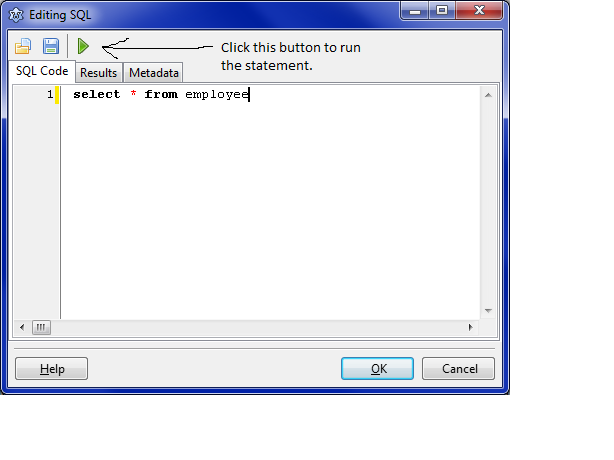 | |
| 269 | + | ||
| 270 | + | You can also get metadata: table names, column names etc (if the sqldb connector supports it but most of them do nowadays): | |
| 271 | + | ||
| 272 | + | 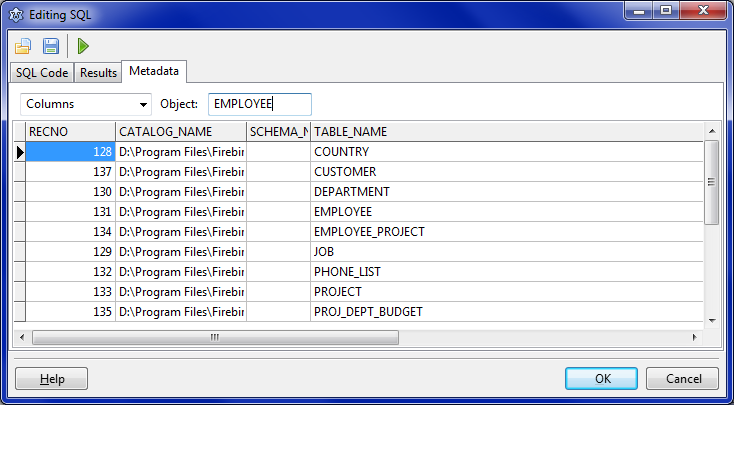 | |
| 273 | + | ||
| 274 | + | (See also: [[Database metadata|Database metadata#Lazarus TSQLQuery metadata tool]]) | |
| 275 | + | ||
| 276 | + | ## 故障排除 | |
| 277 | + | ||
| 278 | + | ### 日志记录 | |
| 279 | + | ||
| 280 | + | See here: [[SqlDBHowto|SqlDBHowto#Troubleshooting: TSQLConnection logging]] for more detail. | |
| 281 | + | ||
| 282 | + | ### 表现不佳 | |
| 283 | + | ||
| 284 | + | - Make sure your database queries are optimized (use proper indexes etc). Use your database tools (e.g. providing query plans) for this. | |
| 285 | + | - See #Out of memory errors below for possible performance improvements when moving forward through an SQLQuery. | |
| 286 | + | ||
| 287 | + | ### 错误消息 | |
| 288 | + | ||
| 289 | + | ### 内存不足错误 | |
| 290 | + | ||
| 291 | + | TSQLQuery is a descendant of BufDataset, a dataset that buffers the data it receives into memory. If you retrieve a lot of records (e.g. when looping through them for an export), your heap memory may become full (with records you already looped through) and you will get out of memory errors. | |
| 292 | + | ||
| 293 | + | A solution is to tell bufdataset to discard the records you have already read by setting the Unidirectional property to true before opening the query: | |
| 294 | + | ||
| 295 | + | ``` pascal | |
| 296 | + | MySQLQuery.UniDirectional:=True; | |
| 297 | + | ``` | |
| 298 | + | ||
| 299 | + | This may also improve performance. | |
| 300 | + | ||
| 301 | + | ### 数据集是只读模式 | |
| 302 | + | ||
| 303 | + | This may happen if you specify a query that you know is updatable but FPC doesn't. | |
| 304 | + | ||
| 305 | + | Example: | |
| 306 | + | ||
| 307 | + | ``` sql | |
| 308 | + | select p.dob, p.surname, p.sex from people p; | |
| 309 | + | ``` | |
| 310 | + | ||
| 311 | + | The SQL parser in FPC is quite simplistic and when it finds a comma or space in the FROM part it considers multiple tables are involved and sets the dataset to read only. To its defense, aliasing tables is usually not done when only one table is involved. Solution: rewrite the query or specify your own `InsertSQL`, `UpdateSQL` and `DeleteSQL`. | |
| 312 | + | ||
| 313 | + | --- | |
| 314 | + | *From the Free Pascal wiki, page "Working With TSQLQuery/zh CN", as it stood on 2022-08-10 after a change by Kai Burghardt, out of the wiki's dump of 2024-05-26. Copyright stays with the author who wrote it, according to the old wiki's [[Licensing]] page. If you have concerns about this material, [message the admin](/wiki-contact).* |