

Windows API examples: what changed
Revision 1 to 2. Removed lines have a minus sign; added lines have a plus sign.
| Old | New | Line | |
|---|---|---|---|
| 1 | 1 | *(Windows only)* | |
| 2 | 2 | ||
| 3 | 3 | This is a collection of Lazarus forum posts from user **440bx**, about Windows API examples. Source codes were [collected in GitHub](https://github.com/Alexey-T/Lazarus-WinAPI-examples). | |
| 4 | 4 | ||
| 5 | 5 | ## Post 1 | |
| 6 | 6 | ||
| 7 | 7 | Attached to this post are six (6) "teaser" API programs that give an idea of what these programs/examples are about. In addition, there is a "Windows Bitness" program that is more an illustration of how to get the Windows bitness than how to use a specific API. | |
| 8 | 8 | ||
| 9 | 9 | The teaser examples do _not_ include source at this time. I will include the source when the time comes to give an example of the API they demonstrate. The "Windows Bitness" includes full source to give an idea of what the source code for a typical example looks like. | |
| 10 | 10 | ||
| 11 | 11 | I will first give a quick description of the purpose of the "teaser" programs before discussing details of the "Windows Bitness" program. The teaser program/examples are: | |
| 12 | 12 | ||
| 13 | 13 | **ExpandEnvironmentStrings** | |
| 14 | 14 | ||
| 15 | 15 | This is an example of the many trivial API functions in Windows. These are APIs that don't have much to say about them. IOW, you read its documentation in MSDN, code the call and you're done. | |
| 16 | 16 | ||
| 17 | 17 | Roughly (iow, an estimate) 50% of the examples fall in that category. Their main reason to exist was to test their performance and/or behavior in unusual cases. (those were my personal reasons.) | |
| 18 | 18 | ||
| 19 | 19 | **SetConsoleWindowInfo** | |
| 20 | 20 | ||
| 21 | 21 | The description of SetConsoleWindowInfo in MSDN isn't particularly enlightening and the MSDN example's purpose seems to be to confuse the reader (just in case you understood the questionable description that preceded it.) | |
| 22 | 22 | ||
| 23 | 23 | The teaser example is a visual representation of how that API works. It shows the parameters before the call, the parameters after the call and the effects of the call. | |
| 24 | 24 | ||
| 25 | 25 | Roughly, 10% of the examples fall in that category (API operation visualization). | |
| 26 | 26 | ||
| 27 | 27 | I won't go into a detailed explanation at this time. It will be included along with the program source when it is its turn. | |
| 28 | 28 | ||
| 29 | 29 | **ExtTextOut** (two (2) examples) | |
| 30 | 30 | ||
| 31 | 31 | **InvalidateRect** | |
| 32 | 32 | ||
| 33 | 33 | **SelectClipRgn** | |
| 34 | 34 | ||
| 35 | 35 | These examples, in addition to demonstrating what the API does and how it works are related by one common goal which is, reducing or eliminating _flicker_ when redrawing. | |
| 36 | 36 | ||
| 37 | 37 | The InvalidateRect example flickers when the mouse coordinates are updated in the area dedicated to them. Selecting "Invalidate entire area" from the InvalidateRect menu shows how the size of the invalid area makes the flicker more noticeable. | |
| 38 | 38 | ||
| 39 | 39 | **ExtTextOut** (v1) | |
| 40 | 40 | ||
| 41 | 41 | That example is almost identical to the InvalidateRect example but, it demonstrates how to use ExtTextOut to significantly reduce flicker. In the case of the example, to a level that is almost imperceptible. | |
| 42 | 42 | ||
| 43 | 43 | **ExtTextOut** (v0) | |
| 44 | 44 | ||
| 45 | 45 | This example also demonstrates how to significantly reduce flicker but in a larger area. It also demonstrates the clipping abilities of ExtTextOut. The example also shows how to slow a GUI program down by using a console and, how to use the console to help in debugging. | |
| 46 | 46 | ||
| 47 | 47 | **SelectClipRgn** | |
| 48 | 48 | ||
| 49 | 49 | This example shows one the ways available to totally eliminate flicker (zero flicker without using double buffering.) Resize the window horizontally and/or vertically. Control flicker/no flicker with the menu options under "Flicker". | |
| 50 | 50 | ||
| 51 | 51 | **Window Bitness** | |
| 52 | 52 | ||
| 53 | 53 | Consider a program, let's call it program "A" that can be compiled as a 32 bit and 64 bit versions. | |
| 54 | 54 | ||
| 55 | 55 | The 64 bit version of the program has it easy. All it has to do is determine that it is itself a 64 bit program, once it knows that, it must be running on a 64 bit version of Windows (until MS releases a 128 bit version of Windows - won't happen tomorrow.) To determine if it is itself a 64 bit program, all it has to do is check the size of a pointer, i.e, sizeof(pointer) and if the size is 8 then it knows that it is a 64 bit program and since it is running, it must be running under a 64 bit version of Windows. Easy as pie. | |
| 56 | 56 | ||
| 57 | 57 | The 32 bit version cannot use that "trick" since its pointer size will be four (4) whether or not it is running under a 32 bit or 64 bit version of Windows. | |
| 58 | 58 | ||
| 59 | 59 | MS would have the programmer use the IsWowProcess() or IsWowProcess2() API to make the determination but, those two APIs have a few annoyances associated with them. First, they may not be present (IsWowProcess() requires XP SP2 or higher) and, even when present, the user running the program must have some privileges, that while not high, he/she may not have. | |
| 60 | 60 | ||
| 61 | 61 | There is a way to determine the bitness without using either or these APIs that do not require the user to have any "special" privileges. The "trick" resides in two details. The first one is that the Windows server is what determines the Windows bitness, the second one is that LoadLibraryEx will load almost anything you want as long as you don't intend to run it. | |
| 62 | 62 | ||
| 63 | 63 | Using the first observation, if Windows is 32 bit then its csrss.exe (client service runtime subsystem) will also be 32 bit and, it will always be 64 bit in a 64 bit version of Windows. | |
| 64 | 64 | ||
| 65 | 65 | Using the second observation, we can simply ask LoadLibraryEx to load csrss.exe as a datafile and unless the user is totally "privilege destitute", LoadLibraryEx will serve csrss.exe in a sliver platter. | |
| 66 | 66 | ||
| 67 | 67 | All that's left is for the program to rummage in csrss.exe to determine its bitness and whatever its bitness is, that's the Windows bitness too :) Done! | |
| 68 | 68 | ||
| 69 | 69 | That's what the program below does (full source in the attachment) | |
| 70 | 70 | ||
| 71 | 71 | On line 192, the program uses LoadLibraryEx to load csrss.exe. On line 211, it checks the address returned by LoadLibraryEx, which fiddles with the LSB to indicate that it was loaded as a data file and adjusts the address to turn it into the real load address. | |
| 72 | 72 | ||
| 73 | 73 | On line 219, using the real load address, it determines the module bitness (see GetModuleBitness on line 75.) If anything does not go according to plan, the program states it could not determine the Windows bitness, otherwise it outputs it. Easy as 32 bit pie. :) | |
| 74 | 74 | ||
| 75 | 75 | My intention is to start with the simplest most trivial API and build from there. This way those who follow the examples can gain the necessary knowledge to understand more subtle and complex use the API. | |
| 76 | 76 | ||
| 77 | 77 | NOTE: There is an example dedicated to LoadLibraryEx by itself which shows how it behaves under various circumstances. | |
| 78 | 78 | ||
| 79 | 79 | About 1% (maybe slightly more) of the examples are like the one above, where one API along with "peripheral" knowledge can be used to extract information out of Windows. | |
| 80 | 80 | ||
| 81 | 81 | I suggest creating a "WinAPI" directory and under that directory, create directories named "Techniques" (which the above example would go into), ntdll, kernel32, gdi32 and user32. Of course, you're free the arrange the examples however you like but, I have found that way to make the large number of programs easier to manage and find. | |
| 82 | 82 | ||
| 83 | 83 | ## Post 2 | |
| 84 | 84 | ||
| 85 | 85 | The examples will be presented roughly in order of complexity, that is, from simplest to more complex. The simplest are by far those APIs which should NOT be used since no example will be provided for those. | |
| 86 | 86 | ||
| 87 | 87 | Amond the APIs that should be avoided and preferably never used are: | |
| 88 | 88 | ||
| 89 | 89 | - GlobalCompact | |
| 90 | 90 | - GlobalFix | |
| 91 | 91 | - GlobalFlags | |
| 92 | 92 | - GlobalHandle | |
| 93 | 93 | - GlobalLock | |
| 94 | 94 | - GlobalReAlloc | |
| 95 | 95 | - GlobalSize | |
| 96 | 96 | - GlobalUnfix | |
| 97 | 97 | - GlobalUnlock | |
| 98 | 98 | - GlobalUnWire | |
| 99 | 99 | - GlobalWire | |
| 100 | 100 | - LocalAlloc | |
| 101 | 101 | - LocalCompact | |
| 102 | 102 | - LocalFlags | |
| 103 | 103 | - LocalFree | |
| 104 | 104 | - LocalHandle | |
| 105 | 105 | - LocalLock | |
| 106 | 106 | - LocalReAlloc | |
| 107 | 107 | - LocalShrink | |
| 108 | 108 | - LocalSize | |
| 109 | 109 | - LocalUnlock | |
| 110 | 110 | ||
| 111 | 111 | All of the above are Windows 16 bit memory management functions which are _not_ well suited for a 32 bit O/S. Use the 32 bit memory management functions instead. | |
| 112 | 112 | ||
| 113 | 113 | As mentioned previously, no example for any of the above APIs will be given. | |
| 114 | 114 | ||
| 115 | 115 | **GlobalAlloc** | |
| 116 | 116 | ||
| 117 | 117 | **GlobalFree** | |
| 118 | 118 | ||
| 119 | 119 | These two (2) APIs are still commonly found in C programs but, are not as flexible as HeapAlloc() and HeapFree() which should be preferred. | |
| 120 | 120 | ||
| 121 | 121 | No example of GlobalAlloc and GlobalFree will be given. An example of HeapAlloc and HeapFree will be given in the future. | |
| 122 | 122 | ||
| 123 | 123 | **GlobalMemoryStatus** | |
| 124 | 124 | ||
| 125 | 125 | GlobalMemoryStatus returns incorrect information on systems with more than 4GB of memory. Use GlobalMemoryStatusEx instead. | |
| 126 | 126 | ||
| 127 | 127 | An example for both will be given in the future. | |
| 128 | 128 | ||
| 129 | 129 | **GetTextExtentPoint** | |
| 130 | 130 | ||
| 131 | 131 | Use GetTextExtentPoint32 instead which, according to MS, is more accurate. | |
| 132 | 132 | ||
| 133 | 133 | **WinAPI - GetTextExtentPoint** (gdi) | |
| 134 | 134 | ||
| 135 | 135 | **WinAPI - GetTextExtentPoint32** (gdi) | |
| 136 | 136 | ||
| 137 | 137 | Both of these APIs return the width and height in pixels of a specified string | |
| 138 | 138 | ||
| 139 | 139 | **WinAPI - SetBkMode** (gdi) | |
| 140 | 140 | ||
| 141 | 141 | Sets the background color to opaque or transparent. When the background is opaque then whatever color was chosen as background will be visible. | |
| 142 | 142 | ||
| 143 | 143 | **WinAPI - SetTextAlign** (gdi) | |
| 144 | 144 | ||
| 145 | 145 | Sets the text alignment. This example visually demonstrates the effects of some of the SetTextAlign options. See MSDN for all available options. | |
| 146 | 146 | ||
| 147 | 147 | **WinAPI - TextOut** (gdi) | |
| 148 | 148 | ||
| 149 | 149 | Outputs a string at the specified location, using the currently selected font, background color, and text color. | |
| 150 | 150 | ||
| 151 | 151 | **WinAPI - GetClientRect** (user) | |
| 152 | 152 | ||
| 153 | 153 | Retrieves the coordinates of the client area. This example draws a frame around the client area. It also serves as an example of CreatePen, SetCapture, ReleaseCapture, InvalidateRect, SelectObject, Rectangle, lstrcpy, lstrlen and DeleteObject. | |
| 154 | 154 | ||
| 155 | 155 | NOTE: this example does not include code to eliminate or minimize flicker,which would not be hard to implement (left for future example.) | |
| 156 | 156 | ||
| 157 | 157 | **WinAPI - Windows Bitness** (technique) | |
| 158 | 158 | ||
| 159 | 159 | This version includes minor editing of the comments and loads csrss.exe as an image resource instead of a data file. Since Windows uses the low bits of the load address to indicate the mode the file was loaded in, this version aligns the load address instead of simply subtracting one (1) which is valid only when the module is loaded as a data file. Using alignment works regardless of the way the module is loaded. | |
| 160 | 160 | ||
| 161 | 161 | recommendation : replace the previous version with this version. | |
| 162 | 162 | ||
| 163 | 163 | What follows is the code for the GetClientRect example (the source for the remaining examples is present in the zip file attached to this post.) | |
| 164 | 164 | ||
| 165 | 165 | ## Post 3 | |
| 166 | 166 | ||
| 167 | 167 | Here are some examples of simple, yet often very useful API functions. | |
| 168 | 168 | ||
| 169 | 169 | **WinAPI - DebugBreak** | |
| 170 | 170 | ||
| 171 | 171 | This example demonstrates using DebugBreak() to transfer control to a debugger. The example should be executed both, under a debugger and directly. | |
| 172 | 172 | ||
| 173 | 173 | This example also serves to demonstrate how a program can detect if it is running under a debugger without using the IsDebuggerPresent() API. | |
| 174 | 174 | ||
| 175 | 175 | Use the "DebugBreak()" menu item to cause the program execution to fall under debugger control. Use F7/F8/F9 to control execution. | |
| 176 | 176 | ||
| 177 | 177 | DebugBreak() is very useful to create conditional breakpoints with very complex conditions that are beyond the capabilities of an application debuggers. | |
| 178 | 178 | ||
| 179 | 179 | Also, DebugBreak() is useful to set breakpoints where it is usually not possible to set them. For instance, during the loading of a program. Windows automatically loads and calls the associated DLLs entry points. A strategically placed DebugBreak instruction allows a debugger to gain control during the DLLs load process. This combined with the use of a system debugger, such as SoftICE, allows debugging almost any code in the executable. | |
| 180 | 180 | ||
| 181 | 181 | In addition to that, combining the use of DebugBreak() with conditional compilation directives allows having the breakpoints, which in a large program may be numerous, in the program itself. This prevents "losing" breakpoints by exceeding the "breakpoint history" capacity in most debuggers and aids in future maintenance as, at least in theory, calls to DebugBreak() should only appear (or be left) in the most important or complex section of the code. | |
| 182 | 182 | ||
| 183 | 183 | DebugBreak() can also be useful to make reverse engineering a program more cumbersome. By littering the executable with a fairly large number of calls to it (say about 60 or more) this can make reverse engineering the application very tedious when it is run under a debugger. | |
| 184 | 184 | ||
| 185 | 185 | (Code skipped...) The above is the "critical" part of the code in the example. By executing DebugBreak() in a try/except, the application can detect whether or not it is running under a debugger. If the code in the exception handler is _not_ executed then, the program is not being debugged because, if it were, the DebugBreak() would have transferred control to the debugger instead of activating the exception handler. | |
| 186 | 186 | ||
| 187 | 187 | To make reverse engineering more cumbersome, a program could place code that _should be_ executed in the exception handler. If the program is running under a debugger, the piece of code that is actually part of the normal operation of the program is not executed thus causing the program to later fail in some way. Put around fifty (50) of those cases around in the program and, that will try the patience of whoever is trying to find out how the code works. :) | |
| 188 | 188 | ||
| 189 | 189 | This works particularly well when present in functions/procedures that are conditionally executed and/or are not executed often (it increases the chances of one or more of them being missed.) | |
| 190 | 190 | ||
| 191 | 191 | **WinAPI - IsDebuggerPresent** | |
| 192 | 192 | ||
| 193 | 193 | This example demonstrates how to use the API IsDebuggerPresent() to determine if a program is running under a debugger or not. If the program is running under a debugger, selecting "Break into the debugger" from the IsDebuggerPresent() menu, will cause a break into the debugger, otherwise the request to break into the debugger will be ignored. | |
| 194 | 194 | ||
| 195 | 195 | It also demonstrates the difference between using DebugBreak() and an inline int 3. When using DebugBreak(), application debuggers will stop at the DebugBreak() line because the _entire_ DebugBreak() procedure has _not_ yet been executed, specifically, it stops at the "ret" that is inside DebugBreak(). | |
| 196 | 196 | ||
| 197 | 197 | When using an inline "int 3" the debugger will stop at the next source line because the "int 3" has been fully executed unlike the DebugBreak() procedure. | |
| 198 | 198 | ||
| 199 | 199 | IsDebuggerPresent() is particularly useful to guard calls to DebugBreak(). That way, it is not necessary to remove the calls to DebugBreak() in the "release" executable since they are triggered only when the executable is run under a debugger (normal users rarely run a program under a debugger and, many of them don't even know what a debugger is anyway.) | |
| 200 | 200 | ||
| 201 | 201 | **WinAPI - QueryPerformanceCounter** | |
| 202 | 202 | ||
| 203 | 203 | **WinAPI - QueryPerformanceFrequency** | |
| 204 | 204 | ||
| 205 | 205 | QueryPerformanceCounter along with QueryPerformanceFrequency can be used to measure elapsed time very accurately. That's the combined purpose of these two APIs. | |
| 206 | 206 | ||
| 207 | 207 | To determine elapsed time in seconds, simply subtract the first query from the second query and divide the result by the frequency. | |
| 208 | 208 | ||
| 209 | 209 | The attached examples only show how to call each of these functions. They do not include how to calculate elapsed time (it is reasonable to believe that programmers can subtract one number from another and divide the result by yet another number, i.e (b - a) div c) | |
| 210 | 210 | ||
| 211 | 211 | **WinAPI - SetLastError** | |
| 212 | 212 | ||
| 213 | 213 | SetLastError can be used by an application's procedures to indicate whether or not they successfully performed their task. Note that it is strongly recommended to mark these custom application errors (the example shows how that is done.) | |
| 214 | 214 | ||
| 215 | 215 | Also, it is important NOT to call any Windows API functions after setting the last error as it is very likely that the API function will overwrite the last error set by the application. | |
| 216 | 216 | ||
| 217 | 217 | Fun experiment : | |
| 218 | 218 | ||
| 219 | 219 | 1\. Start the SetLastError example | |
| 220 | 220 | ||
| 221 | 221 | 2\. Select "LoadLibrary failure" from the "SetLastError" menu | |
| 222 | 222 | ||
| 223 | 223 | 3\. Notice the value of the error (should be \$A1) | |
| 224 | 224 | ||
| 225 | 225 | 4\. Select "About SetLastError" from the "Help" menu | |
| 226 | 226 | ||
| 227 | 227 | 5\. Click the OK button on the About box | |
| 228 | 228 | ||
| 229 | 229 | 6\. Notice the value of the error (should still be \$A1 | |
| 230 | 230 | ||
| 231 | 231 | Now repeat step 1 through 4 above | |
| 232 | 232 | ||
| 233 | 233 | 5\. Move the About box vertically a couple of pixels up and click the OK button | |
| 234 | 234 | ||
| 235 | 235 | 6\. Notice the value of the error (should be \$0 instead of \$A1) | |
| 236 | 236 | ||
| 237 | 237 | 7\. Why did moving the About box cause the value of SetLastError to change ? | |
| 238 | 238 | ||
| 239 | 239 | **WinAPI - Sleep** | |
| 240 | 240 | ||
| 241 | 241 | The MSDN documentation states quite a few things about the Sleep API. This test program demonstrates what _actually_ happens when the sleep interval changes. | |
| 242 | 242 | ||
| 243 | 243 | RECOMMENDATION : _NEVER_ use an interval of zero (0). An interval of zero (0) causes most versions of Windows (maybe all) to consume significantly more CPU than expected. Run the example while watching the CPU usage in Task Manager and selecting various values from the menu. | |
| 244 | 244 | ||
| 245 | 245 | To eliminate the overhead of repainting the screen, uncomment the NOPAINT define. (painting does not perceptibly alter the cpu consumption, the DEFINE is there to test and prove that is the case. | |
| 246 | 246 | ||
| 247 | 247 | ## Post 4 | |
| 248 | 248 | ||
| 249 | 249 | This post includes examples for the following APIs : | |
| 250 | 250 | ||
| 251 | 251 | **WinApi - CreateStatusWindow** (example is named StatusBar) | |
| 252 | 252 | ||
| 253 | 253 | This example shows the use of the obsolete CreateStatusWindow API and a "quirk" in the number of characters a status bar displays. CreateWindow or CreateWindowEx should be used instead of CreateStatusWindow. The fact that the API is obsolete and that the example demonstrates a quirk in the status bar is the reason the example is not named after the API. | |
| 254 | 254 | ||
| 255 | 255 | The sample program attempts to display a string that is longer than 137 characters in the status bar. The string to be displayed consists of a sentence that is repeated three times. If the status bar does not display the same sentence three times then truncation occurred. | |
| 256 | 256 | ||
| 257 | 257 | To show where the truncation took place, the text from the status bar is retrieved using SB_GETTEXT and subsequently displayed in the listbox. If the listbox displays the sentence three times (as expected), it indicates that the status bar did save the entire string but displayed only part of it. | |
| 258 | 258 | ||
| 259 | 259 | In spite of the fact that the status bar will only display 137 characters, it does keep a full copy of the string that was sent to it using SB_SETTEXT. | |
| 260 | 260 | ||
| 261 | 261 | Under build 950 of Windows 95 and later versions as well, the status bar control will not display more than 137 characters. It is not known whether this limit is intentional or not but, it does not seem to be documented anywhere. | |
| 262 | 262 | ||
| 263 | 263 | **WinAPI - GetEnvironmentStrings** | |
| 264 | 264 | ||
| 265 | 265 | This example shows how to call the GetEnvironmentStrings to, as its name indicates, obtain the environment strings. It also shows how to parse the block of memory where the strings reside. As each individual string is identified it loads it into a listbox. | |
| 266 | 266 | ||
| 267 | 267 | NOTE: this example takes a "shortcut" when it comes to determining the listbox horizontal extent. In production code, the horizontal extent should be calculated as the width of the longest string added into the listbox. This simple program uses a hard coded estimate which in many cases will result in the "PATH" string not being fully visible. | |
| 268 | 268 | ||
| 269 | 269 | Future examples will show how to calculate the horizontal extent properly. | |
| 270 | 270 | ||
| 271 | 271 | Also, this example doesn't even bother to free the memory block created by GetEnvironmentStrings which should be done to avoid a potential memory leak. See the FreeEnvironmentStrings example below. | |
| 272 | 272 | ||
| 273 | 273 | This example also shows how to create a status bar at the top of a window as well as at its bottom (the more common case.) However, note that the API CreateStatusWindow is now obsolete. CreateWindow or CreateWindowEx should be prefered. Anything CreateStatusWindow can do, those APIs can do just as well. | |
| 274 | 274 | ||
| 275 | 275 | Also, this example does not show how to workaround a bug in the listbox control. The bug _sometimes_ causes the contents of the listbox to be garbled when the window is resized and the horizontal scroll thumb is not at the origin, i.e, horizontal scrolling has taken place. The reason the workaround code is not present is because the window isn't resizable. See the StatusBar example, which uses a resizable window, for the workaround. Note, that the presence of this bug is likely dependent on the version of Windows and isn't triggered consistently. | |
| 276 | 276 | ||
| 277 | 277 | **WinAPI - FreeEnvironmentStrings** | |
| 278 | 278 | ||
| 279 | 279 | This example calls the GetEnvironmentStrings API immediately followed by a call to FreeEnvironmentStrings. | |
| 280 | 280 | ||
| 281 | 281 | In Windows 9x the FreeEnvironmentStrings function does not free the environment strings. It verifies that the parameter passed does indeed point to the process' environment strings. If it does, the function returns TRUE otherwise it returns FALSE but it never frees the block. | |
| 282 | 282 | ||
| 283 | 283 | In other versions of Windows, FreeEnvironmentStrings does free a memory block that contains the environment strings. | |
| 284 | 284 | ||
| 285 | 285 | **WinAPI - ExpandEnvironmentStrings** | |
| 286 | 286 | ||
| 287 | 287 | This example shows how to retrieve the value of a known environment string. | |
| 288 | 288 | ||
| 289 | 289 | **WinAPI - GetModuleHandle** | |
| 290 | 290 | ||
| 291 | 291 | This example shows how to call GetModuleHandle to retrieve the load address of modules in the process including the .exe itself. | |
| 292 | 292 | ||
| 293 | 293 | It also serves as an example for the **WinAPI - ModifyMenu**. The items under the "GetModuleHandle" menu change depending on the bitness of the program. The change is done using ModifyMenu. Notice that the items in the menu are _not_ those declared in the .rc resource file and differ depending on the program's bitness. | |
| 294 | 294 | ||
| 295 | 295 | It can also serve as an example for the **WinAPI - GetMenu** and **WinAPI - GetSubMenu**. In order to modify a specific menu item, first the handle to the menu must be obtained using GetMenu and after that the handle to the popup menu associated with the menu item must be obtained using GetSubMenu. Once the submenu handle is known then ModifyMenu can be called to modify an item in the popup menu. | |
| 296 | 296 | ||
| 297 | 297 | Note unrelated to any Windows API: the width and precision stated in the StrFmt function is ignored by StrFmt if necessary (it is when the program is 64 bit.) | |
| 298 | 298 | ||
| 299 | 299 | **WinAPI - GetModuleHandleEx** | |
| 300 | 300 | ||
| 301 | 301 | This example shows how to call GetModuleHandleEx to determine a module's load address based on any address that resides in the module. For instance, knowing that some dll function resides at a specific address, GetModuleHandleEx when given that address can return the Dll's load address. | |
| 302 | 302 | ||
| 303 | 303 | This ability can often be useful to debuggers. | |
| 304 | 304 | ||
| 305 | 305 | This example also demonstrates how to "pin" a dll in memory, that is, ensuring that the dll is not unloaded at an undesirable time. | |
| 306 | 306 | ||
| 307 | 307 | There are, at least, two cases when that capability is useful/required. | |
| 308 | 308 | ||
| 309 | 309 | The first is in a multi-threaded environment where one thread obtains a dll's module handle while another thread _may_ unload the dll thus invalidating the handle obtained by the first thread. Note, this situation quite likely indicates very poor programming, a module should _not_ be loaded by one thread and unloaded in another. IOW, the thread that loads a dll should be the only thread responsible for unloading it. | |
| 310 | 310 | ||
| 311 | 311 | The second case is not as common as the first one described above. When a program injects a dll into another process and the injected dll in turn traps functions in application specific dlls then, it is not only conceivable but, even likely that the application may decide to unload one of it dlls that have functions trapped by the injected dll. When this happens the injected dll will call into the void since the dll functions it was trapping are gone. | |
| 312 | 312 | ||
| 313 | 313 | Pinning down a dll prevents this very undesirable situation from taking place. | |
| 314 | 314 | ||
| 315 | 315 | To see the effects of pinning down a dll use the "Module32First" example (source for it will be given in a future post) and follow these steps : | |
| 316 | 316 | ||
| 317 | 317 | 1\. After starting the GetModuleHandleEx example, start the Module32First program. | |
| 318 | 318 | ||
| 319 | 319 | 2\. Search and select "GetModuleHandleEx.exe" on the left hand side pane of Module32First | |
| 320 | 320 | ||
| 321 | 321 | 3\. Note the values of "USG" and "usg" for the "GetModuleHandleExDll" (they should both be two (2) | |
| 322 | 322 | ||
| 323 | 323 | 4\. Select "Pin and attempt to unload the dll" from the "GetModuleHandleEx" menu. | |
| 324 | 324 | ||
| 325 | 325 | 5\. Select "Update snapshot" in the Module32First program. | |
| 326 | 326 | ||
| 327 | 327 | 6\. Repeat steps 2 and 3 above. The values under "USG" and "usg" should read 65535 indicating that the dll is pinned. | |
| 328 | 328 | ||
| 329 | 329 | Every time the "Pin and attempt to unload the dll" option is executed, the program attempts to (unsuccessfully) unload the library 100 times. What should be noted is that 100 is _not_ subtracted from the "USG" and "usg" fields. Once those fields are set to high(word) they are no longer reference counted. | |
| 330 | 330 | ||
| 331 | 331 | The interesting code portions of this program are: | |
| 332 | 332 | ||
| 333 | 333 | ``` pascal | |
| 334 | 334 | case Msg of | |
| 335 | 335 | WM_CREATE: | |
| 336 | 336 | begin | |
| 337 | 337 | { load the supporting dll } | |
| 338 | 338 | ||
| 339 | 339 | ModuleAddressA := LoadLibrary(DllToLoad); | |
| 340 | 340 | ||
| 341 | 341 | FunctionAddress := GetProcAddress(ModuleAddressA, | |
| 342 | 342 | pchar(DLL_FUNCTION_INDEX)); | |
| 343 | 343 | ||
| 344 | 344 | { get the module address again but this time using the function address } | |
| 345 | 345 | ||
| 346 | 346 | if not GetModuleHandleEx(GET_MODULE_HANDLE_EX_FLAG_FROM_ADDRESS, | |
| 347 | 347 | FunctionAddress, | |
| 348 | 348 | ModuleAddressB) then | |
| 349 | 349 | begin | |
| 350 | 350 | LastError := GetLastError(); | |
| 351 | 351 | ||
| 352 | 352 | MessageBox(Wnd, | |
| 353 | 353 | 'GetModuleHandleEx call failed in WM_CREATE', | |
| 354 | 354 | 'Main Window', | |
| 355 | 355 | MB_ICONERROR or MB_OK); | |
| 356 | 356 | ||
| 357 | 357 | WndProc := -1; | |
| 358 | 358 | ||
| 359 | 359 | exit; | |
| 360 | 360 | end; | |
| 361 | 361 | ||
| 362 | 362 | { format and save the values obtained } | |
| 363 | 363 | ||
| 364 | 364 | StrFmt(Values[1], ' %p', [FunctionAddress]); | |
| 365 | 365 | ||
| 366 | 366 | { the next two addresses should be the same } | |
| 367 | 367 | ||
| 368 | 368 | StrFmt(Values[2], ' %p', [pointer(ModuleAddressA)]); | |
| 369 | 369 | StrFmt(Values[3], ' %p', [pointer(ModuleAddressB)]); | |
| 370 | 370 | ||
| 371 | 371 | exit; | |
| 372 | 372 | end; | |
| 373 | 373 | ``` | |
| 374 | 374 | ||
| 375 | 375 | On line 13, GetModuleHandleEx is used to obtain the dll's load address using the address of one of the functions it contains. During WM_PAINT (not shown here) both addresses, the one obtained this way and the one obtained using GetModuleHandleEx are output, thereby making it easy to verify that both addresses are the same (as they should be) | |
| 376 | 376 | ||
| 377 | 377 | The other interesting part is : | |
| 378 | 378 | ||
| 379 | 379 | ``` pascal | |
| 380 | 380 | ||
| 381 | 381 | case LOWORD(wParam) of | |
| 382 | 382 | IDM_BYADDRESSANDPIN: | |
| 383 | 383 | begin | |
| 384 | 384 | if not GetModuleHandleEx(GET_MODULE_HANDLE_EX_FLAG_PIN, | |
| 385 | 385 | DllToLoad, | |
| 386 | 386 | ModuleAddressB) then | |
| 387 | 387 | begin | |
| 388 | 388 | LastError := GetLastError(); | |
| 389 | 389 | ||
| 390 | 390 | MessageBox(Wnd, | |
| 391 | 391 | 'GetModuleHandleEx call failed in IDM_BYADDRESSANDPIN', | |
| 392 | 392 | 'Main Window', | |
| 393 | 393 | MB_ICONERROR or MB_OK); | |
| 394 | 394 | ||
| 395 | 395 | WndProc := -1; | |
| 396 | 396 | ||
| 397 | 397 | exit; | |
| 398 | 398 | end; | |
| 399 | 399 | ||
| 400 | 400 | for i := 1 to 100 do FreeLibrary(ModuleAddressB); | |
| 401 | 401 | ||
| 402 | 402 | end; | |
| 403 | 403 | ``` | |
| 404 | 404 | ||
| 405 | 405 | On line 4, GetModuleHandleEx is used to pin down the dll in memory then in line 20 FreeLibrary is called 100 times to unload the dll. Use Module32First to verify that the dll is not freed/unloaded. | |
| 406 | 406 | ||
| 407 | 407 | **WinAPI - Module32First** | |
| 408 | 408 | ||
| 409 | 409 | For the time being, this example is only included to help visualize what GetModuleHandleEx does. Its source code will be included in a future example. | |
| 410 | 410 | ||
| 411 | 411 | ## Post 5 | |
| 412 | 412 | ||
| 413 | 413 | This post includes examples for the following APIs : | |
| 414 | 414 | ||
| 415 | 415 | **WinAPI - GetFileSize** | |
| 416 | 416 | ||
| 417 | 417 | **WinAPI - GetFileSizeEx** | |
| 418 | 418 | ||
| 419 | 419 | These two examples show how to get a file's size. GetFileSize should be avoided because the results it returns can be ambiguous for large files. For this reason, it is preferable to always use GetFileSizeEx. | |
| 420 | 420 | ||
| 421 | 421 | **WinAPI - GetSystemInfo** | |
| 422 | 422 | ||
| 423 | 423 | **WinAPI - GetNativeSystemInfo** | |
| 424 | 424 | ||
| 425 | 425 | These two functions are very similar, almost identical. The critical difference is in how the Processor Architecture is reported. | |
| 426 | 426 | ||
| 427 | 427 | Presuming the program is run on a 64 bit intel/AMD CPU, A 32 bit program that uses GetSystemInfo will always see the processor architecture as PROCESSOR_ARCHITECTURE_INTEL, while a 32 bit program using GetNativeSystemInfo will see PROCESSOR_ARCHITECTURE_INTEL when running under a 32 bit version of Windows and see PROCESSOR_ARCHITECTURE_AMD64 when running under a 64 bit version of Windows. The reported processor type will also be different in the above mentioned cases, one case reporting PROCESSOR_INTEL_PENTIUM and the other reporting PROCESSOR_AMD_X8664. | |
| 428 | 428 | ||
| 429 | 429 | In spite of that, MS documentation claims that using GetNativeSystemInfo is _not_ a reliable method to determine the O/S bitness. | |
| 430 | 430 | ||
| 431 | 431 | **WinAPI - GetVersion** (deprecated) | |
| 432 | 432 | ||
| 433 | 433 | **WinAPI - GetVersionEx** (deprecated) | |
| 434 | 434 | ||
| 435 | 435 | **WinAPI - RtlGetNtVersionNumbers** (undocumented) | |
| 436 | 436 | ||
| 437 | 437 | Both GetVersion and GetVersionEx should be avoided not only because they are deprecated but, because these functions (and a few others) don't report the _true_/real Windows version the program is running under. | |
| 438 | 438 | ||
| 439 | 439 | On the other hand, RtlGetNtVersionNumbers reports the _true_ and accurate Windows version. | |
| 440 | 440 | ||
| 441 | 441 | The function (in NTDLL) is as simple as can, and should be: | |
| 442 | 442 | ||
| 443 | 443 | ``` asm | |
| 444 | 444 | public RtlGetNtVersionNumbers | |
| 445 | 445 | RtlGetNtVersionNumbers proc near | |
| 446 | 446 | ||
| 447 | 447 | test rcx, rcx ; ensure pointer not nil | |
| 448 | 448 | jz short loc_78E9517B | |
| 449 | 449 | mov dword ptr [rcx], 6 | |
| 450 | 450 | ||
| 451 | 451 | loc_78E9517B: | |
| 452 | 452 | test rdx, rdx ; ensure pointer not nil | |
| 453 | 453 | jz short loc_78E95186 | |
| 454 | 454 | mov dword ptr [rdx], 1 | |
| 455 | 455 | ||
| 456 | 456 | loc_78E95186: | |
| 457 | 457 | test r8, r8 ; ensure pointer not nil | |
| 458 | 458 | jnz loc_78EB7C9D ; see below | |
| 459 | 459 | rep retn | |
| 460 | 460 | RtlGetNtVersionNumbers endp | |
| 461 | 461 | ||
| 462 | 462 | loc_78EB7C9D: | |
| 463 | 463 | ; F000 -> free build | |
| 464 | 464 | ; 1DB1 -> build number | |
| 465 | 465 | ||
| 466 | 466 | mov dword ptr [r8], 0F0001DB1h | |
| 467 | 467 | retn | |
| 468 | 468 | ``` | |
| 469 | 469 | ||
| 470 | 470 | Before any other consideration, it is worth pointing out that while this function is undocumented, some important MS code depends on its existence, notably some standard C dlls. Obviously, deciding for or against using undocumented functions is programmer's choice. In the case of this function, it's likely that it's here to stay. | |
| 471 | 471 | ||
| 472 | 472 | The example RtlGetNtVersionNumbers comes in two "flavors", GUI and Console. From a programming viewpoint, there is nothing particularly remarkable in the GUI version. The console version has some remarkable characteristics, not due to the API but, due to how FPC manages consoles and, getting a console application to display a dialog box by selecting a menu item appended to the system menu. | |
| 473 | 473 | ||
| 474 | 474 | As far as how FPC manages consoles, the FPC RTL assumes that there can only be one console during the life of a program. That assumption is incorrect. Consoles, just like any other "resource" can come and go at any time and multiple times. | |
| 475 | 475 | ||
| 476 | 476 | The functions in console.inc are "general" in nature (actually, only somewhat general.) They are meant to be used by a GUI program which creates and deletes multiple consoles during its execution. Something the RtlGetNtVersionNumbers example does _not_ do. | |
| 477 | 477 | ||
| 478 | 478 | For a discussion of how the FPC RTL manages consoles, see the thread : <https://forum.lazarus.freepascal.org/index.php/topic,44828.msg315468.html#msg315468> The last post includes an example program. | |
| 479 | 479 | ||
| 480 | 480 | The other purpose of console.inc is to provide a mechanism for a console application to display a dialog box (usually with author's name, copyright, etc.) This sounds like it would be a trivial thing to do but, I could not find a simple and straightforward solution that worked reliably. The solution in console.inc is pure brute force (but it works :)). It creates a thread specifically with the goal of figuring out if the "About ..." item in the system menu was selected and, if so, presents the dialog box. | |
| 481 | 481 | ||
| 482 | 482 | If someone can come up with a simpler solution that works reliably to display the dialog box, that would be a very welcome and appreciated improvement. | |
| 483 | 483 | ||
| 484 | 484 | If it weren't for the code to manage the creation and destruction of multiple consoles and displaying a dialog box, the console version of this API example would be totally trivial | |
| 485 | 485 | ||
| 486 | 486 | ## Post 6 | |
| 487 | 487 | ||
| 488 | 488 | This post includes examples for the following APIs : | |
| 489 | 489 | ||
| 490 | 490 | The following two APIs are in one program named GetDesktopWindow | |
| 491 | 491 | ||
| 492 | 492 | **WinAPI - GetDesktopWindow** | |
| 493 | 493 | ||
| 494 | 494 | **WinAPI - GetWindowThreadProcessId** | |
| 495 | 495 | ||
| 496 | 496 | This example gets the handle of the desktop window and the process and thread ids associated with it. It also provides the option to hilight the desktop window in its "GetDesktopWindow" menu. | |
| 497 | 497 | ||
| 498 | 498 | Note that the desktop window and the shell window are different windows in spite of the fact that they cover the same rectangle. | |
| 499 | 499 | ||
| 500 | 500 | **WinAPI - GetShellWindow** | |
| 501 | 501 | ||
| 502 | 502 | This example is almost identical to the GetDesktopWindow except that it shows and highlights the shell window instead of the desktop window. | |
| 503 | 503 | ||
| 504 | 504 | **WinAPI - GetTaskmanWindow** (undocumented) | |
| 505 | 505 | ||
| 506 | 506 | Also very similar to the above mentioned examples but showing the Task manager window. | |
| 507 | 507 | ||
| 508 | 508 | The following two APIs are in one program named GetWindowTextLength | |
| 509 | 509 | ||
| 510 | 510 | **WinAPI - GetWindowText** | |
| 511 | 511 | ||
| 512 | 512 | **WinAPI - GetWindowTextLength** | |
| 513 | 513 | ||
| 514 | 514 | This example shows how to use GetWindowText and GetWindowTextLength as well as drawing a frame around a window, creating a pen, offsetting a rectangle, locking out paint updates on a window, (using GetDCEx), SetROP2, SetWindowPos, GetCapture, ReleaseCapture, GetCursorPos, IsWindow and, LockWindowUpdate among others. | |
| 515 | 515 | ||
| 516 | 516 | The example shows the window text and text length that is associated with the window that resides under the mouse. | |
| 517 | 517 | ||
| 518 | 518 | **WinAPI - IsTopLevelWindow** (undocumented) | |
| 519 | 519 | ||
| 520 | 520 | Functionally similar to the GetWindowTextLength example. It determines if the window that is currently under the cursor is a top level window or not. | |
| 521 | 521 | ||
| 522 | 522 | **WinAPI - GetTopLevelWindow** (undocumented) | |
| 523 | 523 | ||
| 524 | 524 | The same as the IsTopLevelWindow example but displays the top level window that is associated with the window that is currently under the cursor. | |
| 525 | 525 | ||
| 526 | 526 | **WinAPI - SetWindowLong and SetWindowLongPtr** | |
| 527 | 527 | ||
| 528 | 528 | This example uses SetWindowLong (in 32bit) and SetWindowLongPtr (in 64 bit) to change its window frame from that of a typical window to one that has a thin dialog box frame without caption. | |
| 529 | 529 | ||
| 530 | 530 | It also shows how to process the messages WM_NCHITTEST and WM_NCLBUTTONDBLCLK to switch from one frame style to another. | |
| 531 | 531 | ||
| 532 | 532 | It also shows how to use a window's client area to drag it around the screen (feature is purposely active only when the window has no caption.) | |
| 533 | 533 | ||
| 534 | 534 | ## Post 7 | |
| 535 | 535 | ||
| 536 | 536 | This post includes examples for a number of API functions but because they are also meant to show how to deal with flicker, the main APIs used in each example is listed. The APIs are: | |
| 537 | 537 | ||
| 538 | 538 | - WinAPI - Rectangle (in Rectangle) | |
| 539 | 539 | - WinAPI - CreateSolidBrush | |
| 540 | 540 | - WinAPI - CreatePen | |
| 541 | 541 | - WinAPI - CheckMenuRadioItem | |
| 542 | 542 | - WinAPI - GetStockObject | |
| 543 | 543 | - WinAPI - DeleteObject | |
| 544 | 544 | ||
| 545 | 545 | - WinAPI - CreateWindowEx (in FlickerMax) | |
| 546 | 546 | - WinAPI - GetClassInfoEx | |
| 547 | 547 | - WinAPI - RegisterClassEx | |
| 548 | 548 | - WinAPI - BeginPaint | |
| 549 | 549 | - WinAPI - EndPaint | |
| 550 | 550 | - WinAPI - SelectObject | |
| 551 | 551 | - WinAPI - SetBkColor | |
| 552 | 552 | - WinAPI - GetTextExtentPoint32 | |
| 553 | 553 | - WinAPI - SetTextAlign | |
| 554 | 554 | - WinAPI - TextOut | |
| 555 | 555 | - WinAPI - DialogBox | |
| 556 | 556 | - WinAPI - EndDialog | |
| 557 | 557 | - WinAPI - DestroyWindow | |
| 558 | 558 | - WinAPI - PostQuitMessage | |
| 559 | 559 | ||
| 560 | 560 | - WinAPI - CopyRect (in FlickerMin) | |
| 561 | 561 | - WinAPI - Rectangle | |
| 562 | 562 | ||
| 563 | 563 | - WinAPI - GetClassLongPtr (in HREDRAW_VREDRAW) | |
| 564 | 564 | - WinAPI - SetClassLongPtr | |
| 565 | 565 | - WinAPI - GetMenuState | |
| 566 | 566 | - WinAPI - CheckMenuItem | |
| 567 | 567 | ||
| 568 | 568 | - WinAPI - CreateSolidBrush (in Gradient) | |
| 569 | 569 | - WinAPI - DeleteObject | |
| 570 | 570 | - WinAPI - GetDC | |
| 571 | 571 | - WinAPI - ReleaseDC | |
| 572 | 572 | - WinAPI - MulDiv | |
| 573 | 573 | - WinAPI - FillRect | |
| 574 | 574 | - WinAPI - PostMessage | |
| 575 | 575 | - WinAPI - CheckMenuRadioItem | |
| 576 | 576 | - WinAPI - InvalidateRect | |
| 577 | 577 | ||
| 578 | 578 | - WinAPI - GetClipBox (in GetClipBox) | |
| 579 | 579 | - WinAPI - CopyRect | |
| 580 | 580 | - WinAPI - SetRectEmpty | |
| 581 | 581 | - WinAPI - SetTimer | |
| 582 | 582 | - WinAPI - KillTimer | |
| 583 | 583 | - WinAPI - BringWindowToTop | |
| 584 | 584 | - WinAPI - SetForegroundWindow | |
| 585 | 585 | - WinAPI - GetWindow | |
| 586 | 586 | - WinAPI - GetWindowDC | |
| 587 | 587 | - WinAPI - UpdateWindow | |
| 588 | 588 | - WinAPI - Rectangle | |
| 589 | 589 | ||
| 590 | 590 | - WinAPI - GetClipBox (in IsWindowFullyCovered) | |
| 591 | 591 | - WinAPI - SetTimer | |
| 592 | 592 | - WinAPI - KillTimer | |
| 593 | 593 | - WinAPI - BringWindowToTop | |
| 594 | 594 | - WinAPI - SetForegroundWindow | |
| 595 | 595 | - WinAPI - InvalidateRect | |
| 596 | 596 | - WinAPI - UpdateWindow | |
| 597 | 597 | - WinAPI - GetClassLongPtr | |
| 598 | 598 | - WinAPI - CopyRect | |
| 599 | 599 | - WinAPI - Rectangle | |
| 600 | 600 | ||
| 601 | 601 | - WinAPI - GetParent (in GetParent) | |
| 602 | 602 | - WinAPI - GetAncestor | |
| 603 | 603 | - WinAPI - GetConsoleWindow | |
| 604 | 604 | - WinAPI - GetConsoleProcessList | |
| 605 | 605 | - WinAPI - GetDC | |
| 606 | 606 | - WinAPI - ReleaseDC | |
| 607 | 607 | - WinAPI - GetWindowRect | |
| 608 | 608 | - WinAPI - GetTopLevelWindow | |
| 609 | 609 | - WinAPI - IsTopLevelWindow | |
| 610 | 610 | - WinAPI - SetWindowPos | |
| 611 | 611 | - WinAPI - MoveWindow | |
| 612 | 612 | ||
| 613 | 613 | - WinAPI - EnumWindows (in EnumWindows) | |
| 614 | 614 | - WinAPI - GetWindowThreadProcessId | |
| 615 | 615 | - WinAPI - IsWindowVisible | |
| 616 | 616 | - WinAPI - GetWindowText | |
| 617 | 617 | - WinAPI - SendMessage | |
| 618 | 618 | - WinAPI - InitCommonControls | |
| 619 | 619 | - WinAPI - CreateStatusWindow | |
| 620 | 620 | - WinAPI - GetClassLongPtr | |
| 621 | 621 | - WinAPI - SetClassLongPtr | |
| 622 | 622 | - WinAPI - CreateWindowEx | |
| 623 | 623 | - WinAPI - GetDlgItem | |
| 624 | 624 | - WinAPI - MoveWindow | |
| 625 | 625 | - WinAPI - GetScrollPos | |
| 626 | 626 | ||
| 627 | 627 | - WinAPI - EnumChildWindows (in EnumChildWindows) | |
| 628 | 628 | - WinAPI - EnumWindows | |
| 629 | 629 | - WinAPI - GetAncestor | |
| 630 | 630 | - WinAPI - GetDesktopWindow | |
| 631 | 631 | - WinAPI - IsWindowVisible | |
| 632 | 632 | - WinAPI - GetWindowText | |
| 633 | 633 | - WinAPI - GetWindowThreadProcessId | |
| 634 | 634 | ||
| 635 | 635 | in addition to the APIs listed above, this post and the following ones focus on the reduction or elimination of flicker. | |
| 636 | 636 | ||
| 637 | 637 | Flicker is mostly caused by three (3) characteristics, they are: the presence of CS_HREDRAW and CS_VREDRAW in the window class and the processing of the WM_ERASEBKGND (erase background) window message. | |
| 638 | 638 | ||
| 639 | 639 | The CS_HREDRAW and CS_VREDRAW cause the window's entire client area to be invalidated when the window is resized. This in turn causes the entire background of the window to be erased by the default window procedure when a WM_ERASEBKGND message is received. It is the full erasing of the background that is the source of flicker. It causes two different images to appear, the first image is the background (for a very short time) the second one is the image that is supposed to be painted on it. | |
| 640 | 640 | ||
| 641 | 641 | Carefully controlling _what_ has to be erased when a WM_ERASEBKGND message is received can significantly reduce flicker and often eliminate it completely. | |
| 642 | 642 | ||
| 643 | 643 | There are a number of ways to reduce or eliminate flicker, of those, double buffering is likely the most common one due to the fact that it is fairly simple to implement and it completely eliminates flicker. Double buffering consists of painting on a bitmap that is compatible with the output device (usually but not always the screen) then bitblt-ing the fully drawn bitmap onto the output device without having to erase the background first, which is not required because the bitmap is the full and final image that should appear on the output device. | |
| 644 | 644 | ||
| 645 | 645 | Double buffering, while very effective is not without disadvantages, among them, it requires some code to implement it, often specific for each window that uses it and, it can potentially use a fair amount of memory. In addition to that, it has the potential of noticeably lowering the speed at which the windows that use it are repainted. This can be experienced when a program's window feels "elastic" when being resized. The more windows on the user interface, the greater the potential for the window to feel "elastic" when resized. | |
| 646 | 646 | ||
| 647 | 647 | The **FlickerMax** example is what happens when the window class includes CS_HREDRAW and CS_VREDRAW and the default window procedure is allowed to erase the background when processing the WM_ERASEBKGND. The resulting amount of flicker is substantial and visually offensive. It can be seen in its greatest "glory" when the window is resized horizontally. FlickerMax uses the following code when registering the class: | |
| 648 | 648 | ||
| 649 | 649 | ``` pascal | |
| 650 | 650 | if not GetClassInfoEx (hInstance, AppName, cls) then | |
| 651 | 651 | begin | |
| 652 | 652 | with cls do | |
| 653 | 653 | begin | |
| 654 | 654 | { cbSize has already been initialized as required above } | |
| 655 | 655 | ||
| 656 | 656 | style := CS_BYTEALIGNCLIENT or CS_VREDRAW or CS_HREDRAW; | |
| 657 | 657 | lpfnWndProc := @WndProc; { window class handler } | |
| 658 | 658 | cbClsExtra := 0; | |
| 659 | 659 | cbWndExtra := 0; | |
| 660 | 660 | ``` | |
| 661 | 661 | ||
| 662 | 662 | and does not process the WM_ERASEBKGND thus letting the default window procedure erase the entire client area. | |
| 663 | 663 | ||
| 664 | 664 | The **FlickerMin** example is code-wise almost identical to FlickerMax, the difference is that FlickerMin does _not_ allow the default window procedure to erase the background, instead, it erases the rectangles that are above and below the text when processing the WM_PAINT, followed by outputting the line of text. That small difference greatly reduces the amount of flicker. Note that the flicker isn't totally eliminated in this case, resizing the FlickerMin horizontally makes it easy to notice but, for most purposes, it can be considered tolerable. | |
| 665 | 665 | ||
| 666 | 666 | FlickerMin is the reason for the Rectangle example. When using the Rectangle API it is important to keep in mind the type of pen that API uses to draw the edges of the rectangle. When the pen is a NULL pen the rectangle drawn will be one (1) pixel smaller horizontally and vertically than the specified rectangle coordinates. This is because Rectangle uses the pen to draw the outer right and bottom edge of the rectangle and, when the pen is NULL this causes those edges not to be drawn resulting in a rectangle that is one (1) pixel short on the right and bottom edges. | |
| 667 | 667 | ||
| 668 | 668 | This can be seen with the **Rectangle** example by changing the pen used from a null pen to any other colored pen back and forth. A zoomed image of the bottom right of the resulting rectangle is attached where the difference between using a null pen and a colored pen is easier to see. | |
| 669 | 669 | ||
| 670 | 670 | 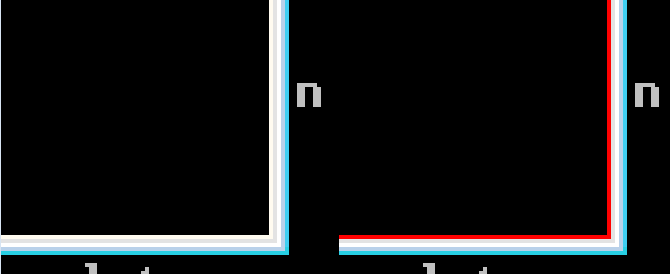 | |
| 671 | 671 | ||
| 672 | 672 | When using the Rectangle API to erase parts of the client area background, the simplest method consists of specifying a null pen and increasing the Right and Bottom coordinates of the rectangle. This is what FlickerMin does to erase the part of the client area that is above and below the text without erasing any portion where the new text should appear. | |
| 673 | 673 | ||
| 674 | 674 | The little bit of flicker seen in FlickerMin is due to its reliance on ExtTextOut to clear the narrow and wide rectangle where the text is displayed. It is possible to make the flicker imperceptible by using Rectangle to erase the area on the left and right of where the text will appear (in addition to above and below) and instruct ExtTextOut to confine its output to the rectangle that is snug to the text. (that improvement is left as an exercise for the reader ;) - simply two additional calls to Rectangle and a change in the rectangle used by ExtTextOut) | |
| 675 | 675 | ||
| 676 | 676 | FlickerMin uses the same code as FlickerMax when registering the window class but, when it gets a WM_ERASEBKGND it tells Windows that it took care of erasing the background by using the following code: | |
| 677 | 677 | ||
| 678 | 678 | ``` pascal | |
| 679 | 679 | WM_ERASEBKGND: | |
| 680 | 680 | begin | |
| 681 | 681 | { tell Windows we erased the background } | |
| 682 | 682 | ||
| 683 | 683 | WndProc := 1; | |
| 684 | 684 | ||
| 685 | 685 | exit; | |
| 686 | 686 | end; | |
| 687 | 687 | ``` | |
| 688 | 688 | ||
| 689 | 689 | then when processing the WM_PAINT it uses: | |
| 690 | 690 | ||
| 691 | 691 | ``` pascal | |
| 692 | 692 | {-----------------------------------------------------------------------} | |
| 693 | 693 | { clear the rectangles above and below the text } | |
| 694 | 694 | ||
| 695 | 695 | { this could have been done when processing the WM_ERASEBKGND message } | |
| 696 | 696 | { but it's more convenient to do here. } | |
| 697 | 697 | ||
| 698 | 698 | CopyRect(ClearRect, ClientRect); | |
| 699 | 699 | ||
| 700 | 700 | { clear the rectangle above the text } | |
| 701 | 701 | ||
| 702 | 702 | with ClearRect do | |
| 703 | 703 | begin | |
| 704 | 704 | { Left, Right and Top are already set } | |
| 705 | 705 | ||
| 706 | 706 | Bottom := TextRect.Top; | |
| 707 | 707 | Rectangle(ps.hdc, Left, Top, Right, Bottom); | |
| 708 | 708 | end; | |
| 709 | 709 | ||
| 710 | 710 | { clear the rectangle below the text } | |
| 711 | 711 | ||
| 712 | 712 | with ClearRect do | |
| 713 | 713 | begin | |
| 714 | 714 | { Left and Right are already set } | |
| 715 | 715 | ||
| 716 | 716 | Top := TextRect.Bottom; | |
| 717 | 717 | Bottom := ClientRect.Bottom; | |
| 718 | 718 | ||
| 719 | 719 | Rectangle(ps.hdc, Left, Top, Right, Bottom); | |
| 720 | 720 | end; | |
| 721 | 721 | ``` | |
| 722 | 722 | ||
| 723 | 723 | which erases the areas above and below the text. A couple of additional calls to rectangle could be used to erase the areas to the right and left of the text that _will_ be output to make flicker imperceptible. | |
| 724 | 724 | ||
| 725 | 725 | One of the most important decisions is determining if CS_HREDRAW and CS_VREDRAW are necessary when registering the window class. It is, unfortunately, somewhat common to see windows include those two (2) styles in the window class when they aren't really necessary. | |
| 726 | 726 | ||
| 727 | 727 | The HREDRAW_VREDRAW is an example. it does NOT include the CS_HREDRAW and CS_VREDRAW styles, yet it updates the window correctly and without a trace of flicker without using any methods to prevent flicker. The example includes the option of adding CS_HREDRAW and CS_VREDRAW in the class styles, when that is done, there will be a very significant amout of flicker. | |
| 728 | 728 | ||
| 729 | 729 | Again, HREDRAW_VREDRAW does NOT include any code at all to prevent flicker. The exclusion of CS_HREDRAW and CS_VREDRAW is all that is needed to have no flicker whatsoever when resizing the window. | |
| 730 | 730 | ||
| 731 | 731 | The CS_HREDRAW and CS_VREDRAW styles need to be included when what is displayed in the client area changes depending on the size of the window. The Gradient is an example of this. Specifically, the color used at a particular location changes depending on the size of the window, because of this, the entire window needs to be invalidated and repainted whenever its size changes. | |
| 732 | 732 | ||
| 733 | 733 | The **Gradient** program draws everything when processing the WM_ERASEBKGND and tells Windows that it took care of erasing the background. This is just to show that, at least in some cases, it is possible to repaint the entire client area when processing the WM_ERASEBKGND. However, a "normal" program would simply return one (1) when processing WM_ERASEBKGND and redraw the gradient when dealing with WM_PAINT. | |
| 734 | 734 | ||
| 735 | 735 | NOTE: the gradient program uses functions to draw the vertical and horizontal gradients. It would be fairly easy to roll them into a single function that uses an "orientation" parameter to select vertical or horizontal. Gradient uses different functions to use a different number of bands depending on the orientation. The vertical orientation uses fewer bands resulting in noticeable banding while the horizontal orientation uses more bands thereby making the gradient band-less (much smoother.) Also, the difference in smoothness is more apparent when the gradient is blue than when it is grey. | |
| 736 | 736 | ||
| 737 | 737 | Continued on next post ... | |
| 738 | 738 | ||
| 739 | 739 | The **GetClipBox** example is meant to show that the mechanisms Windows uses to paint a window's client area changed after Windows XP. When run on WinXP the example will work as expected but won't on Vista and later versions UNLESS its compatibility setting has "Disable visual themes" checked. | |
| 740 | 740 | ||
| 741 | 741 | if "Disable visual themes" is not checked then GetClipBox will report "COMPLEX_REGION" whenever the window is partially visible and "NULL_REGION" when the window is fully covered by other windows. | |
| 742 | 742 | ||
| 743 | 743 | if "Disable visual themes" is checked then GetClipBox can also report "SIMPLE_REGION" if the window's visible area is a rectangle (which may be the entire client area or a portion of the client area.) NOTE that when "Disable visual themes" is checked the window caption will look like a Win95 caption instead of the stylish captions shown by Windows Vista and later. | |
| 744 | 744 | ||
| 745 | 745 | Given that it is unreasonable to require an application to only operate properly when "Disable visual themes" is checked, the current usefulness of GetClipBox is rather limited. | |
| 746 | 746 | ||
| 747 | 747 | GetClipBox is still useful, regardless of the "Disable visual themes" setting, to determine if a window is fully covered by other windows or not. When the window is fully covered by other windows then GetClipBox will always return "NULL_REGION", this can be useful to applications that update the contents of the client area on a regular basis, using a timer, such as the "performance" tab of the task manager (or the GetClipBox program itself.) If the window is fully covered then there is obviously no need to update the client area thus sparing Windows from wasting clock cycles to determine that whatever the application is painting should be ignored. | |
| 748 | 748 | ||
| 749 | 749 | The GetClipBox example also shows how to eliminate flicker by telling Windows the background has been erased and using the Rectangle API to erase only what is required of the background. The result, unlike in FlickerMin that uses the same method, is totally flicker free. | |
| 750 | 750 | ||
| 751 | 751 | In addition to that, it shows how to use BringWindowToTop and SetForegroundWindow to bring the main window to the foreground when a mouse click occurs in the popup's client area. To see this working, have some window cover the GetClipBox main window then click anywhere in the popup's client area. That will cause the main window to be placed back at the top of the Z order. | |
| 752 | 752 | ||
| 753 | 753 | NOTE: the popup's topmost attribute is set in CreateWindowEx. | |
| 754 | 754 | ||
| 755 | 755 | The **IsWindowFullyCovered** example is an "abbreviated" version of GetClipBox that simply reports if the window is fully covered or not. | |
| 756 | 756 | ||
| 757 | 757 | It is simply the "home" of a function "surprisingly" namedd IsWindowFullyCovered which can be copy/pasted into any other program that needs the functionality. | |
| 758 | 758 | ||
| 759 | 759 | The **GetParent** program is to show how the APIs GetParent, GetAncestor and GetWindow behave depending on the type of window (toplevel, child, popup) where it is being called. The MSDN documentation, while it tries hard, it doesn't make it easy to visualize what the result of those APIs is going to be depending on the type of window using it. The GetParent program _shows_ the result in each case. | |
| 760 | 760 | ||
| 761 | 761 | The GetParent program is actually three (3) programs in one. The first shows the results when the owner of the popup window is zero (0). That occurs when none of the {\$define} in the code are active/set. The second one shows the results when a grandchild window is set as the popup owner, controlled by the {\$define POPUP_OWNER_IS_GRANDCHILD}, the third one shows the results when the owner is set using the TopLevelWindow API, controlled by the {\$define POPUP_OWNER_IS_TOPLEVELWINDOW}. | |
| 762 | 762 | ||
| 763 | 763 | In each case note carefully, the values shown GetParent, GetWindow(..., GW_OWNER) and the values returned by the various GetAncestor options. Particularly when the popup's owner is the grandchild window. | |
| 764 | 764 | ||
| 765 | 765 | The GetParent example also shows how to pass a parameter to the WM_CREATE message using the lParam parameter of CreateWindow/CreateWindowEx (their last parameter.) GetParent uses only one (1) window procedure and only one class for the main window, child window, grandchild window and popup window. This causes Window's default window procedure to call the window procedure recursively for the creation of each window. The recursion is controlled and ended using the lParam which determine the type of window to create (main, child, grandchild or popup.) | |
| 766 | 766 | ||
| 767 | 767 | It also uses the WM_ACTIVATE message to make the three (3) windows to be brought up to the top of the Z order whenever either the main window or the popup window is activated. For this it uses SetWindowPos. It is worth noting that using SetWindowPos always works with the GUI windows but, for some unknown reason, does NOT always work with console windows (it only works _most_ of the time.) It does this using the following code: | |
| 768 | 768 | ||
| 769 | 769 | ``` pascal | |
| 770 | 770 | WM_ACTIVATE: | |
| 771 | 771 | begin | |
| 772 | 772 | if LOWORD(wParam) <> 0 then { window is being activated } | |
| 773 | 773 | begin | |
| 774 | 774 | if Wnd = MainWnd then | |
| 775 | 775 | begin | |
| 776 | 776 | { the main window is being activated, make the popup window visible } | |
| 777 | 777 | ||
| 778 | 778 | SetWindowPos(PopupWnd, | |
| 779 | 779 | HWND_TOP, | |
| 780 | 780 | 0, | |
| 781 | 781 | 0, | |
| 782 | 782 | 0, | |
| 783 | 783 | 0, | |
| 784 | 784 | SWP_NOACTIVATE or SWP_NOMOVE or SWP_NOSIZE); | |
| 785 | 785 | ||
| 786 | 786 | if ConsoleWnd <> 0 then | |
| 787 | 787 | begin | |
| 788 | 788 | { NOTE: with consoles SetWindowPos works only MOST of the time. } | |
| 789 | 789 | { the reason why it doesn't work all the time is unknown. } | |
| 790 | 790 | ||
| 791 | 791 | SetWindowPos(ConsoleWnd, | |
| 792 | 792 | HWND_TOP, | |
| 793 | 793 | 0, | |
| 794 | 794 | 0, | |
| 795 | 795 | 0, | |
| 796 | 796 | 0, | |
| 797 | 797 | SWP_ASYNCWINDOWPOS or | |
| 798 | 798 | SWP_NOACTIVATE or SWP_NOMOVE or SWP_NOSIZE); | |
| 799 | 799 | end; | |
| 800 | 800 | ||
| 801 | 801 | exit; | |
| 802 | 802 | end; | |
| 803 | 803 | ||
| 804 | 804 | if Wnd = PopupWnd then | |
| 805 | 805 | begin | |
| 806 | 806 | { the popup window is being activated, make the main window visible } | |
| 807 | 807 | ||
| 808 | 808 | SetWindowPos(MainWnd, | |
| 809 | 809 | HWND_TOP, | |
| 810 | 810 | 0, | |
| 811 | 811 | 0, | |
| 812 | 812 | 0, | |
| 813 | 813 | 0, | |
| 814 | 814 | SWP_NOACTIVATE or SWP_NOMOVE or SWP_NOSIZE); | |
| 815 | 815 | ||
| 816 | 816 | if ConsoleWnd <> 0 then | |
| 817 | 817 | begin | |
| 818 | 818 | { NOTE: with consoles SetWindowPos works only MOST of the time. } | |
| 819 | 819 | { the reason why it doesn't work all the time is unknown. } | |
| 820 | 820 | ||
| 821 | 821 | SetWindowPos(ConsoleWnd, | |
| 822 | 822 | HWND_TOP, | |
| 823 | 823 | 0, | |
| 824 | 824 | 0, | |
| 825 | 825 | 0, | |
| 826 | 826 | 0, | |
| 827 | 827 | SWP_ASYNCWINDOWPOS or | |
| 828 | 828 | SWP_NOACTIVATE or SWP_NOMOVE or SWP_NOSIZE); | |
| 829 | 829 | end; | |
| 830 | 830 | ||
| 831 | 831 | exit; | |
| 832 | 832 | end; | |
| 833 | 833 | end; | |
| 834 | 834 | end; | |
| 835 | 835 | ``` | |
| 836 | 836 | ||
| 837 | 837 | Note that SWP_NOACTIVATE is specified in the call to SetWindowPos, failing to specify that flag will cause the main window and popup window to recursively activate each other, leading to an undesirable situation. | |
| 838 | 838 | ||
| 839 | 839 | Another "interesting" feature of GetParent is how it determines whether or not it should move the console window. If GetParent is started from a command line prompt, it will NOT move the console it was started from. However, if it was NOT started from a command line prompt, it creates its own console (automatically done by Windows because in that case GetParent is a console application) and proceeds to move it to uncover it (make it visible.) It makes the determination using the following code: | |
| 840 | 840 | ||
| 841 | 841 | ``` pascal | |
| 842 | 842 | procedure PositionDebugConsole(Wnd : HWND); | |
| 843 | 843 | { positions the console window to ensure it is not obscured by this } | |
| 844 | 844 | { program's main window or its popup. NOTE: this procedure is NOT general } | |
| 845 | 845 | { it uses knowledge of the total height of the text output in the windows. } | |
| 846 | 846 | var | |
| 847 | 847 | ProcessCount : DWORD; | |
| 848 | 848 | ProcessList : array[1..10] of DWORD; | |
| 849 | 849 | ||
| 850 | 850 | WindowRect : TRECT; | |
| 851 | 851 | ConsoleRect : TRECT; | |
| 852 | 852 | ||
| 853 | 853 | begin | |
| 854 | 854 | { if the main window has not yet been created, there is no need to move the } | |
| 855 | 855 | { console window. } | |
| 856 | 856 | ||
| 857 | 857 | if Wnd = 0 then exit; | |
| 858 | 858 | ||
| 859 | 859 | { the main window exists, figure out if we need to move the console } | |
| 860 | 860 | ||
| 861 | 861 | if GetConsoleWindow() = 0 then | |
| 862 | 862 | begin | |
| 863 | 863 | { there is no console, therefore there is nothing to position } | |
| 864 | 864 | ||
| 865 | 865 | exit; | |
| 866 | 866 | end; | |
| 867 | 867 | ||
| 868 | 868 | ZeroMemory(@ProcessList, sizeof(ProcessList)); | |
| 869 | 869 | ||
| 870 | 870 | ProcessCount := 0; | |
| 871 | 871 | ProcessCount := GetConsoleProcessList(@ProcessList, high(ProcessList)); | |
| 872 | 872 | ||
| 873 | 873 | if ProcessCount > 1 then | |
| 874 | 874 | begin | |
| 875 | 875 | { we were started from a pre-existing console, not from a console we own } | |
| 876 | 876 | { therefore, don't alter the position of the console, it would not be } | |
| 877 | 877 | { "polite" to move a pre-existing console. } | |
| 878 | 878 | ||
| 879 | 879 | exit; { existing console remains whereever it currently is } | |
| 880 | 880 | end; | |
| 881 | 881 | ||
| 882 | 882 | { we own the console, move it to be right next to our window and below the } | |
| 883 | 883 | { popup. } | |
| 884 | 884 | ||
| 885 | 885 | ConsoleWnd := GetConsoleWindow(); { save the handle to the console } | |
| 886 | 886 | ||
| 887 | 887 | GetWindowRect(Wnd, WindowRect); | |
| 888 | 888 | GetWindowRect(ConsoleWnd, ConsoleRect); | |
| 889 | 889 | ||
| 890 | 890 | with ConsoleRect do | |
| 891 | 891 | begin | |
| 892 | 892 | MoveWindow(ConsoleWnd, { our dedicated console window } | |
| 893 | 893 | WindowRect.Right, { x snug to the main window } | |
| 894 | 894 | 2 * LabelsHeight, { below the popup window } | |
| 895 | 895 | Right - Left, { no change in width } | |
| 896 | 896 | Bottom - Top, { no change in height } | |
| 897 | 897 | TRUE); { repaint it } | |
| 898 | 898 | end; | |
| 899 | 899 | end; | |
| 900 | 900 | ``` | |
| 901 | 901 | ||
| 902 | 902 | It makes the determination using GetConsoleProcessList which will return a value greater than 1 if it was started from an existing console and 1 otherwise (it is a new console.) | |
| 903 | 903 | ||
| 904 | 904 | GetParent has another notable and unexpected "peculiarity". For some reason, the messages (hints) emitted by the compiler (v3.0.4) are off by one. Specifically, the line numbers are one greater than the real line number. This is probably the cause why when, in Lazarus, placing a breakpoint at some line, execution stops one line _after_ the breakpoint instead of the line that contains the breakpoint. Reason for this behavior is unknown but, it might be a bug in FPC v3.0.4. | |
| 905 | 905 | ||
| 906 | 906 | **WinAPI - EnumWindows** | |
| 907 | 907 | ||
| 908 | 908 | **WinAPI - EnumChildWindows** | |
| 909 | 909 | ||
| 910 | 910 | The EnumChildWindows program is _very close_ to the same program/example recently posted in another thread. However, there are two important differences. | |
| 911 | 911 | ||
| 912 | 912 | The first one is that one of the constants used by GetAncestor was misspelled, this didn't cause a problem because it was defined for Delphi v2.0 only and it was not used anyway. | |
| 913 | 913 | ||
| 914 | 914 | The second difference is that the original example did NOT account for Windows ever returning a handle whose value exceeds high(DWORD) (all window handles should fit in a DWORD even in a 64 bit installation because window handles can and are shared among 32bit and 64bit programs.) For some unknown reason, there are times when EnumWindows and EnumChildWindows will return a window handle that has the high DWORD set to \$FFFFFFFF. MS' spy++ also sees the presence of \$FFFFFFFF in the high DWORD thus proving it is not a result of a bug in the example. | |
| 915 | 915 | ||
| 916 | 916 | The presence of \$FFFFFFFF in the high DWORD is a problem in EnumWindows and EnumChildWindows because it messes up the alignment of the output in the listbox. | |
| 917 | 917 | ||
| 918 | 918 | This version of EnumChildWindows unceremoniously sets the high DWORD of a window handle to zeroes when necessary thus ensuring the window handle values never exceed high(DWORD) thus not messing up the alignment in the listbox. | |
| 919 | 919 | ||
| 920 | 920 | **ABOUT HINTS and UNUSED PARAMETERS** | |
| 921 | 921 | ||
| 922 | 922 | This set of programs aim to minimize the number of unwanted hints emitted by FPC, specifically those related to some variable not being initialized because it presumes that "var" parameters should be initialized and, those caused by unused parameters. | |
| 923 | 923 | ||
| 924 | 924 | Removing the unwanted hints about variables not being initialized due to parameters being "var" instead of "out" is solved by correcting the definition. This set of example uses corrected definitions whenever necessary. | |
| 925 | 925 | ||
| 926 | 926 | Removing the unwanted hints about parameters being unused is done using the following code: | |
| 927 | 927 | ||
| 928 | 928 | ``` pascal | |
| 929 | 929 | {$ifdef FPC} | |
| 930 | 930 | procedure UNUSED_PARAMETER(UNUSED_PARAMETER : ptrint); inline; begin end; | |
| 931 | 931 | {$endif} | |
| 932 | 932 | ``` | |
| 933 | 933 | ||
| 934 | 934 | and using that procedure to actually use the otherwise unused parameter, as in: | |
| 935 | 935 | ||
| 936 | 936 | ``` pascal | |
| 937 | 937 | {$ifdef FPC} | |
| 938 | 938 | UNUSED_PARAMETER(lParam); { "declare" lParam as unused } | |
| 939 | 939 | {$endif} | |
| 940 | 940 | ``` | |
| 941 | 941 | ||
| 942 | 942 | that will still cause one (1) hint to be emitted due to the procedure not using the parameter but, that procedure can be used for every unused parameter in the program (in a large program, there can be a good number of them) thus getting only one (1) hint instead of one per unused parameter. | |
| 943 | 943 | ||
| 944 | 944 | Additionally, since the procedure is inline and is empty, it generates no code. | |
| 945 | 945 | ||
| 946 | 946 | Bottom line: it is very similar to using UNREFERENCED_PARAMETER in C. | |
| 947 | 947 | ||
| 948 | 948 | **OTHER CONSIDERATIONS:** | |
| 949 | 949 | ||
| 950 | 950 | There are a good number of ways to avoid and/or minimize flicker. This set of examples will be followed by another set that uses other methods/techniques. | |
| 951 | 951 | ||
| 952 | 952 | ## Post 8 | |
| 953 | 953 | ||
| 954 | 954 | This post includes examples for a number of API functions and how they can be used to prevent/eliminate flicker. This is the second and last post related to preventing/eliminating flicker. Some of the examples are not directly about flicker, they are included because they are used in other examples that are about reverting/eliminating flicker. | |
| 955 | 955 | ||
| 956 | 956 | The examples are: | |
| 957 | 957 | ||
| 958 | 958 | - WinAPI - ExtTextOut (ExtTextOut in folder Ex1) | |
| 959 | 959 | - WinAPI - CopyRect | |
| 960 | 960 | - WinAPI - Rectangle | |
| 961 | 961 | - WinAPI - WM_GETMINMAXINFO | |
| 962 | 962 | ||
| 963 | 963 | - WinAPI - ExtTextOut (ExtTextOut in folder Ex2) | |
| 964 | 964 | - WinAPI - GetDC | |
| 965 | 965 | - WinAPI - ReleaseDC | |
| 966 | 966 | - WinAPI - OffsetRect | |
| 967 | 967 | - WinAPI - CopyRect | |
| 968 | 968 | - WinAPI - InflateRect | |
| 969 | 969 | - WinAPI - InvalidateRect | |
| 970 | 970 | - WinAPI - HeapAlloc | |
| 971 | 971 | - WinAPI - GetCursorPos | |
| 972 | 972 | - WinAPI - WindowFromPoint | |
| 973 | 973 | - WinAPI - IsWindow | |
| 974 | 974 | - WinAPI - UpdateWindow | |
| 975 | 975 | - WinAPI - SetBkColor | |
| 976 | 976 | ||
| 977 | 977 | - WinAPI - InvalidateRect (in InvalidateRect) | |
| 978 | 978 | - WinAPI - GetWindowRect | |
| 979 | 979 | - WinAPI - OffsetRect | |
| 980 | 980 | - WinAPI - GetDC | |
| 981 | 981 | - WinAPI - GetDCEx | |
| 982 | 982 | - WinAPI - SetROP2 | |
| 983 | 983 | - WinAPI - Rectangle | |
| 984 | 984 | - WinAPI - ReleaseDC | |
| 985 | 985 | - WinAPI - SetRectEmpty | |
| 986 | 986 | - WinAPI - HeapAlloc | |
| 987 | 987 | - WinAPI - CreatePen | |
| 988 | 988 | - WinAPI - PostMessage | |
| 989 | 989 | - WinAPI - SendMessage | |
| 990 | 990 | - WinAPI - SetCapture | |
| 991 | 991 | - WinAPI - ReleaseCapture | |
| 992 | 992 | - WinAPI - SetWindowPos | |
| 993 | 993 | - WinAPI - LockWindowUpdate | |
| 994 | 994 | - WinAPI - UpdateWindow | |
| 995 | 995 | - WinAPI - GetCursorPos | |
| 996 | 996 | - WinAPI - IsWindow | |
| 997 | 997 | - WinAPI - GetParent | |
| 998 | 998 | - WinAPI - WindowFromPoint | |
| 999 | 999 | - WinAPI - UpdateWindow | |
| 1000 | 1000 | ||
| 1001 | 1001 | - WinAPI - GetCharacterPlacement (GetCharacterPlacement in folder Ex1) | |
| 1002 | 1002 | - WinAPI - ExtTextOut | |
| 1003 | 1003 | - WinAPI - RtlZeroMemory | |
| 1004 | 1004 | ||
| 1005 | 1005 | - WinAPI - GetCharacterPlacement (GetCharacterPlacement in folder Ex2) | |
| 1006 | 1006 | - WinAPI - ExtTextOut | |
| 1007 | 1007 | - WinAPI - RtlZeroMemory | |
| 1008 | 1008 | ||
| 1009 | 1009 | - WinAPI - BitBlt (in BitBlt) | |
| 1010 | 1010 | - WinAPI - LoadBitmap | |
| 1011 | 1011 | - WinAPI - CreateCompatibleDC | |
| 1012 | 1012 | - WinAPI - GetObject | |
| 1013 | 1013 | - WinAPI - DeleteDC | |
| 1014 | 1014 | ||
| 1015 | 1015 | - WinAPI - StretchBlt (in StretchBlt) | |
| 1016 | 1016 | - WinAPI - LoadBitmap | |
| 1017 | 1017 | - WinAPI - CreateCompatibleDC | |
| 1018 | 1018 | - WinAPI - GetObject | |
| 1019 | 1019 | - WinAPI - DeleteDC | |
| 1020 | 1020 | ||
| 1021 | 1021 | - WinAPI - CreateCompatibleBitmap(in CreateCompatibleBitmap) | |
| 1022 | 1022 | - WinAPI - CreateCompatibleDC | |
| 1023 | 1023 | - WinAPI - DeleteDC | |
| 1024 | 1024 | - WinAPI - CreateFont | |
| 1025 | 1025 | - WinAPI - MoveWindow | |
| 1026 | 1026 | - WinAPI - GetSysColor | |
| 1027 | 1027 | - WinAPI - BitBlt | |
| 1028 | 1028 | ||
| 1029 | 1029 | - WinAPI - SelectClipRgn (in SelectClipRgn) | |
| 1030 | 1030 | - WinAPI - CreateFont | |
| 1031 | 1031 | - WinAPI - GetDC | |
| 1032 | 1032 | - WinAPI - ReleaseDC | |
| 1033 | 1033 | - WinAPI - BeginPath | |
| 1034 | 1034 | - WinAPI - EndPath | |
| 1035 | 1035 | - WinAPI - PathToRegion | |
| 1036 | 1036 | - WinAPI - GetRgnBox | |
| 1037 | 1037 | - WinAPI - OffsetRgn | |
| 1038 | 1038 | - WinAPI - ExtSelectClipRgn | |
| 1039 | 1039 | - WinAPI - SelectClipRgn | |
| 1040 | 1040 | ||
| 1041 | 1041 | - WinAPI - CallWindowProc (in ColorMixer) | |
| 1042 | 1042 | - WinAPI - CopyRect | |
| 1043 | 1043 | - WinAPI - CreateSolidBrush | |
| 1044 | 1044 | - WinAPI - CreateRectRgnIndirect | |
| 1045 | 1045 | - WinAPI - ExtSelectClipRgn | |
| 1046 | 1046 | - WinAPI - SelectClipRgn | |
| 1047 | 1047 | - WinAPI - ExtTextOut | |
| 1048 | 1048 | - WinAPI - FrameRect | |
| 1049 | 1049 | - WinAPI - GetWindowLongPtr | |
| 1050 | 1050 | - WinAPI - InvalidateRect | |
| 1051 | 1051 | - WinAPI - MoveWindow | |
| 1052 | 1052 | - WinAPI - Rectangle | |
| 1053 | 1053 | - WinAPI - SetFocus | |
| 1054 | 1054 | - WinAPI - SetScrollInfo | |
| 1055 | 1055 | - WinAPI - SetScrollPos | |
| 1056 | 1056 | - WinAPI - SetTextColor | |
| 1057 | 1057 | - WinAPI - TextOut | |
| 1058 | 1058 | - WinAPI - WM_CTLCOLORSCROLLBAR | |
| 1059 | 1059 | - WinAPI - WM_GETMINMAXINFO | |
| 1060 | 1060 | - WinAPI - WM_VSCROLL | |
| 1061 | 1061 | ||
| 1062 | 1062 | **WinAPI - ExtTextOut** (example 1 of 2) | |
| 1063 | 1063 | ||
| 1064 | 1064 | This first example of the ExtTextOut API is similar to the FlickerMin example in post 7 (see post 7 for the source.) | |
| 1065 | 1065 | ||
| 1066 | 1066 | It demonstrates ExtTextOut's ability to clip text to a rectangle. It clears the background areas as necessary when processing the WM_PAINT message instead of letting the default window procedure clear it when processing the WM_ERASEBKGND. It produces less flicker than FlickerMin because it uses a smaller font. (NOTE: the flicker is easier to see when resizing the window horizontally only.) | |
| 1067 | 1067 | ||
| 1068 | 1068 | Also note that it does not specify CS_HREDRAW nor CS_VREDRAW in the class styles, instead it invalidates the client area, _without erasing it_ when processing the WM_SIZE message. | |
| 1069 | 1069 | ||
| 1070 | 1070 | The rectangle coordinates used to erase the background can be output onto a console by recompiling the program with the "DEBUG" define active. This is useful to see/verify the coordinates of the background rectangles that are erased when painting. | |
| 1071 | 1071 | ||
| 1072 | 1072 | Use the options under the "ExtTextOut" menu to control the clipping of text. | |
| 1073 | 1073 | ||
| 1074 | 1074 | It also demonstrates how to process the WM_GETMINMAXINFO to control the minimum width and height of the window. | |
| 1075 | 1075 | ||
| 1076 | 1076 | **WinAPI - InvalidateRect** | |
| 1077 | 1077 | ||
| 1078 | 1078 | Carefully controlling which parts of the client area are invalidated can significantly reduce flicker. | |
| 1079 | 1079 | ||
| 1080 | 1080 | This example shows the effect of invalidating the entire client area compared to the effect of invalidating a smaller area that is the one that needs to be updated. When "Invalidate entire area" is selected in the "InvalidateRect" menu, the amount of flicker will be very noticeable. When "Invalidate coordinate area" is selected, the amount of flicker is drastically reduced and confined to a much smaller area. | |
| 1081 | 1081 | ||
| 1082 | 1082 | The flicker left is due to the use of TextOut and specifying TRUE in the call to InvalidateRect when processing the WM_MOUSEMOVE message: | |
| 1083 | 1083 | ||
| 1084 | - | ||
| 1084 | + | ```text | |
| 1085 | + | InvalidateRect(Wnd, @UpdateRect, TRUE); | |
| 1086 | + | ``` | |
| 1085 | 1087 | ||
| 1086 | 1088 | This causes the coordinate area to be erased thus showing a clear background before TextOut outputs the new coordinate values. | |
| 1087 | 1089 | ||
| 1088 | 1090 | NOTE: All the coordinates shown are relative to the _client area_ of the respective windows. | |
| 1089 | 1091 | ||
| 1090 | 1092 | **WinAPI - ExtTextOut** (example 2 of 2) | |
| 1091 | 1093 | ||
| 1092 | 1094 | This example is the InvalidateRect example but with all flicker removed. The absence of flicker is due to the different way the coordinate rectangle is invalidated when processing the WM_MOUSEMOVE message: | |
| 1093 | 1095 | ||
| 1094 | - | ||
| 1096 | + | ```text | |
| 1097 | + | InvalidateRect(Wnd, @CoordinateRect, FALSE); { NO background erase! } | |
| 1098 | + | ``` | |
| 1095 | 1099 | ||
| 1096 | 1100 | Note, that InvalidateRect is instructed not to require the background to be erased by specifying FALSE (third parameter.) This combined with the fact that ExtTextOut repaints the background and the text in one operation eliminates all flicker in the coordinates area. | |
| 1097 | 1101 | ||
| 1098 | 1102 | However, it is still possible to see some occasional flicker when first pressing the left mouse button. The default processing of the WM_LBUTTONDOWN message Invalidates the entire client area with the statement: | |
| 1099 | 1103 | ||
| 1100 | - | ||
| 1104 | + | ```text | |
| 1105 | + | InvalidateRect(Wnd, nil, TRUE); | |
| 1106 | + | ``` | |
| 1101 | 1107 | ||
| 1102 | 1108 | This will cause some flicker to be noticeable if the left mouse button is very quickly pressed down and released (about 7 to 10 times per seconds) for a few seconds (5 seconds should normally enough.) | |
| 1103 | 1109 | ||
| 1104 | 1110 | That occasional flicker can be removed by selecting "Exclude bottom line from invalidated area" which will cause the call to InvalidateRect to be: | |
| 1105 | 1111 | ||
| 1106 | 1112 | ``` Pascal | |
| 1107 | 1113 | MenuItemState := GetMenuState(GetMenu(Wnd), IDM_EXCLUDE, MF_BYCOMMAND); | |
| 1108 | 1114 | ||
| 1109 | 1115 | case MenuItemState <> 0 of | |
| 1110 | 1116 | true : | |
| 1111 | 1117 | begin | |
| 1112 | 1118 | { menu item is checked, exclude the bottom of the client area } | |
| 1113 | 1119 | ||
| 1114 | 1120 | GetClientRect(Wnd, ClientRect); | |
| 1115 | 1121 | ||
| 1116 | 1122 | ClientRect.Bottom := ClientRect.Bottom - Exclude; | |
| 1117 | 1123 | InvalidateRect(Wnd, @ClientRect, TRUE); | |
| 1118 | 1124 | end; | |
| 1119 | 1125 | ``` | |
| 1120 | 1126 | ||
| 1121 | 1127 | thus excluding the area where the ExtTextOut definition is drawn causing all flicker to be eliminated. | |
| 1122 | 1128 | ||
| 1123 | 1129 | NOTE: the ExtTextOut attachment contains both examples. | |
| 1124 | 1130 | ||
| 1125 | 1131 | **WinAPI - GetCharacterPlacement** (example 1 of 2) | |
| 1126 | 1132 | ||
| 1127 | 1133 | ExtTextOut is a powerful function and when it is combined with GetCharacterPlacement its power surfaces. | |
| 1128 | 1134 | ||
| 1129 | 1135 | GetCharacterPlacement has a large number of options and the two examples presented here do not do it justice but, will give a _small_ taste of what it enables ExtTextOut to do. For all the available options, please see MSDN. | |
| 1130 | 1136 | ||
| 1131 | 1137 | This example simply takes a string and uses GetCharacterPlacement to determine how to "spread" it over a specified number of pixels. GetCharacterPlacement returns an array of inter-character distances that are used by ExtTextOut to display the string. | |
| 1132 | 1138 | ||
| 1133 | 1139 | **WinAPI - GetCharacterPlacement** (example 2 of 2) | |
| 1134 | 1140 | ||
| 1135 | 1141 | The first example above is a bit deceiving. The same example using a slightly different criteria allows converting a proportionally spaced font into a fixed space font. Normally, such a conversion is undesirable because the additional inter-character whitespace is unsightly but, there are exceptions and, this example shows one of them. | |
| 1136 | 1142 | ||
| 1137 | 1143 | One such case is when outputting the value of registers in a debugger. Most fixed fonts have digits that are not particularly easy to read whereas proportional fonts usually have aesthetically pleasing and easy to read digits. | |
| 1138 | 1144 | ||
| 1139 | 1145 | This example turns any hex number consisting of digits 0-F from proportional to fixed and, for comparison, outputs them as they would in their proportional state on the right hand side and their fixed state on the left hand side. | |
| 1140 | 1146 | ||
| 1141 | 1147 | NOTE: the GetCharacterPlacement attachment contains both examples. | |
| 1142 | 1148 | ||
| 1143 | 1149 | **WinAPI - BitBlt** | |
| 1144 | 1150 | ||
| 1145 | 1151 | Likely the most common method to eliminate flicker is to paint on a bitmap then bitblt the fully drawn bitmap onto the client area. This removes all flicker. | |
| 1146 | 1152 | ||
| 1147 | 1153 | This example is the simplest example of BitBlt-ing meant to serve as a pre-amble to a more sophisticated example that uses it to remove flicker. | |
| 1148 | 1154 | ||
| 1149 | 1155 | Note that this example does NOT use CS_HREDRAW nor CS_VREDRAW and that it uses a NULL_BRUSH as the background color, making it unnecessary to process the WM_ERASEBKGND to tell Windows the program erased the background when it actually didn't. Windows will erase the background with a NULL_BRUSH which does no erasing at all. | |
| 1150 | 1156 | ||
| 1151 | 1157 | **WinAPI - StretchBlt** | |
| 1152 | 1158 | ||
| 1153 | 1159 | StretchBlt is included in this set of examples only because it is very closely related to BitBlt. Since they are close cousins and it is immoral to break a family, they have been kept together as they should be. | |
| 1154 | 1160 | ||
| 1155 | 1161 | **WinAPI - CreateCompatibleBitmap** | |
| 1156 | 1162 | ||
| 1157 | 1163 | This example demonstrates double buffering. The top part of the window is drawn with TextOut (and optionally ExtTextOut by re-compiling - see source) thus causing flicker while, the bottom part of the window is first drawn on a bitmap then BitBlt-ed onto the bottom half of the window. The result is that the bottom part of the window is totally flicker free. | |
| 1158 | 1164 | ||
| 1159 | 1165 | To really appreciate the difference, resize the window. When resizing, the top part of the window will flicker significantly while the bottom part won't flicker at all. | |
| 1160 | 1166 | ||
| 1161 | 1167 | **WinAPI - SelectClipRgn** | |
| 1162 | 1168 | ||
| 1163 | 1169 | This example demonstrates how to use regions to eliminate flicker. Note that it does NOT use double buffering, only regions. | |
| 1164 | 1170 | ||
| 1165 | 1171 | It creates a region that is excluded from the "paintable" region when drawing the background gradient. After the background gradient has been painted then that region is made the "paintable" region and a different gradient is painted in it. | |
| 1166 | 1172 | ||
| 1167 | 1173 | The inclusion and exclusion of the region is controlled by the options under the "Flicker" menu. When the region is excluded, there will be no flicker and, when it is included, flicker will be noticeable when resizing the window. | |
| 1168 | 1174 | ||
| 1169 | 1175 | **Utility - ColorMixer** | |
| 1170 | 1176 | ||
| 1171 | 1177 | This example which doubles as a simple color mixing/selection utility demonstrates how to eliminate flicker using ExtTextOut, Regions and InvalidateRect. | |
| 1172 | 1178 | ||
| 1173 | 1179 | It uses all the methods to prevent flicker except double buffering. | |
| 1174 | 1180 | ||
| 1175 | 1181 | In addition to that, it demonstrates how to use scroll bars as controls, how to subclass a window (in this case the scroll bars), how to handle keyboard input to set and select which scroll bar has the focus, as well as, setting the numeric value for each color (use arrow keys, home/end, page up/down), and how to process the WM_GETMINMAXINFO to set the minimum, maximum and maximized sizes of a window. | |
| 1176 | 1182 | ||
| 1177 | 1183 | Aside from the 3 scroll bars that control the settings of the Red, Green and, blue colors, there is only _one_ window. The right and left hand side are _not_ separate windows. | |
| 1178 | 1184 | ||
| 1179 | 1185 | The example provides the option of displaying the coordinates of the various rectangles used to eliminate flicker by enabling the SHOW_RECTANGLE_COORDINATES define. | |
| 1180 | 1186 | ||
| 1181 | 1187 | It also allows controlling whether or not the sample text will flicker by enabling or disabling the define NO_SAMPLE_TEXT_FLICKER. | |
| 1182 | 1188 | ||
| 1183 | 1189 | The numeric values of Red, Green and Blue shown below the scroll bars are _not_ protected against flicker. Grabbing any of the scroll bar thumbs and moving it up and down quickly for several seconds while paying close attention to the numbers will make a very slight amount of flicker visible. Because the amount of flicker is usually not noticeable, there is no code to prevent it. However, the same method used to ensure the sample text does not flicker can be used with the Red, Green and Blue values for a totally flicker free utility. | |
| 1184 | 1190 | ||
| 1185 | 1191 | ColorMixer uses its own definitions for most of the APIs it uses. The purpose of the definitions is to minimize the number of useless hints and give better parameter names, which are used by CODETOOLS, thereby providing better guidance when programming. | |
| 1186 | 1192 | ||
| 1187 | 1193 |  | |
| 1188 | 1194 | ||
| 1189 | 1195 | **Dead BUG** | |
| 1190 | 1196 | ||
| 1191 | 1197 | There is a "dead" bug in DrawWindowFrame. That function appears in multiple examples presented in Post 6. The bug is as follows: | |
| 1192 | 1198 | ||
| 1193 | 1199 | ``` Pascal | |
| 1194 | 1200 | SelectObject(dc, OldPen); { restore the original pen } | |
| 1195 | 1201 | ReleaseDC(Wnd, dc); | |
| 1196 | 1202 | DeleteObject(Pen); { get rid of the pen } | |
| 1197 | 1203 | ||
| 1198 | 1204 | {---------------------------------------------------------------------------} | |
| 1199 | 1205 | { release the window dc } | |
| 1200 | 1206 | ||
| 1201 | 1207 | ReleaseDC(dc, Wnd); | |
| 1202 | 1208 | end; | |
| 1203 | 1209 | ``` | |
| 1204 | 1210 | ||
| 1205 | 1211 | The last statement "ReleaseDC(dc, Wnd);" is erroneous for two reasons. First, the dc has already been released (just a few lines above) and second, the parameters in that call are reversed. The erroneous statement has no effect on the proper operation of the examples in which it appears but should be removed. Corrected code should read: | |
| 1206 | 1212 | ||
| 1207 | 1213 | ``` Pascal | |
| 1208 | 1214 | SelectObject(dc, OldPen); { restore the original pen } | |
| 1209 | 1215 | ReleaseDC(Wnd, dc); | |
| 1210 | 1216 | ||
| 1211 | 1217 | DeleteObject(Pen); { get rid of the pen } | |
| 1212 | 1218 | end; | |
| 1213 | 1219 | ``` | |
| 1214 | 1220 | ||
| 1215 | 1221 | The examples affected by the above bug are : | |
| 1216 | 1222 | ||
| 1217 | 1223 | - GetDesktopWindow.lpr | |
| 1218 | 1224 | - GetShellWindow.lpr | |
| 1219 | 1225 | - GetTaskmanWindow.lpr | |
| 1220 | 1226 | - GetTopLevelWindow.lpr | |
| 1221 | 1227 | - IsTopLevelWindow.lpr | |
| 1222 | 1228 | - GetWindowTextLength.lpr | |
| 1223 | 1229 | ||
| 1224 | 1230 | Corrected versions of the source files above are attached to this post in the file named "CorrectionsToPost6Examples.7z" (NOTE: only examples presented in Post 6 are affected.) | |
| 1225 | 1231 | ||
| 1226 | 1232 | ## Post 9 | |
| 1227 | 1233 | ||
| 1228 | 1234 | (to be filled later) | |
| 1229 | 1235 | ||
| 1230 | 1236 | --- | |
| 1231 | 1237 | *From the Free Pascal wiki, page "Windows API examples", as it stood on 2022-03-20 after a change by Alextp, out of the wiki's dump of 2024-05-26. Copyright stays with the author who wrote it, according to the old wiki's [[Licensing]] page. If you have concerns about this material, [message the admin](/wiki-contact).* | |
| 1232 | 1238 | Category: Code | |
| 1233 | 1239 | Category: Example programs | |
| 1234 | 1240 | Category: FPC | |
| 1235 | 1241 | Category: Windows |