

Win32TaskbarProgress/zh CN: what changed
Revision 0 to 1. Removed lines have a minus sign; added lines have a plus sign.
Title: Win32TaskbarProgress/zh CN
| Old | New | Line | |
|---|---|---|---|
| 1 | + | *(Windows only)* | |
| 2 | + | ||
| 3 | + | # 关于 | |
| 4 | + | ||
| 5 | + | 这是一个包含 控制进度条 的类的单元,用于控制 Windows 7+ 任务栏按钮的按钮。示例看起来像这样: | |
| 6 | + | ||
| 7 | + | 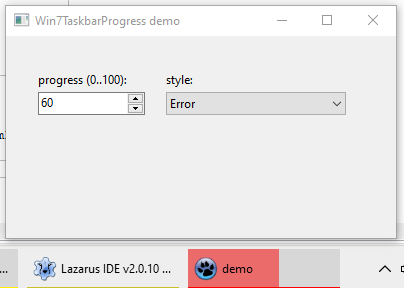 | |
| 8 | + | ||
| 9 | + | 任务栏按钮进度可以有以下几种样式: | |
| 10 | + | ||
| 11 | + | - 空 (非激活) | |
| 12 | + | - 绿色进度 | |
| 13 | + | - 黄色进度 (看起来像暂停状态) | |
| 14 | + | - 红色进度 (看起来像错误状态) | |
| 15 | + | - 字幕浮动动画 (忽略进度值,它不断地从最大到最小的更改动画) | |
| 16 | + | ||
| 17 | + | 作者: Alexey Torgashin | |
| 18 | + | ||
| 19 | + | 协议: MIT | |
| 20 | + | ||
| 21 | + | # 用法 | |
| 22 | + | ||
| 23 | + | 在窗体的 OnShow (或者 OnCreate) 中创建对象,像这样: | |
| 24 | + | ||
| 25 | + | ``` pascal | |
| 26 | + | uses | |
| 27 | + | win32taskbarprogress; | |
| 28 | + | ||
| 29 | + | procedure TForm1.FormShow(Sender: TObject); | |
| 30 | + | begin | |
| 31 | + | GlobalTaskbarProgress:= TWin7TaskProgressBar.Create; | |
| 32 | + | end; | |
| 33 | + | ``` | |
| 34 | + | ||
| 35 | + | 接下来,调用这个对象的属性,像这样: | |
| 36 | + | ||
| 37 | + | ``` pascal | |
| 38 | + | //来更改状态: none, green, yellow, red, floating | |
| 39 | + | GlobalTaskbarProgress.Style:= TTaskBarProgressStyle(ComboBoxStyle.ItemIndex); | |
| 40 | + | ||
| 41 | + | //来更改进度值:0 到 100 | |
| 42 | + | GlobalTaskbarProgress.Progress:= Edit1.Value; | |
| 43 | + | ``` | |
| 44 | + | ||
| 45 | + | 作者尝试在 win32taskbarprogress 的 "initialization" 部分初始化对象,但是失败了,可能是因为 Application.Handle 不能这么早地被初始化 | |
| 46 | + | ||
| 47 | + | # 下载 | |
| 48 | + | ||
| 49 | + | 单元文件和示例工程: <https://github.com/Alexey-T/Win32TaskbarProgress> | |
| 50 | + | ||
| 51 | + | # 贡献者和更改 | |
| 52 | + | ||
| 53 | + | - 简体中文版本由 robsean 于 2020-12-29 创建。 | |
| 54 | + | ||
| 55 | + | --- | |
| 56 | + | *From the Free Pascal wiki, page "Win32TaskbarProgress/zh CN", as it stood on 2020-12-29 after a change by Robsean, out of the wiki's dump of 2024-05-26. Copyright stays with the author who wrote it, according to the old wiki's [[Licensing]] page. If you have concerns about this material, [message the admin](/wiki-contact).* |