

Win32MenuStyler: what changed
Revision 0 to 1. Removed lines have a minus sign; added lines have a plus sign.
Title: Win32MenuStyler
| Old | New | Line | |
|---|---|---|---|
| 1 | + | *(Windows only)* | |
| 2 | + | ||
| 3 | + | # About | |
| 4 | + | ||
| 5 | + | This is unit win32menustyler, which helps to theme TMainMenu/TPopupMenu for Lazarus Windows apps. Sometimes app has dark theme, so it's needed to make TMainMenu also dark. | |
| 6 | + | ||
| 7 | + | 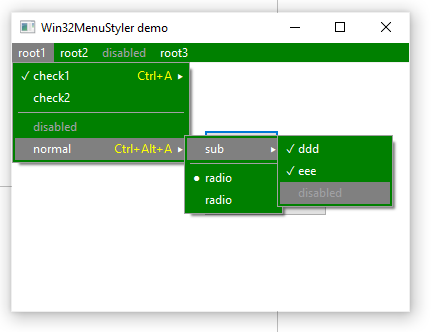 | |
| 8 | + | ||
| 9 | + | Author: Alexey Torgashin | |
| 10 | + | ||
| 11 | + | License: MPL 2.0 or LGPL | |
| 12 | + | ||
| 13 | + | # Detailed info | |
| 14 | + | ||
| 15 | + | What it paints for menu items: | |
| 16 | + | ||
| 17 | + | - background, caption, also for disabled state | |
| 18 | + | - checked state, also for radio-items | |
| 19 | + | - separator line | |
| 20 | + | - shortcut text right-aligned | |
| 21 | + | - sub-menu arrow | |
| 22 | + | - icons from ImageList | |
| 23 | + | - icons from menuitem.Bitmap | |
| 24 | + | - underlines for accelerators, and only when OS requires it (not painted until menu is activated) | |
| 25 | + | ||
| 26 | + | What is not supported: | |
| 27 | + | ||
| 28 | + | - menuitem.SubMenuImages | |
| 29 | + | - menuitem.RightJustify | |
| 30 | + | - white frame is painted for PopupMenus (cannot find a way to fill it, even if I call MenuStyler.ApplyBackColor in OnPopup) | |
| 31 | + | - horizontal white line is painted under menu bar (non-client area, must [handle WM_NCPAINT somehow](https://stackoverflow.com/questions/57177310/how-to-paint-over-white-line-between-menu-bar-and-client-area-of-window)) | |
| 32 | + | ||
| 33 | + | About other OS: GitHub repo has cross-platform "lazmenustyler" unit, but it don't give any effect on gtk2 demo app. And it should not work on macOS, macOS has very special theming and menu is located on the screen top. | |
| 34 | + | ||
| 35 | + | # Usage | |
| 36 | + | ||
| 37 | + | - add win32menustyler to "uses" section | |
| 38 | + | - in form's OnShow, call: | |
| 39 | + | - MenuStyler.ApplyToForm(Self) to theme MainMenu | |
| 40 | + | - MenuStyler.ApplyToMenu() for all needed PopupMenus | |
| 41 | + | - when needed to apply different colors later: | |
| 42 | + | - change them in global theme var | |
| 43 | + | - call MenuStyler.ApplyToForm(Self) | |
| 44 | + | - not needed to call again MenuStyler.ApplyToMenu() for PopupMenus | |
| 45 | + | - to cancel theming, call MenuStyler.ResetForm() and MenuStyler.ResetMenu() | |
| 46 | + | ||
| 47 | + | Unit gives global var to change all theming details: | |
| 48 | + | ||
| 49 | + | ``` pascal | |
| 50 | + | type | |
| 51 | + | TWin32MenuStylerTheme = record | |
| 52 | + | ColorBk: TColor; | |
| 53 | + | ColorBkSelected: TColor; | |
| 54 | + | ColorBkSelectedDisabled: TColor; //used only if <>clNone | |
| 55 | + | ColorSelBorder: TColor; //used only if <>clNone | |
| 56 | + | ColorFont: TColor; | |
| 57 | + | ColorFontSelected: TColor; //used only if <>clNone | |
| 58 | + | ColorFontDisabled: TColor; | |
| 59 | + | ColorFontShortcut: TColor; | |
| 60 | + | CharCheckmark: WideChar; | |
| 61 | + | CharRadiomark: WideChar; | |
| 62 | + | CharSubmenu: WideChar; | |
| 63 | + | FontName: string; | |
| 64 | + | FontSize: integer; | |
| 65 | + | //indents in percents of average char width | |
| 66 | + | IndentMinPercents: integer; //indent from edges to separator line | |
| 67 | + | IndentBigPercents: integer; //indent from left edge to caption | |
| 68 | + | IndentIconPercents: integer; //indents around the icon | |
| 69 | + | IndentRightPercents: integer; //indent from right edge to end of shortcut text | |
| 70 | + | IndentSubmenuArrowPercents: integer; //indent from right edge to submenu '>' char | |
| 71 | + | end; | |
| 72 | + | ||
| 73 | + | var | |
| 74 | + | MenuStylerTheme: TWin32MenuStylerTheme; | |
| 75 | + | ``` | |
| 76 | + | ||
| 77 | + | # Download | |
| 78 | + | ||
| 79 | + | GitHub: <https://github.com/Alexey-T/Win32MenuStyler> | |
| 80 | + | ||
| 81 | + | --- | |
| 82 | + | *From the Free Pascal wiki, page "Win32MenuStyler", as it stood on 2022-06-08 after a change by Alextp, out of the wiki's dump of 2024-05-26. Copyright stays with the author who wrote it, according to the old wiki's [[Licensing]] page. If you have concerns about this material, [message the admin](/wiki-contact).* |